Quick Answer
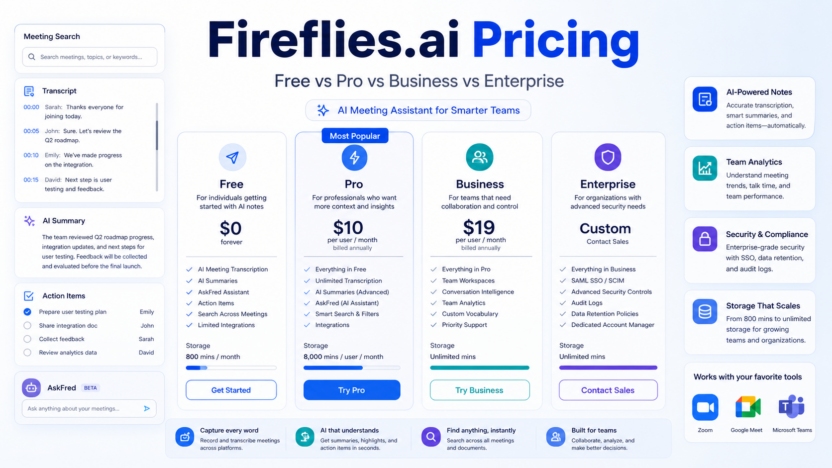
Fireflies.ai pricing is straightforward compared with many AI meeting tools. Pricing last checked on July 22, 2026: Fireflies listed a Free plan at $0, Pro at $10 per seat per month billed annually, Business at $19 per seat per month billed annually, and Enterprise at $39 per seat per month billed annually. The pricing page also showed higher monthly list prices beside the annual prices, with annual billing promoted as saving up to 44%.
For most small businesses, the practical choice is between Free, Pro, and Business. Free is useful for trying transcription and summaries. Pro is the better fit for individuals and small teams that want more storage, video recording, downloads, integrations, AI skills, and action items. Business is the stronger choice when team analytics, conversation intelligence, unlimited storage, user groups, and admin controls matter.
Enterprise is mainly for larger organizations that need rules engine, SSO and SCIM, audit logs, HIPAA compliance, private storage, custom data retention, super admin controls, and dedicated account management.
Fireflies.ai Pricing at a Glance
| Plan | Official annual price | Best for | Main limitation |
|---|---|---|---|
| Free | $0 | Individuals testing AI meeting notes | 400 minutes of storage per team |
| Pro | $10 per seat/month billed annually | Professionals and small teams | Less admin depth than Business |
| Business | $19 per seat/month billed annually | Growing teams | More cost per seat than Pro |
| Enterprise | $39 per seat/month billed annually | Larger organizations with security/admin needs | Annual only and heavier than most small teams need |
Official source: Fireflies.ai pricing
What Fireflies.ai Includes
Fireflies.ai is an AI meeting assistant for recording, transcribing, summarizing, searching, and analyzing meetings. The official pricing page says the platform supports Zoom, Google Meet, Microsoft Teams, and more. It also lists transcription in 100+ languages, real-time notes and live transcription, meeting search, AskFred AI assistant, file upload, desktop and mobile apps, Chrome extension, and API access.
The value for a small business is simple: meetings create follow-up work. Fireflies helps capture the conversation, turn it into notes and action items, and make the meeting searchable later. A sales team can use it to review calls. A recruiting team can summarize interviews. A customer success team can track customer concerns. A founder can search past calls instead of relying on memory.
Plan-by-Plan Breakdown
Free
The Free plan is best for testing whether Fireflies fits your workflow. The official pricing page lists unlimited transcription, unlimited AI summaries, 400 minutes of storage per team, and 20 AI credits. It also includes support for Zoom, Google Meet, Teams, transcription in 100+ languages, real-time notes, meeting search, AskFred, upload, apps, the Chrome extension, and API access.
Free is useful if you want to see transcript quality, summary usefulness, and whether your team accepts an AI notetaker in meetings. It is not ideal for active teams because the storage allowance is limited.
Pro
Pro is listed at $10 per seat per month billed annually. It includes unlimited transcription, unlimited AI summaries, 8,000 minutes of storage per seat, and 20 AI credits. It adds video recording, transcript and summary downloads, Personal Assistant, AI Skills, Voice Agents, action items and task manager, and unlimited integrations.
Pro is the best starting paid plan for consultants, agencies, sales reps, founders, and small teams that want useful meeting notes without advanced admin features. If your team needs to download transcripts, keep more meeting history, and connect meeting notes to other tools, Pro is usually the first serious plan to compare.
Business
Business is listed at $19 per seat per month billed annually. It includes unlimited transcription, unlimited AI summaries, unlimited storage, and 30 AI credits. It adds multi-language mode, conversation intelligence, team analytics for admins, public meeting access, and user groups.
Business is better for teams that need visibility across many calls. A sales manager could review patterns across discovery calls. A customer success lead could track recurring customer issues. A recruiting manager could organize interview notes by role or hiring team. The move from Pro to Business is mainly about team-level control and insight.
Enterprise
Enterprise is listed at $39 per seat per month billed annually and marked annual only. It includes unlimited transcription, unlimited AI summaries, unlimited storage, and 50 AI credits. It adds rules engine, SSO and SCIM, audit logs, HIPAA compliance, private storage, custom data retention, transcript and summary only mode, super admin role, and dedicated account manager.
Enterprise is usually more than a small business needs unless security, compliance, healthcare workflows, centralized IT controls, or private storage requirements are driving the purchase.
Real Use Cases
A typical sales team could use Fireflies to record discovery calls, generate summaries, extract action items, and search for objections or competitor mentions later. The team can reduce note-taking work while keeping call details accessible.
A customer success team could use Fireflies to summarize onboarding calls, capture implementation tasks, and review customer requests. This helps the team avoid losing details after calls.
A recruiting team could use Fireflies for interview notes, candidate debriefs, and hiring-manager alignment. Recruiters should still handle sensitive hiring judgments carefully and avoid relying only on automated summaries.
A consulting agency could use Fireflies to document client calls, convert decisions into tasks, and search past meetings before preparing reports.
A product team could use Fireflies to capture user research calls, identify repeated themes, and share summaries with stakeholders.
Pros and Cons
| Pros | Cons |
|---|---|
| Clear Free, Pro, Business, and Enterprise tiers | Annual billing is the headline discount pricing |
| Unlimited transcription and summaries are listed across plans | Storage and admin controls vary by plan |
| Strong meeting search, summaries, and action-item workflow | Some teams may prefer tools already bundled in their suite |
| Integrations and API access are visible on the pricing page | AI credits may require closer review for advanced usage |
| Business and Enterprise add stronger team/admin features | Enterprise is likely too heavy for many small businesses |
Fireflies.ai Alternatives
| Alternative | Best for | Main strength | Limitation |
|---|---|---|---|
| Otter.ai | Meeting transcription and notes | Familiar AI meeting note workflow | Plan fit depends on storage and collaboration needs |
| Fathom | Simple meeting summaries | Easy meeting capture and sharing | Less broad conversation intelligence than heavier tools |
| tl;dv | Sales and customer calls | Meeting recording and searchable call moments | Pricing/features should be compared by team size |
| Sembly AI | Meeting notes and task extraction | Strong meeting assistant positioning | Best choice depends on workflow and integrations |
If your team already compared Fireflies.ai vs Fathom, use this pricing article to decide whether the paid Fireflies tiers make sense for your team size.
Which Plan Should You Choose?
Choose Free if you only want to test transcript quality and summaries.
Choose Pro if you are an individual, consultant, founder, or small team member who needs downloads, integrations, action items, more storage, and video recording.
Choose Business if your team needs unlimited storage, conversation intelligence, team analytics, user groups, and stronger collaboration controls.
Choose Enterprise if compliance, SSO, SCIM, audit logs, private storage, data retention, or dedicated account support are required.
For a small business, Pro is usually the best value starting point. Business becomes more attractive when managers need visibility across meetings and team usage.
Final Recommendation
Fireflies.ai is priced competitively for small teams that need AI meeting notes, searchable transcripts, summaries, and action items. The Free plan is useful for evaluation, Pro is the practical paid starting point, and Business is the better team plan. Enterprise should be reserved for organizations with formal security, compliance, and admin requirements.
For related guides, read Otter.ai review, Fireflies.ai vs Fathom, best AI note taking apps for client meetings, and best AI call transcription tools.
FAQs
Does Fireflies.ai have a free plan?
Yes. Fireflies lists a Free plan at $0 with unlimited transcription, unlimited AI summaries, 400 minutes of storage per team, and 20 AI credits.
How much is Fireflies.ai Pro?
Fireflies listed Pro at $10 per seat per month billed annually when checked on July 22, 2026.
How much is Fireflies.ai Business?
Fireflies listed Business at $19 per seat per month billed annually when checked on July 22, 2026.
How much is Fireflies.ai Enterprise?
Fireflies listed Enterprise at $39 per seat per month billed annually and marked it as annual only.
Which Fireflies plan is best for small teams?
Pro is usually the best starting point for small teams. Business is better when team analytics, conversation intelligence, and unlimited storage are important.
Does Fireflies include unlimited transcription?
The official pricing page lists unlimited transcription across Free, Pro, Business, and Enterprise.
Does Fireflies support Zoom, Google Meet, and Teams?
Yes. The official pricing page references Zoom, Google Meet, Microsoft Teams, and more.
What are AI credits in Fireflies?
Fireflies lists AI credits by plan. Buyers should review Fireflies documentation for how credits apply to specific AI features.
Is Fireflies good for sales teams?
Yes, especially on Business where conversation intelligence and team analytics are available.
Should I pay annually?
Annual billing is the pricing shown for the main discounted plan rates. Monthly billing may differ, so compare both toggles on the Fireflies pricing page before buying.