Quick Answer
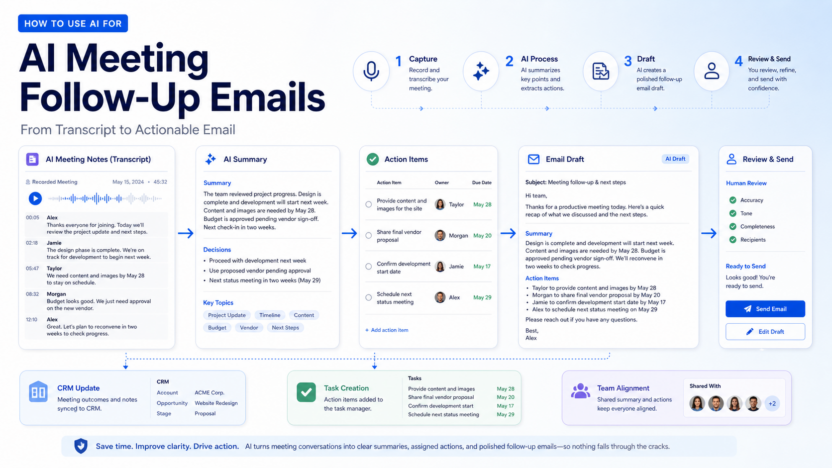
AI can help turn a meeting transcript into a clear follow-up email with a summary, decisions, action items, owners, deadlines, and next steps. The best workflow is simple: record or transcribe the meeting, generate a summary, extract action items, draft the follow-up email, review it manually, then send it through your normal email or CRM workflow.
The important rule is that AI should draft the follow-up, not blindly send it. A human should check accuracy, tone, missing context, sensitive details, deadlines, and recipients before anything goes out.
Best For and Not Best For
| Best for | Not best for |
|---|---|
| Sales calls, client check-ins, onboarding calls, interviews, internal project meetings | Legal, medical, financial, or HR-sensitive messages without human review |
| Teams that forget action items after meetings | Teams expecting AI to replace judgment |
| Small businesses that need consistent recaps | Meetings with poor audio or unclear ownership |
| Customer-facing teams using CRM notes | Sending confidential details to the wrong people |
Why Meeting Follow-Ups Matter
Most meetings do not fail during the call. They fail afterward, when decisions are unclear, owners are not assigned, deadlines are missed, and nobody sends a useful recap. AI meeting tools can reduce that gap by converting conversation into structured notes and draft emails.
Tools like Fathom and Fireflies.ai both publish features around meeting recordings, transcripts, AI summaries, action items, search, and integrations. Those features are useful because a good follow-up email should not depend on memory. It should come from the actual conversation.
A Practical AI Follow-Up Workflow
1. Capture the Meeting
Start with a reliable transcript or recording. A meeting notetaker can capture the conversation from Zoom, Google Meet, Microsoft Teams, or another meeting platform. Make sure your team follows local consent and recording rules.
2. Generate a Meeting Summary
Ask the AI tool to summarize the meeting in plain language. The summary should include the purpose of the meeting, main discussion points, decisions, blockers, and unresolved questions.
3. Extract Action Items
The follow-up should identify each action item, owner, and due date. If the meeting did not clearly assign an owner, say that the owner needs confirmation rather than inventing one.
4. Draft the Email
Use the summary and action items to draft a concise email. The best follow-up emails are not long transcripts. They help recipients understand what changed, what happens next, and who owns each task.
5. Human Review Before Sending
Before sending, check the email for accuracy, tone, confidentiality, missing decisions, incorrect dates, and recipient list. This is the step that prevents automation mistakes from becoming client-facing problems.
6. Update Your CRM or Task Tool
For sales and customer success teams, follow-up emails should connect to CRM updates. For project teams, action items should become tasks in the task manager.
Follow-Up Email Structure
Use this structure:
| Section | Purpose |
|---|---|
| Opening | Thank the participants and state the meeting topic |
| Short recap | Summarize the main decision or outcome |
| Decisions | List what was agreed |
| Action items | Show owner, task, and due date |
| Open questions | Name anything still unresolved |
| Next meeting | Confirm timing if needed |
| Closing | Keep tone professional and clear |
Example Template
Subject: Follow-up from today’s meeting
Hi team,
Thanks for the productive discussion today. Here is a quick recap and the next steps.
Summary:
- [Main outcome]
- [Key decision]
- [Important context]
Action items:
- [Owner]: [Task] by [date]
- [Owner]: [Task] by [date]
- [Owner]: [Task] by [date]
Open questions:
- [Question that still needs a decision]
Next step:
- [Next meeting, review, approval, or deliverable]
Please reply if anything is missing or incorrect.
Best, [Name]
Real Use Cases
A sales team could use AI follow-up emails after discovery calls. The email can recap customer needs, confirm next steps, list requested information, and remind the rep to update the CRM.
A customer success team could use this workflow after onboarding calls. The email can summarize setup progress, assign tasks to the customer and internal team, and confirm the next milestone.
A project team could use AI follow-ups after weekly status meetings. The email can capture blockers, decisions, owners, deadlines, and the date of the next review.
A recruiting team could use AI to summarize interview debriefs internally, but hiring decisions and candidate-facing emails should be reviewed carefully.
An agency could use AI follow-ups after client calls to confirm deliverables, approval requirements, content needs, and timelines.
Tools That Can Help
| Tool | Useful for | Pricing note |
|---|---|---|
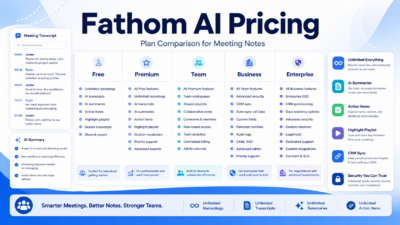
| Fathom | Meeting recordings, summaries, action items, team collaboration, CRM sync | Free plan and paid Premium, Team, Business, Enterprise plans are listed publicly |
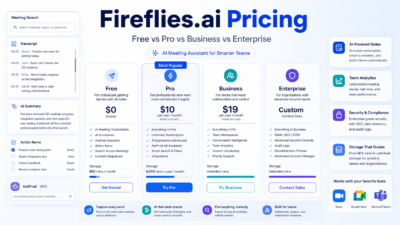
| Fireflies.ai | Transcription, AI summaries, AskFred, meeting search, integrations, team analytics | Free, Pro, Business, and Enterprise pricing are listed publicly |
| Otter.ai | Meeting notes and transcription workflows | Review current plans before buying |
| tl;dv | Meeting recordings, searchable moments, sales/customer call workflows | Review current plan limits before buying |
Pricing last checked on July 22, 2026 for the Fathom and Fireflies official pages used in today’s related pricing guides.
Common Mistakes to Avoid
Do not send the AI draft without review. Do not include private side comments. Do not invent decisions that were not made. Do not assign owners if the meeting did not confirm owners. Do not make the email longer than the meeting notes. Do not send customer-facing follow-ups that include internal strategy or pricing discussion unless it belongs there.
Final Recommendation
Use AI for meeting follow-up emails when your team already has reliable transcripts and a clear review habit. The workflow is most useful for sales, customer success, onboarding, project management, consulting, and recurring client meetings.
The best follow-up email is short, accurate, and action-oriented. AI can speed up the draft, but the human reviewer is responsible for making sure the message is correct.
For related guides, see Fathom AI pricing, Fireflies.ai pricing, Otter.ai review, and best AI note taking apps.
FAQs
Can AI write meeting follow-up emails?
Yes. AI can draft follow-up emails from meeting transcripts, summaries, and action items.
Should AI send follow-up emails automatically?
Usually no. A person should review accuracy, tone, recipients, and sensitive details before sending.
What should a meeting follow-up include?
It should include a short summary, decisions, action items, owners, deadlines, open questions, and next steps.
Which tools can help with AI follow-ups?
Fathom, Fireflies.ai, Otter.ai, tl;dv, and similar AI meeting assistants can help capture transcripts and summaries.
Can AI update CRM records after meetings?
Some tools support CRM sync or integrations. The exact workflow depends on the tool and plan.
Is this useful for sales calls?
Yes. Sales teams can use AI follow-ups to confirm pain points, next steps, buying process, and requested materials.
Is this useful for internal meetings?
Yes. It helps project teams capture decisions, owners, and deadlines.
What is the biggest risk?
The biggest risk is sending an inaccurate or overly broad email without human review.
Do I need a paid tool?
Not always. Start with a free plan or trial if your meeting volume is low. Upgrade when collaboration, CRM sync, search, or advanced summaries become important.
How do I make AI follow-ups better?
Use clear meeting agendas, confirm owners during the call, ask for deadlines, and review the AI draft before sending.