Quick Verdict
Bolt.new is worth considering if you want an AI app builder that can turn a plain-language idea into a working web app, landing page, prototype, or internal tool without setting up a local development environment first. It is strongest for founders, product managers, agencies, marketers, students, and developers who want to move from idea to browser-based build quickly.
It is not the right choice if you need strict enterprise governance from day one, deeply customized backend architecture, full control over every deployment detail, or predictable AI usage costs for a large engineering team. Bolt.new can help you build faster, but the output still needs human review, security checks, prompt discipline, and normal product judgment before anything important goes live.
Based on official Bolt product and pricing information checked on July 23, 2026, the platform includes a free plan, paid Pro access, Teams plans, and Enterprise options. The pricing model uses tokens, so value depends heavily on project complexity, how many iterations you run, and whether the app stays simple or grows into a larger product.
Best For
Bolt.new is best for founders who want to prototype SaaS ideas, agencies that need fast first drafts of websites or small apps, product managers who want clickable prototypes, developers who want a browser-based AI coding workspace, and students who learn by building.
In a typical small business workflow, Bolt.new can help a team turn a rough requirement into something stakeholders can inspect. For example, a service business could describe a booking dashboard, ask Bolt to create the first version, adjust forms and layouts through prompts, and then have a developer review the generated code before using it in production.
Not Best For
Bolt.new is not best for teams that need fully controlled infrastructure, users who expect AI-generated apps to be production-ready without review, businesses that cannot tolerate usage-based token unpredictability, large engineering teams with mature CI/CD processes, or non-technical users who do not want to check outputs carefully.
The important point is that Bolt.new reduces setup friction. It does not remove the need to think through architecture, data privacy, authentication, permissions, testing, accessibility, and maintainability.
What Is Bolt.new?
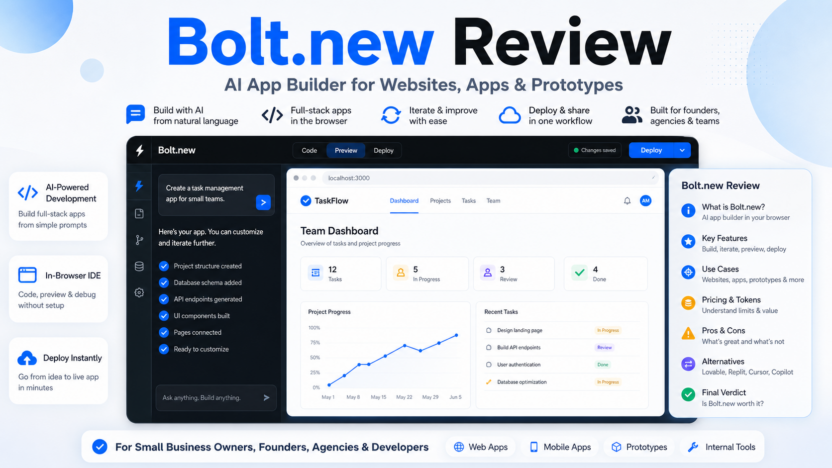
Bolt.new is an AI app builder from StackBlitz that lets users create apps, websites, and prototypes by chatting with AI. The official product page positions it around app and website creation from prompts, imports from sources such as Figma and GitHub, browser-based building, hosting, databases, integrations, and team workflows.
The official GitHub repository describes Bolt.new as an AI-powered web development agent that can prompt, run, edit, and deploy full-stack applications directly from the browser. That browser-first approach is the main difference between Bolt.new and a normal AI coding assistant. Instead of only suggesting code inside an editor, Bolt aims to provide a workspace where the project can be generated, previewed, edited, and deployed in one flow.
That makes Bolt.new especially useful for early-stage app building. You can start with a product idea, landing page brief, dashboard concept, or internal workflow, then ask Bolt to create the first version. The practical value is not that every generated line is perfect. The value is that the blank-project phase becomes much shorter.
Our Evaluation Criteria
For this Bolt.new review, the evaluation is based on official product information, official pricing details, available documentation, and practical fit for small-business software workflows.
| Criteria | What matters |
|---|---|
| Ease of use | How quickly a non-specialist or busy developer can start building |
| Setup speed | Whether the product reduces local environment setup and dependency friction |
| AI app-building quality | How well the workflow supports prompt-based app creation, preview, and iteration |
| Developer control | Whether users can inspect and adjust what the AI creates |
| Hosting and project workflow | Whether the tool supports moving from idea to live project |
| Pricing clarity | Whether official plans, token limits, and team options are clear enough for buyers |
| Small-business fit | Whether the tool works for agencies, founders, marketers, and lean teams |
| Limitations | Where users still need human review, technical judgment, or another tool |
| Alternatives | How it compares with nearby tools such as Lovable, Replit, Cursor, and GitHub Copilot |
Key Features
Prompt-to-App Building
Bolt.new’s central feature is prompt-based app creation. You describe what you want, and Bolt generates a working project structure. This is useful for quick prototypes, internal dashboards, landing pages, admin tools, and small web apps.
For a small business, the benefit is speed. A founder can explain a customer intake portal, a project tracker, or a simple booking app in plain language and get a first version to review. A developer still needs to check the implementation, but the starting point is faster than setting up the stack manually.
Browser-Based Development
Bolt.new is built around browser-based development. The official GitHub repository describes the workflow as prompting, running, editing, and deploying full-stack apps directly from the browser. This matters because many small teams lose time on local setup, package conflicts, and environment differences.
A browser-first workflow is useful for client demos, stakeholder reviews, and quick experiments. It also helps less technical team members collaborate earlier because they can see an app preview rather than reviewing abstract requirements.
App Preview and Iteration
A useful AI app builder needs more than code generation. It needs a way to preview output, catch obvious mistakes, and keep refining the project. Bolt’s positioning emphasizes building, previewing, and improving projects inside one interface.
That workflow fits product discovery. A product manager could ask for a lightweight customer feedback dashboard, review the preview, request changes to filters and charts, and then pass the result to an engineer for cleanup.
Hosting, Databases, and Scaling Features
The official Bolt page describes Bolt Cloud as including backend infrastructure such as hosting, databases, integrations, and related project features. This makes Bolt more useful than a pure mockup generator because the workflow can move closer to a live product.
For small businesses, this is helpful when the goal is a functional microsite, prototype, or internal tool. Still, teams should verify security, backups, access control, and data handling before using any AI-built application with sensitive data.
Team and Enterprise Controls
The official pricing page lists Teams and Enterprise options. Teams add centralized billing, team-level access management, admin controls, organization sharing, private NPM registry support, and design-system knowledge with per-package prompts. Enterprise adds advanced security, compliance support, account management, priority support, custom workflows, integrations, SLAs, procurement options, data governance, and onboarding.
This makes Bolt.new more credible for business use than a single-user prototype tool, but the level of fit depends on company requirements. A small agency may be comfortable with Teams. A larger company will likely need Enterprise review before adopting it broadly.
Real Use Cases
MVP Prototypes
A founder could use Bolt.new to create the first version of a SaaS dashboard, customer portal, lead capture app, or reporting tool. The goal should be to validate the flow and gather feedback, not to skip product validation or engineering review.
Client Landing Pages
An agency could use Bolt.new to draft campaign landing pages, event pages, product pages, or lead-generation microsites. The agency still needs brand review, copy editing, analytics setup, accessibility checks, and final QA.
Internal Tools
A small operations team could use Bolt.new to create a simple task tracker, status dashboard, content calendar, invoice review tool, or onboarding checklist. This is one of the more practical use cases because internal tools often need speed more than pixel-perfect polish.
Product Discovery
Product managers can use Bolt.new to turn feature ideas into clickable prototypes. That helps teams discuss actual workflows instead of debating static documents.
Developer Starting Points
Developers can use Bolt.new for scaffolding and quick experiments. A developer might ask it to create a basic full-stack app, inspect the generated code, then move the parts worth keeping into a normal repository.
Bolt.new Pricing
Pricing last checked on July 23, 2026.
The official Bolt.new pricing page lists these monthly options:
| Plan | Official monthly price | Main included details |
|---|---|---|
| Free | $0 | Public and private projects, 300K daily token limit, 1M monthly token limit, Bolt branding on websites, 10MB file uploads, website hosting, up to 333K web requests, unlimited databases |
| Pro | $25 per month billed monthly | Public and private projects, no daily token limit, starts at 10M tokens per month, no Bolt branding, private site sharing, 100MB file uploads, hosting, up to 1M web requests, token rollover, custom domains, SEO boosting, unlimited databases, expanded database capacity, choice of database provider, AI image editing |
| Teams | $30 per month per member billed monthly | Everything in Pro plus centralized billing, team access management, granular admin controls and user provisioning, organization sharing, private NPM registries, and design-system knowledge |
| Enterprise | Custom | Advanced security, SSO, audit logs, compliance support, dedicated account management, priority support, custom workflows, integrations, SLAs, procurement options, data governance, and onboarding |
The Free plan is useful for trying the workflow. Pro is the more realistic option for regular solo use because it removes the daily token limit and increases monthly tokens. Teams is the better fit when multiple people need shared access and admin controls. Enterprise is for larger organizations that need security, procurement, governance, and support requirements reviewed properly.
The biggest pricing consideration is token usage. Bolt’s pricing FAQ explains that token usage is heavily related to syncing the project file system to AI, and larger projects can use more tokens per message. That means a simple landing page may feel economical, while a complex app with many files and repeated iterations can consume tokens faster.
Pros and Cons
| Pros | Why it matters |
|---|---|
| Fast app starts | Reduces the time between idea and first working draft |
| Browser-based workflow | Helps avoid local setup friction for early prototypes |
| Supports websites, apps, and prototypes | Useful across product, marketing, and internal-tool workflows |
| Free plan available | Lets users test the tool before committing |
| Pro and Teams options | Gives solo users and teams clearer upgrade paths |
| Hosting and database features | Makes the workflow more complete than code-only generation |
| GitHub and Figma import positioning | Helpful for teams starting from existing code or designs |
| Cons | Why it matters |
|---|---|
| Token usage can be hard to predict | Bigger projects and repeated prompts may increase cost pressure |
| AI output still needs review | Generated code can contain mistakes, missing edge cases, or insecure choices |
| Not a replacement for product strategy | Users still need clear requirements and acceptance criteria |
| Enterprise readiness depends on requirements | Larger companies need security and governance review |
| Complex apps may outgrow the simple prompt workflow | Teams may need traditional engineering processes as projects mature |
Bolt.new Alternatives
| Tool | Best For | Main Strength | Limitation |
|---|---|---|---|
| Bolt.new | Browser-based app and website generation | Prompt, preview, edit, and deploy in one workflow | Token usage and generated-code review still matter |
| Lovable | Product-style web app generation | Strong for non-technical app prototypes and UI-led builds | May be less suitable when developers want full coding control |
| Replit | Cloud development and AI-assisted coding | Good for coding, hosting, and developer education workflows | Broader IDE workflow may feel heavier than simple prompt-to-app tools |
| Cursor | Developers working in an AI code editor | Strong coding assistant inside developer workflows | Not a full prompt-to-hosted-app builder by itself |
| GitHub Copilot | Developers inside existing repositories | Strong code assistance across established codebases | Does not replace app planning, hosting, or product scaffolding alone |
If you are comparing AI coding tools more broadly, see our Replit vs GitHub Copilot comparison and Cursor vs Windsurf comparison. If your main goal is app generation, our Lovable vs Bolt comparison is the closest related guide.
Who Should Choose Bolt.new?
Choose Bolt.new if you want to quickly turn product ideas into browser-previewable apps, if you value speed over complete manual setup, and if you are comfortable reviewing generated output before production use.
A founder could use it to test a small SaaS idea. A marketer could use it to build campaign tools and landing pages. An agency could use it to create quick client demos. A developer could use it to scaffold a project and then refine the code manually.
Avoid Bolt.new if your team needs strict infrastructure control, detailed security approvals, predictable fixed-cost engineering workflows, or deeply customized production architecture before any prototype is created.
Final Recommendation
Bolt.new is a strong AI app builder for early-stage web apps, prototypes, and small-business software workflows. Its main advantage is reducing the gap between idea and working project. The browser-based workflow, app preview, hosting-related features, and official free plan make it practical for founders, agencies, product teams, and developers who need to move quickly.
The tool is not magic. You still need clear prompts, product judgment, security review, accessibility checks, and code review before publishing anything important. If you treat Bolt.new as a fast builder for first drafts and prototypes, it can be very useful. If you expect it to replace engineering discipline, it will disappoint you.
For most small teams, the best path is to start with the Free plan, build a simple prototype, watch token usage, and move to Pro only if the workflow consistently saves time. Teams should consider the Teams plan when collaboration, billing, and admin controls matter.
FAQs
Is Bolt.new free?
Yes. The official pricing page lists a Free plan at $0 with public and private projects, website hosting, a 300K daily token limit, and a 1M monthly token limit.
How much does Bolt.new Pro cost?
The official monthly pricing page lists Pro at $25 per month billed monthly. It starts at 10M tokens per month, removes the daily token limit, removes Bolt branding on websites, and includes features such as custom domain support and SEO boosting.
Is Bolt.new good for small businesses?
Yes, when the goal is quick prototyping, simple internal tools, landing pages, or app drafts. Small businesses should still review generated code, permissions, data handling, and business logic before using a Bolt-built app in production.
Can Bolt.new build full-stack apps?
The official GitHub repository describes Bolt.new as an AI-powered web development agent for prompting, running, editing, and deploying full-stack applications directly from the browser.
Does Bolt.new replace developers?
No. Bolt.new can reduce setup and drafting time, but developers are still needed for code review, security, architecture, testing, maintainability, and complex production requirements.
Who is Bolt.new best for?
It is best for founders, product managers, agencies, marketers, students, and developers who want to create app or website drafts quickly and then refine them.
What is the biggest limitation of Bolt.new?
The biggest limitation is that AI-generated app output still requires careful human review. Token usage is also important because larger projects and repeated iterations can affect cost.
Is Bolt.new better than Lovable?
It depends on the workflow. Bolt.new is compelling when users want browser-based code generation, preview, editing, and deployment. Lovable may appeal more to users focused on product-style app generation and visual workflows.
Is Bolt.new good for agencies?
Yes, especially for first drafts, client demos, landing pages, and prototype workflows. Agencies should still apply normal QA, brand review, accessibility checks, and developer review before launch.
Should I publish a Bolt.new app directly?
For low-risk prototypes, publishing can be useful for review. For business-critical apps, inspect the code, test user flows, check security and privacy needs, and confirm deployment settings before using it publicly.