Quick Answer
Fathom AI has a generous free plan for individual meeting notes and paid plans for individuals and teams that need advanced summaries, action items, collaboration, CRM sync, and security controls.
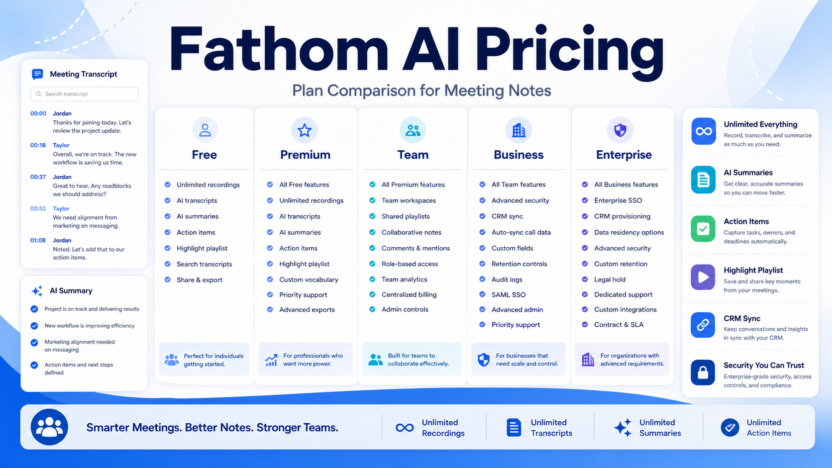
Pricing last checked on July 22, 2026. Fathom’s official pricing page listed Free at $0, Premium at $16 per user per month billed annually, Team at $15 per user per month billed annually with a 2-user minimum, Business at $25 per user per month billed annually with a 2-user minimum, and Enterprise as talk to sales. The same page also showed monthly reference prices beside annual pricing, including Premium at $20, Team at $19, and Business at $34 per user per month.
For most small businesses, Free is enough to test meeting summaries. Premium is best for solo professionals who need advanced summaries and action items. Team is the practical starting point for small teams. Business is better for sales and customer-facing teams that need CRM sync, deal views, coaching metrics, and custom summaries.
Fathom Pricing at a Glance
| Plan | Annual price shown | Best for | Main limitation |
|---|---|---|---|
| Free | $0 | Individuals testing AI meeting notes | Team collaboration and advanced workflows are limited |
| Premium | $16/user/month billed annually | Solo professionals | Not a full team workspace |
| Team | $15/user/month billed annually, 2-user minimum | Small teams | Business sales features are not included |
| Business | $25/user/month billed annually, 2-user minimum | Growing customer-facing teams | Higher cost per user |
| Enterprise | Talk to sales | Larger teams with security/admin needs | Requires sales conversation |
Official source: Fathom pricing
What Fathom Does
Fathom is an AI meeting notetaker. Its product page says it summarizes meetings so users can focus on the conversation, and notes that bot-free capture is available. The official pricing page lists unlimited recordings and transcriptions on Free, instant AI summaries, clips, playlists, search across calls, advanced summaries, AI-generated action items, conversational meeting assistant, custom meeting bot, team collaboration, CRM field sync, deal view, coaching metrics, SSO, SCIM, custom data retention, and dedicated success support depending on plan.
In practical terms, Fathom helps teams capture meeting records, summarize calls, identify action items, save highlights, and push meeting context into tools like CRM or collaboration systems.
Plan Breakdown
Free
Free is best for trying Fathom personally. It includes unlimited recordings and transcriptions, instant AI call summaries, clips, playlists, and search across calls. A consultant, founder, or salesperson can use Free to see whether Fathom’s meeting capture fits their style.
Premium
Premium adds more advanced individual capabilities. The pricing page lists advanced call summaries, AI-generated action items, conversational meeting assistant, and custom meeting bot. It is best for solo users who want more than basic notes but do not need a team workspace.
Team
Team is the first plan for small groups. It includes everything from Premium, global search across calls, highlight playlists, and collaboration using comments, folders, keyword alerts, and more. It is a strong fit for agencies, sales teams, customer success teams, and leadership groups that want shared meeting visibility.
Business
Business adds CRM field sync, automatic record updates after meetings, Deal View, coaching metrics, AI scorecards, advanced call summaries, and custom summaries. This is the plan to consider if meetings drive revenue, customer renewals, implementation, or account management.
Enterprise
Enterprise adds organization-wide security controls, SSO and SCIM provisioning, custom data retention, dedicated success support, priority support SLAs, and related controls. Small businesses usually do not need this unless security or compliance requirements are strict.
Real Use Cases
A sales team could use Fathom Team or Business to capture discovery calls, generate summaries, identify next steps, and share highlights with managers. Business becomes more relevant if CRM sync and coaching metrics matter.
A customer success team could use Fathom to summarize onboarding calls, capture commitments, track account risks, and keep customer context visible across the team.
A founder could use the Free or Premium plan to capture investor calls, candidate interviews, partner meetings, and customer discovery conversations.
An agency could use Fathom Team to keep client calls organized in folders, share highlights internally, and reduce manual recap writing.
A product team could use Fathom to summarize user interviews and search past conversations for repeated feature requests.
Pros and Cons
| Pros | Cons |
|---|---|
| Free plan includes unlimited recordings and transcriptions | Team and Business plans require at least two users |
| Strong meeting summaries, action items, and search | CRM/deal features are mainly Business-level |
| Useful for sales, customer success, agencies, and founders | Some teams may prefer meeting tools bundled in existing software |
| Team plan supports collaboration around meetings | Enterprise security features require sales conversation |
| Business supports CRM sync and coaching workflows | The best plan depends heavily on team workflow |
Alternatives
| Alternative | Best for | Main strength | Limitation |
|---|---|---|---|
| Fireflies.ai | Meeting transcription and team analytics | Strong plan structure and integrations | Storage and AI credits vary by plan |
| Otter.ai | Familiar meeting notes | Simple transcription and notes workflow | Best plan depends on collaboration needs |
| tl;dv | Sales and customer meeting review | Searchable meeting moments and sharing | Feature fit depends on team workflow |
| Sembly AI | Meeting notes and task extraction | Strong meeting assistant positioning | Compare integrations before choosing |
Final Recommendation
Fathom is a strong choice for small businesses that want simple, useful AI meeting notes without starting with an expensive sales platform. Start with Free if you are testing personally. Choose Premium for solo professional work. Choose Team when multiple people need shared call visibility. Choose Business when CRM sync, deal summaries, coaching metrics, and custom summaries are important.
For related guides, see Fireflies.ai pricing, Fireflies.ai vs Fathom, Otter.ai review, and best AI note taking apps.
FAQs
Does Fathom have a free plan?
Yes. Fathom lists a Free plan at $0 with unlimited recordings and transcriptions.
How much is Fathom Premium?
Fathom listed Premium at $16 per user per month billed annually when checked on July 22, 2026.
How much is Fathom Team?
Fathom listed Team at $15 per user per month billed annually with a 2-user minimum.
How much is Fathom Business?
Fathom listed Business at $25 per user per month billed annually with a 2-user minimum.
Does Fathom Enterprise have public pricing?
Fathom lists Enterprise as talk to sales.
Which Fathom plan is best for small teams?
Team is usually the best starting plan for small groups that need shared meeting visibility and collaboration.
Which Fathom plan is best for sales teams?
Business is better for sales teams because it includes CRM field sync, Deal View, coaching metrics, and AI scorecards.
Does Fathom support CRM sync?
Yes, CRM sync and CRM field sync are listed on higher-tier plans.
Is Fathom better than Fireflies.ai?
Fathom is strong for simple meeting capture and summaries. Fireflies.ai is also strong for meeting transcription, summaries, and team analytics. The better choice depends on plan fit and workflow.
Should I start with Free or paid?
Start with Free if you are testing. Upgrade when you need advanced summaries, action items, team collaboration, CRM sync, or security features.