Quick Verdict
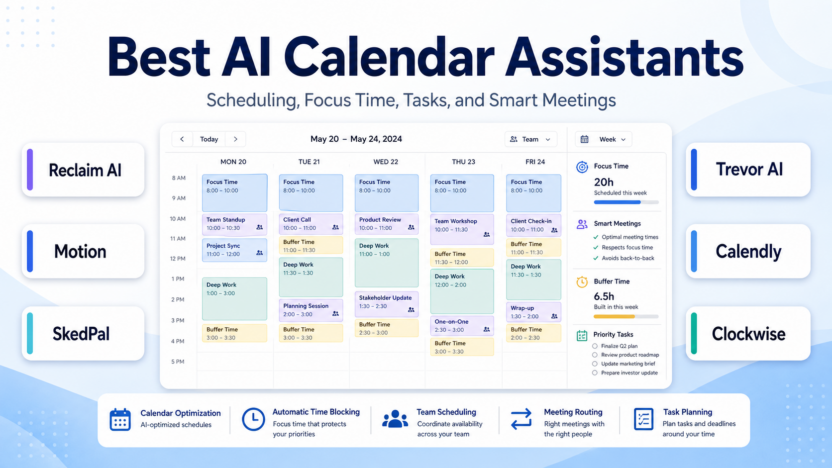
The best AI calendar assistant depends on whether your team needs external booking, automatic task planning, focus-time protection, or structured time blocking. Reclaim AI is the strongest fit for protecting focus time and optimizing a busy work calendar. Motion is better if you want AI task planning, projects, docs, and calendar scheduling in one productivity workspace. SkedPal is a strong choice for people who want their task list converted into an adaptive calendar. Trevor AI is a lighter option for personal task planning. Calendly is still the best-known choice when the main job is letting other people book time with you.
If your calendar problem is external scheduling, start with Calendly. If your problem is overloaded days and constantly shifting priorities, start with Reclaim AI, Motion, or SkedPal.
Best AI Calendar Assistants at a Glance
| Tool | Best for | Main strength | Limitation |
|---|---|---|---|
| Reclaim AI | Busy teams protecting focus time | AI focus time, habits, tasks, buffers, smart meetings | Less focused on classic booking pages |
| Motion | Teams wanting calendar plus task/project planning | AI task planner, projects, meetings, docs, calendar | More product than users need for simple scheduling |
| SkedPal | Time-blocking users with many tasks | Adaptive calendar planning from to-do lists | Requires more planning discipline |
| Trevor AI | Individuals who want a lighter planner | Affordable personal AI task planning | Less team/admin depth |
| Calendly | External booking and meeting routing | Booking links, reminders, routing, integrations | Not designed as an AI workday planner |
| Clockwise | Teams researching focus-time automation | Known for calendar optimization concepts | Clockwise has shifted users toward Reclaim-style alternatives |
Evaluation Criteria
We evaluated these tools by setup effort, calendar automation depth, task scheduling, team scheduling, focus-time protection, pricing clarity, integrations, admin controls, and small-business value.
A good AI calendar assistant should do more than place meetings on a calendar. It should help protect time for important work, reduce scheduling friction, make task commitments visible, and prevent calendars from becoming a pile of meetings with no room to execute.
Pricing
Pricing last checked on July 22, 2026.
Reclaim AI’s official pricing page showed Business at $15 per seat per month in the annual section and $18 per seat per month in the monthly section, with AI agents, focus time, habits, buffer time, smart meetings, tasks, and workforce analytics across its product set.
Motion’s official pricing page showed Pro AI at $19 per seat per month in the annual-billing view for teams/professionals and referenced AI projects and tasks, AI calendar and meetings, AI docs, AI task planner, storage, integrations, and AI credits.
SkedPal’s official pricing page listed Core at $9.95 per month billed annually and Pro at $14.95 per month billed annually, with AI-powered scheduling, calendar sync, scheduling windows, notifications, and time tracking depending on plan.
Trevor AI’s official page listed Pro at $5 per month paid annually or $6 paid monthly, with trial and money-back language on the page.
Calendly’s official pricing page listed Free, Standard at $10 per seat per month billed yearly, Teams at $16 per seat per month billed yearly, and Enterprise starting at $15,000 per year.
| Tool | Official pricing signal checked | Pricing note |
|---|---|---|
| Reclaim AI | Business $15 annual section / $18 monthly section | Check current plan limits and attendee-user details |
| Motion | Pro AI $19/seat/month in annual view | AI credits and team features matter |
| SkedPal | Core $9.95/mo annually; Pro $14.95/mo annually | Strong for time blocking |
| Trevor AI | Pro $5/mo annually or $6/mo monthly | Lower-cost personal planning |
| Calendly | Standard $10/seat/mo yearly; Teams $16/seat/mo yearly | Best for external booking |
Official sources: Reclaim AI pricing, Motion pricing, SkedPal pricing, Trevor AI, and Calendly pricing.
Real Use Cases
A founder could use Reclaim AI to protect focus blocks for strategy work, automatically add buffer time after calls, and schedule tasks around investor, customer, and hiring meetings.
A product manager could use Motion or SkedPal to turn project tasks into calendar blocks so roadmap planning, user research, writing, and follow-up tasks do not get buried under meetings.
A sales team could use Calendly to let prospects book demos, route meetings to the right rep, and automate reminders. Reclaim AI can then protect follow-up blocks after calls.
A consultant could use Trevor AI or SkedPal to plan client work, admin tasks, proposal writing, and delivery deadlines into a realistic daily schedule.
A small agency could use Reclaim AI or Motion to protect deep-work time for client deliverables while still coordinating internal standups and client calls.
Tool-by-Tool Recommendations
Reclaim AI
Choose Reclaim AI if you want AI to defend focus time, schedule tasks, add buffers, manage habits, and improve meeting quality. It is especially useful when a team has too many meetings and not enough protected work time.
Motion
Choose Motion if you want a broader work platform around calendar, tasks, projects, meetings, docs, and AI planning. It can be a better fit when calendar planning is connected to project execution.
SkedPal
Choose SkedPal if you already believe in time blocking and want your task list to become an adaptive calendar. It is best for users who will maintain priorities and task estimates carefully.
Trevor AI
Choose Trevor AI if you want a lower-cost personal planner that helps schedule tasks into your day without adopting a large team platform.
Calendly
Choose Calendly if other people need to book time with you. It is more about scheduling access than AI calendar optimization.
Pros and Cons
| Pros | Cons |
|---|---|
| AI calendar tools protect time for priority work | They require clean calendar habits to work well |
| Task scheduling makes commitments more realistic | Automatic scheduling can feel intrusive if rules are unclear |
| Team tools can reduce meeting overload | Pricing can grow with seats |
| Booking tools reduce external scheduling friction | Booking links do not solve internal workload planning |
Final Recommendation
For small teams, Reclaim AI is the best first choice for focus time and smart calendar protection. Motion is better if you want calendar planning tied to projects and tasks. SkedPal is best for disciplined time blockers. Trevor AI is best for affordable personal task planning. Calendly remains the practical choice for external booking.
For related guides, see Motion vs Reclaim AI, Calendly pricing, best AI work management tools, and best AI project management tools.
FAQs
What is an AI calendar assistant?
An AI calendar assistant helps schedule meetings, tasks, focus time, habits, buffers, and priorities using automation or AI-based rules.
Which AI calendar assistant is best for small teams?
Reclaim AI is a strong first choice for teams that need focus-time protection. Motion is better when project and task planning matter too.
Which tool is best for booking links?
Calendly is the strongest option in this list for external booking links and meeting routing.
Which tool is best for time blocking?
SkedPal is one of the strongest choices for adaptive time blocking from a task list.
Is Motion better than Reclaim AI?
Motion is broader because it includes projects, tasks, docs, and AI work management. Reclaim AI is more focused on calendar optimization.
Is Trevor AI good for teams?
Trevor AI is better for individuals and lightweight planning than deep team scheduling.
Do these tools replace project management software?
Usually no. They help schedule work, but teams may still need project management tools for assignments, files, status, and reporting.
Can I use Calendly and Reclaim AI together?
Yes. Calendly can handle external booking while Reclaim AI protects focus time and internal scheduling.
Should I choose the cheapest tool?
No. Choose based on the scheduling problem. A low-cost planner is not useful if your real problem is sales meeting routing or team calendar overload.
What should I test before paying?
Test calendar sync, task scheduling accuracy, meeting rules, buffer behavior, integrations, mobile apps, and whether the team trusts the schedule changes.