If you are comparing Motion vs Reclaim AI, you are probably trying to solve the same problem: your calendar is too crowded, your task list keeps slipping, and manual planning is eating time that should be spent doing the work.
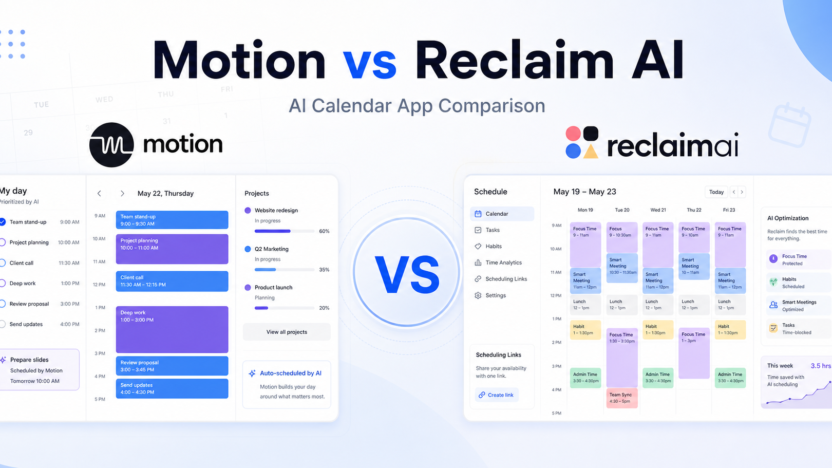
Motion and Reclaim AI both use automation to protect time on your calendar, but they are built for different scheduling styles. Motion is closer to an AI work planner that combines tasks, projects, calendars, meetings, and scheduling into one system. Reclaim AI is more focused on intelligent calendar defense: focus time, habits, smart meetings, scheduling links, and calendar sync.
The better choice depends on whether you want a full AI task-and-project planner or a lighter calendar automation layer that fits around your current tools.
Quick Verdict
Choose Motion if you want AI to build and adjust your daily schedule around tasks, meetings, projects, priorities, and deadlines. It is the stronger choice for people who want one planning system to decide what work happens next.
Choose Reclaim AI if you want smarter calendar protection without replacing your project management tool. It is better for teams that already use tools like Asana, ClickUp, Jira, Linear, Todoist, or Google Calendar and mainly need automatic focus time, habits, meeting scheduling, and calendar sync.
Quick Comparison
| Category | Motion | Reclaim AI |
|---|---|---|
| Best for | AI task planning, project scheduling, daily prioritization | Calendar defense, focus time, habits, meeting scheduling |
| Core product style | AI work planner with calendar, tasks, projects, docs, and meetings | AI calendar assistant that works around existing workflows |
| Ideal user | Busy professionals, founders, consultants, operators, and teams that want one planning system | Teams and individuals who already have task tools but need a smarter calendar |
| Task planning | Strong native task planning with priority and deadline scheduling | Integrates tasks from other tools and blocks time for them |
| Project management | Built-in AI Projects and Tasks | Not a full project management replacement |
| Focus time | Scheduled through AI planning and availability | Strong focus time protection and smart rescheduling |
| Habits | Can schedule recurring work through tasks/calendar | Dedicated Habits feature for recurring routines |
| Meeting scheduling | AI Calendar and Meetings included | Smart Meetings and Scheduling Links are central features |
| Team capacity | Business AI adds team capacity planning | Team features depend on Starter, Business, and Enterprise tiers |
| Best fit | Replace manual planning with one AI planner | Add AI scheduling to an existing calendar/tool stack |
Pricing Comparison
Motion and Reclaim AI use different pricing models. Motion separates Pro AI and Business AI plans and changes pricing by individual vs team billing. Reclaim AI has a free Lite plan plus paid Starter, Business, and Enterprise tiers.
| Pricing Point | Motion | Reclaim AI |
|---|---|---|
| Free plan | Trial CTA shown on Motion pricing page | Lite plan is free |
| Entry paid plan | Pro AI for teams: $29/seat/month monthly or $19/seat/month annually | Starter: $10/seat/month monthly or $8/seat/month annually |
| Higher paid plan | Business AI for teams: $49/seat/month monthly or $29/seat/month annually | Business: $15/seat/month monthly or $12/seat/month annually |
| Individual annual pricing | Pro AI individual: $29/month annually; Business AI individual: $39/month annually | Starter and Business pricing is seat-based |
| Individual monthly pricing | Pro AI individual: $49/month; Business AI individual: $69/month | Starter $10/seat/month; Business $15/seat/month |
| Enterprise tier | Business AI includes business controls and priority support; larger needs use Motion sales/onboarding flow | Enterprise: $22/seat/month monthly or $18/seat/month annually |
| Usage limits | Pro AI includes 7,500 credits/seat/month | Lite, Starter, Business, and Enterprise tiers vary by feature access |
| Higher usage | Business AI includes 15,000 credits/seat/month | Enterprise provides the highest listed Reclaim tier |
| Best pricing fit | Users who want AI planning plus built-in task/project scheduling | Users who need calendar automation at lower per-seat prices |
Motion Overview
Motion is designed to be an AI work planner. It combines calendar scheduling, task prioritization, project work, meetings, docs, wiki-style content, and integrations into one planning environment.
The main promise is simple: give Motion your tasks, deadlines, priorities, and meetings, and it builds a schedule for you. When plans change, Motion can reshuffle work based on remaining time and priority. That makes it useful for professionals who struggle with manual planning or teams that need more structure around deadlines.
Motion’s Pro AI plan includes AI Chat, AI Projects and Tasks, AI Calendar and Meetings, AI Docs and Wiki, unlimited storage, apps, integrations, and 7,500 credits per seat per month. Business AI adds team capacity planning, roles and access control, central billing, priority support, and 15,000 credits per seat per month.
Reclaim AI Overview
Reclaim AI is an AI calendar app built to defend your time. It focuses on automatically scheduling focus time, habits, tasks, meetings, and scheduling links around your availability.
Reclaim is especially useful if your team already has a project management system. Instead of asking everyone to move into a new planner, Reclaim can work around existing tools and calendars. It helps block time for tasks, protect deep work, schedule recurring habits, and coordinate meetings without creating as much planning overhead.
Reclaim’s Lite plan is free. Starter, Business, and Enterprise add more powerful scheduling and team features at paid per-seat pricing.
AI Scheduling and Task Planning
Motion is stronger when you want AI to decide the order of your work. It works best when you enter tasks, priorities, and deadlines directly into Motion. The product then becomes the planning brain for your day.
Reclaim AI is stronger when you want time blocks created around your existing work. It can help you protect calendar space, defend focus time, and fit habits or tasks into open slots. It is less about replacing your work system and more about making your calendar respect it.
For people who want one planner, Motion has the advantage. For teams that already have task systems, Reclaim is easier to adopt.
Meetings and Focus Time
Both tools help with meetings, but they approach them differently.
Motion includes AI Calendar and Meetings as part of its broader planning system. Meetings are one part of the schedule that Motion balances against tasks and priorities.
Reclaim AI puts meeting coordination and focus protection closer to the center of the product. Its Smart Meetings, Scheduling Links, Focus Time, and Habits features are built for teams that constantly negotiate calendar space.
If meetings are the main calendar problem, Reclaim AI is a strong fit. If meetings are only one piece of a bigger planning problem, Motion may be more useful.
Project Management Fit
Motion includes AI Projects and Tasks, so it can act as a lightweight project and task management system. This is helpful for consultants, founders, operators, and small teams that want fewer tools.
Reclaim AI is not trying to be your main project management system. That is a strength if your team already uses another tool. It lets you keep your existing project workflow while making calendar time more realistic.
Choose Motion if you want to consolidate planning. Choose Reclaim if you want to improve scheduling without disrupting the systems your team already uses.
Pros and Cons
Motion Pros
- Strong AI planning for tasks, projects, meetings, and deadlines
- Better fit for users who want one system to organize the day
- Pro AI includes 7,500 credits per seat per month
- Business AI includes 15,000 credits per seat per month and team capacity planning
- Useful for consultants, founders, busy operators, and teams with shifting priorities
Motion Cons
- Higher entry pricing than Reclaim AI
- Requires more commitment because it works best when tasks and projects live inside Motion
- May be too much if you only need focus time and meeting scheduling
- Individual monthly pricing is much higher than annual team pricing
Reclaim AI Pros
- Free Lite plan available
- Lower paid entry price than Motion
- Excellent fit for focus time, habits, smart meetings, and scheduling links
- Works well alongside existing task and project management tools
- Easier to adopt for teams that do not want to replace their work management stack
Reclaim AI Cons
- Not a full project management replacement
- Less suited for users who want AI to run their entire task planning system
- Advanced team features require higher tiers
- The value depends on calendar discipline and connected workflow setup
Which Tool Should You Choose?
Choose Motion if your real problem is planning. If you want AI to decide when tasks happen, adjust your schedule automatically, and manage projects and priorities in one place, Motion is the better fit.
Choose Reclaim AI if your real problem is calendar protection. If you already know what work needs to happen but need your calendar to defend focus time, habits, task blocks, and smarter meetings, Reclaim AI is the cleaner choice.
A simple way to decide: Motion is for people who want an AI planner. Reclaim AI is for people who want an AI calendar assistant.
FAQs
Is Motion better than Reclaim AI?
Motion is better for AI task planning, project scheduling, and all-in-one daily planning. Reclaim AI is better for focus time, habits, calendar defense, and scheduling around existing tools.
Does Reclaim AI have a free plan?
Yes. Reclaim AI lists a free Lite plan.
How much does Motion cost?
Motion Pro AI for teams is listed at $29 per seat/month monthly or $19 per seat/month annually. Business AI for teams is listed at $49 per seat/month monthly or $29 per seat/month annually.
How much does Reclaim AI cost?
Reclaim AI Starter is listed at $10 per seat/month monthly or $8 per seat/month annually. Business is listed at $15 per seat/month monthly or $12 per seat/month annually. Enterprise is listed at $22 per seat/month monthly or $18 per seat/month annually.
Which tool is better for teams?
Motion is better for teams that want one AI planning system with projects, tasks, calendars, and capacity planning. Reclaim AI is better for teams that already use a project tool and want smarter scheduling on top of the calendar.
Which tool is better for focus time?
Reclaim AI is usually better for dedicated focus time workflows because focus protection, habits, and calendar optimization are core parts of the product.
For broader productivity planning, pair this with our Notion AI vs ClickUp AI comparison comparison; automation-heavy teams may also want to compare Zapier vs Make comparison.
Final Verdict
Motion and Reclaim AI are both useful AI scheduling tools, but they are not interchangeable. Motion is the stronger all-in-one AI planner. Reclaim AI is the stronger calendar automation layer.
If you want AI to plan your workday from tasks and priorities, choose Motion. If you want AI to defend calendar time around your existing tools, choose Reclaim AI.