Quick Answer
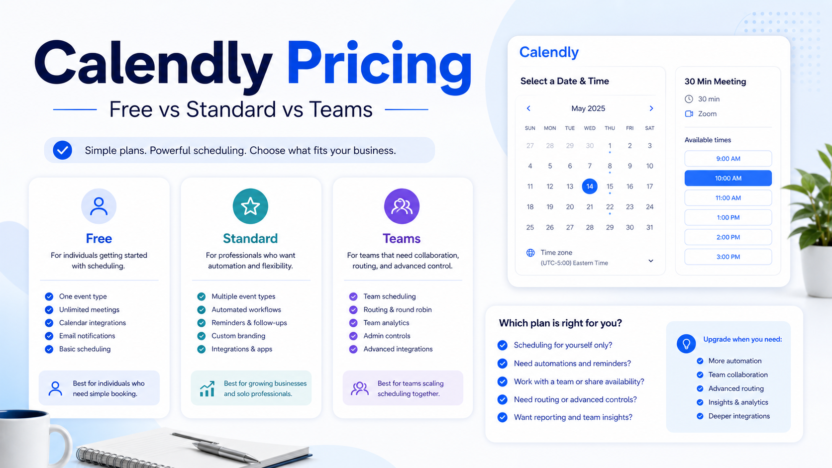
Calendly's Free plan fits basic individual scheduling. Standard is the first practical upgrade for more serious scheduling workflows. Teams is better when multiple users need shared scheduling, routing, admin control, or standardized customer booking.
Calendly vs Reclaim AI best AI calendar apps AI appointment reminder workflow
Pricing Last Checked
Pricing last checked on July 7, 2026. Calendly pricing is the official source used for plan names, billing notes, and packaging.
Plan Comparison
| Plan | Best for | Main value | Limitation |
|---|---|---|---|
| Free | Individuals testing booking links | Basic scheduling access | Limited team controls |
| Standard | Solo professionals and small teams | More customization and workflow control | May not cover advanced team routing |
| Teams | Sales, recruiting, and service teams | Better team scheduling and admin needs | More than a solo user needs |
| Enterprise | Larger organizations | Security, governance, and support needs | Requires a sales process |
Free Plan
The Free plan is best when one person needs a simple booking link. It can be enough for early testing, founders, consultants, and solo operators who only need a basic scheduling page.
Standard Plan
Standard is the practical upgrade point when scheduling becomes part of a business workflow. Consider it when you need more event-type control, reminder workflows, embeds, or integration depth.
Teams Plan
Teams is more relevant when multiple people need shared scheduling rules, routing, admin visibility, or coordinated meeting workflows. A sales team, recruiting team, or customer onboarding team should usually evaluate this tier before trying to manage shared scheduling manually.
Enterprise Plan
Enterprise is for larger organizations that need governance, security review, support, and deployment controls. Small businesses should only consider it when procurement, compliance, or scale requires it.
Real Use Cases
Solo Consultant
Start with Free or Standard depending on whether the booking page is a core sales asset.
Sales Team
Teams can make sense when round-robin routing, team availability, and standardized booking flows matter.
Customer Onboarding
Calendly can help route new customers to the right onboarding session and reduce back-and-forth before kickoff calls.
Alternatives
| Tool | Best for | Main strength | Limitation |
|---|---|---|---|
| Calendly | External booking links | Easy scheduling experience | Not a full AI calendar planner |
| Reclaim AI | Calendar protection | Focus time and task planning | Less direct as a simple booking page |
| Motion | AI day planning | Task-calendar scheduling | More planning-oriented |
| Google Calendar appointment schedules | Simple Google-native booking | Already in many workspaces | Less specialized |
Final Recommendation
Use Free when one person needs a simple booking link. Upgrade to Standard when scheduling is part of a repeatable business process. Consider Teams when multiple people share routing, availability, or customer-facing booking workflows.
FAQs
Is Calendly Free enough?
It can be enough for basic individual scheduling. Upgrade when customization, integrations, reminders, or team controls become important.
Which Calendly plan is best for small business?
Standard is often the first practical paid tier for small businesses, while Teams fits shared scheduling workflows.
What should I compare before upgrading?
Compare event types, reminders, routing, team admin, integrations, and how often scheduling creates manual work.