Quick Verdict
The best choice depends on the type of work your team wants to improve. Some tools are built for sales coaching and revenue teams. Others focus on meeting transcription, call summaries, or lightweight coaching notes. For most small businesses, the safest buying path is to start with the narrow workflow you need most, then choose the tool that fits that workflow without adding a large admin burden.
If you need deep sales coaching, pipeline risk signals, and manager visibility, start with Gong or Avoma. If you need meeting summaries and searchable call notes, compare Fireflies, Fathom, and Otter.ai. If you want the lowest-friction meeting assistant for small teams, begin with a simple recorder before moving into revenue intelligence.
Best For
- Teams that need transcripts from sales, support, or client calls
- Founders who want searchable meeting memory
- Customer success teams capturing onboarding details
Not Best For
- Teams that need legal-grade transcription
- Companies without recording consent policies
- One-off users who only need a single manual transcript
Comparison Table
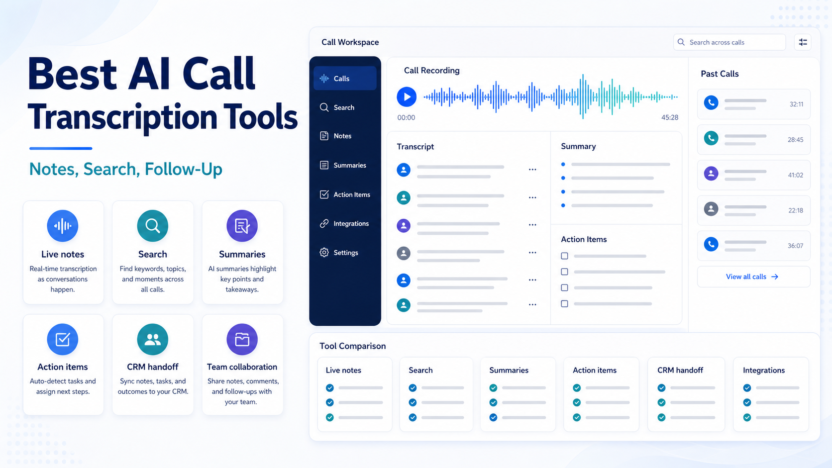
| Tool | Best For | Main Strength | Limitation |
|---|---|---|---|
| Otter.ai | transcription-first meeting notes | searchable transcripts and summaries | not a full sales coaching suite |
| Fireflies.ai | team meeting capture | shared meeting library and collaboration | can be broader than a simple transcript tool |
| Fathom | simple meeting summaries | fast adoption and a strong free-first path | less advanced team analytics |
| tl;dv | remote team meeting records | meeting highlights and shared clips | fit depends on meeting platform and workflow |
| Avoma | sales and customer conversations | conversation intelligence and meeting collaboration | more setup than a simple recorder |
| Krisp | noise reduction plus meeting assistance | cleaner audio and productivity features | transcription depth depends on the workflow chosen |
Key Buying Criteria
Use these criteria before choosing: setup effort, call capture quality, summary usefulness, CRM fit, coaching depth, admin controls, privacy needs, price transparency, and how quickly the tool turns calls into action. Small businesses should avoid buying a heavy platform just because it has impressive dashboards. The right tool should solve a daily workflow problem.
Real Use Cases
For sales teams, AI coaching tools can help review discovery calls, identify missed follow-ups, summarize objections, and prepare managers for one-on-ones. For customer success teams, they can capture onboarding questions, renewal concerns, billing friction, and product feedback. For founders, they can turn scattered call notes into a repeatable sales process.
In a typical small business workflow, a rep records a call, receives a summary, reviews action items, updates the CRM, and schedules the next step. A manager can then scan calls for patterns without listening to every recording. The point is not to replace judgment. The point is to reduce the gap between what happened in a call and what the team does next.
Tool Reviews
Otter.ai
Otter.ai is best for transcription-first meeting notes. Its main strength is searchable transcripts and summaries, which matters when a small team wants value without creating extra admin work. The main limitation is not a full sales coaching suite. Pricing last checked on July 9, 2026 using the official source where public pricing was available: Otter.ai.
Typical use cases include client call notes, internal meeting memory, onboarding recap, and interview notes. A small team should choose Otter.ai when those use cases are more important than the limitations above.
Fireflies.ai
Fireflies.ai is best for team meeting capture. Its main strength is shared meeting library and collaboration, which matters when a small team wants value without creating extra admin work. The main limitation is can be broader than a simple transcript tool. Pricing last checked on July 9, 2026 using the official source where public pricing was available: Fireflies.ai.
Typical use cases include sales call summaries, support escalations, customer feedback, and cross-team handoffs. A small team should choose Fireflies.ai when those use cases are more important than the limitations above.
Fathom
Fathom is best for simple meeting summaries. Its main strength is fast adoption and a strong free-first path, which matters when a small team wants value without creating extra admin work. The main limitation is less advanced team analytics. Pricing last checked on July 9, 2026 using the official source where public pricing was available: Fathom.
Typical use cases include sales recaps, founder calls, action items, and client follow-up. A small team should choose Fathom when those use cases are more important than the limitations above.
tl;dv
tl;dv is best for remote team meeting records. Its main strength is meeting highlights and shared clips, which matters when a small team wants value without creating extra admin work. The main limitation is fit depends on meeting platform and workflow. Pricing last checked on July 9, 2026 using the official source where public pricing was available: tl;dv.
Typical use cases include remote standups, customer calls, research interviews, and shared meeting snippets. A small team should choose tl;dv when those use cases are more important than the limitations above.
Avoma
Avoma is best for sales and customer conversations. Its main strength is conversation intelligence and meeting collaboration, which matters when a small team wants value without creating extra admin work. The main limitation is more setup than a simple recorder. Pricing last checked on July 9, 2026 using the official source where public pricing was available: Avoma.
Typical use cases include discovery calls, customer success handoffs, coaching review, and account notes. A small team should choose Avoma when those use cases are more important than the limitations above.
Krisp
Krisp is best for noise reduction plus meeting assistance. Its main strength is cleaner audio and productivity features, which matters when a small team wants value without creating extra admin work. The main limitation is transcription depth depends on the workflow chosen. Pricing last checked on July 9, 2026 using the official source where public pricing was available: Krisp.
Typical use cases include noisy calls, remote work meetings, client calls, and clearer team communication. A small team should choose Krisp when those use cases are more important than the limitations above.
Pricing Notes
Pricing last checked on July 9, 2026. Public pricing varies by vendor. Gong uses quote-based pricing according to its official pricing page, while tools such as Otter.ai, Fathom, and Fireflies publish plan information on their pricing pages. For this article, pricing claims are limited to official vendor pages and high-level buying guidance.
Pros and Cons of AI Coaching Tools
| Pros | Cons |
|---|---|
| Saves time after calls | AI transcripts can miss nuance |
| Makes decisions searchable | Sensitive calls need careful policy |
| Improves handoff quality | Not every tool includes deep coaching |
Alternatives and Related Guides
For adjacent workflows, read Best AI CRM Tools for Small Business, AI Sales Follow-Up Workflow, and Best AI Note Taking Apps for Client Meetings.
Final Recommendation
Choose Gong if you need a serious revenue intelligence platform and have the budget and team process to use it. Choose Avoma if you want meeting intelligence with a more practical collaboration angle. Choose Fireflies, Fathom, or Otter.ai if your real need is call capture, summaries, and searchable notes. Small teams should start with the simplest tool that improves follow-up quality this month.
FAQs
What is an AI sales coaching tool?
It is software that analyzes sales conversations, creates summaries, highlights action items, and helps managers coach reps based on call patterns.
Do small businesses need Gong?
Some do, but many small teams should start with simpler meeting intelligence tools before buying a larger revenue platform.
Can AI coaching tools replace a sales manager?
No. They can surface patterns and save review time, but coaching still requires human judgment and context.
Which tool is best for call summaries?
Fireflies, Fathom, and Otter.ai are strong starting points for meeting notes and summaries.
Which tool is best for revenue teams?
Gong is built for revenue teams that need broader conversation intelligence and pipeline context.
Are these tools useful for customer success?
Yes. They can capture onboarding questions, renewal risks, support escalations, and customer feedback.
Should AI call notes go directly to customers?
Important summaries should be reviewed before sending externally.
What integrations matter most?
Calendar, video conferencing, CRM, Slack, and email integrations usually matter most.
How should a team evaluate accuracy?
Review transcripts and summaries on real internal calls before relying on them for client communication.
What is the biggest mistake buyers make?
Buying a complex platform before the team has a clear workflow for using call insights.
Practical Buying Advice for Small Teams
The safest way to choose software for best AI call transcription tools is to connect the buying decision to one repeatable workflow. Many small businesses buy AI tools because the demo looks impressive, then struggle to make the tool part of daily work. Before subscribing, write down who will use it, when they will use it, what information should be captured, and where the output should go after the AI creates it.
For example, a sales team should decide whether call notes become CRM updates, Slack alerts, email follow-up drafts, coaching notes, or all of those. A customer success team should decide whether the output becomes an onboarding recap, a support escalation note, a renewal-risk note, or product feedback. A founder should decide whether the tool is mainly for personal memory, team visibility, or customer communication.
This matters because the best tool on paper is not always the best tool for your operating rhythm. A heavy platform can be the right choice when managers actively review calls and coach reps. A lighter meeting assistant can be the better choice when the team mainly needs searchable notes and fewer missed follow-ups. The practical question is not "which tool has the most features?" The better question is "which tool will my team actually use every week?"
Setup Checklist
| Setup Area | What To Decide | Why It Matters |
|---|---|---|
| Ownership | Name the person responsible for reviewing AI output | Unreviewed summaries can create confusion |
| Source | Choose which meetings, forms, or calls enter the workflow | Too much capture creates noise |
| Destination | Decide whether notes go to CRM, email, Slack, docs, or project tools | AI output has value only when it reaches the next workflow |
| Review | Set a rule for checking client-facing summaries | Important details should not be sent blindly |
| Privacy | Confirm consent, retention, and access rules | Meeting and lead data can be sensitive |
What To Look For During a Trial
During a trial or first month, focus on a few practical signs. Does the tool save time after calls or create another inbox to manage? Are summaries specific enough to help with follow-up? Can the team find past conversations quickly? Does the integration with calendar, CRM, email, or Slack feel natural? Are admin settings clear enough for the business to control access?
Do not judge the tool only by one perfect demo call. Use normal messy meetings, different speakers, different accents, internal calls, customer calls, and short check-ins. The output should be useful across ordinary work, not only polished examples. If the tool frequently creates vague summaries, misses action items, or requires long cleanup, the team may not keep using it.
Decision Framework
| Choose This Path | When It Fits | Tradeoff |
|---|---|---|
| Lightweight assistant | You need fast notes and summaries | Less coaching depth |
| Team meeting intelligence | Several people need shared call records | More setup and admin decisions |
| Revenue intelligence | Managers coach reps and inspect pipeline risk | Higher cost and process commitment |
| CRM-native AI | Your CRM is the center of daily work | Best value depends on CRM adoption |
Data Quality and Review Rules
AI output should be treated as a draft. For meeting notes, the meeting owner should review decisions, numbers, commitments, names, dates, and customer-sensitive details. For lead qualification, a human should review high-value leads, uncertain leads, and any rejection path. For pricing or plan comparisons, use official vendor pages as the source of truth and avoid building a workflow that depends on guessed limits.
Teams should also decide what not to automate. Sensitive legal conversations, HR issues, medical information, financial disputes, or private customer escalations may require stricter review and retention rules. A useful AI workflow is not just fast. It is clear, reviewable, and respectful of the information it handles.
How This Fits With Existing DailyTimesPro Guides
If your goal is follow-up quality, pair this article with AI Sales Follow-Up Workflow. If your goal is CRM organization, read Best AI CRM Tools for Small Business. If your goal is meeting capture, compare this with Best AI Note Taking Apps for Client Meetings and Fireflies.ai Review.
Bottom Line for Buyers
Best AI Call Transcription Tools for Small Business should be evaluated as a workflow decision, not just a software feature list. The right choice should reduce manual work, make follow-up more reliable, and give the team clearer records without creating a confusing new process. Start small, measure whether the tool improves a real workflow, and upgrade only when the team has proven it will use the extra features.
Implementation Tips
Start with one workflow and one owner. Use a small group of real users for the first two weeks. Document what the AI should produce, where it should send the output, and which items need human approval. After the first month, review whether the workflow saved time, improved follow-up, or made decisions easier to find.
Avoid expanding too quickly. It is better to have one dependable AI workflow than six half-configured automations. Once the first workflow is stable, reuse the same review rules for related processes.