Quick Answer
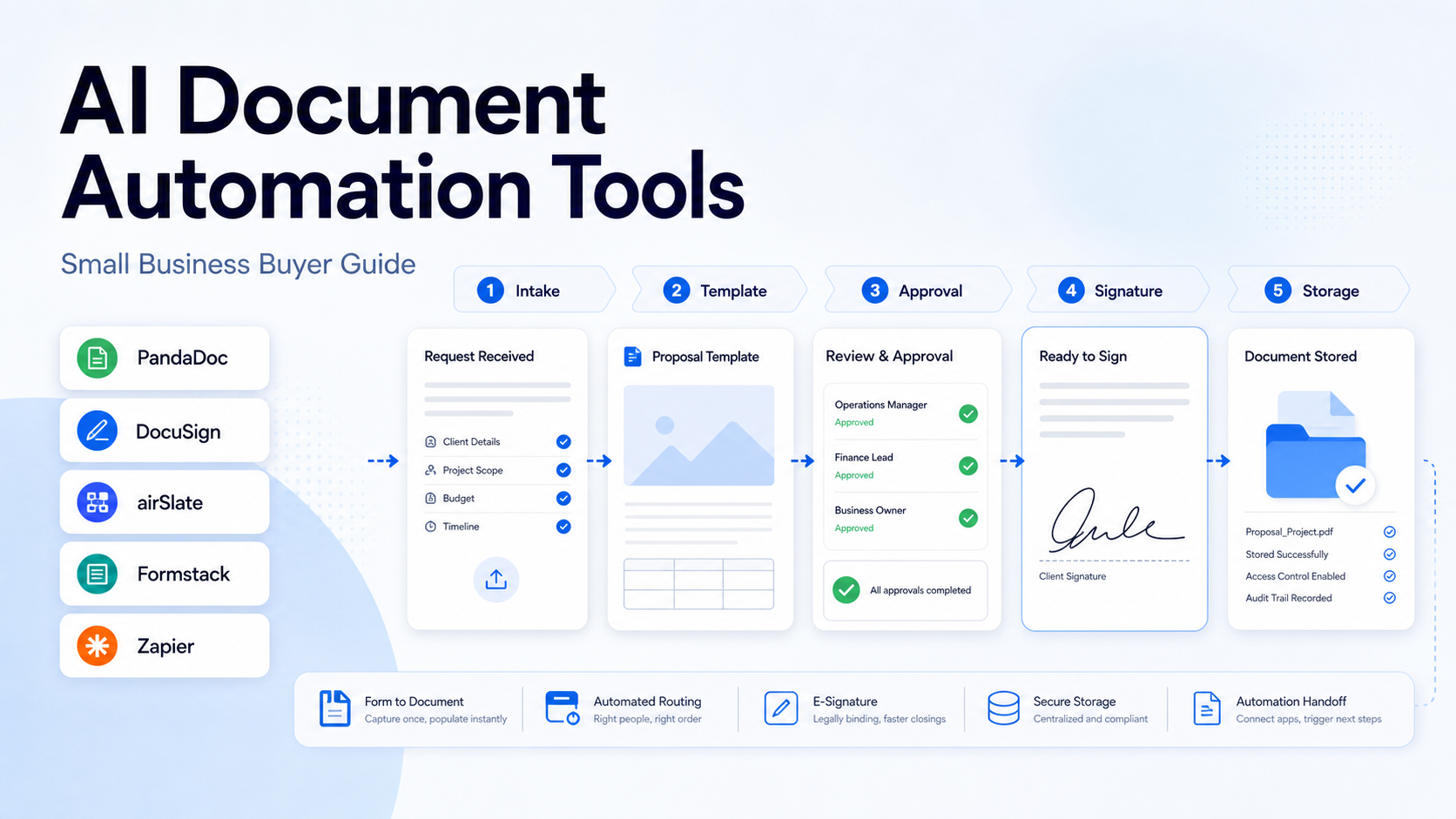
The best AI document automation tools for small business are the tools that turn repeatable documents into controlled workflows: proposals, quotes, contracts, approvals, onboarding packs, forms, and signed agreements. PandaDoc is strong for sales documents and proposals, DocuSign is strongest for agreement workflows and e-signature depth, airSlate is useful for no-code document process automation, Formstack works well when forms and documents need to connect, and Zapier is a practical connector when documents need to trigger actions across other apps.
This guide focuses on practical document automation rather than generic AI writing. A good document automation setup should reduce manual copying, keep templates consistent, route documents to the right person, preserve approval history, and make handoff clear. AI can help draft or summarize, but the durable value comes from the workflow around the document.
If your team is also improving operational workflows, see our AI Procurement Workflow and Best AI Knowledge Management Tools guides for related process design.
Best For
| Tool | Best for | Main strength | Limitation to check |
|---|---|---|---|
| PandaDoc | Sales proposals and quotes | Proposal, CRM, and document workflow fit | Advanced workflow needs depend on plan |
| DocuSign | Agreements and signatures | Mature agreement and e-signature ecosystem | Can be more platform than a tiny team needs |
| airSlate | No-code document process automation | Bots, routing, forms, and document workflows | Setup requires process mapping |
| Formstack | Forms plus document generation | Intake, forms, and document handoff | Best when forms drive the process |
| Zapier | Connecting document workflows | Automation between apps | Not a dedicated document editor |
Not Best For
These tools are not the right choice if your team only needs a one-time PDF editor or a basic word processor. They are most useful when the same document type is produced repeatedly and needs review, signing, data entry, or handoff.
Our Evaluation Criteria
We evaluated the category by workflow fit, template control, approval routing, e-signature support, integrations, pricing clarity, ease of setup, AI assistance, and value for small teams. No fake hands-on testing is claimed. The guidance is based on official product information, official pricing pages, and practical small-business workflow needs.
1. PandaDoc
PandaDoc is a strong fit for teams that create proposals, quotes, contracts, and sales documents. Its main advantage is that document creation is tied closely to revenue workflows. A sales team can use reusable templates, pricing tables, approval steps, and signing to reduce repetitive work.
In a typical small business workflow, a sales representative could start with a proposal template, pull in customer details from a CRM, adjust package options, send the proposal for approval, and then send it for signature. The benefit is not just faster writing. It is fewer formatting mistakes and clearer ownership.
PandaDoc is best for service businesses, agencies, consultants, and sales teams that produce many similar customer-facing documents. It is less useful if your team mostly needs internal policies or static knowledge base files.
2. DocuSign
DocuSign is best known for electronic signatures and agreement workflows. For small businesses, it is useful when documents need to be signed, tracked, and retained with a reliable audit trail.
DocuSign can fit workflows such as client contracts, vendor agreements, HR forms, NDAs, and renewal documents. A small business could use DocuSign when the most important step is getting an agreement completed correctly rather than designing a beautiful proposal.
Choose DocuSign if agreement reliability matters more than sales-document design. Avoid it if you want a lightweight proposal builder and do not need a broader agreement platform.
3. airSlate
airSlate focuses on no-code workflow automation for documents, forms, and business processes. It is useful when a document is part of a longer operation: intake, approval, routing, data extraction, notification, and archiving.
An operations team could use airSlate for employee onboarding paperwork, vendor forms, quote approvals, invoice routing, or compliance checklists. The key is to map the process before building the automation. If the process is unclear, automation will only move confusion faster.
Choose airSlate if your document workflow has multiple steps and owners. Avoid it if your only requirement is creating a simple sales proposal.
4. Formstack
Formstack is useful when a form submission needs to generate or populate a document. This is common in applications, registrations, intake forms, quote requests, and internal requests.
A small agency could collect project scope through a form, generate a statement of work, and route it to the right person for review. A service business could use it to turn customer intake into a formatted document.
Formstack is best when structured data is the starting point. It is not the best fit if your team mainly creates long custom proposals from scratch.
5. Zapier
Zapier is not a document automation suite in the same way as PandaDoc or DocuSign, but it is useful as the glue around a document workflow. It can connect form submissions, CRM updates, email alerts, spreadsheets, storage folders, and project management tasks.
For example, a signed contract could trigger a project folder, onboarding task, CRM stage update, and customer welcome email. That is where Zapier becomes valuable: not the document itself, but the work that should happen after the document changes status.
If automation platforms are part of your selection, our AI Procurement Workflow article explains how to keep approvals and ownership clear.
Pricing Notes
Pricing last checked on July 11, 2026. Pricing may vary by region, billing cycle, usage, seats, add-ons, or sales agreement when the vendor lists custom pricing. PandaDoc, DocuSign, airSlate, Formstack, and Zapier publish pricing or plan information on their official pricing pages. For document automation, compare seats, document volume, e-signature limits, templates, integrations, approval workflows, and advanced automation features before choosing.
Practical Use Cases
Sales proposals
A small agency could use PandaDoc to keep proposal language, package descriptions, and pricing options consistent. AI can help draft supporting copy, but a human should review scope and legal terms.
Client contracts
A service business could use DocuSign to send contracts, track signatures, and keep agreement status visible. This reduces manual follow-up and avoids lost PDFs.
Vendor onboarding
Operations teams can collect vendor information with a form, generate a review packet, route it for approval, and store the final document.
HR onboarding
Employee onboarding often includes signed forms, policy acknowledgements, and role-specific documents. A document automation workflow can keep the process consistent.
Internal approvals
Documents such as purchase requests, policy exceptions, and quote approvals can move through review steps instead of sitting in an inbox.
Common Mistakes
The first mistake is automating a messy process. Write the workflow on paper before choosing software.
The second mistake is focusing only on AI drafting. The bigger benefit is structured handoff, review, signing, and record keeping.
The third mistake is ignoring ownership. Every document should have a clear owner, approver, and next step.
The fourth mistake is using one template for every customer. Templates should standardize repeatable parts while leaving room for specific scope and terms.
Final Recommendation
Choose PandaDoc for sales documents, DocuSign for signature-heavy agreement workflows, airSlate for no-code document processes, Formstack for form-to-document workflows, and Zapier for connecting document events to the rest of your business apps. The best AI document automation tool is the one that matches the document's lifecycle, not just the tool with the longest feature list.
FAQs
What is AI document automation?
AI document automation uses templates, workflow rules, integrations, and AI assistance to create, route, approve, sign, summarize, or store documents with less manual work.
Which document automation tool is best for proposals?
PandaDoc is usually the strongest fit for proposals and sales documents because it focuses on revenue workflows, templates, quotes, and customer-facing documents.
Which tool is best for signatures?
DocuSign is a strong fit when signing, agreement tracking, and auditability are the main requirements.
Can Zapier automate documents?
Zapier can connect document events to other apps. It is useful for follow-up tasks, alerts, CRM updates, and storage workflows, but it is not a full document editor.
Should small businesses automate every document?
No. Start with high-volume documents that repeat often, require approval, or cause delays when handled manually.
Is AI safe for legal documents?
AI can help draft or summarize, but legal language should be reviewed by qualified people. Do not rely on AI alone for legal decisions.
How to Choose the Right Tool
Start with the document type that creates the most repeated work. Sales proposals need a different system from signed agreements, HR forms, or vendor onboarding packets. A proposal workflow needs reusable offer language, pricing options, approval before sending, and signature tracking. An agreement workflow needs reliable signing, audit history, access control, and retention. A form-driven document workflow needs clean intake fields and a predictable output document.
Next, check where the document data comes from. If the source is a CRM, PandaDoc or DocuSign may fit better. If the source is a form submission, Formstack or airSlate may be more natural. If the source is a mix of apps, Zapier may be needed as the connector around the document platform.
Finally, decide who owns each step. Small businesses often fail here. A document might be created by sales, approved by finance, signed by the customer, stored by operations, and used by delivery. If ownership is unclear, the automation will not create accountability.
Implementation Checklist
| Step | Practical decision |
|---|---|
| Pick one document type | Start with proposals, contracts, onboarding, vendor forms, or approvals |
| Define required fields | Customer, vendor, amount, term, scope, owner, approver, deadline |
| Create a template owner | Assign one person to maintain approved language |
| Set approval thresholds | Decide when manager, finance, or legal review is required |
| Connect storage | Save final documents in a predictable folder or record |
| Review monthly | Remove unused templates and update old language |
Where AI Helps and Where It Should Not
AI can help draft first-pass language, summarize a document, classify a request, extract fields, or suggest follow-up steps. It should not approve legal terms, invent pricing, change payment terms, or send sensitive documents without review. The safest use is assistance plus workflow controls: AI prepares or summarizes, and the right person approves.
For example, a consultant might use AI to turn discovery notes into a proposal outline, but the final scope, assumptions, exclusions, payment terms, and timeline should be checked manually. A finance team might use AI extraction to capture invoice data, but vendor bank details should still require careful review.
Limitations to Consider
Document automation can create a false sense of control if templates are outdated. It can also create bottlenecks if every document requires too many approvals. Some tools are strong for external documents but weaker for internal process automation. Others are strong for routing but less polished for customer-facing proposal design. Before choosing, run one real document workflow from start to finish and note where handoff breaks.
Practical Decision Questions
Before choosing a tool or workflow, answer these questions in writing. Who owns the process? What information must be captured? Which step currently creates delay? Which fields or records must stay accurate? Which integrations are required on day one? Which outputs need human review before they reach a customer, vendor, or employee? These questions prevent the team from buying software for a vague problem.
Small teams should also decide what they will not automate. The highest-risk parts of the process should keep human review: legal terms, payment decisions, customer promises, pricing changes, security-sensitive data, and anything that could create financial or reputation risk. AI should reduce repetitive work, not remove accountability.
Rollout Plan for a Small Team
Start with one workflow, one owner, and one success measure. A practical rollout can be as simple as this:
| Week | Focus | Output |
|---|---|---|
| Week 1 | Map the current process | List steps, owners, tools, and failure points |
| Week 2 | Configure the first workflow | Build the smallest useful version |
| Week 3 | Run with real work | Compare results with the old process |
| Week 4 | Fix gaps | Adjust templates, permissions, fields, and handoffs |
| Month 2 | Expand carefully | Add one more use case only after the first works |
This slower rollout is usually better than a broad launch. It gives the team enough evidence to know whether the tool improves work or simply adds another place to update.
What to Review After 30 Days
After the first month, review adoption, time saved, quality of outputs, errors, exceptions, and whether employees trust the workflow. If people bypass the tool, find out why. The problem may be missing integrations, too many required fields, unclear ownership, or weak training.
Also review cost. AI and automation tools often look affordable at the first seat or starter plan, then become expensive when usage, add-ons, seats, or higher-tier features are required. The right question is not only monthly price. The right question is whether the workflow removes enough manual effort, rework, and missed follow-up to justify the operational cost.
Governance Notes
Every AI-assisted business workflow needs basic governance. Define who can change templates, who can approve outputs, who can invite users, who can export data, and who reviews sensitive information. This matters even for small teams because AI tools often touch customer records, internal tasks, meeting notes, invoices, contracts, or sales information.
Keep a simple review cadence. Once a month, check whether the workflow still reflects the way the team works. Remove unused automations, update stale templates, archive old projects, and review permission levels. A lightweight governance habit prevents the tool from becoming a confusing collection of old experiments.
Bottom Line for Small Businesses
The best tool is not always the tool with the most AI features. The best tool is the one that makes a specific workflow clearer, faster, and easier to review. If a feature does not improve ownership, quality, speed, or decision-making, treat it as optional. Start narrow, prove value, and expand only after the first workflow is reliable.
Leave a Reply