
Quick Answer
AI can improve invoice approval by extracting invoice data, matching it against purchase orders or vendor records, flagging exceptions, routing approvals, sending reminders, and preparing payment status updates. The goal is not to let AI approve spend without oversight. The goal is to reduce manual review time while keeping clear approval controls.
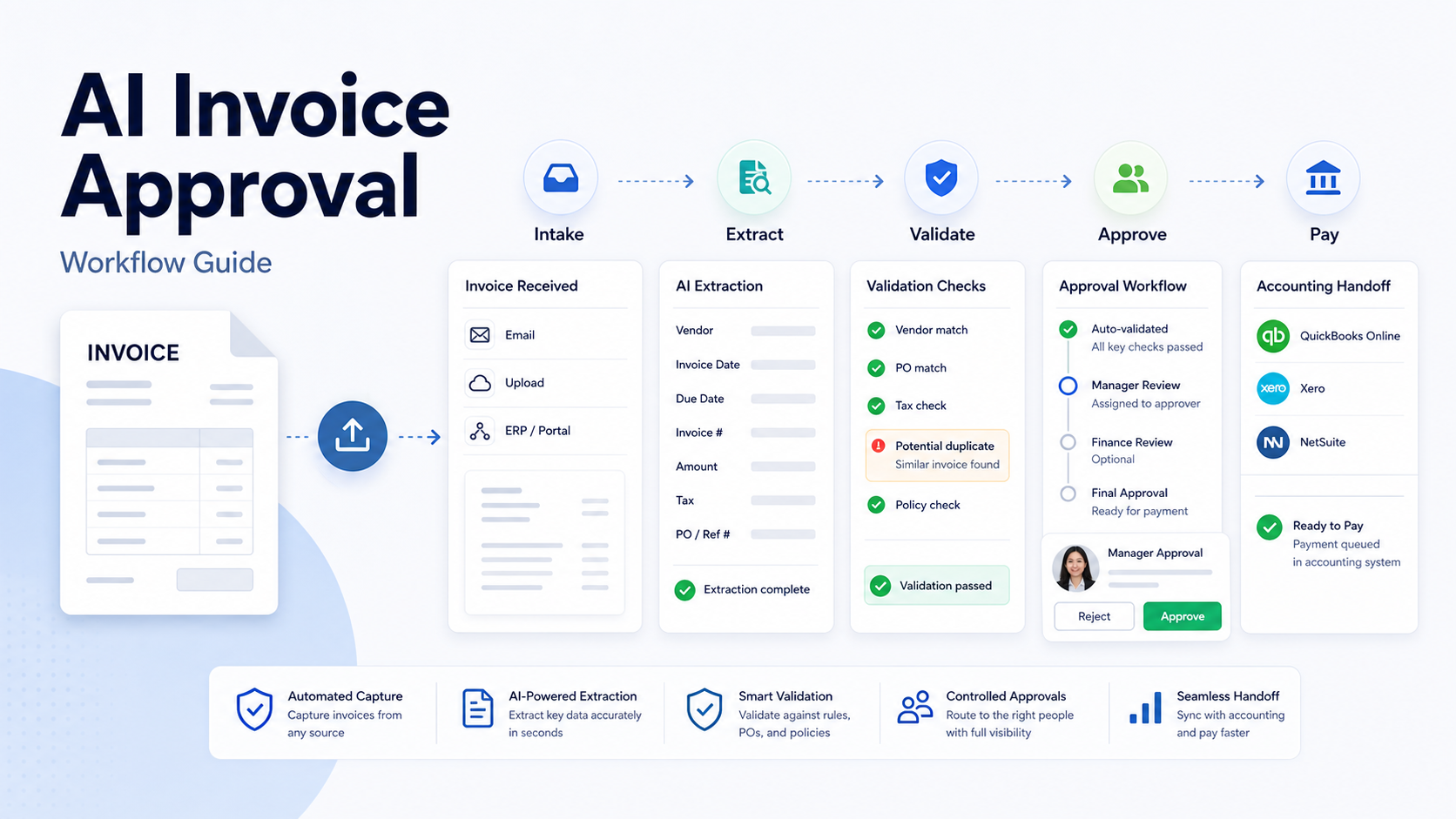
An invoice approval workflow should include intake, data capture, validation, approval routing, exception handling, payment handoff, and audit records. Tools such as BILL, Ramp, QuickBooks, airSlate, Zapier, and Microsoft Power Automate can support parts of this workflow depending on the business stack.
If your team is improving back-office operations, also review our AI Procurement Workflow and Best AI Document Automation Tools guidance.
Best For
This workflow is best for small businesses that receive recurring vendor invoices, need manager approvals, want fewer payment delays, or have invoices scattered across email, PDFs, accounting tools, and spreadsheets.
Not Best For
It is not best for teams that want AI to make final payment decisions without policy review. Human approval is still required for exceptions, new vendors, unusual amounts, disputed work, tax questions, and contract issues.
Workflow Map
| Step | What happens | AI or automation role | Human role |
|---|---|---|---|
| 1. Intake | Invoice arrives by email, form, or upload | Collect and classify document | Confirm channel ownership |
| 2. Extract | Key fields are captured | Extract vendor, amount, date, due date, line items | Review exceptions |
| 3. Validate | Compare invoice to records | Match vendor, PO, contract, budget, or duplicate risk | Approve policy exceptions |
| 4. Route | Send to approver | Route by amount, department, or vendor | Approve or reject |
| 5. Record | Store decision and status | Update accounting or workflow tools | Maintain audit trail |
| 6. Pay | Payment moves to accounting process | Prepare handoff or reminder | Execute payment |
Step 1: Choose the Intake Channel
Start by deciding where invoices should arrive. Email inboxes are common but messy. A form, vendor portal, accounting upload, or shared AP inbox is easier to control. The fewer intake channels you use, the easier the workflow becomes.
AI can help classify attachments, recognize invoice types, and identify missing fields. But it cannot fix a process where vendors send invoices to random team members. Create one official intake path first.
Step 2: Capture Invoice Data
The workflow should capture vendor name, invoice number, invoice date, due date, amount, currency, tax, purchase order number, line items, and payment terms when available. AI extraction can speed this up, but the system should flag low-confidence fields.
For high-value invoices, do not rely on extraction alone. Require a human check for amount, vendor, and bank details.
Step 3: Validate Against Business Rules
Validation is where invoice approval becomes safer. The system should check for duplicate invoice numbers, unfamiliar vendors, mismatched purchase orders, unusual amounts, missing tax details, expired contracts, and budget exceptions.
In a typical small business workflow, invoices under a low threshold may route to a department manager, while higher invoices require finance review. New vendors should require extra review before payment.
Step 4: Route Approval
Routing should be simple. Common approval rules include department owner, project owner, amount threshold, vendor category, or purchase order owner. AI can summarize invoice context for the approver, but the approver should see the original invoice and key extracted fields.
Avoid routing every invoice to the founder. That creates delay and weak accountability. Assign approval by ownership.
Step 5: Handle Exceptions
Exceptions are the real test. The workflow should have clear paths for duplicate invoice, wrong vendor, missing PO, amount mismatch, disputed work, and urgent payment. AI can draft a vendor clarification email, but a human should approve any external message.
Step 6: Connect to Accounting
Once approved, the invoice should move into the accounting or payment process. For small businesses, this may be QuickBooks, BILL, Ramp, Xero, or another finance tool. The workflow should update status so team members do not ask finance repeatedly whether an invoice was approved.
Tools to Consider
| Tool | Use case | Notes |
|---|---|---|
| BILL | AP and payments workflow | Useful for payable processes |
| Ramp | Spend management and AP workflows | Useful when cards, expenses, and AP connect |
| QuickBooks | Accounting and bill management | Practical for small-business accounting |
| airSlate | Document workflow automation | Useful for no-code invoice routing |
| Zapier | App-to-app automation | Useful for alerts and handoffs |
| Microsoft Power Automate | Microsoft workflow automation | Useful for teams using Microsoft 365 |
Pricing Notes
Pricing last checked on July 11, 2026. Pricing may vary by region, billing cycle, usage, seats, add-ons, or sales agreement when the vendor lists custom pricing. Pricing for finance and workflow tools depends heavily on plan, transaction volume, seats, modules, and payment features. Use official vendor pricing pages or sales quotes for current details. Do not estimate AP software costs from third-party articles.
Common Mistakes
The first mistake is automating approvals without policy. Write approval thresholds before building the automation.
The second mistake is skipping duplicate checks. Duplicate invoice numbers and repeated vendor bills should be flagged.
The third mistake is treating AI extraction as final. Extraction should be reviewed when confidence is low or payment risk is high.
The fourth mistake is forgetting audit history. Every approval needs timestamp, approver, status, and reason.
The fifth mistake is creating too many approval steps. More steps can reduce risk, but they also create delays.
Practical Example
A small agency receives vendor invoices in a shared AP inbox. The automation saves the attachment, extracts invoice fields, checks the vendor against a spreadsheet or accounting record, and routes invoices under a set threshold to the project owner. Larger invoices route to finance. If the invoice has no purchase order or the vendor is new, it becomes an exception. This is a realistic workflow pattern, not a claim of measured results.
Final Recommendation
Use AI for invoice approval when your team has enough recurring invoices to justify workflow structure. Start with intake and approval rules, then add extraction, routing, exception handling, and accounting handoff. Keep humans in control of approvals, vendor changes, disputed invoices, and payment execution.
FAQs
Can AI approve invoices automatically?
AI can support invoice approval, but final approval should remain with authorized people, especially for new vendors, high-value invoices, exceptions, or payment changes.
What fields should AI extract from invoices?
Vendor name, invoice number, invoice date, due date, amount, tax, currency, purchase order number, line items, and payment terms are common fields.
How do you prevent duplicate invoice payments?
Check invoice number, vendor, amount, date, and purchase order before approval. Flag duplicates for finance review.
Which tools can help?
BILL, Ramp, QuickBooks, airSlate, Zapier, and Microsoft Power Automate can support parts of the workflow depending on the current finance stack.
Should small businesses use OCR?
OCR and AI extraction can reduce manual entry, but teams should review low-confidence fields and high-risk payments.
What is the most important control?
Clear approval thresholds are the most important control. Without them, automation only moves unclear decisions faster.
Approval Policy Template
Before building the workflow, define a simple policy. For example, invoices under a low threshold may need one department approval. Medium invoices may need department and finance approval. High-value invoices may need executive approval. New vendors, changed bank details, missing purchase orders, and unusual payment terms should always become exceptions.
This policy should be written in plain language. If the policy is too complex to explain, it will be hard to automate and harder for employees to follow.
Exception Rules
| Exception | Recommended handling |
|---|---|
| Duplicate invoice number | Hold for finance review |
| New vendor | Require vendor verification before payment |
| Changed bank details | Require manual verification through an approved channel |
| Amount mismatch | Route to requester or purchase owner |
| Missing PO | Hold or request explanation |
| Urgent payment | Require approver note and finance review |
Data Security and Access
Invoice workflows contain sensitive vendor, tax, banking, and payment information. Limit access to the people who need it. Avoid copying invoice data into public chat tools or unmanaged AI assistants. Use tools that fit your company's data policy, and keep approvals inside systems that preserve audit history.
Measuring Success
Track practical metrics: average approval time, number of invoices waiting for approval, duplicate invoice flags, exception rate, and number of invoices missing required information. Do not measure success only by whether AI extracted fields. The real business outcome is faster, safer invoice processing with fewer lost approvals.
Small-Team Rollout Plan
Start with one vendor category or one department. Run the automation in parallel with the old process for a short period. Compare extracted fields with the original invoice. Review exception handling. Then expand to more vendors or invoice types. This reduces the risk of payment errors while the team learns the workflow.
Practical Decision Questions
Before choosing a tool or workflow, answer these questions in writing. Who owns the process? What information must be captured? Which step currently creates delay? Which fields or records must stay accurate? Which integrations are required on day one? Which outputs need human review before they reach a customer, vendor, or employee? These questions prevent the team from buying software for a vague problem.
Small teams should also decide what they will not automate. The highest-risk parts of the process should keep human review: legal terms, payment decisions, customer promises, pricing changes, security-sensitive data, and anything that could create financial or reputation risk. AI should reduce repetitive work, not remove accountability.
Rollout Plan for a Small Team
Start with one workflow, one owner, and one success measure. A practical rollout can be as simple as this:
| Week | Focus | Output |
|---|---|---|
| Week 1 | Map the current process | List steps, owners, tools, and failure points |
| Week 2 | Configure the first workflow | Build the smallest useful version |
| Week 3 | Run with real work | Compare results with the old process |
| Week 4 | Fix gaps | Adjust templates, permissions, fields, and handoffs |
| Month 2 | Expand carefully | Add one more use case only after the first works |
This slower rollout is usually better than a broad launch. It gives the team enough evidence to know whether the tool improves work or simply adds another place to update.
What to Review After 30 Days
After the first month, review adoption, time saved, quality of outputs, errors, exceptions, and whether employees trust the workflow. If people bypass the tool, find out why. The problem may be missing integrations, too many required fields, unclear ownership, or weak training.
Also review cost. AI and automation tools often look affordable at the first seat or starter plan, then become expensive when usage, add-ons, seats, or higher-tier features are required. The right question is not only monthly price. The right question is whether the workflow removes enough manual effort, rework, and missed follow-up to justify the operational cost.
Governance Notes
Every AI-assisted business workflow needs basic governance. Define who can change templates, who can approve outputs, who can invite users, who can export data, and who reviews sensitive information. This matters even for small teams because AI tools often touch customer records, internal tasks, meeting notes, invoices, contracts, or sales information.
Keep a simple review cadence. Once a month, check whether the workflow still reflects the way the team works. Remove unused automations, update stale templates, archive old projects, and review permission levels. A lightweight governance habit prevents the tool from becoming a confusing collection of old experiments.
Bottom Line for Small Businesses
The best tool is not always the tool with the most AI features. The best tool is the one that makes a specific workflow clearer, faster, and easier to review. If a feature does not improve ownership, quality, speed, or decision-making, treat it as optional. Start narrow, prove value, and expand only after the first workflow is reliable.
Red Flags Before You Buy
Pause the purchase if the team cannot describe the current workflow clearly, if the required integrations are unknown, if pricing depends on a sales quote that has not been reviewed, or if the tool will introduce sensitive data into a system without a permission plan. Also pause if the buyer is excited about AI outputs but has no plan for who reviews them.
Another red flag is unclear ownership. If everyone is responsible for follow-up, nobody is responsible. Assign one owner for the workflow, one owner for templates or configuration, and one owner for reviewing results after launch.
Leave a Reply