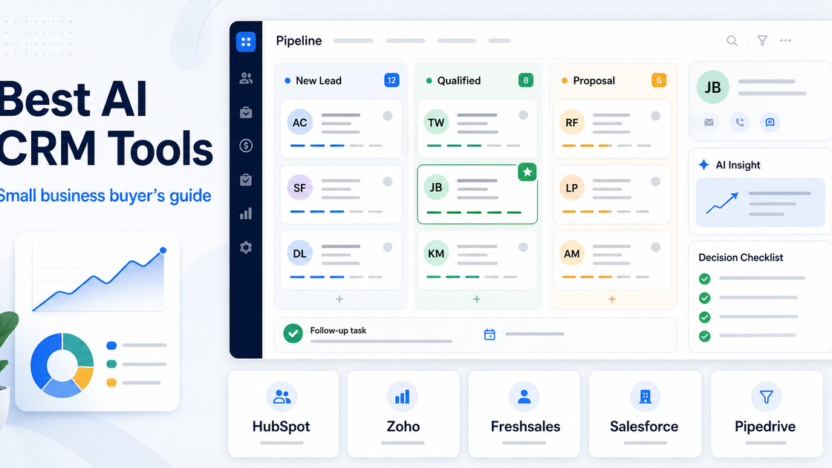
The best AI CRM tool for a small business is the one that helps your team manage leads, follow up faster, and understand customer activity without adding a heavy admin layer. For most small teams, HubSpot is the safest starting point because its free CRM is strong and its Breeze AI features sit inside a broader customer platform. Zoho CRM is better when you want more customization and a lower-cost CRM ecosystem. Freshsales is useful when sales and support teams want built-in communication tools. Salesforce Starter makes sense when you expect to grow into the Salesforce ecosystem.
This guide focuses on practical fit, not feature count. A small business CRM should make daily follow-up easier, keep customer data clean, and give your team useful AI help without forcing a complicated rollout. Pricing notes below use official product or pricing pages where a clear public fact was available.
If you are still building the process around support and follow-up, our AI customer support workflow is a useful companion. If you need automation after choosing a CRM, the Zapier vs Make comparison can help you decide how to connect forms, emails, tasks, and CRM records.
Quick Answer
Choose HubSpot if you want the easiest free CRM starting point with AI features across a customer platform. Choose Zoho CRM if you want a customizable CRM that can grow with sales operations and Zia AI. Choose Freshsales if your team needs CRM, email, phone, live chat, and Freddy AI features in one sales workspace. Choose Salesforce Starter if you want a small-business entry point into Salesforce with AI plus sales, marketing, and service tools.
Do not choose an AI CRM just because it promises automation. Pick the CRM that your team will keep updated every day. AI only helps when the underlying contact, deal, and activity data is accurate.
Best AI CRM Tools For Small Business
| CRM | Best For | AI Angle | Verified Pricing Note |
|---|---|---|---|
| HubSpot CRM | Small businesses that want a free, approachable CRM | Breeze supports content generation, summarization, enrichment, and personalization inside HubSpot tools | HubSpot describes its CRM as 100% free with no expiration date |
| Zoho CRM | Small teams that want customization and a broad business app ecosystem | Zia supports generative AI, record summaries, report creation, workflow creation, and other CRM tasks | Zoho CRM Free Edition is free forever for 3 users |
| Freshsales | Sales teams that want built-in communication and CRM workflow | Freshsales uses Freddy AI for sales workflows, forecasting insights, and add-on AI agent sessions | Freshsales lists a free plan for 3 users and paid plans starting from $9 USD |
| Salesforce Starter | Teams that may grow into Salesforce | Starter Suite is positioned as AI + CRM for small businesses across sales, marketing, and service | Starter Suite starts at $25 USD/user/month; Pro Suite starts at $100 USD/user/month |
| Pipedrive | Sales teams that care most about pipeline visibility | Pipedrive's Sales Assistant surfaces AI insights, deal summaries, prompts, and win-probability guidance | Pipedrive publishes CRM pricing plans for its sales CRM |
How To Choose An AI CRM
Start with the sales process, not the AI feature list. A CRM should answer four questions quickly:
- Which leads need follow-up?
- Which deals are stuck?
- Which customers need attention?
- What should the team do next?
AI features are useful when they support those questions. Summaries, lead insights, email help, workflow suggestions, forecasting, and deal alerts can save time. But if the CRM is messy, AI can summarize messy data. That is why small businesses should prioritize simple adoption, clean fields, repeatable pipeline stages, and clear ownership.
The best buyer decision is usually not "which CRM has the most AI?" It is "which CRM will our team actually keep current?"
1. HubSpot CRM
HubSpot CRM is the strongest default choice for many small businesses because the free CRM is approachable and the platform can expand into marketing, sales, service, content, and operations.
HubSpot says its free CRM has no expiration date, which makes it a low-risk starting point for teams moving away from spreadsheets. HubSpot's Breeze AI features are embedded across HubSpot tools and support tasks such as content generation, summarization, enrichment, and personalization.
Best For
HubSpot is best for small businesses that want one customer platform instead of separate tools for contacts, forms, email, deals, chat, marketing, and service. It is also a good choice when the team has limited technical resources and needs an easier onboarding path.
Not The Right Choice If
HubSpot may not be the right choice if your business wants deep customization from day one or if you expect advanced paid features to become expensive as the team grows. The free CRM is useful, but teams should map which paid hubs and seats they may need later.
Practical Buying Note
Use HubSpot first if your main problem is scattered customer data. Add more advanced tools only after your team is consistently logging contacts, deals, and follow-ups.
2. Zoho CRM
Zoho CRM is a strong option for small businesses that want a customizable CRM inside a larger business software ecosystem. Zoho's Zia AI supports CRM tasks such as generative AI, module creation, workflow creation, report creation, and record summaries.
Zoho's official pricing page lists a Free Edition for 3 users. That makes it attractive for small teams that want to test CRM discipline before committing to a larger stack.
Best For
Zoho CRM is best for small teams that want flexibility, customization, and room to build more structured sales operations. It can fit businesses that expect to use multiple Zoho apps around CRM, campaigns, forms, surveys, finance, or support.
Not The Right Choice If
Zoho may not be the best first CRM for teams that want the simplest possible interface. Its flexibility is useful, but flexibility also means the setup can become more complex if the team does not define fields, stages, and ownership clearly.
Practical Buying Note
Choose Zoho when you want a CRM you can shape around your sales process. Avoid over-customizing early. Start with contacts, companies, deals, activities, and one clean pipeline before adding heavier automation.
3. Freshsales
Freshsales is designed for sales teams that want CRM records, communication, and pipeline work in one place. Freshworks describes Freshsales as a sales CRM that helps capture, qualify, route, and track leads with Freddy AI.
Freshworks' pricing page lists a free plan for 3 users, and the page also describes Freddy AI Agent session packs as an add-on for customer-facing AI bot interactions. It also shows forecasting insights by Freddy AI in higher-plan context.
Best For
Freshsales is best for teams that want built-in sales communication, lead tracking, and CRM workflow without stitching together too many separate products. It can be a practical fit for small sales teams that need phone, chat, email, lead routing, and deal tracking close together.
Not The Right Choice If
Freshsales may not be ideal if your team already uses another CRM ecosystem deeply or if your main need is a lightweight free contact database. It is stronger when sales activity and communication are central to the workflow.
Practical Buying Note
Choose Freshsales when your sales process depends on fast communication and follow-up. Before upgrading, check which Freddy AI features are included in the plan you are considering and which require add-ons.
4. Salesforce Starter
Salesforce Starter Suite is Salesforce's small-business CRM entry point. Salesforce positions Starter Suite as AI + CRM for small businesses across sales, marketing, and service.
The official Starter page lists Starter Suite at $25 USD per user per month and Pro Suite at $100 USD per user per month. Starter includes Assistive AI with Employee Agent, built-in sales flows and lead routing, dynamic email marketing, forms, analytics, and other small-business features.
Best For
Salesforce Starter is best for small businesses that expect to scale into Salesforce or want a known CRM ecosystem from the beginning. It can fit teams that need sales, marketing, service, and commerce-style features under one vendor.
Not The Right Choice If
Salesforce Starter may be too much if your team only needs a simple contact database and basic follow-up reminders. It also deserves more setup discipline than a lightweight CRM because the long-term value comes from using the system consistently.
Practical Buying Note
Choose Salesforce Starter when the Salesforce ecosystem is part of your growth plan. If your team just needs a simple CRM this month, compare it carefully against HubSpot, Zoho, and Freshsales before committing.
5. Pipedrive
Pipedrive is a sales-focused CRM built around pipeline visibility. Its AI Sales Assistant is designed to surface insights from sales data, summarize deals, analyze team performance, highlight metrics, recommend next actions, and help teams understand pipeline patterns.
Pipedrive is especially relevant for small businesses that already think in stages, activities, follow-ups, and deal movement. Its AI value is strongest when there is enough sales activity in the system to analyze.
Best For
Pipedrive is best for sales teams that want a pipeline-first CRM. If your team needs to know which deals are active, which deals are stuck, and what sales actions should happen next, Pipedrive is worth evaluating.
Not The Right Choice If
Pipedrive may not be the best fit if you need an all-in-one marketing, service, and content platform. It is strongest as a sales CRM, not as a full customer platform for every department.
Practical Buying Note
Choose Pipedrive when your main CRM problem is sales pipeline discipline. Make sure your team will log activities and deal updates consistently, because AI insights depend on the quality of CRM data.
Decision Framework
Use this simple decision path:
1. If you need the easiest free CRM starting point, choose HubSpot. 2. If you want more customization and a broad business app ecosystem, choose Zoho CRM. 3. If your sales team wants built-in communication and CRM workflow, choose Freshsales. 4. If you expect to grow into Salesforce, choose Salesforce Starter. 5. If your sales process is pipeline-heavy, choose Pipedrive.
The wrong way to choose is to chase every AI feature. The right way is to map the CRM to one repeatable business process: lead capture, qualification, follow-up, deal movement, customer handoff, or support escalation.
Common Mistakes Small Businesses Make With AI CRMs
The first mistake is buying before defining the sales process. A CRM cannot fix unclear ownership, inconsistent follow-up, or a messy pipeline.
The second mistake is giving AI poor data. If contacts are duplicated, deals are outdated, and activities are missing, AI summaries and recommendations become less useful.
The third mistake is over-automating too early. A simple CRM with clean habits is better than a complex automated system nobody trusts.
Before you add AI workflows, define:
- Lead sources
- Pipeline stages
- Required contact fields
- Follow-up rules
- Deal ownership
- Handoff points between sales and support
- Reporting needs
If your CRM later needs workflow automation, pair it with a tool such as Zapier or Make after the process is stable.
Final Recommendation
HubSpot is the best first AI CRM for many small businesses because it is easy to start, has a free CRM, and gives teams room to grow into AI-supported sales, marketing, service, and content workflows. Zoho CRM is the better choice for teams that want customization and a broader business app ecosystem. Freshsales is a strong pick for sales teams that need built-in communication and Freddy AI features. Salesforce Starter fits teams that want a small-business path into Salesforce. Pipedrive is best when pipeline visibility and sales activity discipline matter most.
Choose the CRM your team will update every day. AI is useful only when the customer data underneath it is clean, current, and connected to real follow-up work.
FAQs
What is the best AI CRM for small business?
HubSpot is the safest first choice for many small businesses because its free CRM is easy to adopt and its Breeze AI features are built into a larger customer platform. Zoho, Freshsales, Salesforce Starter, and Pipedrive can be better when customization, sales communication, Salesforce growth, or pipeline management matters more.
Which AI CRM has a free plan?
HubSpot describes its CRM as free with no expiration date. Zoho CRM lists a Free Edition for 3 users. Freshsales lists a free plan for 3 users. Free plans are useful for testing CRM habits before committing to paid features.
Is an AI CRM worth it for a small business?
An AI CRM is worth it when the business already has enough customer activity to organize. AI can help with summaries, insights, follow-up, content, forecasting, and prioritization, but it cannot replace a clear sales process or clean customer data.
Should I choose HubSpot or Zoho CRM?
Choose HubSpot if you want an easier starting point and a broader customer platform. Choose Zoho CRM if you want more customization and a wider business app ecosystem. HubSpot is usually simpler at the start; Zoho can be stronger when you want to shape the system around your process.
Is Salesforce Starter good for small businesses?
Salesforce Starter can be good for small businesses that expect to grow into Salesforce or want sales, marketing, service, and AI capabilities under one vendor. It may be more than needed for a team that only wants a simple contact and deal tracker.
What should I check before buying an AI CRM?
Check whether the CRM matches your pipeline, lead sources, follow-up process, team size, budget, integrations, reporting needs, and data cleanup habits. Also review which AI features are included in the plan and which require add-ons or higher tiers.
Can AI CRM tools replace salespeople?
No. AI CRM tools can summarize data, suggest next actions, help draft messages, and surface patterns, but relationship-building, negotiation, judgment, and customer trust still require people.
Which CRM is best for sales pipeline management?
Pipedrive is a strong choice for pipeline-focused sales teams. HubSpot, Zoho, Freshsales, and Salesforce also support pipeline management, but Pipedrive is especially focused on deal movement and sales activity visibility.
How many CRM tools should a small business compare?
Compare three to five tools at most. Build one sample pipeline, import a small set of contacts, test follow-up tasks, and ask the same team members to use each CRM for a realistic sales workflow.
What is the biggest AI CRM mistake?
The biggest mistake is expecting AI to fix poor CRM discipline. If the team does not update contacts, activities, and deals, AI recommendations will be weaker. Start with clean data and a simple process before adding advanced AI workflows.