Quick Answer
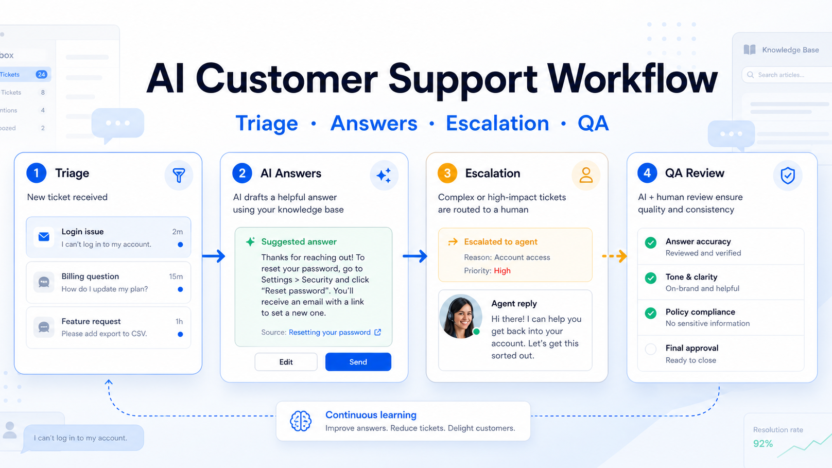
A useful AI customer support workflow has four stages: triage the request, draft or deliver the answer, escalate risky cases to a human, and review quality after the conversation. The goal is not to let AI answer everything. The goal is to let AI handle repeatable requests while humans keep control over exceptions, customer trust, and policy-sensitive decisions.
For most small teams, the safest setup is a help center, a shared inbox, an AI agent or answer assistant, a human handoff rule, and a weekly QA review. Intercom and Zendesk both publish AI support options, but the same workflow can also apply to other helpdesk tools if they support knowledge-base answers, routing, and review.
If your support work connects to automation platforms, our Zapier vs Make comparison can help you decide how to move support events into other systems.
Workflow Summary
| Stage | Goal | AI Role | Human Role |
|---|---|---|---|
| Triage | Understand request type, urgency, and customer context | Classify topic, summarize history, suggest priority | Define rules and review edge cases |
| Answer | Resolve simple questions quickly | Draft or deliver answers from approved knowledge | Approve policies, update help content, handle unclear cases |
| Escalation | Prevent bad automation decisions | Handoff when confidence, billing, security, or emotion requires care | Own refunds, exceptions, complaints, and relationship-sensitive cases |
| QA review | Improve the system over time | Score conversations, find content gaps, surface repeated issues | Fix macros, docs, routing, and escalation rules |
Step 1: Start With Support Categories
Before choosing a tool, divide support work into categories. Common buckets include billing, login problems, setup questions, plan limits, bugs, refunds, integrations, feature requests, and account security.
AI works best when each bucket has clear source material. For example, a password-reset question can use a help-center article. A refund request may need policy logic and human review. A customer who says they are about to cancel may need an account manager, not a generated answer.
This is where many teams get customer support AI wrong. They start with the tool instead of the support map. The result is an AI assistant that answers easy questions but mishandles edge cases because nobody defined the edges.
Step 2: Build the Knowledge Base First
An AI support workflow is only as good as the information it can use. Create or clean up articles for the top 20-30 repeated questions before you automate answers. Each article should have one clear answer, updated screenshots if needed, and ownership.
Good source content includes setup guides, billing policies, troubleshooting steps, plan limits, integration instructions, refund rules, and escalation notes. Poor source content includes outdated FAQs, vague policy pages, internal chat explanations, and undocumented exceptions.
A practical example: a small SaaS team with 80 weekly tickets might find that 35 tickets are about login, billing, and setup. Those categories are safe candidates for first-pass automation. Security complaints, enterprise billing, and angry cancellation tickets should stay human-led until the team has clear policies.
Step 3: Choose the AI Layer
There are two common approaches.
The first approach is an AI-first support platform. Intercom's pricing page lists Fin AI Agent in its Essential, Advanced, and Expert plans, with Fin priced from $0.99 per outcome and seat pricing by plan. Intercom also lists a standalone Fin AI Agent option for teams that already have a helpdesk.
The second approach is adding AI to a helpdesk suite. Zendesk's pricing page lists support and suite plans, AI agents, Copilot, quality assurance, routing, ticketing, messaging, live chat, and help center features. Zendesk also describes AI agent resolutions and add-ons as cost components.
Do not choose only by feature count. Choose by where your support team already works, how clean your help center is, how many tickets are repetitive, and how often customers need a human decision.
Step 4: Define Handoff Rules
Handoff rules protect trust. AI should escalate when the request involves refunds, legal terms, security, account access, angry sentiment, medical or financial claims, enterprise contracts, repeated failed answers, or anything the company has not documented.
A simple rule set could look like this:
| Trigger | Action |
|---|---|
| Customer asks for refund | Route to billing queue |
| AI cannot find a source answer | Send to human support |
| Customer mentions security issue | Escalate to priority queue |
| Customer asks a plan-limit question | Answer from pricing/docs if source is approved |
| Customer repeats the same question | Handoff after one failed AI response |
| Customer is angry or threatening churn | Handoff to senior support or success owner |
The hidden limitation is that AI can sound confident even when the underlying policy is unclear. Handoff rules are the guardrail that prevents a polished but wrong answer.
Step 5: Add Human Review Before Full Automation
Do not launch full auto-answering on day one. Start with AI drafts that agents approve. After the team sees repeated correct drafts, move low-risk categories to direct AI responses.
A staged rollout works well:
1. Week one: AI drafts answers only. 2. Week two: AI answers password, setup, and simple how-to questions. 3. Week three: AI handles more categories with confidence and source checks. 4. Week four: QA reviews missed cases and updates help articles.
This approach gives the team evidence from its own inbox without pretending to run a scientific test. It also shows which help-center articles need fixing before automation expands.
Step 6: Connect Support to Other Systems Carefully
Support workflows often need CRM notes, billing flags, bug reports, and product feedback. AI can help summarize the ticket, but automation should move only structured, reviewed information into other systems.
For example, a support ticket about a broken integration can become a product bug report after an agent confirms the issue. A churn-risk conversation can update the CRM after a success manager reviews the summary. A repeated setup issue can become a documentation task.
Do not let AI create noisy tasks for every conversation. That creates more work than it saves.
Step 7: Run Weekly QA
A good QA review asks practical questions:
- Did the AI answer from approved source material?
- Were any answers technically correct but unhelpful?
- Which tickets should have escalated earlier?
- Which help articles caused confusion?
- Which categories are safe to automate next?
- Which automations created unnecessary work?
This is also where support leaders should update macros, help articles, routing rules, and escalation triggers. AI support improves when the operating system around it improves.
When AI Support Is Not the Right Choice
AI support is not the right first move if your product changes every week, your help center is outdated, your support policies are undocumented, or most tickets require negotiation. It is also risky when customers ask about regulated decisions, security, billing exceptions, or account ownership.
In those cases, build the support knowledge base and escalation process first. Then add AI to the safest categories.
Final Recommendation
Use AI support for repeatable questions, routing, summarization, and quality review. Keep humans in charge of exceptions, emotional conversations, policy decisions, and account-sensitive issues.
The best workflow is not the one with the most automation. It is the one where customers get faster answers without losing the option to reach a capable human when the situation needs judgment.
FAQs
What is an AI customer support workflow?
It is a structured process that uses AI to triage requests, draft or deliver answers, route tickets, escalate risky issues, and review support quality. The workflow should define where AI can answer directly and where a human must take over.
Should AI answer customers automatically?
Only for categories with clear source material, low risk, and strong escalation rules. Many teams should start with AI drafts for human approval before allowing direct AI responses.
What should be in the knowledge base before using AI support?
Start with articles for login, billing, setup, integrations, plan limits, troubleshooting, refunds, and security basics. Each article should be accurate, specific, and owned by someone who can keep it updated.
When should AI escalate to a human?
Escalate when the answer is uncertain, the customer is upset, money or account access is involved, the policy is unclear, or the request involves legal, security, privacy, or enterprise terms.
Is Intercom Fin enough by itself?
Fin can be useful when the team has clean support content and clear outcome goals. It is not a replacement for support operations, documentation ownership, escalation rules, and QA.
Is Zendesk better for larger support teams?
Zendesk can be a strong fit for teams that need ticketing, routing, live chat, help center, AI agents, Copilot, quality assurance, and enterprise workflows in a broader support suite. The right choice depends on your existing stack and support process.
What is the biggest mistake with AI support?
The biggest mistake is automating before defining support categories, source content, and escalation rules. That creates confident answers but not necessarily correct or trusted support.
How do you measure whether the workflow is working?
Track resolution rate, escalation rate, reopened tickets, customer satisfaction, article gaps, agent edits to AI drafts, and the number of unnecessary tasks created by automation. These show whether AI is helping or adding noise.