Quick Verdict
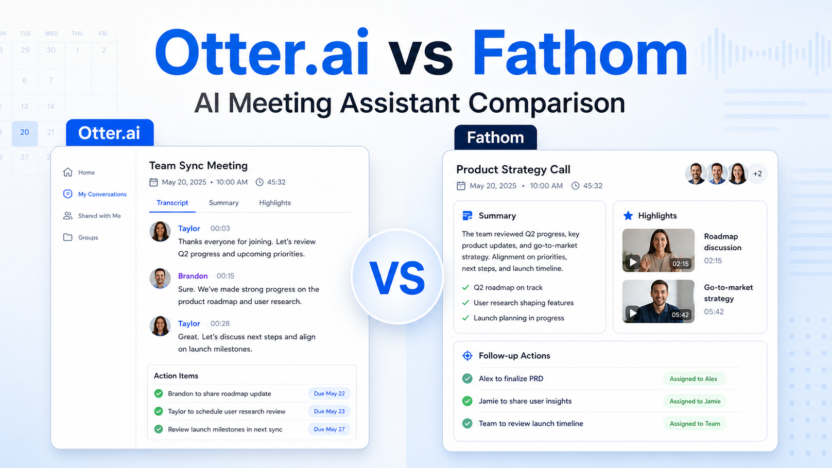
Choose Otter.ai if your team needs live transcription, searchable meeting records, shared vocabulary, exports, and broader admin controls across Zoom, Google Meet, and Microsoft Teams. Choose Fathom if your main goal is faster meeting capture with unlimited recordings, clean AI summaries, clips, playlists, and simple follow-up workflows.
For most small teams, Fathom is easier to adopt because its free plan includes unlimited recordings and transcription. Otter.ai is better when transcription depth, import limits, conversation history, vocabulary, and enterprise controls matter more than simplicity.
If you are comparing meeting assistants more broadly, our Otter.ai vs Fireflies.ai comparison is a useful next read. If your team already has call summaries but needs a repeatable follow-up process, see our AI meeting notes workflow.
Quick Comparison
| Decision Point | Otter.ai | Fathom |
|---|---|---|
| Best for | Teams that need live notes, exports, admin controls, and searchable transcripts | Teams that want fast meeting summaries, clips, and lightweight sharing |
| Free plan | Basic plan with 300 monthly transcription minutes and recent conversation history limits | Free forever plan with unlimited recordings and transcriptions |
| Meeting capture | Joins Zoom, Google Meet, and Microsoft Teams | Records meetings and supports bot-free capture in beta |
| Summaries | Automated summaries, action items, outlines, and AI chat | Instant AI summaries, advanced summaries on paid plans, and action items |
| Collaboration | Folders, sharing, comments, annotations, team vocabulary, and admin features by plan | Shared call search, comments, folders, keyword alerts, playlists, and team features |
| Sales workflow fit | Stronger at higher tiers because of Salesforce, HubSpot, API, and webhooks | Strong for sales teams that use clips, CRM sync, coaching metrics, and deal views |
| Ease of adoption | More controls, but more plan limits to understand | Simpler for individuals and teams that want quick meeting capture |
| Not the right choice if | You need unlimited free transcription minutes | You need deeper transcript governance and enterprise controls from day one |
| Final recommendation | Best for structured meeting documentation and larger-team controls | Best for fast meeting capture and shareable follow-up moments |
Pricing Comparison
Pricing sources checked: 2026-06-15. Sources: Otter.ai official pricing page and Fathom official pricing page.
| Pricing Point | Otter.ai | Fathom |
|---|---|---|
| Free plan | Basic is free | Free plan is $0 and free forever |
| Individual paid plan | Pro is $16.99 per user/month monthly, or $8.33 per user/month annually | Premium is $20 per user/month monthly, or $16 per user/month annually |
| Team plan | Business is $30 per user/month monthly, or $19.99 per user/month annually | Team is $19 per user/month monthly, or $15 per user/month annually, with a 2-user minimum |
| Higher team plan | Enterprise uses demo/contact sales | Business is $34 per user/month monthly, or $25 per user/month annually, with a 2-user minimum |
| Free transcription | 300 monthly transcription minutes on Basic | Unlimited recordings and transcriptions on Free |
| File imports | Basic includes 3 lifetime audio/video imports; Pro includes 10 monthly imports | Free and paid plans focus on unlimited recordings and transcription |
| Meeting length limits | Basic 30 minutes, Pro 90 minutes, Business 4 hours | Pricing page highlights unlimited recording/transcription, with paid summaries and team controls |
| Team collaboration | Business adds admin features, usage analytics, concurrent meetings, and prioritized support | Team adds shared search, playlists, comments, folders, keyword alerts, and SSO |
| Sales/CRM | Pro mentions Salesforce, HubSpot, and Zapier subject to limits; Enterprise adds custom integrations/API/webhooks | Business adds CRM field sync, deal view, coaching metrics, and AI scorecards |
| Trial/guarantee | Otter provides free plan and paid buy-now paths | Fathom paid plans list free trial CTAs and a 90-day guarantee |
| Enterprise | Custom demo path with SSO, SCIM, domain capture, security controls, HIPAA add-on, API and webhooks | Business plan is listed publicly; sales contact is available for larger needs |
What Otter.ai Does Better
Otter.ai is built around meeting records. The official pricing page lists live transcription, speaker identification, audio playback, multi-language support, AI chat across meetings, meeting templates, exports, and admin controls across paid tiers. That makes it stronger when a team treats meeting notes as a searchable knowledge base, not just a follow-up summary.
The practical advantage is control. A manager who runs weekly client calls can search transcripts, export notes, tag speakers, and maintain vocabulary for product names or client terminology. A sales team can also value the higher-tier integrations with Salesforce, HubSpot, Zapier, API, and webhooks when those are available on the right plan.
Otter.ai is not the right choice if your main frustration is simply, "I want every call recorded and summarized without thinking about minutes." Its free plan is useful, but it has transcription and history limits. Teams with high meeting volume should study the plan limits before standardizing on it.
What Fathom Does Better
Fathom is stronger for quick capture and follow-through. Its official pricing page highlights unlimited recordings and transcriptions on the free plan, instant AI summaries, clips, playlists, search across calls, advanced summaries, AI-generated action items, a conversational meeting assistant, and team collaboration features on paid plans.
That makes Fathom a better fit for sales calls, customer interviews, user research calls, internal check-ins, and founder-led meetings where the goal is to turn a conversation into shareable moments and next steps. A small agency running discovery calls could use clips and summaries to send useful recaps without building a heavier documentation system.
Fathom is not the right choice if your team needs deeper transcript governance, detailed export control, complex enterprise compliance, or a meeting archive that behaves like a formal company knowledge base. It can still work, but Otter.ai usually offers more visible controls for that use case.
Common Mistakes When Choosing
The first mistake is choosing based only on summary quality. Both tools can summarize meetings, but teams usually fail because they do not define what happens after the summary. If action items are not routed, reviewed, and assigned, the best summary still becomes another forgotten note.
The second mistake is ignoring limits. Otter.ai has detailed limits around transcription minutes, meeting length, imports, vocabulary, AI chat queries, exports, and admin features by plan. Fathom has simpler capture positioning, but team features, CRM workflows, and advanced summary controls still sit behind paid plans.
The third mistake is treating every meeting the same. Recruiting, sales, customer success, and internal standups need different templates. Pick the tool that supports your highest-volume meeting type first.
Choose Otter.ai If
- You need live transcription and meeting notes across Zoom, Microsoft Teams, and Google Meet.
- Your team cares about transcript history, exports, search, vocabulary, and speaker labels.
- Admin controls, analytics, SSO, SCIM, domain capture, API, webhooks, or compliance add-ons matter.
- You want a meeting knowledge base that can be searched after the call.
Choose Fathom If
- You want a generous free meeting assistant for recording, transcription, and summaries.
- Your team values clips, playlists, highlight sharing, and fast follow-ups.
- Sales or customer teams need easy call recaps and CRM-friendly notes.
- You want less setup friction and fewer limits on basic capture.
Final Recommendation
Otter.ai is the better choice for teams that need structured meeting documentation, searchable transcripts, exports, and stronger controls. Fathom is the better choice for individuals and teams that want fast AI meeting capture, summaries, clips, and practical follow-up workflows without heavy setup.
If you are a small team choosing today, start with Fathom if unlimited free capture is the deciding factor. Choose Otter.ai if transcripts, governance, exports, and admin depth will matter as your meeting archive grows.
FAQs
Is Otter.ai better than Fathom?
Otter.ai is better for structured transcription, searchable meeting history, exports, admin controls, and enterprise-style meeting documentation. Fathom is better for simple meeting capture, unlimited free recordings and transcriptions, AI summaries, clips, and follow-up sharing.
Is Fathom really free?
Fathom lists a free forever plan at $0 with unlimited recordings and transcriptions on its official pricing page. Paid plans add Premium, Team, and Business features such as advanced summaries, AI action items, collaboration, CRM field sync, and coaching metrics.
Does Otter.ai have a free plan?
Yes. Otter.ai lists a Basic free plan with live transcription, AI chat, meeting workflows, mobile apps, and 300 monthly transcription minutes. Paid plans raise limits and add collaboration, exports, integrations, admin controls, and enterprise options.
Which tool is better for sales teams?
Fathom is often easier for sales teams that want clips, summaries, CRM sync, coaching metrics, and call highlights. Otter.ai can be stronger when sales notes need to live inside a broader transcript archive with exports, vocabulary, and admin controls.
Which tool is better for agencies?
Small agencies that want quick client call summaries may prefer Fathom. Agencies that need searchable archives, transcript exports, speaker tagging, and formal documentation across many clients may prefer Otter.ai.
Can either tool replace project management?
No. These tools help capture meetings and summarize decisions. They do not replace a task system. A good workflow still sends action items into tools like Asana, ClickUp, Trello, Notion, or a CRM.
What matters more than the AI summary?
The follow-up workflow matters more. Decide where action items go, who reviews the summary, how transcript corrections are handled, and when the team deletes or archives sensitive recordings.