Small teams do not need more project noise. They need clearer tasks, better handoffs, faster status updates, and fewer surprises. An AI project management workflow helps when it turns scattered updates into structured work. It does not help when it creates more summaries nobody reads.
Several project platforms now offer AI features for this kind of work. ClickUp Brain connects projects, docs, people, and company knowledge inside ClickUp. Asana AI positions AI around work management and team workflows, including AI Teammates. Notion AI supports search, agents, and workspace assistance. monday AI support describes AI workflows and automation features.
The Project Workflow
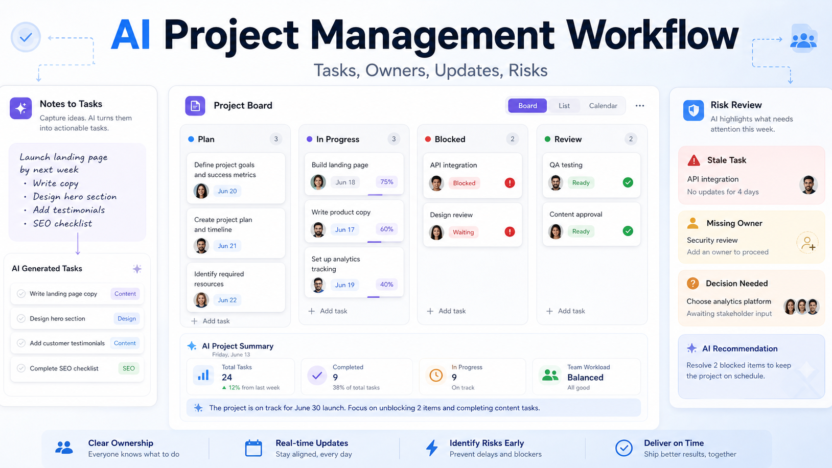
| Stage | AI role | Human role |
|---|---|---|
| Capture | Turn notes into tasks | Decide what is real work |
| Plan | Suggest owners, dependencies, and due dates | Confirm priority and capacity |
| Update | Summarize progress and blockers | Validate status |
| Risk review | Flag stale tasks and missing owners | Decide action |
| Retrospective | Summarize lessons and patterns | Improve the process |
Put All Work In One System
AI project management fails when work lives everywhere. If tasks are split across chat, email, documents, and memory, AI will summarize fragments instead of reality. Start by choosing one system for projects and one rule: important work must become a task with an owner.
That task should include a clear title, outcome, owner, due date, status, and link to relevant context. AI can help draft the task, but a human should decide whether it belongs in the project at all.
This foundation matters more than the tool. ClickUp, Asana, Notion, and monday.com can all support small-team workflows, but none can rescue a team that refuses to write work down.
Use AI For Status Updates
Status updates are a strong AI use case because they require summarizing recent activity. Ask AI to produce a weekly project update with completed work, current blockers, decisions needed, and next priorities.
The project owner should review the update before sending it. AI may overstate progress if task comments are vague. It may miss a blocker buried in a conversation. Human review keeps the update trustworthy.
A good update is short. It should answer: are we on track, what changed, what is blocked, and who needs to act? If the update does not drive action, it is decoration.
Build Task Creation Rules
Teams often ask AI to create tasks from meetings, documents, or briefs. That is useful, but only if tasks follow a standard. Each AI-created task should have a verb, owner, due date, acceptance criteria, and link to context.
For example, “Update landing page†is weak. “Rewrite hero copy for product launch page and send to design review by Friday†is stronger. AI can help convert vague notes into stronger tasks, but the owner should confirm scope.
For adjacent workflows, see AI meeting notes workflow and AI customer support workflow.
Review Risks Weekly
AI can surface stale tasks, missing owners, delayed dependencies, and repeated blockers. That makes it useful for weekly risk review. Ask it to find tasks with no updates, tasks past due, work without an owner, and projects with too many active priorities.
The project manager should then make decisions. Extend the timeline, reduce scope, reassign ownership, unblock a dependency, or close work that no longer matters. AI can identify signals; people make trade-offs.
Keep Accountability Human
The main danger of AI project management is false clarity. A beautiful summary can make a messy project look organized. Do not confuse AI-generated order with real execution.
Keep ownership visible. Every task needs a person. Every project needs a decision-maker. Every update needs a source. If AI cannot point to the task, comment, document, or meeting note behind a claim, treat the claim as a suggestion.
FAQ
What is an AI project management workflow?
It is a structured process for using AI to create tasks, summarize updates, flag risks, and improve follow-through inside a project system.
Is AI project management useful for small teams?
Yes, especially when small teams have many handoffs and limited project-management time.
Which tool should I use?
Use the platform where your team already tracks work. ClickUp, Asana, Notion, and monday.com all offer AI capabilities, but adoption matters more than feature count.
Can AI assign task owners?
AI can suggest owners, but a human project lead should confirm accountability.
What should AI summarize?
Project updates, meeting notes, task comments, blockers, decisions, and retrospective notes are good candidates.
What should AI not decide?
AI should not make priority trade-offs, approve scope changes, or commit team capacity without a human.
How often should I run an AI project review?
Weekly is enough for most small teams. Fast-moving launches may need a shorter cycle.
How do I prevent bad AI tasks?
Require every task to include outcome, owner, due date, acceptance criteria, and source context.
What metrics matter?
Track overdue tasks, blocked tasks, ownerless work, cycle time, and project completion predictability.
What is the biggest limitation?
AI cannot infer accurate project status from incomplete or outdated task data.
Final Decision
Use this workflow if your team already has the core business process in place and wants AI to remove drafting, summarizing, sorting, and follow-up friction. Do not use it as a substitute for human review, legal approval, customer-sensitive judgment, or final publishing decisions. The best setup is simple: one source of truth, one review owner, a short list of approved prompts, and a weekly check of what the AI helped create.