Gamma is worth considering if your team needs to turn ideas, notes, outlines, or messy briefs into polished presentation-style documents quickly. It is strongest for small business owners, consultants, marketers, educators, sales teams, and founders who need a clean deck, proposal, training resource, microsite, or visual document without building every slide manually.
It is not the best choice if your team needs full enterprise presentation governance, advanced PowerPoint animation control, complex spreadsheet-linked charts, or a design workflow built around heavy brand production. Gamma works best when speed, structure, and presentation quality matter more than fine-grained slide-by-slide design control.
This Gamma review is based on official product and pricing information available from Gamma, the official Gamma pricing page, and Gamma help documentation.
If you are choosing between Gamma and Canva, see our Gamma vs Canva AI comparison. If your team is building broader research content before presentations, our NotebookLM review and AI research workflow for teams are useful supporting reads.
Quick Verdict
Gamma is a strong AI presentation tool for teams that want faster first drafts, cleaner layouts, and flexible presentation formats. It helps users generate decks, refine content, apply themes, export to common formats, and turn structured ideas into shareable visual pages.
Choose Gamma if you want:
- fast AI-generated presentation drafts
- clean visual documents without heavy design work
- decks, proposals, guides, training material, or microsites
- exports to presentation-friendly formats
- simple branding and theme controls
- collaboration around visual content
- a tool that feels lighter than traditional slide software
Avoid Gamma if you need:
- advanced PowerPoint animation workflows
- complex Excel-linked business reporting decks
- strict enterprise template governance
- pixel-level layout control for every slide
- a pure graphic design tool
- guaranteed offline desktop editing
The practical answer: Gamma is useful when your team starts with content and needs a polished presentation quickly. It is less useful when your team starts with a strict design system and needs every visual detail controlled manually.
Best For
Gamma is best for small teams that create repeatable visual business content. A consultant can use it for proposals. A founder can use it for investor-style updates. A marketer can use it for campaign briefs. A sales team can use it for product explainers. An educator can use it for training material.
The tool is especially useful when the input is an outline, meeting note, document, or rough idea. Instead of opening a blank slide deck, the user can start with a prompt and let Gamma create a structured draft. That can reduce the friction of getting from idea to presentable version.
Not Best For
Gamma is not ideal for teams that already have a strict PowerPoint production process with approved slide masters, detailed animation sequences, and heavy executive formatting requirements. It can export to presentation formats, but its core value is AI-assisted creation inside Gamma, not replacing every advanced desktop presentation feature.
It is also not a full design suite. Canva may be better for broad graphic design, social posts, brand kits, and visual asset production. PowerPoint or Google Slides may still be better when the team needs native slide editing, offline compatibility, or established corporate templates.
Our Evaluation Criteria
For this review, the most important evaluation criteria are practical business criteria rather than hype-heavy AI claims:
| Criteria | What We Looked For | Why It Matters |
|---|---|---|
| Ease of use | Can a non-designer create a useful first draft? | Small teams need speed without design bottlenecks |
| Setup | Does the tool require heavy configuration? | A presentation tool should not need weeks of rollout |
| AI quality | Does AI help structure useful presentation content? | The draft needs to save real thinking time |
| Layout quality | Are the generated pages clean and readable? | Visual polish matters for sales, clients, and internal teams |
| Editing control | Can users refine the output after generation? | AI drafts usually need human judgment |
| Export options | Can teams move work into common formats? | Presentations often need sharing outside the tool |
| Pricing clarity | Are plans, limits, and credits explained by official sources? | Small businesses need predictable tool costs |
| Value for money | Does it replace enough manual work to justify adoption? | A tool should solve a real workflow problem |
This framework is intentionally practical. The goal is not to declare Gamma as universally best. The goal is to show where it fits and where another tool may be safer.
Key Features
AI Presentation Generation
Gamma's main value is the ability to generate a structured presentation or visual document from a prompt. In a typical small business workflow, someone might paste a campaign idea, sales outline, training topic, or client proposal summary and ask Gamma to turn it into a first draft.
That first draft still needs review. The benefit is not that AI replaces the presenter. The benefit is that it creates a starting structure, visual rhythm, and page flow faster than a blank deck.
Flexible Cards Instead Of Traditional Slides
Gamma uses a card-based format. This makes the output feel like a mix between slides, documents, and web pages. That can work well for business explainers, internal guides, pitch summaries, and educational material.
For teams used to PowerPoint, the card model may take adjustment. But it can also reduce the rigid feeling of slide-by-slide editing.
Themes And Layouts
Gamma includes themes and layout tools that help users keep documents visually consistent. This matters for non-designers. A weak deck often fails because spacing, hierarchy, and visual balance are inconsistent. Gamma tries to handle more of that structure automatically.
The best use is to start with a reasonable theme, generate the draft, and then edit for clarity. Do not rely on the first output as final client-ready material.
Export And Sharing
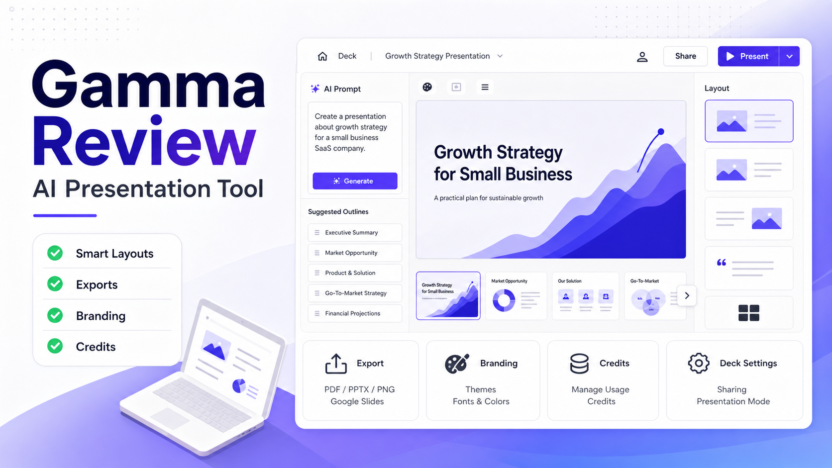
The official pricing page references exports to PDF, PPTX, PNG, and Google Slides across paid tiers. This is important because many teams still need to present, send, or archive content outside the original tool.
A small agency might create a client proposal in Gamma, export it to PDF for delivery, and keep the editable version inside Gamma. A sales team might draft a product explainer and export it when a prospect needs a file.
Branding And Customization
Gamma's paid plans include stronger branding options than the free tier. That matters when a business wants presentations to look consistent with its own brand rather than like a generic AI deck.
For small businesses, the practical question is not whether Gamma has every branding feature. The question is whether the branding controls are enough for the kind of decks the team creates most often.
Real Use Cases
Sales Presentations
A SaaS team could use Gamma to create a product explainer for prospects. The team might start with the problem, product value, core features, customer workflow, and next steps. Gamma can turn that outline into a deck-like flow, then the salesperson can edit the claims and remove anything too generic.
This is useful for early-stage teams that do not have a dedicated designer for every sales asset.
Client Proposals
A consultant or agency could use Gamma to create proposal drafts. In a typical small business workflow, the consultant might paste a discovery-call summary, project scope, deliverables, timeline, and pricing approach. Gamma can help turn that into a structured proposal format.
The user still needs to verify the scope and pricing. Gamma should not invent client-specific claims or results.
Training And Onboarding
Gamma can be useful for internal training. A manager could create a short onboarding deck for new staff, a process explanation, or a policy walkthrough. The card format works well when the goal is to explain a process in digestible sections.
For sensitive policies, the final version should be reviewed by the relevant manager before publishing internally.
Marketing Campaign Briefs
A marketing team could use Gamma to turn campaign notes into a visual brief. The output might include audience, offer, key messages, channels, content ideas, timeline, and measurement plan.
This is useful when a team needs alignment quickly. It is not a replacement for campaign strategy, but it can help make the strategy easier to review.
Founder Updates
A founder could use Gamma for monthly updates, board-style summaries, product plans, hiring plans, or investor-style narrative decks. The value is speed and structure. A founder can create a readable update faster, then refine the important points.
Pricing
Pricing last checked on June 21, 2026.
Gamma's official pricing page lists a Free plan plus paid plans such as Plus, Pro, and Ultra. The page also describes plan differences around AI credits, cards per generation, exports, Gamma branding, custom domains, custom fonts, analytics, and advanced model access.
Because pricing can be affected by plan, billing selection, usage, credits, or add-ons, use the official Gamma pricing page for the latest current details before buying.
For most small businesses, the decision should start with workload. If Gamma is used once a month, the free plan may be enough to evaluate. If it becomes part of sales, marketing, or client delivery, the paid plans are more realistic.
Pros
- Fast first drafts for decks and visual documents.
- Cleaner starting layouts than many blank-slide workflows.
- Useful for non-designers who need presentable business content.
- Flexible card format works for decks, proposals, guides, and microsites.
- Export options make it easier to share work outside the tool.
- Paid plans add more practical controls for branding and heavier use.
Cons
- Not a full replacement for advanced PowerPoint workflows.
- AI-generated drafts still need human review and editing.
- Teams with strict brand systems may need more control than Gamma provides.
- Exact pricing and limits should be checked on the official page before purchase.
- Some users may prefer traditional slide tools if they need familiar desktop editing.
Gamma Alternatives
| Tool | Best For | Main Strength | Limitation |
|---|---|---|---|
| Gamma | Fast AI-generated decks and visual documents | Strong first-draft workflow and modern layouts | Less ideal for advanced PowerPoint control |
| Canva | Broad design, presentations, social assets, brand kits | Wide design ecosystem and templates | Can feel broader than needed for AI deck creation |
| Beautiful.ai | Structured business presentations | Professional slide automation | Less flexible for document-style content |
| Plus AI | Google Slides and PowerPoint-focused AI workflows | Works closer to traditional slide tools | Less of a standalone visual document workspace |
| Tome | Narrative presentations and visual storytelling | Good for story-led decks | May not fit teams needing standard business formats |
Choose Gamma if your priority is fast, polished, AI-assisted presentation creation. Choose Canva if you need a broader design platform. Choose Beautiful.ai if you want structured business slides. Choose Plus AI if your team wants AI help inside Google Slides or PowerPoint-style workflows.
Final Recommendation
Gamma is worth using if your team regularly turns ideas, notes, briefs, or documents into presentations. It is especially useful for small businesses that need better-looking decks without hiring a designer for every internal update, sales explainer, training guide, or proposal.
The best way to evaluate it is simple: take one real presentation task, create a Gamma draft, edit it carefully, and compare the result with your normal slide workflow. If it saves time and produces a cleaner starting point, Gamma can justify a place in your content and presentation stack.
Do not treat it as a magic presentation writer. Treat it as a strong first-draft and layout assistant. The final business logic, claims, pricing, and recommendations still need human review.
FAQs
Is Gamma good for small businesses?
Yes. Gamma is useful for small businesses that need fast presentation drafts, proposals, training material, visual guides, or sales explainers. It is most useful when the team has content ideas but limited design time.
Is Gamma better than Canva?
Gamma is better for fast AI-generated presentation-style documents. Canva is better for broader design work, social assets, and template-heavy visual production. The better choice depends on whether your workflow starts with a deck idea or a design asset.
Can Gamma replace PowerPoint?
Gamma can replace PowerPoint for some lightweight presentation workflows, but not for every team. If your team depends on advanced animations, complex corporate templates, or desktop slide editing, PowerPoint may still be necessary.
Does Gamma have a free plan?
Gamma's official pricing page lists a Free plan. The free tier is useful for testing the workflow, but regular business use may require a paid plan depending on exports, credits, branding, and usage needs.
What should I use Gamma for first?
Start with a real but low-risk deck, such as a campaign brief, internal training guide, product explainer, or client proposal draft. This shows whether Gamma improves your workflow without putting critical business material at risk.
Does Gamma create finished presentations automatically?
Gamma can create a strong first draft, but it should not be treated as a final approval system. Review the claims, structure, visual hierarchy, and business details before sending the deck to clients or stakeholders.
Who should avoid Gamma?
Teams that need strict slide masters, detailed animation control, offline desktop workflows, or complex spreadsheet-linked reporting may prefer PowerPoint, Google Slides, or a specialized presentation system.
What are the best Gamma alternatives?
The main alternatives are Canva, Beautiful.ai, Plus AI, Tome, Google Slides, and PowerPoint. Canva is broader for design, Beautiful.ai is structured for business decks, and Plus AI is useful when teams want AI inside traditional slide workflows.