Quick Verdict
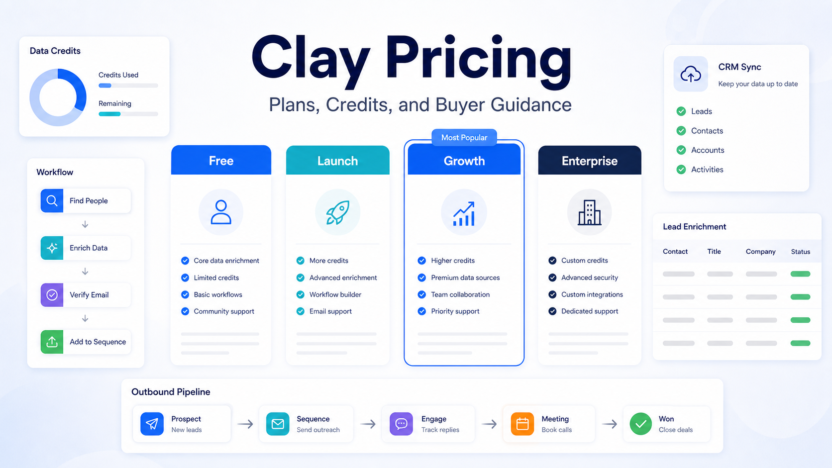
Clay pricing is easiest to understand if you think in terms of credits, enrichment volume, and outbound workflow complexity. The Free plan is best for learning the product. Launch is the first serious paid plan for teams building outbound prospecting workflows. Growth is better for teams that need more credits, more workflow capacity, and stronger go-to-market operations. Enterprise is for larger teams that need custom scale, controls, and support.
Pricing last checked on July 9, 2026. Official source: Clay pricing.
The short answer: start with Free if you are learning Clay. Choose Launch when you are ready to run real enrichment and outbound workflows. Choose Growth when Clay becomes part of a larger sales or marketing operation. Choose Enterprise when your team needs custom volume, security, and procurement support.
Best For
- Sales teams that use data enrichment for prospecting
- Founders building targeted outbound lists
- Agencies managing lead research and personalization workflows
- RevOps teams that want flexible data workflows without custom scripts
- Growth teams that need enrichment, research, and CRM handoff in one place
Not Best For
- Teams that only need a basic spreadsheet
- Buyers who want a traditional CRM replacement
- Companies without a clear outbound or enrichment workflow
- Teams that cannot review AI-generated personalization before sending
Clay Pricing Table
| Plan | Official Positioning | Public Price Shown | Best Fit |
|---|---|---|---|
| Free | Explore Clay and test workflows | $0/month | Learning the product and testing small workflows |
| Launch | Start building outbound workflows | Starts at $185/month | Early go-to-market teams and small outbound programs |
| Growth | Scale workflows with more capacity | Starts at $495/month | Growing teams with larger enrichment needs |
| Enterprise | Custom team requirements | Custom | Larger teams with security, support, and procurement needs |
What Each Plan Means in Practice
Free is the right plan when you are still learning how Clay works. It lets you understand tables, enrichments, waterfall data providers, workflow actions, and AI-assisted research without committing to a paid workflow. A founder or solo operator can use Free to test whether Clay fits their lead research process.
Launch is the first plan to evaluate when outbound becomes real work. A small sales team can use it to build targeted lead lists, enrich company and contact data, personalize outreach drafts, and prepare CRM handoff. The key question is whether Clay will become a repeatable part of weekly prospecting rather than an occasional research tool.
Growth is for teams that already know Clay will sit inside the go-to-market process. This is where higher volume, more credits, and more operational structure matter. A RevOps team, agency, or growing B2B sales team may choose Growth when several people depend on Clay for list building and enrichment.
Enterprise is for organizations with custom requirements. Larger teams may need security review, procurement support, higher usage, custom terms, and more control over how enrichment workflows run.
Our Evaluation Criteria
For this pricing guide, the important criteria are credit model clarity, workflow capacity, enrichment reliability, CRM fit, collaboration, data review needs, AI personalization quality, pricing transparency, and value for money. This article does not claim private testing, fake benchmark scores, fake customer results, or invented usage numbers. It uses official Clay pricing information and practical buying criteria for small teams.
Real Use Cases
In a typical small business workflow, Clay can help a team turn a target account list into a richer prospecting list. A user can import companies, enrich contact and company attributes, identify relevant signals, draft personalized context, and send qualified records to a CRM or outreach tool.
A SaaS team could use Clay to find companies using a particular technology, enrich decision-maker data, draft first-line personalization, and route high-fit prospects to sales reps. An agency could use Clay to research leads for multiple client campaigns while keeping enrichment steps consistent. A founder could use Clay to turn a small target list into a more useful outbound workflow without building custom scripts.
The practical value is not just data. The value is the repeatable workflow: research, enrich, prioritize, personalize, and hand off.
Plan Comparison
| Buyer Situation | Best Starting Plan | Why |
|---|---|---|
| You are learning Clay | Free | It lowers risk while you test tables and enrichments |
| You have a small outbound motion | Launch | It supports real campaigns without jumping to a larger plan |
| You run larger enrichment workflows | Growth | It offers more practical capacity for ongoing operations |
| You need security and procurement support | Enterprise | Custom requirements usually need direct vendor review |
Pros and Cons
| Pros | Cons |
|---|---|
| Useful for flexible enrichment and outbound research | Credits and workflow design require planning |
| Free plan helps teams learn before paying | Not a full CRM replacement |
| Launch and Growth map to real go-to-market usage | AI-personalized output still needs review |
| Strong fit for sales, growth, and RevOps workflows | Value depends on having a clear target market |
Alternatives
| Tool | Best For | Main Strength | Limitation |
|---|---|---|---|
| Apollo | Sales prospecting database and engagement | Large contact database and outreach workflow | Less flexible for custom enrichment workflows |
| HubSpot Breeze | CRM-native sales and marketing AI | Works inside HubSpot workflows | Best value depends on HubSpot adoption |
| Zapier | Workflow automation | Connects apps and actions | Not a dedicated enrichment platform |
| Make | Visual automation workflows | Flexible scenario builder | Requires workflow design skill |
Related guides: Best AI CRM Tools for Small Business, AI Sales Follow-Up Workflow, and How to Use AI for Lead Qualification.
When Free Is Enough
Free is enough when you are exploring Clay, learning the table interface, testing a few enrichment steps, or deciding whether the workflow fits your sales process. It is also useful for building a proof of concept before a team pays for a larger plan.
Free is not enough when Clay becomes part of an active outbound motion. If a sales team needs regular list building, enrichment, personalization, and CRM handoff, a paid plan is usually the more realistic comparison.
When Launch Makes Sense
Launch makes sense when the team is ready to run real outbound workflows. This could mean enriching a weekly account list, researching buying signals, preparing personalization, and passing qualified records to sales. It is best for teams that have a defined ideal customer profile and need Clay to support repeatable prospecting.
Before choosing Launch, define your workflow clearly. What data enters Clay? Which enrichments are needed? What fields must be reviewed? Where does the finished lead record go? If the team cannot answer those questions, use Free longer and refine the process.
When Growth Makes Sense
Growth makes sense when Clay is no longer a side tool. If multiple campaigns, team members, or client accounts depend on Clay, the buying decision changes from experimentation to operations. Growth is better suited for teams that need more capacity and a more serious process around enrichment and outbound research.
The Growth plan should be evaluated against time saved, better targeting, cleaner handoffs, and improved lead quality. A higher plan is easier to justify when Clay replaces scattered manual research and creates a repeatable lead workflow.
When Enterprise Makes Sense
Enterprise makes sense when the organization needs custom volume, support, governance, and procurement review. Larger sales or RevOps teams may need security conversations, custom terms, team administration, and vendor approval before Clay becomes a core workflow.
Small businesses should not jump to Enterprise unless those needs are real. For most smaller teams, Free, Launch, and Growth are the more practical comparison points.
Credit Planning
Clay pricing is closely tied to credits and enrichment usage. Before choosing a plan, estimate the number of records you enrich each month, the number of enrichment steps per record, and how many workflows will run regularly. A list with several enrichment steps can consume more capacity than a simple table import.
The safest approach is to model one real campaign. Estimate records, enrichment providers, AI actions, and CRM updates. Then compare that model with the plan you are considering. This avoids buying based on a vague idea of usage.
Data Quality and Review Rules
Clay can help teams research and personalize outbound, but AI-generated personalization should be reviewed before sending. Do not let the workflow invent customer facts, unsupported company details, or fake reasons for outreach. If a field is unknown, keep it unknown until a reliable source supports it.
Teams should also decide who owns data quality. A sales rep, RevOps manager, founder, or agency strategist should review the workflow and sample outputs. Good enrichment saves time only when the team trusts the fields it creates.
Setup Checklist
| Setup Area | What To Decide | Why It Matters |
|---|---|---|
| Target market | Which companies and roles are worth enriching | Prevents wasted credits |
| Data sources | Which enrichment sources matter | Keeps workflows focused |
| Review rule | Which fields need human approval | Reduces bad outreach |
| Destination | CRM, outreach tool, spreadsheet, or internal queue | Turns research into action |
| Success metric | Meetings booked, research time saved, or data quality | Makes the plan easier to judge |
How to Measure Value After Upgrading
After upgrading, measure whether Clay reduces manual research time, improves lead fit, increases useful personalization, and creates cleaner CRM handoff. Do not measure value only by how many records were enriched. A smaller list with better targeting can be more useful than a large list full of weak prospects.
Good signs include faster account research, fewer missing fields, clearer qualification notes, and better rep confidence before outreach. Weak signs include unused enriched lists, vague AI personalization, too many manual corrections, or workflows that only one person understands.
Buyer Risks to Review Before Paying
The biggest risk with Clay is not the software itself. The biggest risk is building an enrichment workflow before the sales strategy is clear. If the team has not defined the ideal customer profile, buying signals, exclusions, and handoff process, even a powerful enrichment tool can produce noisy lists. Start with a narrow market segment and a specific campaign before expanding.
Another risk is overusing automation for personalization. Clay can help gather context and draft useful angles, but every customer-facing message should still sound accurate, relevant, and human. A small team should sample records before each campaign and confirm that important facts are supported. This protects the brand and prevents outreach that feels careless or invented.
Finally, watch credit usage. A workflow with many enrichment steps can consume more capacity than expected. Run a small batch first, inspect the output, remove unnecessary steps, and then scale. This keeps the plan tied to business value rather than experimentation.
Final Recommendation
Choose Free if you are learning Clay. Choose Launch if you have a clear outbound workflow and need regular enrichment. Choose Growth if Clay supports ongoing team or agency operations. Choose Enterprise if security, procurement, support, or custom scale is required.
Clay is most valuable when the team already knows who it wants to reach and what data improves outreach quality. If your target market is unclear, fix that first. If the target market is clear and manual research is slowing the team down, Clay can become a useful part of the sales and growth workflow.
FAQs
Does Clay have a free plan?
Yes. Clay's official pricing page lists a Free plan at $0/month.
How much does Clay Launch cost?
Clay's official pricing page lists Launch starting at $185/month.
How much does Clay Growth cost?
Clay's official pricing page lists Growth starting at $495/month.
Does Clay have Enterprise pricing?
Yes. Clay lists Enterprise as a custom plan.
What are Clay credits?
Credits are tied to enrichment and workflow usage. Teams should estimate expected records and enrichment steps before choosing a plan.
Is Clay a CRM?
No. Clay supports enrichment and go-to-market workflows, but a CRM should remain the system of record.
Is Clay good for small businesses?
Yes, if the business has a clear target market and a repeatable outbound process.
Is Clay good for agencies?
Yes. Agencies can use Clay to standardize lead research and enrichment workflows across campaigns.
Should AI personalization be sent without review?
No. A person should review customer-facing personalization before sending.
Which Clay plan should a small team start with?
Start with Free while learning, then move to Launch when a real outbound workflow is ready.