Quick Answer
AI can improve lead qualification by collecting inbound lead details, enriching company context, scoring fit, drafting follow-up questions, and routing qualified leads to the right person. The best workflow keeps humans in control of final qualification while using automation to reduce manual research and response delays.
For a small business, the goal is not to build a complicated black-box scoring system. The goal is to create a clear path from form submission to useful next step: capture the lead, understand the request, identify fit, send the right follow-up, update the CRM, and alert the team when a high-value opportunity arrives.
Best For
- Small businesses with inbound leads
- Sales teams that need faster triage
- Teams using a CRM but losing follow-up context
Not Best For
- Teams with very low lead volume
- Businesses without clear qualification rules
- Teams hoping to remove human review completely
Step 1: Define Fit Before You Automate
Start with a simple qualification model. Good fit might include industry, company size, budget range, urgency, location, use case, and the product or service requested. Poor fit might include unsupported regions, low-intent questions, unrelated services, or requests that your team cannot handle profitably.
Write these rules in plain English before choosing tools. If your team cannot explain the rules clearly, the AI workflow will be hard to review and harder to trust.
Step 2: Capture Better Lead Data
Use forms, chatbots, email intake, or calendar questions to collect the information that sales needs. Do not ask for everything. Ask for enough to decide the next action. Useful fields include role, company website, business problem, expected timeline, team size, and preferred contact method.
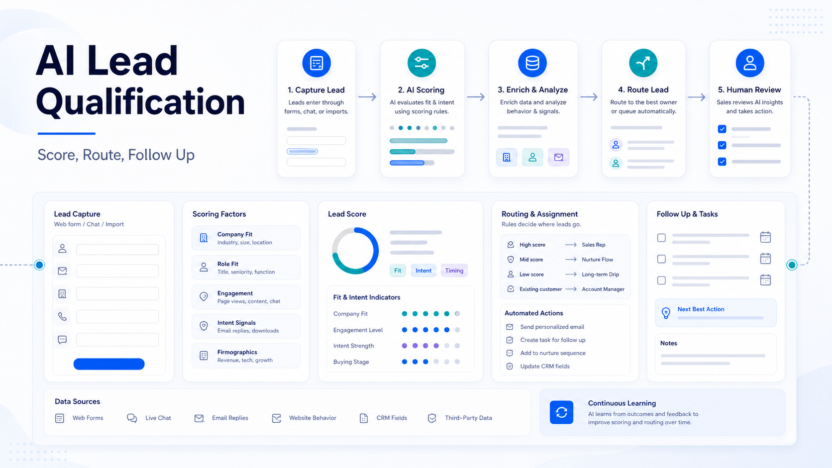
In a typical small business workflow, a website form sends the lead to a CRM, the AI summarizes the request, and the automation adds a suggested next step for the owner.
Step 3: Enrich Context Carefully
AI can help summarize public company information, categorize the request, and identify whether the lead appears to match your ideal customer profile. Tools such as HubSpot Breeze, Zapier, Make, and Clay can support different parts of this workflow.
Use enrichment to assist decisions, not to invent facts. If company size, funding, or revenue is unknown, keep it unknown rather than guessing.
Step 4: Score Leads With Transparent Rules
Use simple labels such as high fit, medium fit, low fit, and needs review. A high-fit lead might match the target industry, describe a clear problem, and request a near-term sales conversation. A low-fit lead might ask for unsupported services or provide very little context.
Avoid fake precision. A score of 87 out of 100 looks scientific, but it may hide uncertainty. A clear label with reasons is often more useful.
Step 5: Route and Follow Up
Once a lead is classified, route it to the right workflow. High-fit leads can trigger a Slack alert, CRM task, and personalized email draft. Medium-fit leads can receive a clarifying question. Low-fit leads can receive a polite resource or a self-serve path.
This connects naturally with the AI Sales Follow-Up Workflow and Best AI CRM Tools for Small Business guides.
Example Lead Qualification Workflow
| Stage | AI Role | Human Role |
|---|---|---|
| Capture | Summarize form or email request | Review required fields |
| Enrich | Find public company context | Reject unsupported assumptions |
| Score | Apply fit labels and reasons | Approve rules and edge cases |
| Route | Create CRM task or alert | Take ownership of the lead |
| Follow up | Draft email or questions | Edit before sending |
Pricing and Tool Selection
Pricing last checked on July 9, 2026. Official vendor sources used for tool categories: HubSpot Breeze, Zapier, Make, and Clay.
The cost depends on which parts you automate. CRM AI features, automation task volume, enrichment credits, and email volume can all affect the total. Keep the first version narrow: one form, one scoring model, one CRM, and one follow-up route.
Common Mistakes
- Automating before defining fit
- Using fake precision in scores
- Rejecting leads without human review
- Collecting too many form fields
- Letting AI invent company facts
Final Recommendation
Use AI for lead qualification when your team already has a clear sales process and loses time on manual triage. Start with transparent rules, keep a human review step, and measure whether speed and fit improve. Do not use AI to reject valuable leads automatically until your data and rules are proven.
FAQs
Can AI qualify leads automatically?
It can assist qualification, but a human should review important leads and edge cases.
What data should a lead form collect?
Collect company, role, problem, timeline, budget range when appropriate, and contact preference.
Can AI write the first sales email?
Yes, but a person should review it before sending.
Should low-fit leads be deleted?
No. Route them to a nurture path, resource page, or manual review queue.
What is the best CRM for AI qualification?
The best CRM is the one your team already uses consistently. AI only helps when records are kept clean.
Can Zapier or Make run this workflow?
Yes, they can connect forms, CRMs, alerts, spreadsheets, and email tools.
Is enrichment always accurate?
No. Treat enrichment as supporting context and avoid guessing unknown facts.
How many qualification labels should we use?
Start with three or four labels: high fit, medium fit, low fit, and needs review.
What should be measured?
Measure response time, booked calls, lead quality, manual review time, and follow-up completion.
Is AI lead scoring useful for very small teams?
Yes, if the team receives enough inbound leads to make triage painful. If lead volume is low, manual review may be enough.
Practical Buying Advice for Small Teams
The safest way to choose software for AI lead qualification is to connect the buying decision to one repeatable workflow. Many small businesses buy AI tools because the demo looks impressive, then struggle to make the tool part of daily work. Before subscribing, write down who will use it, when they will use it, what information should be captured, and where the output should go after the AI creates it.
For example, a sales team should decide whether call notes become CRM updates, Slack alerts, email follow-up drafts, coaching notes, or all of those. A customer success team should decide whether the output becomes an onboarding recap, a support escalation note, a renewal-risk note, or product feedback. A founder should decide whether the tool is mainly for personal memory, team visibility, or customer communication.
This matters because the best tool on paper is not always the best tool for your operating rhythm. A heavy platform can be the right choice when managers actively review calls and coach reps. A lighter meeting assistant can be the better choice when the team mainly needs searchable notes and fewer missed follow-ups. The practical question is not "which tool has the most features?" The better question is "which tool will my team actually use every week?"
Setup Checklist
| Setup Area | What To Decide | Why It Matters |
|---|---|---|
| Ownership | Name the person responsible for reviewing AI output | Unreviewed summaries can create confusion |
| Source | Choose which meetings, forms, or calls enter the workflow | Too much capture creates noise |
| Destination | Decide whether notes go to CRM, email, Slack, docs, or project tools | AI output has value only when it reaches the next workflow |
| Review | Set a rule for checking client-facing summaries | Important details should not be sent blindly |
| Privacy | Confirm consent, retention, and access rules | Meeting and lead data can be sensitive |
What To Look For During a Trial
During a trial or first month, focus on a few practical signs. Does the tool save time after calls or create another inbox to manage? Are summaries specific enough to help with follow-up? Can the team find past conversations quickly? Does the integration with calendar, CRM, email, or Slack feel natural? Are admin settings clear enough for the business to control access?
Do not judge the tool only by one perfect demo call. Use normal messy meetings, different speakers, different accents, internal calls, customer calls, and short check-ins. The output should be useful across ordinary work, not only polished examples. If the tool frequently creates vague summaries, misses action items, or requires long cleanup, the team may not keep using it.
Decision Framework
| Choose This Path | When It Fits | Tradeoff |
|---|---|---|
| Lightweight assistant | You need fast notes and summaries | Less coaching depth |
| Team meeting intelligence | Several people need shared call records | More setup and admin decisions |
| Revenue intelligence | Managers coach reps and inspect pipeline risk | Higher cost and process commitment |
| CRM-native AI | Your CRM is the center of daily work | Best value depends on CRM adoption |
Data Quality and Review Rules
AI output should be treated as a draft. For meeting notes, the meeting owner should review decisions, numbers, commitments, names, dates, and customer-sensitive details. For lead qualification, a human should review high-value leads, uncertain leads, and any rejection path. For pricing or plan comparisons, use official vendor pages as the source of truth and avoid building a workflow that depends on guessed limits.
Teams should also decide what not to automate. Sensitive legal conversations, HR issues, medical information, financial disputes, or private customer escalations may require stricter review and retention rules. A useful AI workflow is not just fast. It is clear, reviewable, and respectful of the information it handles.
How This Fits With Existing DailyTimesPro Guides
If your goal is follow-up quality, pair this article with AI Sales Follow-Up Workflow. If your goal is CRM organization, read Best AI CRM Tools for Small Business. If your goal is meeting capture, compare this with Best AI Note Taking Apps for Client Meetings and Fireflies.ai Review.
Bottom Line for Buyers
How to Use AI for Lead Qualification should be evaluated as a workflow decision, not just a software feature list. The right choice should reduce manual work, make follow-up more reliable, and give the team clearer records without creating a confusing new process. Start small, measure whether the tool improves a real workflow, and upgrade only when the team has proven it will use the extra features.
Implementation Tips
Start with one workflow and one owner. Use a small group of real users for the first two weeks. Document what the AI should produce, where it should send the output, and which items need human approval. After the first month, review whether the workflow saved time, improved follow-up, or made decisions easier to find.
Avoid expanding too quickly. It is better to have one dependable AI workflow than six half-configured automations. Once the first workflow is stable, reuse the same review rules for related processes.
Additional Evaluation Notes
For a final buying pass, review three areas: output quality, workflow fit, and operational risk. Output quality means the transcript, summary, score, or recommendation is specific enough to support a real action. Workflow fit means the result can move into the place your team already works, such as a CRM record, project task, shared note, Slack thread, or client email draft. Operational risk means the team understands consent, access, retention, and review requirements before relying on the tool.
Small teams should also compare the cost of the tool with the cost of the manual work it replaces. If the software saves ten minutes after one meeting per week, it may not be a priority. If it saves time after twenty client calls, improves response speed, and reduces missed follow-ups, it can be much easier to justify. The value is usually highest when the tool becomes part of a repeatable workflow, not when it is used occasionally by one person.
Before making a long commitment, assign one owner to measure results for thirty days. Track whether follow-up is faster, whether CRM notes are cleaner, whether managers can find coaching moments, whether customer questions are easier to revisit, and whether team members trust the output. Keep the measurement practical. You need a clear answer to this question: did the tool make the work easier and more reliable?
Finally, keep the first version simple. Use one source, one destination, one review rule, and one success metric. Once the workflow is dependable, expand it to more teams or more tools. This prevents the common problem where AI software creates excitement during setup but fails to become part of everyday operations.