Quick Verdict
The best AI invoice automation tool for a small business depends on how your accounts payable work actually arrives. If invoices mostly land in an email inbox as PDFs and you want extraction plus approval workflows, Docsumo and Rossum are strong options. If you want developer-friendly invoice OCR that can feed your own product, portal, or custom back office, Veryfi and Nanonets are easier to evaluate. If your company already runs Microsoft 365, SharePoint, Excel, or Dynamics-style workflows, Microsoft AI Builder inside Power Automate may be the most practical starting point. If you want an accounts-payable product with transparent entry pricing and built-in approval workflow, Doxis AI.dp by Klippa deserves a close look.
For most small businesses, the right first step is not choosing the most advanced AI model. It is choosing the system that fits your invoice volume, approval process, accounting stack, and tolerance for manual review. AI can extract vendor names, invoice numbers, due dates, totals, tax details, line items, and payment data, but the best workflows still include human review for exceptions, new vendors, unusual amounts, duplicate invoices, and low-confidence fields.
Best AI Invoice Automation Tools at a Glance
| Tool | Best for | Main strength | Limitation |
|---|---|---|---|
| Docsumo | Small teams that want document extraction plus workflow automation | Strong invoice/document processing workflows with integrations | Entry pricing is higher than simple OCR APIs |
| Nanonets | Teams building flexible document automation workflows | Usage-based workflow block pricing and broad document automation | Cost depends on workflow complexity and number of block runs |
| Veryfi | Developers and finance apps needing invoice OCR APIs | Clear per-document invoice API pricing and structured JSON output | Less ideal if you want a full AP approval suite out of the box |
| Microsoft AI Builder | Microsoft-heavy businesses using Power Automate | Native invoice model inside the Power Platform ecosystem | Licensing can become complex when AI Builder credits and Power Automate plans are combined |
| Rossum | Growing AP teams with complex invoice processes | End-to-end transactional document automation with ERP integrations | Pricing is tailored, so small teams need a sales conversation |
| Doxis AI.dp by Klippa | Businesses that want packaged invoice processing with approvals | Transparent plan tiers with OCR, approval workflows, and ERP integrations | API access is reserved for the custom tier |
Pricing last checked on July 22, 2026. Prices, credits, limits, and regional availability can differ by country, annual billing, document volume, add-ons, and contract terms.
How We Evaluated These Tools
For this guide, the evaluation focused on practical small-business buying criteria rather than generic AI claims. The key criteria were ease of setup, invoice extraction quality signals, approval workflow support, pricing clarity, integration options, developer access, document volume fit, and value for money.
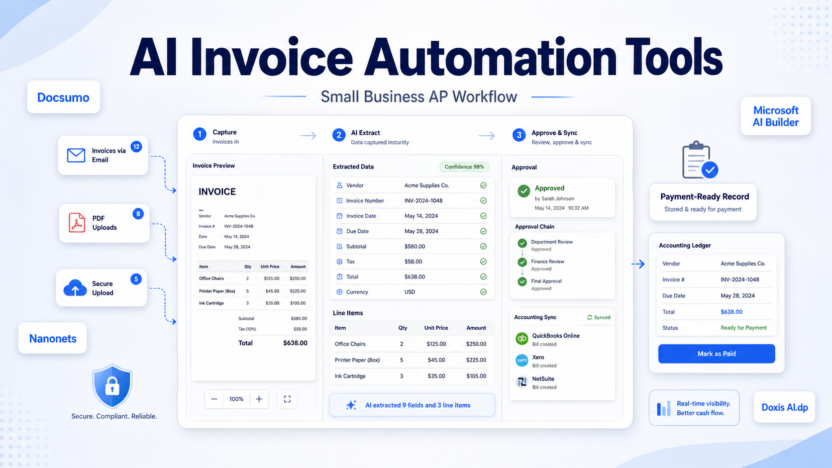
Invoice automation is not just OCR. A useful system should help a business move from an incoming invoice to an accurate payable record. That usually means capturing the file, extracting structured data, matching it to the vendor or purchase order, routing it for approval, handling exceptions, syncing the record into accounting or ERP software, and keeping an audit trail.
A small business should also think about who owns the workflow. A finance manager may prefer a packaged AP product with screens and approvals. An operations team may prefer a no-code automation platform. A software team may prefer an API that returns clean JSON. The best tool is the one that reduces manual data entry without adding a new process nobody wants to maintain.
1. Docsumo
Docsumo is a good fit for businesses that want invoice data extraction as part of a broader document automation workflow. It is designed for teams that receive invoices, forms, financial documents, or other semi-structured documents and need to move that data into downstream systems with less manual entry.
Docsumo’s official pricing page lists a Starter plan at $499 per month and describes Growth and Enterprise options for larger teams and higher volumes. The page also notes a free trial structure, monthly page allowances, users, API access, webhook access, and enterprise controls depending on plan. Because Docsumo sells into document-heavy workflows, small businesses should map expected monthly invoice volume before choosing it.
Key features include AI document capture, invoice extraction, review workflows, integrations, APIs, webhooks, and compliance-focused controls. In a typical small business workflow, invoices could arrive through email or upload, Docsumo could extract vendor, amount, tax, invoice number, due date, and line-item data, and a finance user could review exceptions before pushing the record into an accounting or ERP workflow.
Docsumo is best for teams that want more than basic OCR. It makes sense when invoices are one part of a document operations process and the business values workflow control. It is not the cheapest option for very low invoice volume, so a freelancer or tiny team processing a few invoices a month may prefer a lighter API or accounting-native feature.
Pros: strong document automation positioning, useful workflow and integration options, suitable for teams handling more than invoices.
Cons: higher starting price than simple invoice OCR APIs, plan details should be reviewed carefully because page allowances and users can affect value.
Official source: Docsumo pricing
2. Nanonets
Nanonets is a flexible choice for teams that want AI document processing with usage-based workflow pricing. Its official pricing page explains pricing by workflow block run. Simple operations are listed at $0.02 per run, Standard AI at $0.10 per run, and Complex AI at $0.30 per run. Nanonets also says every account starts with $50 free credits, and its example pricing explains that a typical invoice workflow may run four to six blocks per document.
That model is useful because it lets a business estimate cost based on the actual automation built. For example, an invoice workflow might include upload, classification, extraction, validation, approval routing, and export. A simple extraction-only workflow may cost less than a workflow with multiple AI steps and business logic.
Nanonets is best for operations teams, finance teams, and technical teams that want to build document workflows around invoices and adjacent documents. It can work well when invoices come from multiple vendors and need structured data before being sent into accounting, spreadsheets, databases, or approval systems.
In a typical small business workflow, Nanonets could read invoices from a shared inbox, extract key fields, route exceptions to a finance user, and pass clean data into a downstream system. For a SaaS team, it could power a customer-facing document upload feature where invoice data needs to be turned into structured records.
Pros: transparent usage logic, free credits for evaluation, strong fit for configurable document workflows, useful for API and automation teams.
Cons: final cost depends on workflow design, so buyers need to estimate block usage rather than only invoice count.
Official source: Nanonets pricing
3. Veryfi
Veryfi is one of the clearest options for businesses and developers that want an invoice OCR API. Its invoice OCR product page says users can send an invoice and get structured JSON back, including line items, vendor details, taxes, and totals. That makes it especially useful for software products, internal tools, expense workflows, procurement apps, and accounting-adjacent systems.
Veryfi’s pricing page lists invoices at up to 100 per month on the Free plan and $0.16 per invoice on the Starter plan, with volume discounts on Growth. It also lists other document categories such as receipts, bank checks, bank statements, W-2s, W-9s, and other documents. For small businesses, this is straightforward: estimate how many invoices you process each month and compare that to the monthly allowance and per-document rate.
Veryfi is best for teams that want clean invoice extraction without buying a full AP suite. A developer could use it to turn uploaded invoices into structured records for review. A finance team with technical support could route the JSON output into Airtable, a database, an ERP connector, or a custom approval screen.
In a typical small business workflow, a vendor invoice could be uploaded to an internal portal, Veryfi could return fields like vendor, invoice date, due date, totals, tax, and line items, and the business could use automation to send that record for approval. It is also useful when invoice extraction needs to be embedded into a product rather than used only by the finance department.
Pros: clear per-invoice pricing, strong API orientation, structured JSON output, good fit for custom systems and product workflows.
Cons: businesses that want built-in AP approvals, vendor management, and accounting sync may need to build or connect those layers.
Official sources: Veryfi pricing and Veryfi invoice OCR API
4. Microsoft AI Builder
Microsoft AI Builder is a strong candidate when the business already works inside Microsoft 365, SharePoint, Excel, Teams, Power Apps, or Power Automate. Microsoft’s invoice processing prebuilt AI model extracts common invoice fields such as invoice ID, invoice date, amount due, vendor details, tax, line items, and payment details. Microsoft also documents supported file formats, page limits, supported languages, model output fields, and a 360-calls-per-60-seconds environment limit for document processing models.
The practical advantage is ecosystem fit. A small business could create a Power Automate flow that watches a SharePoint folder or email inbox, sends invoices to AI Builder, stores extracted fields in Excel or Dataverse, and routes approvals to the right user. If the business already pays for Microsoft tools and has someone comfortable with Power Automate, this can be easier than adding another SaaS platform.
Pricing requires care. Microsoft’s Power Automate pricing page lists Power Automate Premium at $15 per user per month paid yearly, Power Automate Process at $150 per bot per month paid yearly, and Hosted Process at $215 per bot per month paid yearly. AI Builder usage also involves credits in Microsoft’s licensing model, so buyers should confirm the exact plan and credit needs for invoice processing before rollout.
Microsoft AI Builder is best for Microsoft-centered teams that want invoice extraction inside existing workflows. It is not the simplest choice for a business that does not already use the Power Platform.
Pros: native Microsoft workflow ecosystem, strong documented invoice model fields, good fit for SharePoint and Power Automate scenarios.
Cons: licensing and credits can be harder to understand than per-invoice API pricing, and setup depends on Power Platform familiarity.
Official sources: Microsoft AI Builder invoice processing and Power Automate pricing
5. Rossum
Rossum is built for transactional document automation, including invoice processing. Its product pages describe ingestion through email, scanners, PEPPOL, and shared drives; validation and enrichment using master data, ERP data, third-party APIs, and business rules; approval workflows; vendor notifications; audit trails; document archive and search; and ERP integrations.
Rossum’s pricing page says pricing is tailored based on page or document volume, workflow complexity, additional services, integrations, and add-ons. That makes it less immediately transparent for a small buyer, but it also signals that Rossum is aimed at more complex AP operations.
Rossum is best for growing finance teams that have more than simple invoice extraction needs. It fits when invoices arrive from many channels, require validation against business rules, need approval routing, and must connect cleanly with ERP or procurement systems. A business with a high invoice volume, multiple subsidiaries, international vendors, or strict audit requirements may find Rossum more appropriate than a lightweight OCR API.
In a typical finance operations workflow, Rossum could ingest invoices from several sources, classify documents, extract fields, enrich vendor or PO details, route exceptions for approval, and sync approved invoice data with an ERP. For smaller businesses, that depth is only worth it if invoice handling is already a meaningful operational burden.
Pros: broad AP automation workflow, strong ERP and integration emphasis, good fit for complex document operations.
Cons: tailored pricing means buyers need a sales conversation; may be more platform than a very small business needs.
Official sources: Rossum product and Rossum pricing
6. Doxis AI.dp by Klippa
Doxis AI.dp by Klippa is worth considering if you want a packaged invoice processing product with clearer entry pricing than many enterprise AP tools. Klippa’s invoice processing pricing page lists an Effective plan at €95 per month, including up to 4,000 invoices per year, up to 10 active users, OCR data extraction, custom workflow approvals, error and fraud detection, and accounting and ERP integrations. It also lists a Premium plan at €275 per month for up to 12,000 invoices per year and up to 30 active users, plus a Custom tier for fully customized accounts payable needs.
For small businesses, this pricing structure is easy to compare against invoice volume. If a company processes a few hundred invoices per month and wants approval workflows, the Effective plan may be more predictable than pure usage-based pricing. If the company needs API access, the pricing page places that under the Custom tier, so technical buyers should factor that in early.
In a typical small business workflow, invoices could be uploaded or received, extracted with OCR, routed through custom approvals, checked for errors or potential fraud indicators, and connected to accounting or ERP systems. That combination makes Doxis AI.dp more of an AP workflow product than a developer-only extraction API.
Pros: transparent published pricing, invoice volume allowances, approval workflow support, accounting and ERP integrations.
Cons: API access appears tied to the custom tier, and businesses outside Europe should confirm availability, billing, and support fit.
Official source: Klippa invoice processing prices
Which AI Invoice Automation Tool Should You Choose?
Choose Veryfi if you want a clear invoice OCR API with straightforward per-invoice pricing and structured JSON output. It is especially strong when developers are involved or invoice extraction must be embedded into another system.
Choose Nanonets if you want flexible document automation and are comfortable estimating cost by workflow steps. It is a good fit for teams that need extraction plus configurable automation logic.
Choose Docsumo if you want a broader document processing workflow and can justify the higher starting plan based on volume, process complexity, or the value of reducing manual document work.
Choose Microsoft AI Builder if your invoice process already lives in Microsoft tools. It is the natural option for SharePoint, Power Automate, Excel, Teams, and Microsoft-centered approval flows.
Choose Rossum if invoice processing is becoming an operational workflow with many channels, ERP needs, approvals, audit trails, and exception handling.
Choose Doxis AI.dp by Klippa if you want invoice OCR plus approvals with published plan tiers and invoice allowances.
If you are still early, start by documenting your invoice flow. Where do invoices arrive? Who approves them? Which fields are usually wrong or missing? Which accounting system receives the final record? How many invoices do you process each month? Those answers matter more than a long feature checklist.
Practical Use Cases for Small Businesses
A small accounting team could use invoice automation to reduce manual entry from vendor PDFs. The tool extracts vendor name, invoice number, due date, tax, total, and line items, then a finance user reviews only low-confidence fields.
A SaaS company could use invoice automation to handle contractor and vendor invoices. Invoices arrive in a shared inbox, the system extracts key data, and approval is routed to department heads before payment.
An ecommerce business could use invoice automation to manage supplier invoices from different formats and currencies. The workflow can flag duplicate invoice numbers, unusual totals, or missing purchase order references.
An agency could use invoice automation to organize recurring vendor bills for software, contractors, and media spend. Extracted data can feed a reporting sheet or accounting system so owners can see expected cash outflows before invoices are paid.
A business with many branch locations could use invoice automation to centralize invoice capture. Local managers upload invoices, the finance team gets structured records, and exceptions are handled before payment.
Buying Checklist
Before choosing a tool, ask these questions:
| Question | Why it matters |
|---|---|
| How many invoices do we process monthly? | Pricing often depends on document volume, pages, credits, or workflow runs. |
| Do we need approvals inside the tool? | OCR-only APIs may require a separate approval layer. |
| Which accounting or ERP system must receive the data? | Integration fit can make or break the workflow. |
| Do invoices follow consistent formats? | Highly variable vendor invoices may need stronger validation and human review. |
| Do we need line-item extraction? | Some workflows only need totals; others need every line item. |
| Who will maintain the automation? | Finance users, operations teams, and developers need different products. |
| What happens when confidence is low? | The exception workflow is as important as extraction accuracy. |
Final Recommendation
For a small business that wants the fastest practical start, Veryfi is the easiest to evaluate if you need an API, while Doxis AI.dp by Klippa is attractive if you want a packaged invoice workflow with transparent pricing. Microsoft AI Builder is the best first stop for Microsoft-heavy teams. Nanonets and Docsumo are better when the workflow needs more configurable document automation, and Rossum is better for more mature AP operations.
The best AI invoice automation tool should save time without weakening financial controls. Use AI for extraction and routing, but keep clear review steps for new vendors, unusual totals, duplicate invoices, tax issues, bank details, and low-confidence fields.
For broader automation planning, compare this guide with our articles on AI invoice approval, best AI workflow automation tools, Make vs n8n, and n8n vs Zapier.
FAQs
What is AI invoice automation?
AI invoice automation uses OCR, machine learning, and workflow rules to extract invoice data, route approvals, reduce manual entry, and prepare records for accounting or ERP systems.
Is AI invoice automation the same as OCR?
No. OCR reads text from documents. Invoice automation usually adds field extraction, validation, approval routing, integrations, exception handling, and audit trails.
Which AI invoice automation tool is best for small businesses?
Veryfi is strong for API-based invoice OCR, Doxis AI.dp is strong for packaged invoice workflows with published pricing, and Microsoft AI Builder is strong for businesses already using Microsoft Power Automate.
Can AI process PDF invoices?
Yes. Many invoice automation tools support PDFs and image files. Microsoft’s invoice processing model supports JPEG, PNG, and PDF inputs, with documented file and page limits.
Can AI extract line items from invoices?
Many tools can extract line items, but line-item accuracy depends on invoice layout, scan quality, language, and vendor format. Human review is still useful for exceptions.
Do these tools replace accountants?
No. They reduce repetitive data entry and routing work. Finance teams still need to review approvals, vendor changes, exceptions, cash planning, and payment decisions.
How much does AI invoice automation cost?
It varies by tool. Veryfi lists invoice extraction at up to 100 invoices per month on Free and $0.16 per invoice on Starter. Microsoft Power Automate Premium is listed at $15 per user per month paid yearly, while AI Builder credit needs should be confirmed in the Microsoft licensing flow. Docsumo, Nanonets, Rossum, and Klippa use different plan, credit, volume, or tailored pricing models.
Should I choose an API or a full AP automation platform?
Choose an API if you have developers or an existing app that needs invoice data. Choose a full AP platform if you need built-in approvals, user roles, audit trails, and accounting integrations.
What fields can invoice automation extract?
Common fields include vendor name, invoice number, invoice date, due date, subtotal, tax, total, amount due, line items, payment details, and purchase order references.
What is the safest way to start?
Start with a limited pilot using real invoice formats, review the extracted fields manually, measure exception volume, and connect automation only after the finance team trusts the workflow.