Quick Verdict
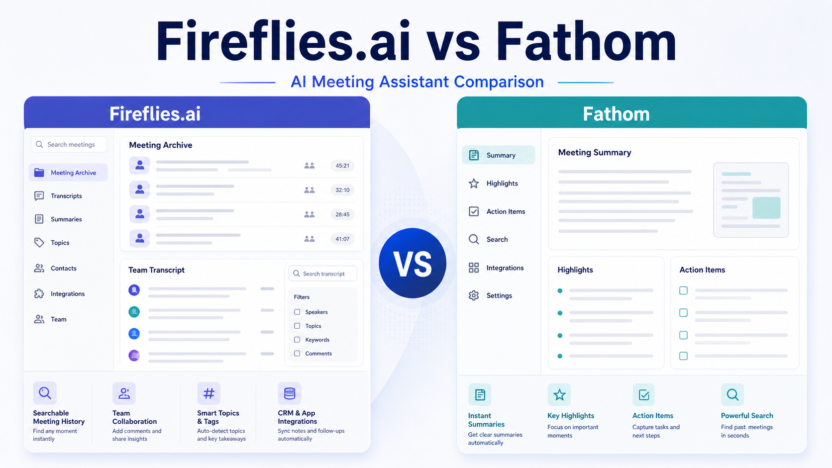
Choose Fireflies.ai if your team wants stronger meeting capture, searchable notes, and a broader assistant-style workflow across many calls. Choose Fathom if you want a very simple meeting assistant with a strong free-first experience and fast post-call summaries. Both tools can help a small business stop losing meeting decisions, but they feel different in daily use.
The practical decision is simple: Fireflies.ai is better for teams that want more structured meeting intelligence and collaboration options. Fathom is better for individuals and small teams that want a lightweight assistant with less buying friction.
Best For
- Teams comparing meeting assistants
- Sales and customer success teams
- Founders who need searchable call records
Not Best For
- Teams that need full CRM replacement
- Users who never record meetings
- Businesses with unresolved recording-consent policies
Feature Comparison
| Category | Fireflies.ai | Fathom |
|---|---|---|
| Best fit | Team meeting capture and searchable library | Simple meeting summaries and lightweight adoption |
| Pricing style | Free and paid team tiers | Free plan plus Premium and Team options |
| Workflow depth | Broader meeting intelligence | Fast capture and recap |
| Team use | Good for shared meeting libraries | Good for individuals and smaller teams |
Real Use Cases
For a sales team, either tool can record discovery calls, summarize objections, and capture next steps. For a customer success team, they can preserve onboarding decisions, billing questions, renewal risks, and product feedback. For internal teams, they can summarize planning meetings, standups, and project reviews.
In a typical small business workflow, the meeting owner reviews the summary after the call, edits anything important, moves tasks into the CRM or project tool, and shares the recap with the team. That review step matters. AI meeting assistants are useful drafting and capture tools, not final decision systems.
Pricing
Pricing last checked on July 9, 2026. Official sources: Fireflies.ai pricing and Fathom pricing.
Fireflies publishes Free, Pro, Business, and Enterprise plan information. Fathom publishes a Free plan plus paid Premium and Team options. Fathom's official pricing page lists Free at $0, Premium at $20 per user/month with an annual-discount price shown, and Team at $19 per user/month with a lower annual-discount price shown. Fireflies' official pricing page lists Enterprise at $39 per seat/month billed annually and presents lower team tiers for smaller teams.
Pros and Cons
| Tool | Pros | Cons |
|---|---|---|
| Fireflies.ai | Strong meeting library, team summaries, searchable calls | May be more than a solo user needs |
| Fathom | Simple, low-friction, strong free-first appeal | Less specialized for deeper team analytics |
Alternatives
| Tool | Best For | Main Strength | Limitation |
|---|---|---|---|
| Otter.ai | Transcription-first teams | Searchable notes | Not revenue intelligence |
| Avoma | Sales and CS meetings | Coaching and conversation intelligence | More setup |
| Gong | Revenue teams | Deep sales intelligence | Quote-based pricing |
For more context, read Fireflies.ai Review, Fathom Review, and Otter.ai vs Fireflies.ai.
Final Recommendation
Use Fireflies.ai if your team wants a fuller meeting intelligence workspace with searchable notes, collaboration, and broader team workflows. Use Fathom if you want a simpler assistant that is easy to adopt and attractive for individuals or small teams. If you are still unsure, decide based on where your notes need to go after the meeting: CRM and team processes favor Fireflies, while simple personal and team recaps favor Fathom.
FAQs
Is Fireflies.ai better than Fathom?
Fireflies.ai is often better for teams that want searchable meeting notes and collaboration features. Fathom is often better for lightweight meeting summaries.
Is Fathom really free?
Fathom's official pricing page lists a Free plan at $0 for individuals.
Which tool is better for sales calls?
Fireflies.ai may fit sales teams that want more team-level meeting intelligence. Fathom can still work well for individual reps.
Which tool is easier to start with?
Fathom is usually the simpler starting point for individual users.
Can either tool replace a CRM?
No. They can capture notes and next steps, but the CRM should remain the system of record.
Do both tools support meeting summaries?
Yes. Both focus heavily on AI meeting summaries and transcripts.
Which one is better for customer success?
Fireflies.ai may fit larger success teams better, while Fathom can work for lean teams.
What should buyers compare?
Compare recording limits, summaries, team controls, exports, integrations, and pricing fit.
Are AI meeting summaries always accurate?
No. Important summaries should be reviewed before they are shared or entered into a system of record.
What is the best alternative?
Otter.ai is a strong alternative for teams that want another transcription-first meeting notes option.
Practical Buying Advice for Small Teams
The safest way to choose software for Fireflies.ai vs Fathom is to connect the buying decision to one repeatable workflow. Many small businesses buy AI tools because the demo looks impressive, then struggle to make the tool part of daily work. Before subscribing, write down who will use it, when they will use it, what information should be captured, and where the output should go after the AI creates it.
For example, a sales team should decide whether call notes become CRM updates, Slack alerts, email follow-up drafts, coaching notes, or all of those. A customer success team should decide whether the output becomes an onboarding recap, a support escalation note, a renewal-risk note, or product feedback. A founder should decide whether the tool is mainly for personal memory, team visibility, or customer communication.
This matters because the best tool on paper is not always the best tool for your operating rhythm. A heavy platform can be the right choice when managers actively review calls and coach reps. A lighter meeting assistant can be the better choice when the team mainly needs searchable notes and fewer missed follow-ups. The practical question is not "which tool has the most features?" The better question is "which tool will my team actually use every week?"
Setup Checklist
| Setup Area | What To Decide | Why It Matters |
|---|---|---|
| Ownership | Name the person responsible for reviewing AI output | Unreviewed summaries can create confusion |
| Source | Choose which meetings, forms, or calls enter the workflow | Too much capture creates noise |
| Destination | Decide whether notes go to CRM, email, Slack, docs, or project tools | AI output has value only when it reaches the next workflow |
| Review | Set a rule for checking client-facing summaries | Important details should not be sent blindly |
| Privacy | Confirm consent, retention, and access rules | Meeting and lead data can be sensitive |
What To Look For During a Trial
During a trial or first month, focus on a few practical signs. Does the tool save time after calls or create another inbox to manage? Are summaries specific enough to help with follow-up? Can the team find past conversations quickly? Does the integration with calendar, CRM, email, or Slack feel natural? Are admin settings clear enough for the business to control access?
Do not judge the tool only by one perfect demo call. Use normal messy meetings, different speakers, different accents, internal calls, customer calls, and short check-ins. The output should be useful across ordinary work, not only polished examples. If the tool frequently creates vague summaries, misses action items, or requires long cleanup, the team may not keep using it.
Decision Framework
| Choose This Path | When It Fits | Tradeoff |
|---|---|---|
| Lightweight assistant | You need fast notes and summaries | Less coaching depth |
| Team meeting intelligence | Several people need shared call records | More setup and admin decisions |
| Revenue intelligence | Managers coach reps and inspect pipeline risk | Higher cost and process commitment |
| CRM-native AI | Your CRM is the center of daily work | Best value depends on CRM adoption |
Data Quality and Review Rules
AI output should be treated as a draft. For meeting notes, the meeting owner should review decisions, numbers, commitments, names, dates, and customer-sensitive details. For lead qualification, a human should review high-value leads, uncertain leads, and any rejection path. For pricing or plan comparisons, use official vendor pages as the source of truth and avoid building a workflow that depends on guessed limits.
Teams should also decide what not to automate. Sensitive legal conversations, HR issues, medical information, financial disputes, or private customer escalations may require stricter review and retention rules. A useful AI workflow is not just fast. It is clear, reviewable, and respectful of the information it handles.
How This Fits With Existing DailyTimesPro Guides
If your goal is follow-up quality, pair this article with AI Sales Follow-Up Workflow. If your goal is CRM organization, read Best AI CRM Tools for Small Business. If your goal is meeting capture, compare this with Best AI Note Taking Apps for Client Meetings and Fireflies.ai Review.
Bottom Line for Buyers
Fireflies.ai vs Fathom: Which AI Meeting Assistant Should You Choose? should be evaluated as a workflow decision, not just a software feature list. The right choice should reduce manual work, make follow-up more reliable, and give the team clearer records without creating a confusing new process. Start small, measure whether the tool improves a real workflow, and upgrade only when the team has proven it will use the extra features.
How To Choose Between the Two
If both tools look close, run the same three meetings through each: a sales call, an internal planning call, and a customer follow-up. Compare the summary quality, action items, search experience, and how easy it is to share the output. The winner is the tool that creates the least cleanup while fitting the team's existing systems.
Also consider who owns the workflow. Individual users often prefer the tool that feels fastest. Managers often prefer the tool that gives better team visibility. Operations teams often prefer the tool with clearer admin controls and integrations. The best choice is the one that satisfies the person responsible for making the process work every week.
Additional Evaluation Notes
For a final buying pass, review three areas: output quality, workflow fit, and operational risk. Output quality means the transcript, summary, score, or recommendation is specific enough to support a real action. Workflow fit means the result can move into the place your team already works, such as a CRM record, project task, shared note, Slack thread, or client email draft. Operational risk means the team understands consent, access, retention, and review requirements before relying on the tool.
Small teams should also compare the cost of the tool with the cost of the manual work it replaces. If the software saves ten minutes after one meeting per week, it may not be a priority. If it saves time after twenty client calls, improves response speed, and reduces missed follow-ups, it can be much easier to justify. The value is usually highest when the tool becomes part of a repeatable workflow, not when it is used occasionally by one person.
Before making a long commitment, assign one owner to measure results for thirty days. Track whether follow-up is faster, whether CRM notes are cleaner, whether managers can find coaching moments, whether customer questions are easier to revisit, and whether team members trust the output. Keep the measurement practical. You need a clear answer to this question: did the tool make the work easier and more reliable?
Finally, keep the first version simple. Use one source, one destination, one review rule, and one success metric. Once the workflow is dependable, expand it to more teams or more tools. This prevents the common problem where AI software creates excitement during setup but fails to become part of everyday operations.
Example Decision Scenarios
Scenario one: a two-person agency needs cleaner notes after client calls. The best first step is usually a lightweight meeting assistant, because the immediate pain is remembering decisions and sending follow-up. Scenario two: a ten-person sales team has many discovery calls and managers need to coach reps. That team should compare sales coaching or meeting intelligence tools more seriously, because the value comes from patterns across calls. Scenario three: a founder receives inbound leads from several forms and inboxes. The best first step may be a lead qualification workflow connected to a CRM, not a meeting recorder.
These scenarios show why context matters. The same AI category can solve different problems, but only if the buyer names the workflow first. Choose the tool that fits the workflow you can maintain this month, then expand after the team has proof that the process works.