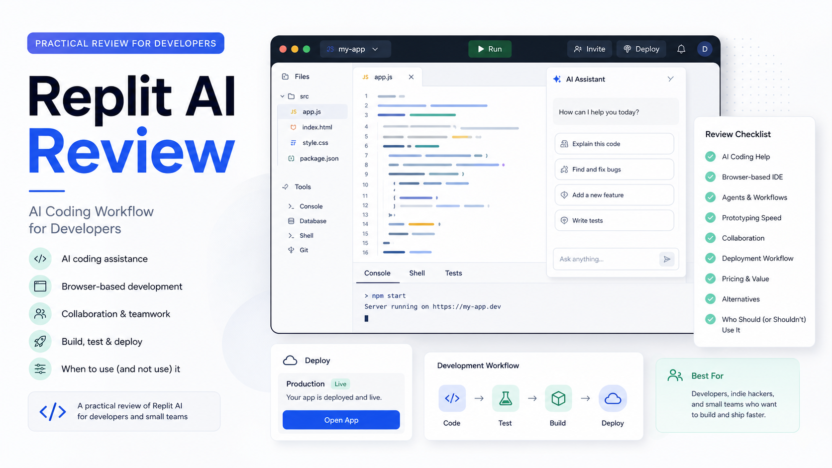
Replit AI is worth considering if you want a browser-based coding environment with AI agents, collaboration, databases, deployments, and fast prototyping in one place. It is not the right fit for every professional developer, especially teams already deep in local IDEs, custom infrastructure, and strict enterprise engineering workflows.
Quick Verdict
Replit AI is best for prototyping, learning, small apps, internal tools, and founders who want to move quickly from idea to working project. Developers should treat it as a coding workflow platform, not a guarantee that AI-generated code is production-ready.
Best For
- Founders and small teams building prototypes.
- Developers who want a browser-based workspace.
- Students and builders learning full-stack development.
- Teams that want quick collaboration and publishing.
- Non-engineering operators building simple internal apps with developer review.
Not Best For
- Teams that require local-first development and custom infrastructure.
- Regulated engineering teams with complex compliance needs.
- Developers who want AI to replace code review.
- Large codebases that already depend on mature local tooling.
Our Evaluation Criteria
This Replit AI review evaluates setup speed, coding workflow, AI agent usefulness, collaboration, deployment, pricing clarity, governance fit, limitations, alternatives, and value for money. This review is based on official Replit product and pricing information, not hands-on testing.
What Replit AI Does
Replit combines development workspace, AI assistance, databases, deployment, collaboration, and publishing. Its official pricing page describes Starter, Replit Core, Replit Pro, and Enterprise. It also notes that Replit Agent is powered by large language models and may occasionally make mistakes.
That warning matters. Replit AI can speed up building, but human review remains essential. A useful workflow is to let the agent draft or modify code, then review the architecture, security, dependencies, data handling, tests, and deployment behavior before relying on it.
Pricing
Replit's official pricing page lists Starter as free. Replit Core is shown at $20 per month when billed annually, with $25 of monthly credits, up to 5 collaborators, up to 2 agents in parallel, unlimited workspaces, and Replit AI integrations. Replit Pro is shown at $95 per month when billed annually, with $100 monthly credits, up to 15 collaborators, up to 50 viewers, up to 10 agents in parallel, access to powerful models, database rollbacks for up to 28 days, and premium support. Enterprise is custom.
Pricing last checked on June 24, 2026.
Key Features
Browser-Based Development
Replit is useful when the team wants to avoid local setup. A user can start projects in the browser, invite collaborators, and publish apps without building a custom environment first. This is helpful for workshops, prototypes, quick demos, and internal tools.
AI Agent Workflow
The Agent workflow can help create or modify app code from prompts. The practical value is speed, but the risk is over-trusting generated changes. Developers should review diffs, dependencies, permissions, and security-sensitive logic.
Collaboration
Core and Pro plans include collaborator limits, which makes Replit more useful for pair building, client demos, team learning, and quick internal app experiments.
Publishing And Deployment
Replit includes publishing features, which can reduce friction for simple apps. Teams should still document environment variables, domain settings, database behavior, and rollback plans.
Real Use Cases
Startup MVPs
A founder could use Replit AI to sketch a basic app, landing page, or admin tool before hiring a full development team. A developer should still review the project before customer data is involved.
Internal Tools
An operations team could prototype a small form, reporting helper, or automation dashboard. Replit can be useful when speed matters more than long-term architecture at the first stage.
Education And Learning
Students and new developers can use Replit because setup friction is low. AI help can explain code and suggest changes, but learning still requires reading and understanding the output.
Client Demos
Agencies or consultants can build quick demos for stakeholders. This is useful for discovery, but production handoff needs documentation and review.
Alternatives
| Tool | Best For | Main Strength | Limitation |
|---|---|---|---|
| Replit | Browser-based AI app building | Workspace, agent, collaboration, publishing | Generated code still needs review |
| Cursor | Local AI code editor workflow | Strong developer IDE fit | Requires local setup |
| GitHub Copilot | AI assistance inside existing IDEs | Fits professional developer workflows | Less all-in-one than Replit |
| Lovable | No-code app prototypes | Fast product idea creation | Less traditional developer control |
| Bolt | Browser-based app generation | Fast project scaffolding | Production readiness needs review |
Pros
- Fast setup for prototypes and small apps.
- Free Starter plan exists for exploration.
- Core and Pro include monthly credits and collaboration.
- Browser workflow lowers setup friction.
- Publishing path is useful for demos and internal tools.
Cons
- AI output can be wrong and must be reviewed.
- Pro pricing may be high for casual builders.
- Complex engineering teams may prefer local IDEs and custom pipelines.
- Credit usage needs monitoring.
- Enterprise needs custom evaluation.
Common Mistakes
The biggest mistake is treating an AI-built prototype as production-ready. Teams should still review authentication, database rules, dependency safety, API keys, input validation, logging, backups, and deployment behavior. The second mistake is choosing Replit only because it is fast. Speed is valuable, but long-term maintainability matters.
Final Recommendation
Choose Replit AI if your main job is rapid prototyping, learning, demos, or simple internal apps. Choose Cursor, GitHub Copilot, or a local development workflow if your team already has mature engineering practices and wants AI inside that process. Replit is strongest when the cost of setup is the main blocker.
For related coverage, see our Cursor alternatives guide and Replit vs GitHub Copilot comparison.
FAQs
Is Replit AI good for beginners?
Yes, Replit can be useful for beginners because it removes local setup friction and provides a browser-based environment. Beginners should still learn what the generated code does.
Can Replit AI build production apps?
It can help build apps, but production readiness depends on code review, security, testing, deployment setup, data handling, and maintainability.
How much does Replit cost?
Replit's official pricing page lists Starter as free, Core at $20 per month billed annually, Pro at $95 per month billed annually, and Enterprise as custom. Pricing last checked on June 24, 2026.
Who should use Replit Pro?
Replit Pro is more relevant for commercial or professional builds where higher monthly credits, more collaborators, more viewers, parallel agents, database rollback, and premium support matter.
Is Replit better than Cursor?
Replit is better for browser-based building and quick publishing. Cursor is better for developers who want AI inside a local editor-style workflow.
Does Replit replace a developer?
No. It can help generate and modify code, but developers still need to review architecture, security, data handling, and deployment decisions.
What should teams review before shipping?
Review dependencies, authentication, database rules, environment variables, logs, error handling, backups, and user permissions.
Is Replit good for agencies?
It can be useful for prototypes and demos. Agencies should create a handoff process before using Replit output for client production systems.
Implementation Notes
Start with a small app that has low business risk. Ask Replit AI to create a draft, then inspect every file. Keep a change log of what the agent changed and what humans approved. This creates a healthier workflow than prompting until the app appears to work.
How Developers Should Evaluate Replit AI
Developers should evaluate Replit AI by building one small but real project. A good pilot has a database, one external API, user input, error handling, and a deployment step. This is enough to reveal whether the workflow helps or whether the team still needs local tooling.
During the pilot, review the generated code line by line. Check whether the app stores secrets safely, validates input, handles errors, uses dependencies responsibly, and keeps business logic understandable. AI-generated code can look plausible while hiding weak structure. A review habit matters more than the prompt.
Setup And Maintenance Considerations
Replit is attractive because setup is fast. That is a real advantage for learning, prototyping, and internal tools. The tradeoff is that professional teams still need conventions. Decide where documentation lives, how environment variables are managed, who reviews agent changes, and how deployed apps are monitored.
For a small team, the practical workflow is simple: create the project, prompt the agent for a small task, review the diff, run the app, fix errors, document the change, then deploy only after approval. This keeps AI in the assistant role rather than letting it silently become the engineer of record.
Security And Data Notes
Do not give any AI coding tool production credentials, private customer data, or sensitive internal logic unless the company has approved the workflow. Use test keys, sample data, and development environments. If the project will handle customer data, payment data, authentication, or private business records, require developer review before launch.
When Replit Is The Right Choice
Replit is most compelling when the alternative is not a mature development workflow but no working app at all. For founders, students, operators, and small teams, reducing setup friction can be valuable. It lets the team explore ideas quickly and learn what needs to be built properly later.
For engineering-heavy teams, Replit may still be useful for demos, prototypes, or education, but not necessarily as the main production workflow. The decision should be based on project risk, team skill, review process, and maintainability.
Review Workflow For AI-Generated Code
A Replit AI workflow should include review checkpoints. First, check whether the generated app matches the requested behavior. Second, inspect security-sensitive areas such as authentication, forms, database access, file uploads, API calls, and environment variables. Third, review dependencies and generated configuration. Fourth, test the app with normal and edge-case inputs.
This review process does not need to be complicated for prototypes, but it should exist. A small team can use a simple checklist: what changed, why it changed, how it was tested, what risk remains, and who approved it. That checklist prevents AI coding from becoming a black box.
Team Fit
Replit fits teams that value speed, shared access, and low setup friction. It is especially useful when a non-developer founder wants to work with a developer, when a student needs a learning environment, or when a small team needs a quick internal tool. It fits less well when the company already has mature repositories, CI/CD, infrastructure, security review, and local development standards.
Value For Money
The paid plan decision should be based on how often the team uses credits, how many collaborators need access, and whether parallel agents or higher plan limits save real time. A casual builder may not need a paid plan. A team using Replit as a serious prototyping environment may justify the spend if it replaces setup work and shortens the path to a useful demo.
Final Buying Checklist
Before paying, build one real but low-risk app. Confirm that the team understands credit use, collaboration limits, deployment process, database behavior, and review needs. If the tool makes the project faster while keeping code understandable, it is a good fit. If it creates code the team cannot maintain, choose a more conventional developer workflow.