Claude is a strong AI assistant, but it is not the only reasonable choice for business teams. The best Claude alternative depends on whether your team needs writing, research, spreadsheet work, Microsoft 365 integration, Google Workspace support, web answers, coding, admin controls, or predictable team pricing.
Quick Answer
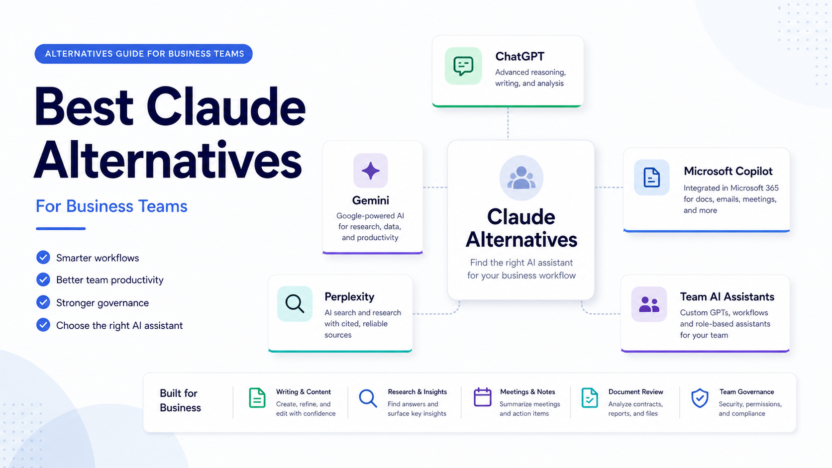
ChatGPT Business is the strongest all-purpose Claude alternative for many teams. Microsoft Copilot is best when the company already runs on Microsoft 365. Gemini is the natural fit for Google Workspace-heavy teams. Perplexity is strongest for research workflows. NotebookLM is useful for document-grounded research, while Replit or Cursor fit coding-focused teams better than general assistants.
Best For
- Teams comparing business AI assistants.
- Small companies choosing between ChatGPT, Gemini, Copilot, Perplexity, and Claude.
- Operators who need writing, research, and document workflows.
- Managers looking for team controls and predictable collaboration.
Not Best For
- Users who only need a free casual chatbot.
- Teams that have not defined approved AI use cases.
- Companies that need legal, compliance, or security review before AI rollout.
- Businesses expecting one assistant to solve every workflow.
Evaluation Criteria
The alternatives are evaluated by workflow fit, pricing clarity, business controls, research quality, document handling, workspace integration, ease of adoption, limitations, and value for money. This article is based on official product and pricing information, not hands-on testing.
Alternatives Table
| Alternative | Best For | Main Strength | Limitation |
|---|---|---|---|
| ChatGPT Business | Broad team AI workspace | Writing, analysis, search, apps, admin controls | Not always the most source-focused research tool |
| Microsoft Copilot | Microsoft 365 teams | Works inside Microsoft ecosystem | Best value depends on existing Microsoft setup |
| Gemini | Google Workspace teams | Google ecosystem fit and Gemini app features | Plan availability and features vary by account and region |
| Perplexity | Research and answer workflows | Source-backed search style | Less of a full internal workspace |
| NotebookLM | Document-grounded research | Source-focused notebook workflows | Narrower than general assistants |
| Cursor or Replit | Coding teams | Developer workflow support | Not a general business assistant |
Claude Pricing Context
Claude lists individual, Team & Enterprise, and API pricing paths. Its official pricing page lists Team standard seats at $20 per seat/month billed annually and $25 billed monthly, premium seats at $100 per seat/month billed annually and $125 billed monthly, and Enterprise with seat price plus usage at API rates. Pricing last checked on June 24, 2026.
This matters because some teams choose alternatives not because Claude is weak, but because their usage, admin, or workspace needs fit another ecosystem better.
Alternative Overviews
ChatGPT Business
ChatGPT Business is a strong Claude alternative for teams that need one flexible workspace for writing, data analysis, images, search, projects, shared GPTs, admin controls, SAML SSO, domain verification, and workspace features. It is often the best first comparison point because it covers many business use cases.
Microsoft Copilot
Microsoft Copilot is most relevant when the team works in Word, Excel, PowerPoint, Outlook, Teams, SharePoint, and Microsoft security controls. The main value is integration with the Microsoft workspace, not only chatbot quality.
Gemini
Gemini is the obvious option for teams already using Google Workspace. Google's official subscription page describes Google AI Pro and Ultra benefits and mentions Gemini in Gmail and Google Docs, storage, Deep Research, and model access. Team buyers should check the plan available for their account type and region.
Perplexity
Perplexity is useful when the job is research. It is not just a writing assistant; it is better framed as a research and answer workflow where the user checks sources, compares answers, and turns findings into briefs.
NotebookLM
NotebookLM is helpful when the team needs to work from specific documents, notes, sources, or internal materials. It is less of a general business assistant and more of a source-grounded research workspace.
Real Use Cases
Marketing And Content
A marketing team might use ChatGPT Business or Gemini for campaign drafts, summaries, internal briefs, and content repurposing. Human editors still need to check claims, positioning, and brand fit.
Research And Strategy
Perplexity and NotebookLM are better when research quality and source review matter. A strategy team could use them to compare vendor pages, summarize documents, or prepare a briefing note.
Microsoft Or Google Workflows
If the company already lives in Microsoft 365, Copilot may reduce context switching. If the company is Google Workspace-heavy, Gemini may be more natural. The best assistant is often the one closest to where the work already happens.
Engineering Work
Coding teams may be better served by Cursor, Replit, or GitHub Copilot than by Claude alternatives built for general business users.
Pros And Cons Of Switching From Claude
Pros
- Better fit for specific ecosystems.
- More source-focused options for research.
- Dedicated coding tools for developer teams.
- Different team pricing and admin models.
- Broader choice for departments with different workflows.
Cons
- Switching tools can fragment knowledge and workflows.
- Employees may need new training and policies.
- Feature availability differs by plan, region, and account type.
- One tool rarely wins every use case.
Final Recommendation
Choose ChatGPT Business if your team wants a broad AI workspace. Choose Microsoft Copilot if Microsoft 365 integration matters most. Choose Gemini if Google Workspace is central. Choose Perplexity or NotebookLM for research-heavy work. Choose Replit, Cursor, or Copilot-style developer tools for engineering. Do not replace Claude unless the alternative clearly fits a workflow Claude does not serve well enough.
For related context, see our ChatGPT Business vs Claude Team comparison and Claude pricing guide.
FAQs
What is the best Claude alternative for business teams?
ChatGPT Business is the strongest broad alternative for many teams. Microsoft Copilot, Gemini, Perplexity, and NotebookLM can be better depending on the workflow.
Is ChatGPT Business better than Claude?
It depends on the job. ChatGPT Business is broad and workspace-oriented. Claude remains strong for writing and analysis. Compare by use case, admin needs, and team workflow.
Which Claude alternative is best for research?
Perplexity and NotebookLM are strong research-focused options. Perplexity is useful for source-backed web research, while NotebookLM is useful for working from selected documents.
Which alternative is best for Microsoft teams?
Microsoft Copilot is the most natural fit for teams already using Microsoft 365 heavily.
Which alternative is best for Google Workspace?
Gemini is the natural fit for Google Workspace teams because it connects to Google's ecosystem and AI subscription path.
Should a business use more than one AI assistant?
Some teams should. A company may use one assistant for writing, another for research, and a different tool for coding. The key is governance and clear approved use cases.
Is Claude still worth using?
Yes. Claude can still be a strong choice for writing, analysis, and team work. Alternatives make sense when another product fits the team's ecosystem better.
What should teams compare before switching?
Compare pricing, admin controls, data policies, workspace integration, research quality, document workflow, and the departments that will actually use the tool.
Implementation Notes
Run a two-week pilot with two or three departments. Give each team the same approved tasks: summarize a document, draft an email, prepare a brief, analyze a spreadsheet, and research a vendor. Compare usefulness, review time, errors, and policy fit. Do not switch based on one impressive demo.
How To Build An AI Assistant Stack
Many business teams do not need one winner. They need a controlled assistant stack. A marketing team may use ChatGPT Business for drafting and campaign planning, Perplexity for research, NotebookLM for document review, and Microsoft Copilot or Gemini for work inside existing office suites. The important part is to define which tool is approved for which job.
A useful policy can be simple. Define public research, internal writing, spreadsheet analysis, customer data, legal content, code, and confidential strategy as separate use cases. Then decide which assistants are approved for each category. This prevents employees from pasting sensitive material into whichever tool happens to be open.
Evaluation Questions For Buyers
Before switching from Claude, ask what problem the team is trying to solve. Is the issue pricing, admin control, research quality, document context, ecosystem integration, or user adoption? If the issue is unclear, switching tools may only create more confusion.
For each candidate, evaluate data policy, admin controls, user management, file handling, source support, workspace integration, mobile access, and export workflow. Also ask whether the tool fits the department that will use it most. Finance, marketing, engineering, support, and sales often need different AI workflows.
Common Mistakes
The first mistake is choosing an assistant based on one impressive answer. A single demo does not prove workflow fit. The second mistake is ignoring where employees already work. If the company lives in Microsoft 365, Copilot deserves a serious look. If the company lives in Google Workspace, Gemini may be more convenient. If the work is source-backed research, Perplexity and NotebookLM may matter more than broad chatbot features.
The third mistake is buying multiple tools without governance. More tools can mean more confusion unless the team has rules for data, review, and approved use cases.
Final Selection Framework
Choose by workflow first. For writing and general work, compare ChatGPT Business and Claude. For Microsoft documents and meetings, evaluate Copilot. For Google Workspace, evaluate Gemini. For research, evaluate Perplexity and NotebookLM. For coding, evaluate Replit, Cursor, and GitHub Copilot. The best Claude alternative is the tool that removes the most friction from a real business process while staying within your data and review rules.
Department-Level Recommendations
For marketing teams, compare ChatGPT Business, Claude, and Gemini with the same campaign brief. Ask each assistant to create an outline, email draft, landing page copy, and social post variations. Judge whether the output follows brand guidance and whether it reduces editing time.
For operations teams, compare spreadsheet support, document summarization, meeting notes, workflow documentation, and internal policy drafting. Microsoft Copilot may be strongest when work happens in Microsoft 365. Gemini may be strongest when the company works in Google Workspace. Perplexity and NotebookLM may be better when source review matters more than document editing.
For leadership teams, focus on governance. The best assistant is not only the one with the best answer quality. It is the one the company can manage responsibly. Review user permissions, data controls, admin settings, and whether employees understand what they can and cannot paste into the tool.
Pricing Considerations
Pricing should be compared from official sources because plan names, seat rules, usage, and enterprise terms can change. Claude's official pricing page lists team and enterprise paths. OpenAI, Google, Microsoft, and Perplexity each have their own plan logic. A side-by-side price is useful only when the plan capabilities match the same use case.
For many teams, total cost also includes training, policy work, and workflow design. A cheaper tool can become expensive if employees do not use it well. A more expensive tool can be worth it if it reduces real work across a large team.
Implementation Plan
Start with three approved use cases. For example: internal writing, research briefs, and meeting summaries. Pick two or three tools and test them with the same prompts and source materials. Review output quality, privacy fit, admin experience, and how much human editing is required. Then standardize around the tool or combination that performs best.
When To Keep Claude
Do not replace Claude just because alternatives exist. Keep Claude if the team already gets strong writing, reasoning, and analysis results from it and the admin model fits. Alternatives should solve a specific pain: ecosystem fit, source research, coding, team controls, or pricing structure.