Perplexity can be useful for research when you treat it as a source-finding and answer-checking workflow, not as a final authority. The best results come from clear questions, follow-up prompts, source review, and a habit of turning answers into structured notes.
Quick Answer
Use Perplexity by starting with a specific research question, reading the cited sources, asking follow-up questions, comparing claims, saving useful notes, and turning the final answer into a brief. Do not copy the answer blindly. Check the underlying sources before using the research in business, SEO, academic, or customer-facing work.
Best For
- Small business research.
- Content briefs and topic exploration.
- Vendor comparison prep.
- Market and competitor research.
- Summarizing public-source information.
- Learning a topic before deeper verification.
Not Best For
- Private or confidential data research without an approved policy.
- Legal, medical, financial, or compliance decisions without expert review.
- Publishing source-backed claims without opening the sources.
- Replacing original expert judgment.
Research Workflow
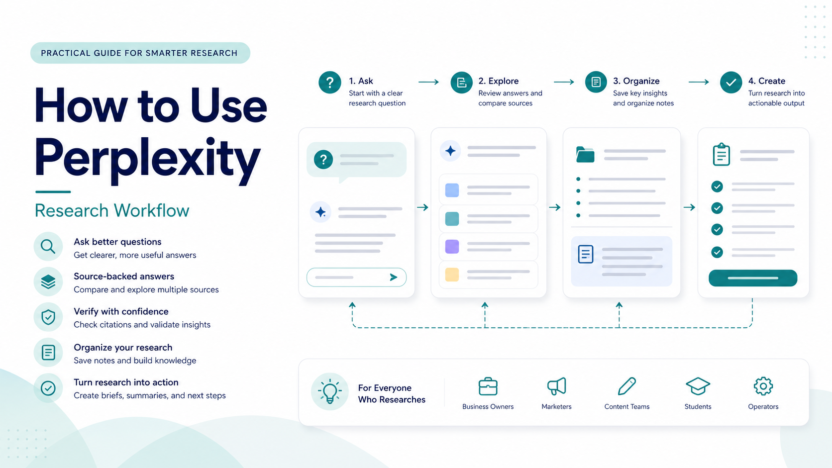
1. Start With A Specific Question
Ask a narrow question. Instead of asking, "Tell me about AI tools," ask, "What are the main differences between AI research assistants and AI writing assistants for a small marketing team?" A narrow question gives the answer engine a better target.
2. Check The Sources
Perplexity-style research is valuable only when the sources are reviewed. Open the source pages, check dates, confirm the source is relevant, and look for official pages when the claim involves pricing, features, product limits, or company facts.
3. Ask Follow-Up Questions
Good research is iterative. Ask what changed recently, what limitations matter, what the strongest counterargument is, and which sources disagree. Follow-up questions are often where the useful insight appears.
4. Turn Answers Into Notes
Do not leave research as a chat thread. Convert it into a brief with sections for summary, verified facts, open questions, sources, decisions, and next actions.
5. Verify High-Risk Claims
Pricing, plan limits, integrations, security features, legal requirements, and product availability should be checked from official sources. If a claim matters to a buying decision, verify it directly.
Practical Use Cases
Content Research
A content team could use Perplexity to collect background sources, compare competing definitions, find official product pages, and shape an outline. The writer should still verify facts before publishing.
Vendor Research
A founder comparing software vendors could ask for differences, pricing pages, common use cases, and questions to ask sales. The final vendor decision should come from official pages and the team's requirements.
Competitor Research
Marketing teams can use Perplexity to gather public competitor positioning, product pages, pricing pages, help docs, and launch posts. Avoid turning weak snippets into claims.
Internal Briefs
An operations lead could use Perplexity to prepare a short brief for a team meeting. The brief should separate verified facts from assumptions and open questions.
Prompt Examples
Use prompts like these:
- "Find official sources that explain the difference between [tool A] and [tool B]."
- "Summarize this topic for a small business owner and list the claims I should verify."
- "What are the strongest reasons not to choose this tool?"
- "Create a research brief with source links, open questions, and decision criteria."
- "Compare these three sources and tell me where they disagree."
These prompts are examples of workflow style, not proof of testing results.
Common Mistakes
The first mistake is trusting a polished answer without reading the source. The second is using old or third-party pages for current pricing. The third is asking broad questions and expecting expert output. The fourth is publishing claims without checking whether the source actually supports them.
How To Use Perplexity With Other Tools
Perplexity can support ChatGPT, Claude, Google Docs, Notion, spreadsheets, and SEO tools. A practical workflow is to research in Perplexity, organize notes in a document, draft with a writing assistant, then verify final claims against official sources.
Privacy And Safety
Do not paste private customer data, contracts, credentials, financial records, or confidential strategy into any AI research tool unless your company has approved that use. Use anonymized prompts and public-source research when possible.
Final Recommendation
Use Perplexity when source discovery and quick research matter. Do not use it as a final fact checker. The best workflow is question, answer, source review, follow-up, notes, verification, and decision.
For related research coverage, see our NotebookLM review and ChatGPT vs Perplexity comparison.
FAQs
Is Perplexity good for research?
Yes, it can be useful for research because it encourages source-backed answers. The user still needs to open and verify sources before relying on important claims.
Can Perplexity replace Google Search?
Not completely. It can speed up research, but traditional search is still useful for checking original pages, official sources, and alternate viewpoints.
How should I start a Perplexity research session?
Start with a narrow question, ask for source-backed information, then review the sources and ask follow-up questions.
Can I use Perplexity for business research?
Yes, for public-source research, vendor comparison, content briefs, and market exploration. Avoid sharing confidential information without an approved policy.
Should I use Perplexity for pricing research?
You can use it to find official pricing pages, but pricing facts should be taken from official pricing pages directly.
How do I avoid bad research?
Use specific questions, check source dates, prefer official sources, compare multiple sources, and separate verified facts from assumptions.
Can Perplexity help with SEO content?
It can help gather sources and understand a topic. SEO writing still needs keyword research, original structure, internal links, and editorial review.
What should the final research output look like?
A useful output should include summary, key facts, source links, open questions, risks, and next steps.
Implementation Checklist
Create a reusable research template with these sections: question, context, answer summary, official sources, supporting sources, conflicting claims, open questions, final decision, and next action. This keeps research from becoming a messy chat history.
A Practical Research Template
Use a repeatable template for every research session. Start with the research question. Add the business context. List the sources found. Separate confirmed facts from uncertain claims. Add conflicts between sources. End with a short recommendation and the next action.
This template matters because AI research can feel complete even when it is only a starting point. A structured note forces the researcher to ask whether the evidence is strong enough for the decision. It also makes the work easier for a manager, editor, or client to review.
Example Workflow For A Software Buying Decision
A small business comparing help desk tools could start by asking Perplexity for official pages, pricing pages, and feature documentation. The team would then open those sources directly, list plan limits, identify missing information, and create a comparison table. After that, the team could ask follow-up questions about common limitations or alternatives, but the final pricing and feature claims should still come from official pages.
This workflow avoids a common problem: treating an answer summary as proof. The summary is useful because it points the user toward sources and frames the question. The sources do the real verification work.
Example Workflow For Content Research
A content team could ask Perplexity to identify major subtopics, official sources, and common questions around a software category. The editor can then build an outline, decide which claims need verification, and add original decision guidance. The final article should not simply repeat a Perplexity answer. It should use research as input and add editorial judgment.
How To Review Sources
Open the cited pages. Check whether the source is official, recent, and relevant. For pricing, use official pricing pages. For features, use official product pages or documentation. For sentiment, use review platforms or communities only as labeled user sentiment, not as official fact.
When To Stop Researching
Stop when the decision has enough evidence, not when the chat has many answers. A good stopping point is when you have official sources for important facts, enough context for tradeoffs, a clear list of open questions, and a next step. More answers are not always better. Better evidence is better.
Building Better Questions
The quality of the question determines the quality of the research path. Good questions include context, audience, scope, and output format. A weak prompt asks for a broad answer. A stronger prompt says what decision needs to be made, what sources matter, what timeframe matters, and what format the answer should use.
For example, a vague question is, "What are the best AI tools?" A better question is, "Compare official pricing and workflow fit for three AI research tools for a small content team preparing software review articles." The second question gives the research assistant a real task.
Turning Research Into Decisions
After collecting answers, convert them into a decision memo. Include the question, the top findings, the source list, risks, open questions, and a recommendation. This final step is where research becomes useful. Without it, the team may only have a long chat history.
For business use, a decision memo should be short enough to read quickly. The goal is not to show every source. The goal is to present enough evidence for the next action.
Quality Control Checklist
Before using Perplexity research, ask five questions. Did I open the sources? Are the sources official or trustworthy? Are any claims outdated? Are pricing or product claims verified from official pages? Did I separate facts from assumptions? If the answer is no, the research is not ready.
Common Team Workflow
A good team workflow assigns roles. One person asks the research question. One person reviews sources. One person turns the notes into a brief. One person approves the final decision. Small teams can combine roles, but the responsibilities should still be clear.
Final Practical Advice
Use Perplexity to accelerate finding and organizing information. Use human review to decide what is true, relevant, and safe to publish or act on. That balance is what makes AI research useful instead of risky.