Cursor is one of the best-known AI code editors, but it is not the only serious option for developers. Some teams want deeper GitHub integration, some need browser-based app building, some want stronger privacy controls, and some prefer open-source customization instead of moving fully into a new editor.
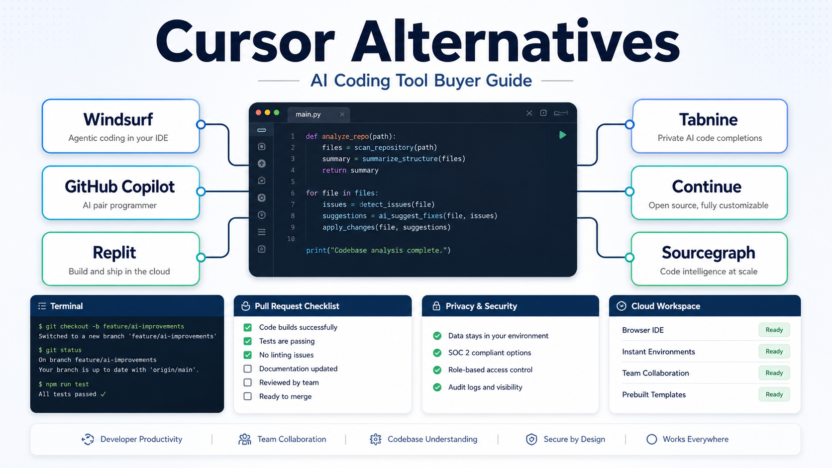
This guide compares practical Cursor alternatives for developers, small engineering teams, technical founders, and agencies. The tools covered are Windsurf, GitHub Copilot, Replit, Tabnine, Continue, and Sourcegraph Cody.
Quick Answer
The best Cursor alternative depends on why Cursor is not the right fit. Choose Windsurf if you want an AI-native coding environment with agentic workflows. Choose GitHub Copilot if your team already works heavily inside GitHub and wants broad IDE support. Choose Replit if you want a browser-based coding workspace for building, hosting, and collaborating. Choose Tabnine if privacy, compliance, and controlled AI code assistance matter most. Choose Continue if you want an open-source AI coding assistant that can connect to different models and workflows. Choose Sourcegraph Cody if your team needs AI assistance connected to large codebases and code search context.
Do not choose an alternative only because it looks cheaper. The real decision is whether the tool fits your editor, repository workflow, security requirements, review process, and deployment habits.
Cursor Alternatives Comparison
| Alternative | Best For | Main Strength | Pricing Snapshot | Main Limitation |
|---|---|---|---|---|
| Windsurf | Developers who want an AI-native editor experience | Agentic coding and editor-first workflows | Official plans include free access and paid plans such as Pro and higher tiers | Requires adopting another AI coding environment |
| GitHub Copilot | Teams already using GitHub and mainstream IDEs | Deep GitHub ecosystem fit and broad IDE availability | Copilot Pro is listed at $10/month; Business at $19/user/month; Enterprise at $39/user/month | Best value is strongest when your workflow already lives in GitHub |
| Replit | Founders, students, and teams building in the browser | Cloud development, collaboration, app creation, and deployment | Replit Core is listed at $25/month or $20/month billed annually | Not every professional team wants browser-first development |
| Tabnine | Teams with privacy and compliance requirements | Private, personalized AI code assistant positioning | Official pricing includes Dev and Enterprise options with per-user plans | May be less appealing if you want a full AI-native editor |
| Continue | Developers who want open-source customization | Open-source assistant with flexible model and IDE workflows | Open-source project; paid/team details may vary by deployment and provider | Requires more setup discipline than a packaged SaaS workflow |
| Sourcegraph Cody | Teams with larger codebases and code search needs | Codebase context and Sourcegraph integration | Official Sourcegraph plans vary by product and team needs | Best fit is larger codebase context, not lightweight solo use |
Pricing last checked on June 21, 2026. The official pages linked below were used for the pricing and plan details in this article.
How We Evaluated These Alternatives
It is based on official product pages, official pricing pages, and source-backed product positioning available at the time of writing.
The evaluation criteria were:
- Editor fit: Does the tool work where developers already code?
- AI workflow: Does it support autocomplete, chat, agentic edits, or codebase questions?
- Team fit: Is it realistic for small teams, agencies, or larger engineering groups?
- Privacy and control: Does the product speak to private repositories, compliance, or deployment control?
- Pricing clarity: Are public prices or plan paths visible from official sources?
- Learning curve: Does adopting the tool require a major workflow change?
- Best use case: Does the tool solve a specific problem better than Cursor?
1. Windsurf
Windsurf is the closest alternative if you like the idea of an AI-native coding environment but want a different product direction from Cursor. Its official site positions it around AI coding, developer flow, and agentic software work.
In a typical small development workflow, Windsurf can be used for writing features, asking questions about the codebase, generating edits, and moving faster inside an AI-first editor. A solo founder or small app team could use it when they want the editor itself to guide more of the development process.
Windsurf is not the best choice if your team refuses to change editors or if your workflow is already standardized around an existing IDE plus GitHub Copilot. It is strongest for developers willing to adopt an AI-native coding environment.
Windsurf Pricing
Windsurf's official pricing is published through the product's current official pricing surface. Public plans and model access can change as the product evolves, so the safest buying step is to compare the current plan limits directly on the official page before switching a team.
Windsurf Pros
- Strong fit for developers who want an AI-native editor.
- Useful when agentic coding is part of the workflow.
- Good alternative for users comparing Cursor-style tools.
- Can support focused coding sessions rather than scattered plugin workflows.
- Relevant for solo developers and small teams building new software quickly.
Windsurf Cons
- Requires adopting another coding environment.
- Team rollout can be harder if developers prefer different IDEs.
- Public pricing and plan details vary by plan, model access, and team needs.
- It may overlap heavily with Cursor for users who only need basic AI autocomplete.
2. GitHub Copilot
GitHub Copilot is the safest Cursor alternative for teams already built around GitHub. It works across popular development environments and is backed by a mature developer ecosystem.
For a small engineering team, Copilot can help with code suggestions, explanations, pull request workflows, and everyday development assistance. The key advantage is that it does not require the team to adopt a completely new editor. Developers can keep their IDE and add Copilot into the workflow.
Copilot is not always the best fit if you specifically want an AI-native editor experience. It is better when your main priority is broad compatibility, GitHub integration, and predictable team adoption.
GitHub Copilot Pricing
GitHub lists Copilot Pro at $10/month or $100/year, Copilot Pro+ at $39/month or $390/year, Copilot Business at $19/user/month, and Copilot Enterprise at $39/user/month.
GitHub Copilot Pros
- Strong fit for GitHub-centered teams.
- Broad IDE availability makes adoption easier.
- Public pricing is clear on official GitHub pages.
- Business and Enterprise options support team management.
- Good option when you want AI coding help without switching editors.
GitHub Copilot Cons
- Less of a full AI-native editor than Cursor or Windsurf.
- Best value depends on how deeply your team uses GitHub.
- Developers still need code review and security checks.
- It may feel less experimental than newer agentic coding tools.
3. Replit
Replit is a different kind of Cursor alternative. It is best for developers, founders, educators, and small teams that want to build in the browser, collaborate quickly, and move from code to hosted app without a traditional local setup.
In a typical startup workflow, Replit can be useful for prototypes, internal tools, demos, learning projects, and small apps where collaboration and hosting matter as much as the coding assistant itself. It is also useful for non-traditional developers who want less setup friction.
Replit is not the best fit if your team has a complex local development environment, strict infrastructure requirements, or a mature deployment pipeline outside Replit.
Replit Pricing
Replit's official pricing page lists Starter as free, Replit Core at $25/month or $20/month billed annually, and higher team or enterprise options depending on use case.
Replit Pros
- Browser-based development reduces setup friction.
- Good for prototypes, demos, education, and collaborative building.
- Helpful when hosting and app creation are part of the workflow.
- Free and paid plans make it accessible to solo builders.
- Different enough from Cursor to be a real workflow alternative.
Replit Cons
- Browser-first coding is not right for every engineering team.
- Larger production workflows may need more infrastructure planning.
- It may not replace a preferred local IDE.
- Teams should confirm plan limits and deployment needs before committing.
4. Tabnine
Tabnine is best for teams that care about privacy, compliance, and controlled AI assistance. Its official product positioning emphasizes AI code assistance for professional development teams, with deployment and enterprise-oriented options.
A SaaS team working with private repositories could consider Tabnine when they want AI code suggestions but also need a stronger conversation around security, customization, and control. This makes it different from tools that focus mainly on flashy agentic demos.
Tabnine is not the strongest choice if you want a full AI-native editor, browser IDE, or end-to-end app-building environment. It is better as an AI assistant layer for teams that care about governance.
Tabnine Pricing
Tabnine publishes pricing and plan information on its official pricing page, including developer and enterprise-oriented options. Teams should compare the listed seat pricing, plan limits, deployment options, and enterprise terms on the linked official source.
Tabnine Pros
- Strong privacy and enterprise positioning.
- Useful for teams with compliance or repository-control concerns.
- Works as an assistant layer rather than forcing a full editor switch.
- Good fit for professional development teams.
- Useful when governance matters more than novelty.
Tabnine Cons
- May feel less like a complete AI coding environment.
- Teams focused on agentic editing may prefer Cursor, Windsurf, or Copilot.
- Enterprise-oriented value depends on your security requirements.
- Pricing and deployment fit should be checked carefully for your team.
5. Continue
Continue is best for developers who want an open-source AI coding assistant workflow. It can appeal to teams that want more control over models, extensions, prompts, and how AI coding help is wired into their environment.
In a typical developer workflow, Continue can be used for chat, code editing assistance, and model-flexible AI development inside supported editors. A technical team could use it when they want to avoid being locked into one proprietary coding assistant.
The tradeoff is setup. Open-source flexibility can be powerful, but it also requires more ownership. If your team wants a polished subscription product with less configuration, Continue may not be the fastest route.
Continue Pricing
Continue is an open-source project with official documentation and product information. Costs may depend on model provider, deployment choices, and any paid team features available through the official product path.
Continue Pros
- Open-source approach gives developers more control.
- Useful for teams that want model flexibility.
- Good fit for technical users who like configuring their workflow.
- Avoids a one-size-fits-all assistant model.
- Strong option for experimentation and internal tooling.
Continue Cons
- Requires more setup and maintenance judgment.
- Pricing depends on provider and deployment choices.
- Less plug-and-play than mainstream paid assistants.
- Non-technical teams may prefer a packaged SaaS tool.
6. Sourcegraph Cody
Sourcegraph Cody is best for teams that care about large codebase context. It is connected to Sourcegraph's broader code search and code intelligence ecosystem, which makes it more relevant for teams with complex repositories than for casual solo projects.
A growing engineering team could use Cody when developers need to understand unfamiliar code, ask codebase questions, or navigate large repositories. This is different from simply getting autocomplete suggestions in a small project.
Cody is not the first alternative for someone who only wants a lightweight coding assistant. It makes more sense when codebase scale and context are important.
Sourcegraph Cody Pricing
Sourcegraph's official product and pricing pages should be used for current Cody and Sourcegraph plan details. Pricing may depend on product configuration, users, deployment model, and team needs.
Sourcegraph Cody Pros
- Strong fit for large codebase context.
- Useful for teams that already value code search and repository understanding.
- Better for codebase questions than simple autocomplete-only workflows.
- Relevant for scaling engineering teams.
- Complements code search and knowledge workflows.
Sourcegraph Cody Cons
- May be more than a solo developer needs.
- Best value depends on Sourcegraph adoption.
- Pricing and deployment details should be reviewed for your team.
- It is not a direct clone of Cursor's editor-first workflow.
Best Cursor Alternative By Use Case
| Use Case | Best Alternative | Why |
|---|---|---|
| Staying inside GitHub and mainstream IDEs | GitHub Copilot | Broad IDE support and GitHub ecosystem fit. |
| AI-native editor alternative | Windsurf | Closest match for users who like Cursor-style coding environments. |
| Browser-based app building | Replit | Combines coding, collaboration, and hosting in the browser. |
| Privacy-focused professional teams | Tabnine | Stronger enterprise and governance positioning. |
| Open-source customization | Continue | Flexible assistant workflow for technical teams. |
| Large codebase understanding | Sourcegraph Cody | Useful when code search and repository context matter. |
Practical Team Scenarios
Solo Developer Building Side Projects
A solo developer who wants fast help in a familiar IDE should start with GitHub Copilot. If the project is browser-friendly and deployment friction matters, Replit may be better. If the developer wants to experiment with model routing and open-source tools, Continue is worth exploring.
Startup Building A New Product
A startup could choose Windsurf or Cursor-style tools when speed and agentic edits matter. It could choose Replit for prototypes and internal tools. It could choose Copilot if the team already has a standard IDE workflow and wants low-friction adoption.
Agency Working With Client Code
An agency should care about privacy, repo boundaries, and developer consistency. Tabnine, Copilot Business, and Sourcegraph Cody may be worth reviewing depending on client requirements. The agency should avoid any tool that makes it hard to control where code context goes.
Growing Engineering Team
A growing team should think beyond autocomplete. Code review, onboarding, repository search, permissions, and deployment matter. Copilot Business or Enterprise, Sourcegraph Cody, Tabnine, and Windsurf team plans may be more relevant than individual-only tools.
Pricing Notes
| Tool | Official Pricing Path | What To Check |
|---|---|---|
| Windsurf | Official Windsurf pricing page | Plan names, model access, team features, and current usage limits. |
| GitHub Copilot | Official Copilot plans page | Pro, Pro+, Business, Enterprise, model access, and organization controls. |
| Replit | Official Replit pricing page | Core, Teams, usage, deployments, and collaboration needs. |
| Tabnine | Official Tabnine pricing page | Dev, team, enterprise, privacy, and deployment details. |
| Continue | Official Continue website and docs | Open-source setup, model provider costs, and team features. |
| Sourcegraph Cody | Official Sourcegraph pricing page | Sourcegraph plan, Cody availability, deployment, users, and codebase scale. |
Pricing last checked on June 21, 2026. Pricing may vary based on plan, usage, or add-ons, so use the official links in this article for current plan details.
Which Cursor Alternative Should You Choose?
Choose GitHub Copilot if your team wants the least disruptive alternative and already works in GitHub.
Choose Windsurf if you want another AI-native editor experience and are comfortable changing coding environments.
Choose Replit if your workflow benefits from browser-based development, collaboration, and deployment in one place.
Choose Tabnine if privacy, governance, and professional team controls matter more than novelty.
Choose Continue if you want open-source flexibility and are comfortable owning more setup.
Choose Sourcegraph Cody if your team needs help understanding large repositories and codebase context.
Final Recommendation
Cursor is still a strong option, but the best alternative depends on the kind of development work you do. For most small teams, GitHub Copilot is the safest first comparison because it fits common IDE and GitHub workflows. Windsurf is the closest editor-first alternative. Replit is the most different because it changes the development environment. Tabnine and Sourcegraph Cody are stronger when team governance or codebase context matters. Continue is best when flexibility and open-source control are more important than polish.
The practical next step is simple: choose one real repository, one real feature, and one real code review. Try the alternative against that workflow. The right tool should reduce friction without weakening review quality, security habits, or developer understanding.
FAQs
What is the best Cursor alternative?
GitHub Copilot is the safest Cursor alternative for teams that want broad IDE support and GitHub integration. Windsurf is the closest AI-native editor alternative. Replit, Tabnine, Continue, and Sourcegraph Cody are better for specific workflows such as browser development, privacy, open-source customization, or large codebase context.
Is GitHub Copilot better than Cursor?
GitHub Copilot is better if your team wants AI coding help inside existing IDEs and GitHub workflows. Cursor may be better if you want an AI-native editor. The best choice depends on whether you want a plugin-style assistant or a dedicated AI coding environment.
Is Windsurf a good Cursor alternative?
Yes, Windsurf is one of the closest Cursor alternatives for developers who want an AI-native coding environment. It is worth considering if you like the idea of agentic coding but want to compare editor workflow, pricing, and team fit against Cursor.
Is Replit a Cursor alternative?
Replit can be a Cursor alternative when your goal is browser-based development, collaboration, and hosting. It is not a direct editor clone. It is better for projects where building and deploying in the cloud matters more than using a local IDE.
Which Cursor alternative is best for privacy?
Tabnine is a strong option to review when privacy, compliance, and controlled AI assistance matter. Sourcegraph Cody may also be relevant for teams with large private codebases, depending on deployment and plan requirements.
Which Cursor alternative is open source?
Continue is the main open-source option in this guide. It can be useful for developers who want control over models and assistant behavior, but it requires more setup ownership than packaged SaaS tools.
Should small teams switch away from Cursor?
Small teams should switch only if there is a clear reason: editor preference, GitHub workflow, privacy needs, browser development, open-source flexibility, or large codebase context. If Cursor already fits your workflow, switching may add unnecessary friction.
What should I test before choosing?
Test one real feature, one bug fix, and one code review. Measure whether the tool helps you understand code faster, edit safely, avoid hallucinated changes, and keep review quality high. Do not choose based only on a polished demo.