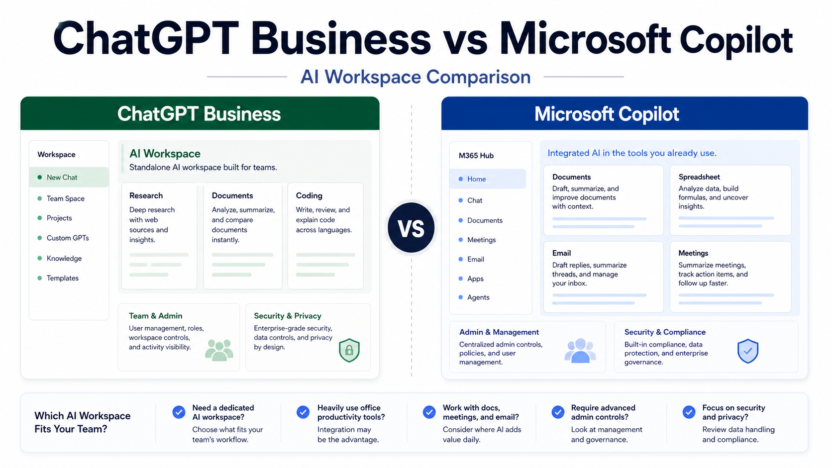
ChatGPT Business and Microsoft Copilot both promise to bring AI into company work, but they fit different environments. ChatGPT Business is a flexible OpenAI workspace. Microsoft Copilot is strongest when the company already works inside Microsoft 365.
This comparison is for small businesses, agencies, SaaS teams, and operations leaders choosing a managed AI workspace.
Quick Verdict
Choose ChatGPT Business if your team wants a broad, standalone AI workspace for writing, research, analysis, coding support, custom GPTs, projects, and cross-functional work.
Choose Microsoft Copilot if your team already lives in Word, Excel, PowerPoint, Outlook, Teams, SharePoint, and Microsoft 365 workflows.
Pricing Snapshot
OpenAI and Microsoft publish current pricing and plan requirements on their official business pricing pages. Pricing last checked on June 22, 2026. Compare seat requirements, eligible Microsoft subscriptions, admin controls, and included features before buying.
What ChatGPT Business Is Best For
ChatGPT Business is useful when a company wants a shared AI workspace that is not tied only to one office suite. Teams can use it for content planning, research, analysis, coding help, process writing, customer support drafts, and internal knowledge work.
It is especially appealing for companies using mixed tools rather than a pure Microsoft stack.
What Microsoft Copilot Is Best For
Microsoft Copilot is best when the work already lives in Microsoft 365. If employees spend most of their day in Outlook, Teams, Word, Excel, PowerPoint, and SharePoint, Copilot can meet them inside those tools.
That can reduce workflow friction because AI appears where the documents, emails, meetings, and spreadsheets already exist.
Feature Comparison
| Area | ChatGPT Business | Microsoft Copilot |
|---|---|---|
| Best environment | Mixed-tool teams | Microsoft 365 teams |
| Writing and research | Strong standalone workspace | Strong inside Microsoft apps |
| Spreadsheets | Useful for reasoning and formulas | Natural fit for Excel workflows |
| Meetings | Can summarize and draft if connected to workflow | Natural fit for Teams workflows |
| Coding support | Stronger OpenAI/Codex angle | Better for Microsoft ecosystem productivity |
| Rollout | Flexible workspace | Best with Microsoft admin stack |
Real Use Cases
Marketing Team
A marketing team could use ChatGPT Business for briefs, campaign ideas, research, and drafting across different tools. A Microsoft-first marketing team could use Copilot to work directly in Word, PowerPoint, Outlook, and Teams.
Finance And Operations
Microsoft Copilot may be better for spreadsheet-heavy teams because Excel is central. ChatGPT Business may still help with policy writing, analysis, and process documentation.
Sales And Customer Success
Copilot can be useful if emails, meetings, and documents live in Microsoft 365. ChatGPT Business can be useful for broader account research, call prep, and follow-up drafting.
Product And Engineering
ChatGPT Business is attractive when teams want AI support for research, product writing, and coding-related workflows. Microsoft Copilot is attractive when product plans and meetings already live in Microsoft 365.
For related business AI workspace coverage, see ChatGPT Business vs Claude Team and Perplexity pricing.
Pros And Cons
ChatGPT Business Pros
- Flexible across many departments.
- Strong fit for mixed-tool teams.
- Useful for writing, research, analysis, and coding support.
- Easier to think of as a general AI workspace.
ChatGPT Business Cons
- May require more workflow design outside existing office apps.
- Microsoft-first teams may prefer AI directly inside their existing suite.
- Companies still need governance and review policies.
Microsoft Copilot Pros
- Strong fit for Microsoft 365 users.
- Works close to email, meetings, documents, and spreadsheets.
- Natural admin path for Microsoft-centered companies.
- Reduces tool switching for office-suite work.
Microsoft Copilot Cons
- Best value depends on Microsoft 365 adoption.
- Less attractive for teams using mixed non-Microsoft tools.
- Buyers must review Microsoft plan eligibility and licensing.
Final Recommendation
Choose the workspace where your work already happens. If your business lives in Microsoft 365, Microsoft Copilot is the natural first comparison. If your team uses many tools and wants a broad AI assistant workspace, ChatGPT Business is usually the better starting point.
Do not buy either tool because it sounds advanced. Buy the one that fits your documents, meetings, spreadsheets, admin stack, and review process.
FAQs
What is the main difference between ChatGPT Business and Microsoft Copilot?
ChatGPT Business is a broad OpenAI workspace, while Microsoft Copilot is strongest for teams already working deeply in Microsoft 365.
Which is better for Microsoft 365 users?
Microsoft Copilot is usually the more natural fit for teams that live in Word, Excel, PowerPoint, Outlook, Teams, and SharePoint.
Which is better for general AI work?
ChatGPT Business may be better for teams that want a flexible standalone AI workspace across many departments.
How much does Microsoft 365 Copilot cost?
Microsoft publishes Copilot pricing on official Microsoft 365 Copilot pages. Pricing last checked on June 22, 2026.
How much does ChatGPT Business cost?
OpenAI's Help Center and business pricing pages publish ChatGPT Business pricing for most countries.
Can a company use both?
Yes, but small businesses should usually start with one unless separate teams have clear recurring workflows for each.
Which is better for Excel?
Microsoft Copilot is the more natural fit for Excel-centered workflows.
Which is better for coding?
ChatGPT Business has stronger OpenAI ecosystem positioning around Codex access.
Which is easier to roll out?
That depends on the existing stack. Microsoft-first organizations may roll out Copilot more naturally, while mixed-tool teams may prefer ChatGPT Business.
Do these tools replace employee review?
No. AI outputs still need review, especially for customer-facing, legal, financial, and strategic work.
Deeper Buying Criteria
The right choice depends on where work happens. If most business documents, spreadsheets, emails, and meetings are already in Microsoft 365, Microsoft Copilot has a natural advantage. If work is spread across many tools and the team wants a broad AI workspace, ChatGPT Business may feel more flexible.
Do not compare only the chat interface. Compare the surrounding workflow: permissions, files, meetings, integrations, admin controls, training needs, and how employees will review AI outputs.
Rollout Plan
Start with one department and one measurable workflow. A marketing team could test campaign briefs and content review. A sales team could test account research and follow-up drafting. A finance or operations team could test spreadsheet explanations and policy summaries.
After two weeks, review adoption, output quality, time saved, review burden, and whether the AI tool created any new governance problems.
Decision Matrix
| Business Situation | Better Starting Point |
|---|---|
| Company is Microsoft 365-first | Microsoft Copilot |
| Company uses mixed tools | ChatGPT Business |
| Excel workflows are central | Microsoft Copilot |
| Broad writing, research, and coding support matters | ChatGPT Business |
| Admin stack is already Microsoft-centered | Microsoft Copilot |
| Team wants reusable custom AI assistants | ChatGPT Business |
Common Mistakes
The first mistake is buying both tools before learning one. The second is giving access to everyone without training. The third is treating AI-generated summaries, spreadsheets, or emails as final. The fourth is ignoring privacy and data rules because the tool is familiar.
Practical Recommendation
Microsoft-first organizations should evaluate Copilot first because the workflow fit is obvious. Mixed-tool companies should evaluate ChatGPT Business first because it is more flexible across teams. Companies with enough budget can compare both in separate pilot groups, but most small businesses should avoid duplicate AI subscriptions until usage data proves the need.
Department-Level Fit
Marketing teams may prefer ChatGPT Business when they need brainstorming, campaign briefs, SEO outlines, competitive research, and flexible writing workflows across many tools. Microsoft Copilot may be better when campaigns are built mainly in Word, PowerPoint, Excel, Outlook, and Teams.
Sales teams should compare where account work happens. If the team lives in Outlook and Teams, Copilot can be easier to adopt. If sales reps need broader research, call preparation, and custom prompt workflows, ChatGPT Business may offer more flexibility.
Operations and finance teams should look closely at Excel, documents, policies, and reporting. Microsoft Copilot has a natural advantage for Microsoft-file workflows. ChatGPT Business can still be useful for policy drafting, analysis, and general problem solving.
Engineering and product teams may prefer ChatGPT Business when coding help, technical planning, product research, and flexible AI workflows matter. Microsoft Copilot can still help when product work is heavily documented in Microsoft 365.
Pricing And Licensing Considerations
OpenAI and Microsoft publish official pricing and plan requirements on their own pages. Pricing last checked on June 22, 2026. For Microsoft Copilot, pay attention to eligible Microsoft 365 plans and admin setup. For ChatGPT Business, pay attention to workspace controls, user count, billing interval, and included capabilities.
The cheapest option is not always the best option. The better value is the tool employees actually use inside their daily workflow.
Security And Governance
Both products are business tools, but governance still belongs to the company. Decide what employees can paste into AI, how outputs should be reviewed, what customer data is restricted, and whether AI-generated work can be shared externally.
The best rollout includes a short policy, example prompts, review rules, and a small pilot group. Without that, even a strong tool can create inconsistent habits.
Final Decision Shortcut
Choose Microsoft Copilot when the company is Microsoft-first and the strongest use cases are email, meetings, documents, spreadsheets, and presentations. Choose ChatGPT Business when the team wants a flexible AI workspace for research, writing, analysis, coding support, and mixed-tool workflows.
Real Use Cases By Department
A marketing team could use ChatGPT Business for campaign research, audience messaging, landing page drafts, SEO outlines, ad variations, and content refresh planning. The same team could use Microsoft Copilot when the work is centered in Word, PowerPoint, Excel, Outlook, and Teams.
A sales team could use ChatGPT Business for account research, discovery questions, call preparation, objection handling, and follow-up drafts. Microsoft Copilot may be a stronger starting point if reps already spend most of the day in Outlook, Teams meetings, and Microsoft 365 documents.
An operations team could use ChatGPT Business to draft SOPs, summarize policies, explain processes, and create checklists. Microsoft Copilot may fit better when those SOPs and reports already live in Microsoft documents and spreadsheets.
For finance and admin workflows, Copilot's Microsoft 365 connection can be valuable when the team needs help inside Excel, Word, meetings, and email. ChatGPT Business can still help with explanation, planning, and analysis, but teams should be careful with sensitive financial data and review outputs before use.
Governance Questions Before Buying
Both tools need business rules. Decide what employees can paste into AI, which documents are restricted, how outputs should be reviewed, who owns workspace administration, and whether AI-generated text can be sent to customers without approval.
Small businesses can keep the policy simple:
| Rule Area | Practical Policy |
|---|---|
| Customer data | Do not paste sensitive customer data unless the company approves the workflow |
| External output | Review AI-written emails, proposals, and public content before sending |
| Financial data | Use caution and verify calculations or interpretations |
| Legal or HR content | Treat AI output as a draft for qualified review |
| Source review | Check important claims against source documents |
Pilot Design
Do not buy for the whole company first. Give access to a small pilot group with clear use cases. For ChatGPT Business, test flexible workflows such as content briefs, research summaries, custom assistant-style processes, and problem-solving across mixed tools. For Microsoft Copilot, test Outlook, Teams, Word, PowerPoint, and Excel workflows.
At the end of the pilot, review adoption, output quality, time saved, review burden, security concerns, and employee preference. The best tool is the one people use responsibly inside their daily work.
When Both Tools May Make Sense
Some companies may eventually use both. A Microsoft-heavy company might use Copilot broadly for Microsoft 365 work while a marketing, product, or technical team uses ChatGPT Business for flexible research and drafting. However, this should happen after usage data proves the need. Paying for both too early creates duplicate subscriptions and unclear habits.
Final Recommendation For Small Teams
Choose Microsoft Copilot first if your company is deeply Microsoft 365-centered and your strongest use cases are documents, spreadsheets, email, meetings, and presentations. Choose ChatGPT Business first if your team works across many tools and wants a flexible AI workspace for writing, research, analysis, brainstorming, and custom workflows. If the choice is still unclear, run a two-week pilot with one department instead of guessing from feature pages.