Small businesses now need video for product demos, webinars, short-form social clips, customer education, sales enablement, online courses, ads, and internal training. The problem is that video work quickly becomes slow: cutting silence, adding captions, resizing for platforms, cleaning audio, recording interviews, writing descriptions, and exporting multiple versions.
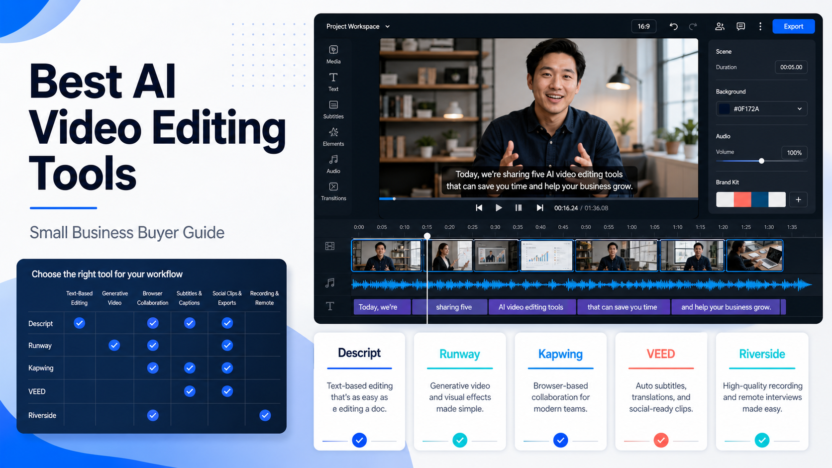
The best AI video editing tools do not remove the need for creative judgment. They reduce repetitive production work so a small team can publish more consistently. This guide compares Descript, Runway, Kapwing, VEED, and Riverside from a practical small-business point of view.
Quick Answer
Choose Descript if your workflow starts with spoken content and you want transcript-based editing. Choose Runway if the goal is generative video or AI creative experiments. Choose Kapwing if your team needs a simple browser editor for social clips, captions, and repurposing. Choose VEED if you want a lightweight online editor with AI-assisted video tasks. Choose Riverside if recording interviews, webinars, or podcasts is the first step.
There is no single winner for every team. A service business creating weekly educational clips has a different need from an agency editing client interviews or a founder experimenting with AI-generated ads.
Comparison Table
| Tool | Best For | Main Strength | Limitation To Consider |
|---|---|---|---|
| Descript | Podcasts, interviews, transcript editing | Editing video and audio like a document | Teams must adapt to transcript-first editing |
| Runway | Generative video and creative assets | AI video, image, and model-based creation | Less suited to routine business editing alone |
| Kapwing | Social clips and browser collaboration | Simple online editor, captions, resizing | Watermark and export limits matter on free plan |
| VEED | Fast online video editing | Captions, templates, browser workflow | Advanced production teams may need deeper tools |
| Riverside | Recording-led content | Remote recording and content capture | Editing is not the only reason to buy it |
Our Evaluation Criteria
We evaluated each tool based on small-business fit: ease of setup, editing workflow, AI usefulness, caption and transcript support, collaboration, export quality, pricing clarity, learning curve, and whether the tool helps a team publish real business content rather than just experiment.
This article is based on official product and pricing information, not hands-on testing. Pricing last checked on June 23, 2026.
Descript
Descript is strongest when a video is built around speech: interviews, podcasts, tutorials, webinars, customer calls, and explainers. Its key workflow is editing media through text. Delete a sentence in the transcript and the corresponding audio or video section can be removed from the timeline.
In a typical small business workflow, Descript fits a team that records a webinar, cleans up audio, removes filler, creates clips, adds captions, and prepares a final version for YouTube or social. It is also useful when non-editors need to review content because the transcript gives them a familiar way to navigate the recording.
Descript pricing includes a Free plan, Hobbyist at $16 per person/month annually, Creator at $24 per person/month annually, Business at $50 per person/month annually, and Enterprise custom pricing according to its official pricing page.
Runway
Runway is the creative AI option in this group. It is not only a normal editor. It is built around generative video, image generation, model access, credits, and creative workflows. A marketing team could use it to create concept footage, product mood visuals, ad backgrounds, or short AI-generated clips that support a campaign.
Runway is best when the team needs creative generation. It is less ideal when the main need is ordinary editing, approval, subtitles, and social repurposing. Many teams will pair it with another editor rather than using it as the only video tool.
Runway pricing includes Free, Standard at $12 per user/month billed annually, Pro at $28 per user/month billed annually, Max at $76 per user/month billed annually, and Enterprise by contact, according to its official pricing page.
Kapwing
Kapwing is a practical browser-based editor for social content teams. It is useful for subtitles, resizing, templates, simple edits, brand assets, team collaboration, and turning long content into smaller clips.
For a small marketing team, Kapwing is attractive because it does not require a heavy editing setup. A team member can upload a clip, create captions, resize it for different platforms, and export versions without opening a professional editing suite.
Kapwing's official pricing page lists a Free plan, Pro at $16 per member/month billed annually, Business at $50 per member/month billed annually, and Enterprise custom pricing.
VEED
VEED is another browser-based video editor that focuses on fast creation, captions, recording, templates, and AI-assisted editing tasks. It is worth comparing with Kapwing when your team wants an online editor and needs to decide which interface and export limits fit better.
VEED is best for teams that want a simple editing workflow. It may not replace a professional editor for high-end brand films, but it can work well for tutorials, social clips, internal explainers, and quick marketing videos.
Riverside
Riverside is different because it starts with recording. If your content comes from remote interviews, webinars, podcasts, or founder-led videos, recording quality and speaker capture may matter before editing.
A small agency could record client interviews in Riverside, then use a video editor for post-production. A founder could record product explainers and repurpose them into clips. Riverside is strongest when capture quality, remote recording, and speaker workflows are central.
Real Use Cases
Webinar Repurposing
A B2B company could turn a 45-minute webinar into a YouTube replay, three LinkedIn clips, a short teaser, and a transcript-based article brief. Descript, Kapwing, and VEED are especially relevant here.
Founder-Led Product Demos
A founder could record screen demos, clean up audio, add captions, and create short clips for product updates. Descript and VEED can fit this use case, while Riverside may help if recording quality is the bottleneck.
Social Media Content
Marketing teams often need resizing, captions, templates, and quick exports more than complex editing. Kapwing and VEED are strong starting points.
AI Creative Concepts
Runway is useful when the team needs generative footage, concept visuals, or creative video experiments. It should be reviewed carefully before relying on it for routine production.
Pricing Summary
| Tool | Official Pricing Notes |
|---|---|
| Descript | Free, Hobbyist, Creator, Business, Enterprise; paid plans include media hours and AI credits |
| Runway | Free, Standard, Pro, Max, Enterprise; paid plans are credit-based |
| Kapwing | Free, Pro, Business, Enterprise; paid plans include credits and export/collaboration features |
Pricing last checked on June 23, 2026.
Pros And Cons
Pros
- These tools reduce repetitive editing tasks such as captions, resizing, trimming, and cleanup.
- Browser-based editors make video work easier for non-specialists.
- Transcript editing helps reviewers understand long recordings faster.
- Generative video tools can support creative campaign concepts.
- Recording-led tools can improve the quality of interviews and webinars before editing begins.
Cons
- AI editing still needs human review for brand, accuracy, legal risk, and tone.
- Free plans often include limits such as watermarks, credits, storage, or export quality.
- Generative outputs can be inconsistent and may need several attempts.
- Team workflows can become messy if files, approvals, and final versions are not organized.
- Some tools solve recording, while others solve editing, so one subscription may not cover the whole workflow.
Final Recommendation
If you publish spoken content, start with Descript. If you need social clips and browser collaboration, compare Kapwing and VEED. If you need generative AI video, evaluate Runway separately from your everyday editor. If remote recording quality matters, include Riverside in the buying decision.
For related content workflows, see our AI social media content workflow and Descript vs Riverside comparison.
FAQs
What is the best AI video editing tool for small business?
Descript is the strongest starting point for text-based editing, Kapwing and VEED are practical browser editors, Runway is better for generative video work, and Riverside fits recording-led workflows. The best choice depends on whether your team edits interviews, social clips, webinars, ads, or product demos.
Is Descript better than Kapwing?
Descript is better when transcript-based editing, podcasts, interviews, and voice cleanup matter. Kapwing is better when a browser-based team editor, subtitles, resizing, and fast social content repurposing are the main needs.
Is Runway a normal video editor?
Runway is more of an AI creative studio than a traditional video editor. It is useful for generative video, image-to-video, and experimental visuals, but many small businesses still need a separate editor for final assembly and routine social publishing.
Which AI video editor is easiest for a marketing team?
Kapwing and VEED are often easier for lightweight marketing workflows because they work in the browser and focus on captions, resizing, templates, and quick exports. Descript is easy once the team understands transcript editing.
Can AI video tools replace a video editor?
They can reduce repetitive editing work, but they do not replace judgment around story, brand, pacing, legal review, and final approval. Treat them as production assistants, not final decision makers.
Do these tools include free plans?
Several tools in this category publish free or entry-level access, but limits vary by export quality, watermark, credits, minutes, storage, and collaboration. Pricing last checked on June 23, 2026 from official sources.
Which tool is best for podcasts?
Descript and Riverside are the strongest options to compare for podcast or interview-led workflows. Descript focuses on editing and post-production, while Riverside is stronger when high-quality remote recording is the first step.
Which tool is best for AI-generated video?
Runway is the most relevant option in this list for generative video. It is best for creative experiments, concept visuals, and AI-generated clips rather than simple captioning or transcript editing.
What should agencies test first?
Agencies should test client approval workflow, brand kit support, subtitle accuracy, export quality, project organization, and whether non-editor teammates can make small changes without breaking the final video.
What is the safest buying approach?
Start with one repeated use case, such as turning webinars into short clips or editing interviews. Evaluate the tool against that workflow before paying for a larger team plan.
Implementation Checklist
Before buying, run a small pilot. Pick one real source video, one social clip target, one caption requirement, one approval workflow, and one export destination. Compare how long each tool takes from source file to approved output. Check whether the tool supports your actual file size, caption needs, brand assets, export quality, and teammate review process.
A small business should also document ownership. Who uploads source footage? Who approves captions? Who checks legal claims? Who stores final exports? AI can speed production, but it cannot replace workflow ownership.
Common Buying Mistakes
The first mistake is buying a generative video platform when the real need is captioning and resizing. The second is buying a simple browser editor when the real need is remote recording quality. The third is letting every teammate create exports without a naming system or approval process.
Good video operations need folders, naming conventions, approval rules, and brand standards. The tool matters, but the workflow around the tool matters just as much.
How To Evaluate Output Quality
Video editing tools should be judged by the final output, not by the number of AI features on the homepage. Export the same source clip from each tool and compare caption accuracy, audio clarity, visual pacing, watermark behavior, brand controls, and how many manual fixes are needed before publishing. If a tool produces attractive clips but requires heavy caption cleanup, it may still slow down a small team.
Also compare collaboration. A founder working alone may only need fast captions and simple resizing. A marketing team needs comments, approval status, shared folders, brand kits, and predictable export settings. Agencies need client separation and a clear review process. The best AI video editor is the one that fits the approval workflow, not only the one with the most impressive demo.
Suggested Small Business Workflow
A practical workflow starts with one long source asset: a webinar, podcast, sales call, product demo, or customer education video. The editor creates a transcript, identifies clip candidates, adds captions, resizes for social platforms, and exports approved versions. A team member then checks claims, names, captions, and visual quality before publishing. AI can shorten the editing cycle, but final approval should stay with a human because video errors are public and visible.
When To Avoid AI Video Editing Tools
Avoid adding another video tool if the real issue is strategy. If your team does not know what audience it is serving, what offer it is promoting, or what channel it is publishing to, automation will not fix that. Start with a repeatable content plan first. Then use AI editing to reduce production time.