
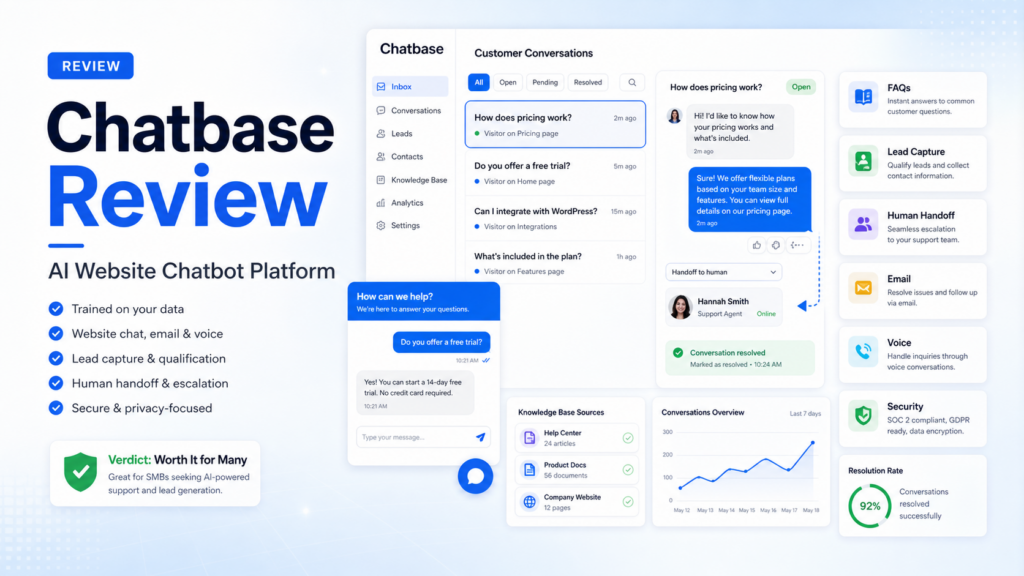
Quick Verdict
Chatbase is worth considering if your small business wants an AI website chatbot or support agent that can answer customer questions from your own business content. It is strongest for companies that need FAQ handling, lead capture, product support, order-status guidance, email support, voice support, and human escalation without building a custom AI system from scratch.
It is not the best choice if you only need a simple contact form, a live chat widget with human agents, or a general AI writing assistant. Chatbase makes the most sense when your team has enough repeated customer questions to justify training and maintaining an AI agent.
The practical buyer question is not whether Chatbase can create a chatbot. It can. The better question is whether your website, documentation, support policies, product pages, and help center are clear enough for an AI agent to answer customers accurately. If your source content is weak, any AI chatbot will need more review and correction.
Pricing last checked on August 27, 2026. Official sources reviewed include Chatbase, Chatbase pricing, Chatbase security, and Chatbase documentation.
Related Dailytimespro reading: compare broader category options in Best AI website chatbots for lead capture, Best AI customer support tools, Best AI help desk tools, and Tidio vs Zendesk.
Best For
Chatbase is best for small businesses that want a trained AI agent on their website. It fits ecommerce stores, SaaS companies, agencies, course businesses, local service providers, and B2B companies that answer the same customer questions every week.
It is especially useful when customers ask about pricing, features, shipping, returns, booking, onboarding, account setup, product instructions, troubleshooting, or lead qualification. A trained AI agent can handle common questions quickly while escalating sensitive or complex cases to a person.
Chatbase also fits teams that want a customer support agent across more than one channel. The official site describes support across chat, email, and voice, which makes it more serious than a basic website-only bot.
Not Best For
Chatbase is not the right fit if your website content is outdated or incomplete. AI agents work from the information they can access. If your policies, pricing, documentation, or product details are unclear, the chatbot may give weak answers or require constant correction.
It is also not the best fit for teams that want full help desk replacement. A support agent can answer many repetitive questions, but billing disputes, cancellations, legal issues, refunds, medical questions, financial questions, and account-risk cases should still have human review.
If your team only gets a few inquiries per week, a simple contact form or live chat workflow may be enough. Chatbase becomes more valuable when repeated questions create real support volume.
What Is Chatbase?
Chatbase is an AI customer experience and support platform for building AI agents trained on business data. The official documentation describes it as a way to create intelligent agents from website content, documents, custom text, and other business information.
For a website owner, the simplest use case is an embedded chat widget. A visitor asks a question, the agent searches the knowledge it was trained on, and it returns an answer. Depending on the setup, the agent can also capture lead details, route unresolved issues, and support other channels.
The platform is positioned for customer support, lead generation, ecommerce, technology, travel, hospitality, and financial services use cases. That positioning matters because the product is not only a generic chatbot builder. It is aimed at support and customer interactions where accuracy, handoff, and trust matter.
Our Evaluation Criteria
This Chatbase review evaluates the platform using practical buyer criteria: ease of setup, knowledge training, answer quality, channel support, lead capture, human escalation, integrations, security controls, pricing clarity, reporting, and value for money.
Ease of setup matters because small teams rarely have spare engineering capacity. A support tool should be easy enough for an operator, founder, marketer, or support lead to maintain.
Knowledge training matters because answer quality depends on source material. The best chatbot is not the one with the flashiest interface. It is the one that answers from accurate company information and admits when a human should help.
Escalation matters because not every customer question should be automated. A useful agent should make handoff easier, not trap customers in a loop.
Pricing clarity matters because chatbot cost can depend on plan, message volume, seats, channels, model usage, or advanced features. Buyers should compare expected monthly conversation volume before choosing a plan.
Key Features
Trained AI Agents
Chatbase lets businesses create AI agents trained on their own content. Official documentation references websites, documents, custom text, and business information as sources for creating an agent. This is useful for businesses that already have help articles, product pages, policies, onboarding content, or internal support notes.
A trained agent is only as useful as the material behind it. Before deploying Chatbase, review the pages and documents customers are likely to ask about. Remove outdated policy language, update pricing references, and make sure important exceptions are written clearly.
Website Chat Widget
The most common Chatbase workflow is a website chat widget. Visitors can ask questions while reading a pricing page, feature page, product page, or help article. This can reduce friction when customers are close to buying or need a quick answer.
For ecommerce, that may include sizing, shipping, returns, product compatibility, delivery times, or order guidance. For SaaS, it may include setup, integrations, billing, onboarding, documentation, and plan differences.
Email and Voice Support
The Chatbase homepage describes support across chat, email, and voice. This is important for teams that want more than a small website bot. If a business receives support requests in multiple places, a broader AI agent can keep answers more consistent across channels.
Small teams should still pilot one channel first. Website chat is usually easier to test than email or voice because the risk is lower and the conversation context is more visible.
Lead Capture and Qualification
Chatbase can support lead generation by answering visitor questions and collecting contact details. This is useful when a visitor wants to know whether the product fits their use case before booking a call.
A typical small business setup might ask the agent to collect name, email, company size, use case, budget range, and urgency after it answers the visitor’s initial question. The lead can then be routed to sales or stored in a CRM if the integration workflow supports it.
Human Handoff and Escalation
The product is most trustworthy when it has clear escalation rules. A support agent should know when to stop answering and route the case to a person. Common escalation triggers include billing disputes, refunds, account access issues, angry customers, legal language, regulated topics, and anything not covered in the knowledge base.
Human handoff protects customer trust. It also helps the business learn which content needs improvement. If the same question keeps escalating, the help center or product page may need a clearer answer.
Security Controls
Chatbase’s official security page states that the platform supports GDPR and SOC 2 Type II compliance, encryption at rest and in transit, user roles, rate limiting, domain allowlists, and controls around data use. The documentation also includes rate limiting and allowed-domain controls for embedded agents.
Those details make Chatbase more credible for business use, but each buyer should review security requirements before connecting sensitive documents, customer data, health information, financial data, or internal systems.
Practical Use Cases
Handling Repeated FAQs
A small business could train Chatbase on its pricing page, product documentation, help center, shipping policy, refund policy, and onboarding guide. The agent can answer repeated questions before a customer opens a support ticket.
This is the safest first use case because the source content is public or already customer-facing. It also creates a clear test: compare the chatbot’s answers against the official pages.
Lead Qualification
A B2B service business could use Chatbase to answer pre-sales questions and collect lead information. The agent can ask what the visitor needs, which service they are considering, company size, timeline, and preferred contact method.
The goal is not to replace sales. The goal is to give sales a cleaner first conversation and reduce repetitive intake work.
Ecommerce Support
An ecommerce team could use Chatbase for sizing questions, shipping rules, returns, product comparisons, and order-policy explanations. The agent should escalate anything involving refunds, payment problems, account issues, damaged items, or exceptions.
This use case works best when product information and policies are well structured. Poor product data will produce weaker answers.
SaaS Onboarding and Product Help
A SaaS company could train an agent on documentation, setup guides, pricing pages, and integration notes. Users can ask how to set up features, connect tools, or troubleshoot common errors.
For in-app help, the team should be careful with account-specific data and permissions. Users should only receive information they are allowed to see.
Internal Knowledge Support
Some teams may use a trained agent for internal questions about processes, policies, or documentation. This can reduce repeated questions in Slack or email. The risk is that internal content changes often, so someone must own updates.
Pricing
Pricing last checked on August 27, 2026. Chatbase publishes plan details on its official pricing page. The public page should be reviewed against your expected use because chatbot pricing can depend on usage, channels, seats, message volume, and advanced support features.
| Pricing factor | Why it matters for buyers |
|---|---|
| Conversation or message volume | High-traffic sites need enough capacity for normal support volume |
| Number of agents | Teams may need separate agents for support, sales, product, or internal use |
| Channels | Website chat, email, and voice needs may affect plan choice |
| Team seats | Support and operations users may need access to manage workflows |
| Security and compliance needs | Regulated or sensitive workflows may require higher-tier controls |
| Integrations | CRM, help desk, or workflow routing can affect the real value |
The right plan depends on how many questions your customers ask, which channels you need, and how much review or handoff your team expects. Start with the smallest plan that can support a real pilot, then expand only when the agent is answering useful questions consistently.
Pros and Cons
| Pros | Why it matters |
|---|---|
| Built for customer support AI agents | Better fit for website and support use cases than a generic chatbot |
| Can train on business content | Answers can reflect your own docs, pages, and policies |
| Supports website chat and broader channels | Useful for teams that want more than a website widget |
| Lead capture use cases | Can help qualify visitors before a sales call |
| Human escalation patterns | Helps keep complex issues under human control |
| Public security documentation | Useful for buyer review and procurement |
| Cons | Why it matters |
|---|---|
| Source content quality is critical | Weak docs produce weak answers |
| Requires ongoing maintenance | Policies, pricing, and product details must stay updated |
| Not every issue should be automated | Billing, refunds, legal, and sensitive cases need human review |
| Pricing depends on real usage | Teams should estimate support volume before scaling |
| May overlap with help desk tools | Existing support platforms may already include AI features |
Alternatives
| Tool | Best for | Main strength | Limitation |
|---|---|---|---|
| Tidio | Small business live chat and chatbot workflows | Combines chat, support, and automation | May fit simple support better than advanced AI agents |
| Intercom Fin | SaaS and support teams using Intercom | Strong AI agent inside a mature support platform | Best value often depends on Intercom ecosystem fit |
| Zendesk AI | Teams already using Zendesk | Deep support desk workflow and enterprise support controls | More platform than some small teams need |
| Help Scout AI | Human-first support teams | Good fit for shared inbox support and knowledge workflows | Not mainly a standalone website chatbot builder |
| Custom OpenAI assistant | Technical teams with custom needs | Maximum flexibility | Requires engineering, hosting, monitoring, and support ownership |
If you already use a help desk with strong AI features, compare Chatbase against the tool you already pay for. If your main need is a public website chatbot trained on your content, Chatbase deserves a closer look.
Final Recommendation
Chatbase is a strong option for small businesses that want an AI support agent trained on their own website, documentation, and help content. It is most useful for repeated customer questions, lead qualification, ecommerce support, SaaS onboarding, and support triage.
The best way to test Chatbase is to start with a narrow, public-content workflow. Train the agent on a small set of accurate pages, test common customer questions, define escalation rules, and review conversations before expanding to email, voice, or internal data.
Choose Chatbase if your team wants a dedicated AI chatbot and customer-support agent platform. Choose a broader help desk AI tool if your support operation already lives inside Zendesk, Intercom, Help Scout, or another customer support platform.
FAQs
Is Chatbase good for small businesses?
Yes, Chatbase can be useful for small businesses that receive repeated questions through their website or support channels. It works best when the company has clear documentation, policies, and product information for the AI agent to learn from.
What is Chatbase used for?
Chatbase is used to create AI agents for customer support, website chat, FAQ answering, lead capture, product guidance, email support, voice support, and internal knowledge workflows.
Does Chatbase replace human support agents?
No. Chatbase can reduce repeated questions and prepare answers, but human review is still important for refunds, billing disputes, sensitive account issues, legal language, and complex customer situations.
Can Chatbase capture leads?
Yes. Chatbase can support lead capture by answering visitor questions and collecting useful contact details. Sales teams should still review lead quality and follow up personally when the opportunity matters.
Is Chatbase secure?
Chatbase publishes security information including GDPR and SOC 2 Type II references, encryption, user roles, rate limiting, and domain allowlist controls. Buyers should review the official security page for their own compliance needs.
How much does Chatbase cost?
Pricing last checked on August 27, 2026. Chatbase publishes current plan details on its pricing page. Buyers should compare expected message volume, channels, agents, seats, integrations, and security requirements before choosing a plan.
What are the best Chatbase alternatives?
Strong alternatives include Tidio, Intercom Fin, Zendesk AI, Help Scout AI, and custom AI assistants. The right choice depends on whether you need a standalone website chatbot, a help desk AI agent, or a custom technical workflow.
What should I test before publishing a Chatbase agent?
Test common questions, edge cases, escalation triggers, pricing questions, policy questions, lead capture forms, mobile display, rate limits, allowed domains, and handoff quality before making the agent a major support channel.