
Quick Verdict
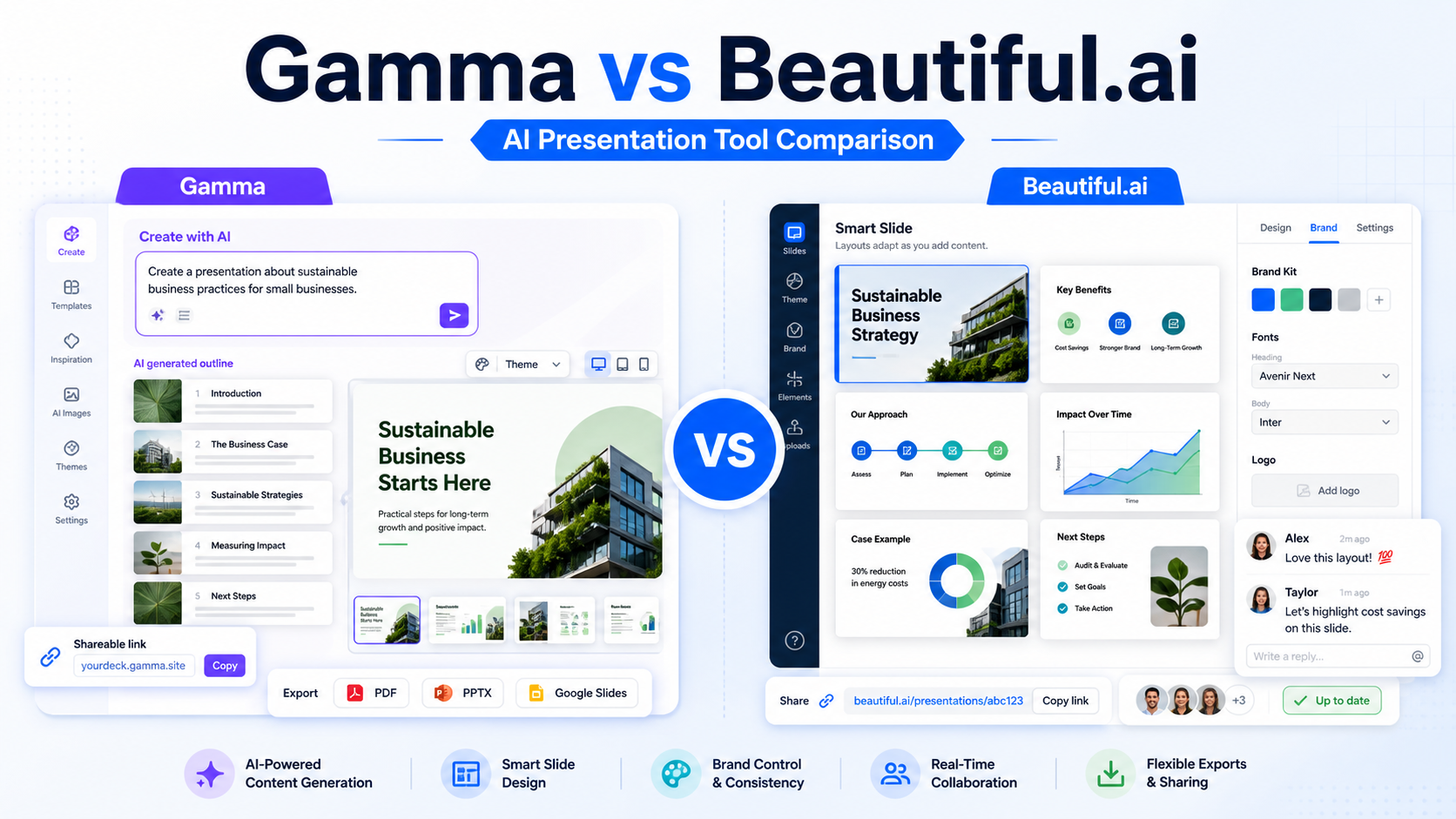
Gamma is the better choice if you want fast AI-generated decks, web-style presentations, documents, and shareable content from a prompt. Beautiful.ai is the better choice if your team wants polished slide design, brand consistency, and a more traditional presentation workflow with smart layouts.
For most small businesses, Gamma feels faster for turning an idea into a useful first draft. It is especially strong when a founder, marketer, consultant, or operator needs to create a client brief, proposal outline, training document, landing-page style narrative, or internal explainer without building every slide manually. Beautiful.ai is stronger when the final output needs to look like a clean business deck and stay visually consistent across a team.
Pricing last checked on August 26, 2026. Official pricing sources reviewed include Gamma pricing and Beautiful.ai pricing. The pricing section below uses only official pricing-page information and focuses on buyer guidance rather than estimates.
Related Dailytimespro reading: our Gamma review gives more detail on Gamma alone, while Beautiful.ai pricing covers Beautiful.ai plan considerations. If presentations are part of a wider workflow, see Best AI work management tools and Best AI sales enablement tools.
Best For
Choose Gamma if you want AI to help create the structure, copy, and visual flow of a presentation quickly. It is useful for founders, consultants, marketers, course creators, agencies, and small teams that often turn rough ideas into decks, memos, proposals, or shareable web presentations.
Choose Beautiful.ai if you want a more controlled presentation-design tool. It is a better fit for teams that already know the message but need slides to stay clean, professional, and consistent. Sales teams, leadership teams, customer success teams, and agencies may prefer Beautiful.ai when brand presentation quality matters more than rapid content generation.
Not Best For
Gamma is not the best fit if your team needs strict slide-by-slide brand governance, complex PowerPoint workflows, or highly controlled corporate templates. It can create polished work quickly, but teams with rigid design systems may need more review.
Beautiful.ai is not the best fit if the main bottleneck is writing the first draft. It helps with slide layout and design consistency, but Gamma is usually the more natural choice when the user wants to start from a prompt and quickly shape the story.
Neither tool replaces strategy. A weak message, unclear audience, or unsupported claim will still produce a weak deck. Use AI for structure and production speed, then review the deck for accuracy, tone, positioning, and business risk.
What Is Gamma?
Gamma is an AI-powered content and presentation tool that helps users create decks, documents, and webpages from prompts or outlines. Its workflow is built around fast creation: describe the idea, generate a draft, then refine the structure and design.
In a typical small business workflow, Gamma can help create a sales proposal, product explainer, webinar outline, internal training deck, investor-style narrative, or client update. The output can feel less like a traditional slide file and more like a modern shareable content page.
Gamma is useful when the user is still shaping the idea. It can help organize rough notes into sections, suggest a flow, and generate visual blocks that make the first draft easier to review.
What Is Beautiful.ai?
Beautiful.ai is a presentation software platform focused on smart slide design. Its core strength is helping users create business presentations that stay visually consistent without manually adjusting every slide element.
The tool is especially relevant for teams that create recurring decks: sales decks, strategy updates, board-style presentations, training materials, customer proposals, and marketing reports. Beautiful.ai’s smart templates and brand controls are designed to reduce the usual formatting work that happens after the content is written.
Beautiful.ai fits users who know they need a deck, want it to look professional, and do not want design cleanup to become the longest part of the process.
Our Evaluation Criteria
This comparison evaluates Gamma and Beautiful.ai by practical small-business criteria: speed to first draft, content generation, slide design quality, brand consistency, collaboration, sharing, export options, pricing clarity, workflow fit, and value for money.
Speed matters because many small teams create presentations under deadline. The right tool should reduce blank-page time and make review easier.
Design quality matters because a deck often represents the business in front of clients, investors, employees, or partners. A fast draft is not enough if the final result looks inconsistent.
Workflow fit matters because presentations rarely live alone. They often support sales, training, marketing, onboarding, reporting, or client delivery. The better tool is the one that fits the actual job.
Feature Comparison
| Decision point | Gamma | Beautiful.ai |
|---|---|---|
| Best overall use | Fast AI-created presentations and documents | Polished business decks with smart slide design |
| Starting point | Prompt, outline, imported notes, or existing content | Smart templates, slide structure, and presentation workflow |
| Content generation | Strong for turning ideas into a first draft | Useful, but more design-led than prompt-first |
| Slide design | Modern and flexible | Strong smart layouts and consistency |
| Brand control | Useful for lightweight brand needs | Stronger fit for team presentation standards |
| Collaboration | Good for sharing and team review | Good for teams producing recurring decks |
| Output style | Decks, docs, and web-style content | More traditional presentation format |
| Best small-business use | Proposals, explainers, training outlines, content briefs | Sales decks, reporting decks, client presentations, leadership updates |
| Learning curve | Easy for prompt-first creation | Easy for users familiar with presentations |
| Main limitation | Needs review for final brand polish | Less natural for rapid idea-to-draft work |
| Pricing decision | Good if AI generation is central | Good if presentation quality and team consistency are central |
| Best buyer rule | Choose when speed and content structure matter most | Choose when polished slide design matters most |
Real Use Cases
Sales Proposals
A small agency could use Gamma to turn discovery notes into a first proposal structure. The team can generate sections such as problem, proposed approach, timeline, deliverables, and next steps. A human should still review pricing, scope, deadlines, and client-specific promises.
Beautiful.ai is stronger when the proposal format is already defined and needs to look consistent across sales reps. A manager can maintain a cleaner visual standard without relying on every rep to manually format slides.
Internal Training
A SaaS team could use Gamma to draft onboarding lessons, product walkthroughs, or process explainers from existing notes. This works well when the team needs to move quickly from rough documentation to a presentation-style learning asset.
Beautiful.ai fits recurring training decks where each lesson should follow a consistent template. HR, customer success, and enablement teams may prefer it when the visual format matters and updates happen often.
Marketing and Webinars
Gamma can help marketers turn campaign ideas into webinar outlines, educational decks, and shareable lead magnets. Its flexible format is useful when the final asset may be shared as a page or deck.
Beautiful.ai works better for polished webinar decks, product launches, and brand-controlled marketing presentations. It can reduce formatting cleanup when several people contribute slides.
Leadership Reporting
Beautiful.ai is usually the stronger fit for leadership reporting because recurring updates benefit from consistent charts, layouts, and design rules. Gamma can still help draft the story, but Beautiful.ai is better when the final deck needs executive polish.
Pricing Comparison
Pricing last checked on August 26, 2026. Gamma and Beautiful.ai both publish pricing pages with free or trial entry points and paid plan options. Buyers should compare the plan limits that affect actual work: AI generation allowances, seats, exports, brand features, collaboration, and team administration.
| Pricing factor | Gamma | Beautiful.ai |
|---|---|---|
| Entry point | Public pricing page includes a free starting option | Public pricing page promotes a free trial for paid plans |
| Paid plans | Plans are presented for individual and higher-use needs | Plans are presented for individuals, teams, and larger organizations |
| Main cost driver | AI creation usage, plan features, and collaboration needs | Seats, team features, brand controls, and presentation workflow needs |
| Best value fit | Teams creating many AI-first drafts | Teams needing repeatable polished business decks |
| Enterprise path | Review official page for current business options | Review official page for current enterprise options |
If pricing is close for your team, decide by workflow. Gamma is more valuable when AI drafting saves the most time. Beautiful.ai is more valuable when design cleanup and brand consistency are the recurring problem.
Pros and Cons
| Gamma pros | Why it matters |
|---|---|
| Very fast idea-to-draft workflow | Reduces blank-page time for founders and marketers |
| Good for decks, docs, and web-style content | Useful when the output is not only a slide file |
| Strong fit for proposals and explainers | Helps turn rough notes into structured narratives |
| Easy for non-designers | Users can create presentable work without deep slide design skill |
| Flexible sharing | Good for lightweight collaboration and review |
| Gamma cons | Why it matters |
|---|---|
| Final brand polish may need review | Important client decks may still need editing |
| Not ideal for strict corporate templates | Larger teams may need tighter presentation governance |
| AI-generated content needs fact review | Claims, numbers, names, and promises must be checked |
| Less traditional than PowerPoint-style workflows | Some teams may prefer conventional slide tools |
| Beautiful.ai pros | Why it matters |
|---|---|
| Strong smart slide design | Reduces manual layout work |
| Better for polished business decks | Useful for sales, leadership, and client presentations |
| Good team presentation consistency | Helps reduce off-brand decks |
| Familiar presentation workflow | Easier for teams used to slide decks |
| Strong recurring-deck fit | Good for reports, proposals, and updates |
| Beautiful.ai cons | Why it matters |
|---|---|
| Less prompt-first than Gamma | Not always as fast for rough idea generation |
| Best value depends on recurring deck volume | Occasional users may not need a dedicated tool |
| Still requires message strategy | Smart layouts cannot fix weak positioning |
| Export and workflow needs should be checked | Teams should confirm fit before moving from existing tools |
Alternatives to Consider
| Alternative | Best for | Main strength | Limitation |
|---|---|---|---|
| Canva | Broader design and social assets | Large template library and simple design workflow | Less focused on AI-first business decks |
| Microsoft PowerPoint Copilot | Microsoft 365 teams | Familiar enterprise slide workflow | Requires Microsoft ecosystem fit |
| Google Slides with Gemini | Google Workspace teams | Collaborative slide editing | AI presentation workflow depends on Workspace setup |
| Tome | Narrative presentations | Storytelling-oriented decks | Fit depends on current product direction and team needs |
Which One Should You Choose?
Choose Gamma if your team frequently starts with rough ideas, notes, or prompts and needs a strong first draft quickly. It is the better choice for content-led presentations, internal explainers, strategy narratives, and shareable web-style decks.
Choose Beautiful.ai if your team already knows the message and needs the deck to look polished. It is the better choice for sales decks, leadership updates, recurring reports, client presentations, and brand-controlled team workflows.
Choose another tool if your presentation work is already tied tightly to Microsoft 365, Google Workspace, or Canva. Switching tools only makes sense when the new workflow removes real production friction.
Final Recommendation
Gamma wins for speed, AI-first drafting, flexible presentation formats, and turning rough ideas into structured content. Beautiful.ai wins for smart slide design, polished business decks, and team consistency.
For most small businesses, the decision comes down to the bottleneck. If the bottleneck is writing and structuring the deck, choose Gamma. If the bottleneck is making decks look professional and consistent, choose Beautiful.ai.
FAQs
Is Gamma better than Beautiful.ai?
Gamma is better for fast AI-generated drafts and flexible content. Beautiful.ai is better for polished slide design and team presentation consistency. The better choice depends on whether your main problem is creating the first draft or refining the final deck.
Is Beautiful.ai good for small businesses?
Yes, Beautiful.ai can be useful for small businesses that create recurring sales, marketing, training, or leadership decks. It is most valuable when design cleanup takes too much time.
Is Gamma good for business presentations?
Yes. Gamma is strong for proposals, explainers, reports, training content, and shareable narratives. Important client or investor presentations should still be reviewed for accuracy, brand fit, and final polish.
Which tool is better for sales decks?
Beautiful.ai is usually stronger for repeatable polished sales decks. Gamma is better when the sales team needs to create a first draft from discovery notes or a new campaign idea.
Which tool is better for AI content generation?
Gamma is generally the stronger prompt-first content creation tool. Beautiful.ai includes AI support, but its main advantage is smart presentation design and visual consistency.
Can either tool replace PowerPoint?
They can replace PowerPoint for some teams, but not all. If your organization depends on PowerPoint templates, offline editing, or Microsoft workflows, test export and collaboration needs before switching.
What should I review before choosing a paid plan?
Review AI usage limits, exports, team seats, brand controls, collaboration features, admin controls, and the type of presentations your team creates most often.
What is the safest way to test Gamma or Beautiful.ai?
Use a real deck your team already creates, such as a sales proposal, monthly report, onboarding lesson, or webinar outline. Compare setup time, edit time, design quality, team feedback, and final usability.
Leave a Reply