Quick Verdict
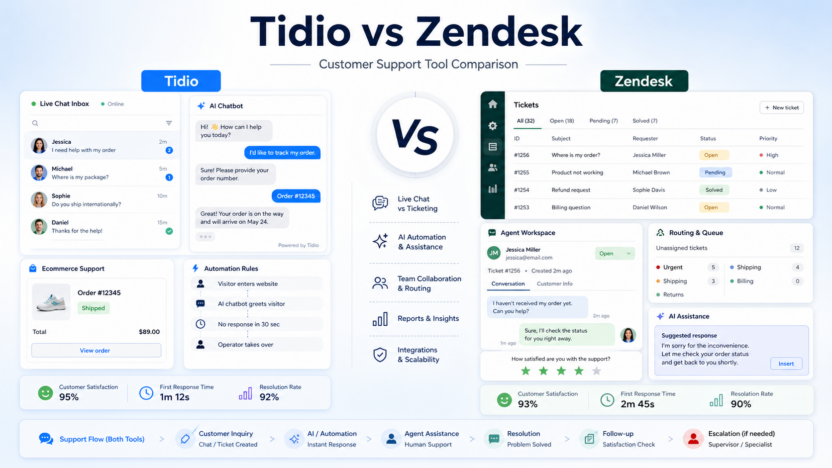
Choose Tidio if your small business needs website chat, ecommerce-style conversations, simple automation, and AI assistance for a smaller support motion. Choose Zendesk if you need structured ticketing, reporting, routing, omnichannel support, and room to grow into a more mature support operation. Tidio is usually easier to think about for chat-first teams; Zendesk is better when support complexity is already visible.
Pricing last checked on July 25, 2026. Pricing details below are based on official vendor sources: Tidio pricing, Tidio AI Agent, Tidio vs Zendesk, Zendesk pricing. Before purchase, review the vendor's current plan table, billing cycle, usage terms, and add-on language because SaaS plans can vary by account, region, workspace size, and contract terms.
Related Dailytimespro reading:
- Zendesk AI Review
- Intercom Fin Review
- Best AI Knowledge Base Tools
- Best AI Customer Onboarding Tools
Best For
Tidio is best for small ecommerce sites, service businesses, and website-led support teams. Zendesk is best for teams with ticket queues, multiple agents, service levels, reporting needs, and broader support channels.
Not Best For
Tidio may not be enough for complex enterprise support operations. Zendesk may be more platform than a very small team needs if support is mostly low-volume website chat.
Our Evaluation Criteria
This article evaluates the topic through practical small-business criteria: ease of setup, pricing clarity, AI output quality, workflow fit, integrations, handoff quality, admin controls, support readiness, and value for money. The goal is not to pick a universal winner. The goal is to help a business owner, operator, marketer, sales lead, support manager, creator, or founder choose a tool that fits a real workflow.
The strongest products are easy to explain internally. A team should be able to say what the tool reads, what it creates, who reviews it, and where the approved result goes. If those steps are vague, the software may still be good, but the implementation is not ready.
Key Features
- Tidio combines live chat, automation, and AI agent support for customer conversations.
- Tidio's AI agent page says Lyro can be priced at $0.50 per conversation.
- Zendesk offers structured support plans, suite plans, AI agent language, and Copilot add-ons.
- Zendesk pricing includes Support Team and Suite Team entry points for different support depths.
- Both tools need knowledge content and escalation rules to produce reliable AI-assisted support.
Real Use Cases
Small ecommerce chat
Tidio can help answer shipping, returns, product availability, and checkout questions directly on the website.
Growing ticket queue
Zendesk fits teams that need tickets, statuses, priorities, routing, reporting, and consistent agent workflows.
AI first response
Both products can support AI-assisted response workflows, but teams should define which questions are safe for automation and which need human review.
Support reporting
Zendesk is stronger when leaders need structured reporting across agents, queues, and channels.
Human escalation
Tidio can escalate website chat to a person; Zendesk can support more formal routing, priority, and team assignment processes.
Pricing
| Plan or product | Official pricing signal | Buyer note |
|---|---|---|
| Tidio Plus | Starts at $300 per month plus monthly usage according to Tidio pricing | Fit depends on chat volume, AI usage, and support needs |
| Tidio Lyro AI Agent | $0.50 per conversation according to Tidio's AI agent page | Relevant for AI-assisted customer conversations |
| Zendesk Support Team | $19 per agent per month paid yearly | Entry point for structured support ticketing |
| Zendesk Suite Team | $55 per agent per month paid yearly | Broader suite for omnichannel support |
| Zendesk Copilot | $50 per agent per month paid yearly | AI add-on for agent assistance |
When comparing pricing, estimate normal monthly usage rather than only the first user account. For seat-based products, count the people who create, approve, manage, or depend on the work. For usage-based products, estimate the number of conversations, sessions, AI actions, recordings, credits, or media minutes. For custom enterprise options, ask what is included in onboarding, admin controls, support, security, retention, and overage handling.
Pros and Cons
Pros
- Tidio is approachable for chat-first small business support.
- Zendesk has stronger ticketing, routing, reporting, and scale.
- Both can help with repeated questions when the knowledge base is maintained.
- Official pricing pages provide useful starting signals for comparison.
Cons
- Tidio can become usage-sensitive as AI conversation volume grows.
- Zendesk may be heavier and more expensive for very small teams.
- AI support depends on answer quality and escalation design.
- Plan comparisons require separating base support features from AI add-ons.
Comparison Table
| Criteria | Tidio | Zendesk | Better fit |
|---|---|---|---|
| Primary workflow | Website chat and automation | Ticketing and support operations | Depends on channel |
| Small team ease | Generally simpler | More structured | Tidio |
| Support scale | Good for focused chat use | Stronger for larger queues | Zendesk |
| AI pricing signal | Lyro conversation pricing | Copilot and AI agent plan language | Depends on usage |
| Reporting depth | Useful for chat/support basics | Stronger support analytics | Zendesk |
Alternatives
| Alternative | Best for | Main strength | Limitation |
|---|---|---|---|
| Intercom | Conversational support and AI agents | Strong messenger and Fin AI Agent | Outcome pricing needs planning |
| Freshdesk | Traditional help desk teams | Familiar ticketing and Freddy AI add-ons | Can require add-on budget |
| Help Scout | Simple customer support inbox | Clean shared inbox experience | Less enterprise support depth |
Practical Buying Guidance
The right choice depends on the workflow that already exists inside the business. A small team should define the job first, then choose software. For Tidio vs Zendesk, the practical question is whether the product reduces repeated manual work without making review harder. If the team saves a few minutes but creates confusion about ownership, permissions, or accuracy, the workflow needs more design before a paid rollout.
Start with one process that happens every week. Assign one owner, write down the input material, decide where the output goes, and define who reviews it. This simple setup prevents a common mistake: buying a tool because the demo looks strong while the actual team process remains unclear. AI features are most useful when they support a repeated step such as summarizing, routing, drafting, organizing, editing, answering, or handing work to the next person.
Small businesses should also watch the cost model. Some products are priced by seat, some by usage, some by credits, some by outcomes, and some by custom sales terms. A low entry price can still become expensive if the active user count, automation volume, media minutes, AI credits, or customer conversation volume grows quickly. Estimate normal monthly usage before comparing plans.
Finally, keep human review in the process. AI output may be useful as a first pass, summary, draft, classification, or recommendation, but the business is still responsible for the final customer-facing answer, published content, CRM update, support decision, or public claim. The best setup is not fully hands-off. It is a clear workflow where AI makes the next human step faster and easier to trust.
Setup Checklist
| Setup area | What to decide |
|---|---|
| Workflow owner | Who configures the tool and judges whether the output is useful |
| Source material | Which calls, tickets, pages, databases, videos, or customer records the tool can use |
| Review rule | What must be approved before it reaches a customer, prospect, or public page |
| Integration path | Which help desk, CRM, CMS, website builder, editor, or workspace receives the final output |
| Cost trigger | Which seats, credits, outcomes, sessions, or usage levels may change monthly cost |
| Data control | Which private information should stay out of the workflow |
30-Day Pilot Plan
During week one, configure the smallest useful workflow. Use real internal examples, but avoid sensitive customer details unless the team has a clear permission rule. The goal is to understand setup effort, not to automate every edge case.
During week two, compare output quality. Track which summaries, drafts, replies, recommendations, or interface outputs are accepted, edited, or rejected. The log should be simple. The point is to see whether the product makes normal work faster after review.
During week three, test collaboration. Invite the people who will actually depend on the workflow. Watch whether they use the tool naturally, ignore it, or create manual workarounds. Adoption issues usually reveal a process problem before they reveal a software problem.
During week four, make a renewal decision. Keep the tool if the team can name a clear improvement: faster responses, cleaner notes, better handoffs, clearer pages, shorter editing cycles, or fewer repeated questions. Pause expansion if the value is still vague.
Common Mistakes to Avoid
1. Choosing Zendesk before the team needs structured ticket operations. 2. Choosing Tidio without estimating AI conversation volume. 3. Using AI replies without updated support articles. 4. Ignoring escalation rules for billing, refunds, angry customers, and technical problems.
Practical Implementation Examples
In a typical small business workflow, the first implementation should be narrow and measurable. For a support topic, that could mean routing billing questions, delivery questions, onboarding issues, and product setup questions into clear queues. For a meeting or sales topic, it could mean turning each call into a summary, next-step list, CRM note, and follow-up draft. For a website or video topic, it could mean using AI to create the first version, then assigning a human editor to check messaging, accuracy, brand fit, and publish readiness.
A SaaS team could use the same pattern with a weekly operating rhythm. On Monday, the workflow owner reviews the examples from the previous week. On Tuesday and Wednesday, the team uses the tool on real work. On Thursday, the owner checks where the output helped and where it caused extra editing. On Friday, the team decides whether to adjust prompts, templates, knowledge base articles, integration settings, or review rules. This keeps the pilot grounded in work the team already does.
The most useful signal is not whether the tool creates a polished-looking output once. The useful signal is whether the reviewed output becomes easier to produce again next week. If the team can repeat the workflow with less confusion, fewer missed details, and clearer ownership, the tool is moving in the right direction. If every output needs heavy rewriting or manual cleanup, the team should improve the source material, narrow the use case, or consider a different product category.
Before expanding, document the workflow in a short internal note. Include the owner, connected tools, accepted use cases, review rule, plan cost, renewal date, and stop conditions. Stop conditions matter because they protect the business from subscription sprawl. If the product is not used for the selected workflow, if output quality does not improve after cleanup, or if the monthly cost rises faster than value, the team should pause and reassess.
How to Judge Results After the Pilot
Judge the product by the quality of the finished workflow, not by the novelty of the AI feature. A good result should be visible in ordinary work: fewer repeated questions, faster follow-ups, clearer notes, cleaner handoffs, better drafts, shorter editing cycles, or more consistent support decisions. The team should be able to point to examples that were reviewed and used, not only examples that looked impressive during setup.
It is also useful to compare the tool against the old process. If the old process required copying notes into a CRM, manually tagging support tickets, rewriting meeting summaries, editing video by timeline, or rebuilding landing page drafts from scratch, measure whether the new workflow removes steps after review. If the tool only moves work from one dashboard to another, the value is weaker.
For small teams, the best buying decision is usually conservative. Keep the tool when it improves a repeated workflow and the team knows who owns it. Delay expansion when the use case is still unclear, when output quality varies too much, or when pricing depends on usage levels the team has not estimated.
Final Recommendation
Pick Tidio when the business is chat-first, ecommerce-oriented, and wants a simpler live-chat plus AI support layer. Pick Zendesk when support has multiple agents, ticket queues, reporting needs, and operational complexity. If the team is unsure, map the support workflow first: channels, volume, common questions, escalation needs, and budget triggers.
FAQs
Is Tidio cheaper than Zendesk?
The answer depends on plan, agent count, AI usage, and support volume. Tidio has usage-related AI conversation language, while Zendesk lists per-agent support and suite plans plus AI add-ons.
Is Zendesk better for larger teams?
Yes, Zendesk is generally stronger when support needs structured ticketing, routing, reporting, and scale.
Is Tidio good for ecommerce?
Tidio can be a strong fit for ecommerce-style website chat, product questions, shipping questions, and basic automation.
Can either tool automate all support?
They can automate some common questions, but sensitive, account-specific, billing, refund, or technical cases should have human handoff rules.