Quick Verdict
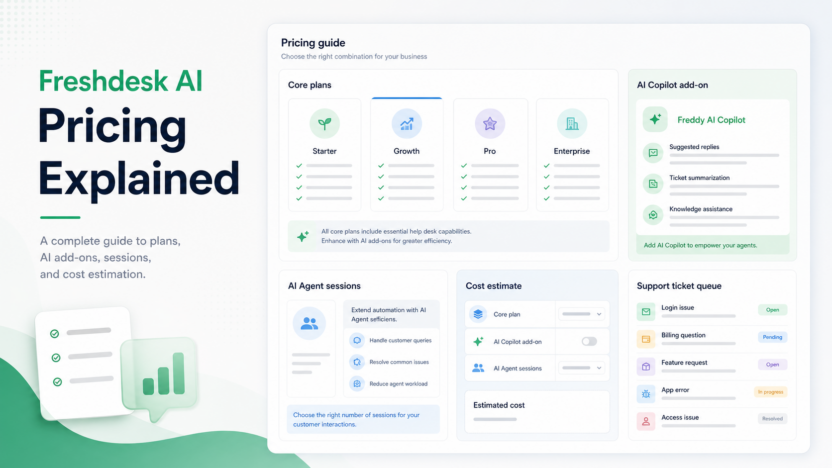
Freshdesk AI pricing is worth evaluating if your team already wants a help desk with ticketing, routing, reporting, and AI support features. The key decision is not only the base Freshdesk plan. A small business also needs to account for Freddy AI Copilot, Freddy AI Agent sessions, day passes, connector tasks, and whether Pro or Enterprise features are needed.
Pricing last checked on July 26, 2026. Pricing details below are based on official Freshworks sources: Freshdesk pricing and Freshworks Freddy AI pricing help.
Related Dailytimespro reading:
Best For
Freshdesk AI pricing is most relevant for support teams that want a traditional help desk with AI-assisted ticket handling, self-service, routing, and reporting. It fits teams moving beyond shared inboxes but not ready for a fully custom enterprise support platform.
Not Best For
It is not ideal for teams with very few monthly tickets, no maintained knowledge base, or no process for reviewing AI output. AI support software becomes useful when repetitive questions, routing, and agent assistance happen often enough to justify the setup.
Our Evaluation Criteria
This article evaluates Freshdesk AI pricing through practical small-business criteria: ease of setup, pricing clarity, AI quality, workflow fit, integrations, admin controls, reporting, support process, and value for money. The goal is to help small-business support teams comparing help desk AI costs make a real buying or implementation decision, not to list every feature on a vendor page.
The strongest option is the one a team can explain in one sentence: what data goes in, what AI creates, who reviews it, and where the approved result goes. If those steps are unclear, the tool may still be capable, but the workflow is not ready for a wider rollout.
Switching cost matters as much as feature depth. A tool that looks stronger on paper may be the wrong choice if it forces the team to rebuild habits, duplicate records, or add review work that cancels out the AI benefit. A narrower tool can be the better first purchase when it solves one repeated job cleanly and leaves room to expand later.
Freshdesk AI Pricing at a Glance
| Pricing item | Official pricing signal | What it means |
|---|---|---|
| Freshdesk Growth | $15 per agent per month when billed annually on official pricing | Entry paid help desk plan |
| Freshdesk Pro | $49 per agent per month when billed annually on official pricing | More AI and help desk features, including Freddy AI Agent sessions |
| Freshdesk Enterprise | $79 per agent per month when billed annually on official pricing | Advanced AI, routing, sandbox, audit logs, and enterprise controls |
| Freddy AI Copilot | $29 per agent per month according to official Freshworks sources | Agent-assist add-on |
| Additional AI Agent sessions | $49 per 100 sessions according to Freshdesk pricing | Usage cost to model when volume grows |
| Connector app tasks | $80 per 5,000 tasks according to Freshdesk pricing | Relevant for teams using connected automation tasks |
What You Actually Pay For
Freshdesk pricing has several layers. The base plan controls help desk capabilities such as ticketing, routing, dashboards, SLAs, collaboration, and admin controls. AI features can add cost through Copilot, AI Agent sessions, and task usage. For a small business, the real monthly cost depends on agents, support volume, automation needs, and how much AI assistance is used.
The practical mistake is comparing only the entry plan. A support team should estimate the number of agents, ticket channels, expected AI Agent sessions, Copilot seats, reporting requirements, and integration tasks before choosing a plan.
Real Use Cases
FAQ replies
Freshdesk AI can support repeated questions when the knowledge base is accurate. Common examples include shipping status, account setup, billing paths, troubleshooting steps, and product usage questions.
Agent assistance
Freddy AI Copilot can help agents draft responses, summarize context, or work faster inside tickets. The value depends on agent adoption and review quality.
Ticket routing
Teams can route tickets by urgency, topic, customer type, or skill. AI becomes more useful when routing rules are paired with clean categories and escalation paths.
Self-service
A support team can reduce repeated tickets by maintaining help center articles and using AI to suggest relevant answers.
Reporting
Managers can use dashboards and AI insights to understand ticket volume, response times, repeated issues, and team workload.
Plan-by-Plan Buyer Guidance
Growth
Growth can work for teams that need a paid help desk foundation but do not yet need the full AI and reporting depth of higher plans. It is a reasonable evaluation point when the team is moving from inbox support to ticketing.
Pro
Pro is often the plan small support teams will evaluate when AI support becomes serious. Official pricing highlights more AI and help desk features, including Freddy AI Agent sessions, custom dashboards, intelligent routing, and multiple SLA policies.
Enterprise
Enterprise is for teams that need stronger admin, routing, sandbox, audit logs, and enterprise controls. It may be more than a small business needs unless support complexity, compliance, or scale justifies it.
Pros and Cons
Pros
- Clear official base plan pricing.
- Freddy AI Copilot and AI Agent session costs are publicly visible in official pricing materials.
- Good fit for traditional help desk teams that want AI add-ons.
- Pro and Enterprise plans include more advanced routing and reporting options.
- Freshworks documentation gives useful AI pricing detail.
Cons
- Total cost can rise with agents, AI Copilot seats, sessions, and connector tasks.
- AI value depends heavily on knowledge base quality.
- Very small teams may not need the AI layer yet.
- Comparing Freshdesk to chat-first tools requires separating ticketing needs from AI features.
- Higher-tier controls may be unnecessary for simple support workflows.
Alternatives
| Tool | Best for | Main strength | Limitation |
|---|---|---|---|
| Zendesk | Structured support operations | Deep ticketing and reporting | Can be heavier for small teams |
| Intercom | Conversational AI support | Fin AI Agent and messenger workflow | Outcome pricing needs volume planning |
| Tidio | Website chat and ecommerce support | Live chat plus AI assistance | Less suited to complex enterprise support |
| Help Scout | Shared inbox support | Simple customer support workflow | Less AI-heavy than some teams want |
Realistic Small-Business Use Cases
In a typical small business workflow, AI help desk pricing should improve one repeated job. A team might use AI to turn raw notes into tasks, summarize support patterns, classify customer requests, build a first draft, compare records, or prepare a manager-ready report. The important point is that a person still owns the final decision.
A SaaS team could use the same pattern for weekly operating work. The workflow owner reviews examples from the previous week, updates the source material, checks which outputs were accepted or edited, and adjusts prompts or connected records before expanding usage.
An agency could use it for client work when the review path is clear. AI can prepare a first summary, brief, comparison, or table, but the agency should still check claims, pricing, brand language, and client-specific details before anything is shared.
An ecommerce team could use it for product, support, inventory, or marketing work. Useful examples include cleaning product copy, summarizing customer questions, finding repeated stock issues, routing returns questions, or preparing weekly performance summaries.
Practical Rollout Plan
Start with one workflow that happens every week. For Freshdesk AI pricing, that means choosing a small, repeatable process rather than trying to automate the whole department. Write down the source material, the owner, the review step, and the place where the approved output should live.
During the first week, configure the smallest useful version. Use real internal examples, but keep sensitive customer, employee, legal, or financial information out of the workflow until permissions are clear. The goal is to understand setup effort and output quality.
During the second week, compare the reviewed output against the old process. Look for concrete workflow signals: clearer handoffs, fewer repeated questions, faster summaries, cleaner status updates, better task routing, or shorter editing cycles. Do not judge the tool only by whether the first output looks polished.
During the third week, involve the people who will actually depend on the result. If they ignore the output, rewrite it manually, or keep separate notes, the process needs adjustment. Adoption problems often reveal unclear ownership, weak source material, or a tool that does not fit the daily workflow.
During the fourth week, decide whether to keep, expand, or pause. Keep the setup if the team can name a repeated improvement. Pause expansion if output quality is inconsistent, review takes too long, pricing depends on usage the team has not estimated, or the tool duplicates software already in the stack.
Buyer Decision Framework
Before choosing a tool for Freshdesk AI pricing, separate the buying decision into three parts: workflow fit, data fit, and operating cost. Workflow fit asks whether the product improves a real repeated process. Data fit asks whether the source material is clean enough for AI to produce useful output. Operating cost asks whether the plan, seats, usage limits, add-ons, and review time make sense after the first month.
The safest buyer path is to score each option against the same internal checklist. Use simple labels such as strong fit, workable fit, weak fit, or not needed. Avoid fake precision. A small business does not need a complex scoring model to make a good software decision. It needs a clear reason why the tool improves a job that already matters.
Ask these questions before buying:
| Decision area | Question to answer | Why it matters |
|---|---|---|
| Workflow owner | Who will configure, review, and maintain the process? | AI workflows fail when ownership is vague |
| Source quality | Is the input data, document, ticket, call, or table reliable? | Bad source material creates confident but weak output |
| Review path | Who approves customer-facing or business-critical results? | Human review protects trust and accuracy |
| Integration fit | Where does the approved output go next? | Value drops when teams copy data manually |
| Pricing trigger | What makes the monthly cost rise? | Seats, usage, credits, sessions, and add-ons can change the real cost |
| Stop condition | What result would make the team cancel or pause? | Clear stop rules prevent subscription sprawl |
For most small businesses, the best tool is not the most advanced one. It is the one that fits the existing team rhythm, reduces repeated manual effort after review, and can be explained to a new team member without a long training session.
Common Mistakes to Avoid
1. Comparing only per-agent base plan pricing. 2. Forgetting AI Copilot seats and AI Agent sessions. 3. Buying AI before updating help center content. 4. Using AI for sensitive billing or account changes without review. 5. Ignoring routing, reporting, and integration requirements.
Final Recommendation
Freshdesk AI pricing makes the most sense for small businesses that need a real help desk and can benefit from AI-assisted support work. Estimate agent count, AI session volume, Copilot seats, and integration tasks before choosing a plan. If the team only needs simple chat or a shared inbox, compare lighter alternatives before adopting a full AI help desk stack.
FAQs
How much does Freddy AI Copilot cost?
Freshworks official pricing materials list Freddy AI Copilot at $29 per agent per month.
Does Freshdesk include AI Agent sessions?
Freshdesk pricing shows Freddy AI Agent sessions included on higher plans and additional AI Agent sessions priced separately.
Is Freshdesk AI good for small business?
It can be a good fit when support volume, knowledge base quality, and routing needs justify a help desk plus AI add-ons.
What should I estimate before buying?
Estimate agents, ticket volume, AI sessions, channels, integrations, SLA needs, and reporting requirements.
What is the main pricing risk?
The main risk is underestimating add-on and usage costs when AI adoption grows.