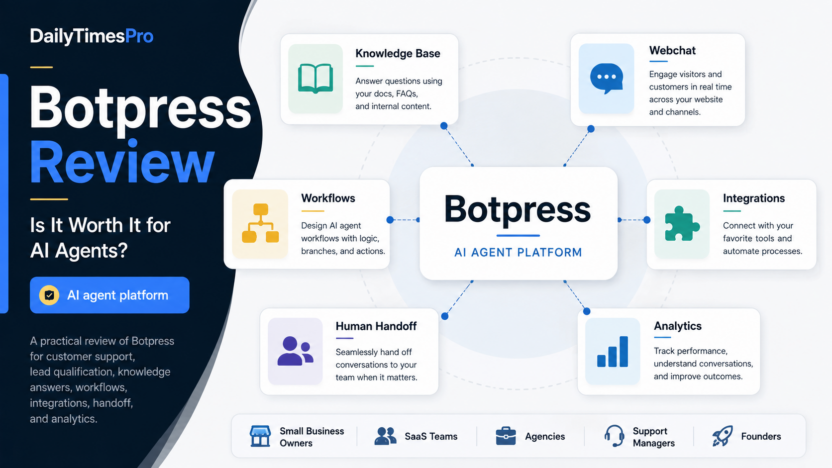
Botpress is worth considering if you want to build AI agents that can answer customer questions, use knowledge base content, connect to business tools, and hand conversations to people when automation is not enough. It is strongest for teams that want more control than a simple chatbot widget but do not want to host the entire agent stack themselves.
The short version: Botpress fits SaaS teams, agencies, support teams, and technical small businesses that need a flexible AI agent builder. It may be too much for a business that only needs a basic FAQ bot or a simple contact form replacement.
This Botpress review looks at the product from a practical buyer angle: what it does, where it is useful, how pricing works, what limitations to watch, and which alternatives deserve a look before you commit.
Quick Verdict
Botpress is a strong AI agent platform for teams that want to build support, lead qualification, internal workflow, and knowledge base agents with visual control and integration options. Its biggest strength is that it combines a visual Studio, knowledge bases, webchat, integrations, autonomous decision-making, and developer extensibility in one platform.
The main tradeoff is complexity. Botpress is not only a plug-and-play chat widget. To get real value, you need to define the agent's role, connect the right knowledge sources, configure handoff paths, monitor conversations, and understand usage-based AI spend. For a serious business workflow, that control is useful. For a very small website with a few FAQ questions, it may be heavier than necessary.
Best For
Botpress is best for teams that want to build AI agents around real workflows, not just publish a generic chat bubble. A SaaS team could use it to answer onboarding questions, route pricing questions, collect lead details, and escalate support conversations. An agency could use it to build client-specific agents with different knowledge bases and integrations. A support team could use it to deflect repetitive tickets while keeping human handoff available.
It is also a good fit for technical operators who want visual building but still need API and integration flexibility. Botpress documentation describes the platform as an all-in-one system for building, testing, and deploying AI agents, with the cloud infrastructure handled by Botpress rather than self-hosted by the customer.
Not Best For
Botpress is not the cleanest choice if you only need a very lightweight help widget, a static FAQ page, or a no-configuration lead form. It also may not be ideal for a non-technical business owner who wants every support workflow designed automatically with no setup decisions.
Pricing also needs attention. Botpress has base subscription tiers and separate AI Spend, plus usage limits and add-ons. That model can be practical because usage scales with activity, but a growing team should understand message volume, bots, seats, vector storage, and AI token usage before relying on it for high-volume support.
Our Evaluation Criteria
For this review, Botpress is evaluated against the factors that matter most to small businesses and software teams choosing an AI agent platform:
| Criteria | What We Looked For | Why It Matters |
|---|---|---|
| Ease of use | Visual building, setup flow, documentation clarity | Teams need to launch without turning every change into a developer project. |
| Setup depth | Knowledge base setup, workflow logic, agent instructions, testing | AI agents need guardrails and structured workflows to be reliable. |
| AI quality controls | Knowledge grounding, autonomous logic, fallback paths | Helpful agents need to answer from approved context and know when to escalate. |
| Integrations | Channels, APIs, external tools, webchat, business systems | Agents become more useful when they can connect to real systems. |
| Support workflow | Human handoff, conversation insights, analytics | AI should reduce support load without trapping customers. |
| Pricing clarity | Published plan pricing, AI Spend, usage limits, add-ons | Buyers need to estimate total cost before production usage. |
| Value for money | Fit between features, complexity, and business use case | The right tool should match the team's workflow maturity. |
What Is Botpress?
Botpress is an AI agent platform for building, deploying, and operating agents across webchat, support, internal workflows, and connected systems. The official Botpress site describes it as a complete AI agent platform for building, deploying, and monitoring AI agents across channels, tools, and data.
The product is centered around Botpress Studio, where teams can design agent behavior, add knowledge sources, use workflows, configure integrations, and test conversations. Botpress documentation describes knowledge bases as sources of information your bot can reference when answering users. These sources can include websites, documents, tables, search, rich text, and integrations.
That matters because most business chatbot failures are not caused by a missing chat bubble. They are caused by weak context, unclear routing, poor handoff design, or automation that cannot connect to the tools the team uses. Botpress tries to solve more of the agent operating layer, not only the front-end chat interface.
Key Features
Visual Botpress Studio
Botpress Studio gives teams a visual place to build agent behavior. The official pricing page lists a visual building studio even on the Pay-as-you-go plan. For small teams, this is useful because support managers, founders, and technical operators can design the broad flow without writing every interaction as custom code.
Visual building does not remove the need for planning. You still need to define what the agent should answer, what it should refuse, when it should ask a clarifying question, and when it should escalate. But a visual workspace can make those decisions easier to review than a collection of scattered prompts and scripts.
Knowledge Bases
Knowledge bases are one of the most important Botpress features for support and self-service use cases. According to Botpress docs, a knowledge base gives the bot sources it can reference, including company policies, pricing charts, troubleshooting steps, websites, documents, tables, and other structured or unstructured content.
In a typical small business workflow, this could mean connecting help center articles, onboarding documentation, refund policies, plan limits, and internal troubleshooting notes. The goal is to let the agent answer from approved material instead of improvising.
This is where Botpress can be more useful than a basic website chatbot. A simple chatbot may collect emails or answer a few scripted FAQs. A configured Botpress agent can use selected knowledge sources and fit into a more complete support process.
Autonomous Engine
Botpress has an Autonomous Engine designed to blend LLM reasoning with structured logic. Botpress says the autonomous approach lets agents make decisions, execute tasks, use tools, and handle multi-step workflows while still allowing constraints, fallback actions, and rule-based logic.
For business users, the important point is control. You do not want an AI agent to be fully scripted for every sentence, but you also do not want it to decide everything without guardrails. Botpress gives teams a way to combine AI flexibility with workflow structure.
Integrations
Botpress documentation explains that integrations connect bots with external services, APIs, tools, and messaging channels. Integrations can help agents fetch data, trigger actions, communicate through other platforms, and work with systems such as messaging apps or internal software.
A SaaS team could connect an agent to support and CRM workflows. An agency could create client-specific assistants that connect to different tools. A technical operations team could use APIs to let an agent collect information, trigger a task, or route a request into an internal process.
Webchat and Channels
Botpress can be used as a website chat experience and can also connect to other channels through integrations. The website chat use case is the most obvious starting point: answer visitor questions, qualify leads, collect context, and route the conversation.
For a small business, webchat is useful only when it has clear boundaries. A good Botpress setup should know whether it is answering product questions, support questions, pricing questions, onboarding questions, or internal employee questions. Mixing all of those jobs into one vague bot usually creates weak results.
Human Handoff
Human handoff is included in paid plans according to the official Botpress pricing page. This matters because not every conversation should stay with AI. Billing issues, angry customers, sales objections, account access problems, and edge cases often need a person.
The best use of Botpress is not replacing every support interaction. It is handling routine questions, gathering context, suggesting next steps, and sending the right conversations to a human with enough background to continue.
Conversation Insights and Analytics
Botpress pricing lists conversation insights on the Plus plan and custom analytics on the Team plan. These features are useful when an agent moves from experiment to production. A team needs to see what people ask, where conversations fail, what topics cause handoff, and whether the agent is improving the support experience.
Analytics are especially important for content maintenance. If customers repeatedly ask questions the bot cannot answer, that may mean the knowledge base is incomplete, the agent instructions need refinement, or the product documentation is unclear.
Botpress Pricing
Pricing last checked on September 7, 2026. The pricing details below are based on the official Botpress pricing page.
| Plan | Published Price | Useful For | Important Notes |
|---|---|---|---|
| Pay-as-you-go | $0/month plus AI Spend | Trying Botpress, building a first agent, solo projects | Includes visual building studio, free monthly AI credit, and community support. |
| Plus | $89/month plus AI Spend, or $79/month when billed annually | Small teams launching a production webchat or support agent | Adds human handoff, conversation insights, watermark removal, proactive chat bubble, visual knowledge base indexing, and live chat technical support. |
| Team | $495/month plus AI Spend, or $445/month when billed annually | Teams needing collaboration, permissions, analytics, and higher included usage | Adds role-based access control, real-time collaboration, custom analytics, advanced support, and a customer success manager. |
| Managed | $1,495/month plus AI Spend, or $995/month introductory annual billing | Organizations that want Botpress to build and maintain the agent | Includes custom development, maintenance, integration, training, deployment, optimization, and dedicated success support. |
| Enterprise | Custom | Larger organizations with advanced security, scale, and support requirements | Pricing and limits are handled through sales. |
Botpress also separates AI Spend from the base subscription. The official pricing page says AI Spend is the budget allocated for LLM usage, charged at provider cost without markup. It also lists add-ons and limits for incoming messages and events, table rows, bots, always alive capacity, collaborators, vector database storage, and file storage.
This pricing model is reasonable for teams that understand their expected usage. For a production support agent, estimate monthly conversations, knowledge base size, number of bots, number of collaborators, and likely LLM usage before choosing a plan. If the agent becomes a core support channel, the base subscription is only part of the total cost picture.
See the official Botpress pricing page for the latest plan details.
Real Use Cases
Customer Support FAQ Deflection
In a typical small business workflow, Botpress can answer repeated support questions from documentation, policies, and help center content. The agent can handle questions about setup, account basics, troubleshooting, plan limits, refund policy, and product usage.
This works best when the company keeps its knowledge base clean. If the source content is outdated, the agent may repeat outdated information. The practical workflow is simple: update help docs first, then let the Botpress agent reference those docs.
Billing and Plan Questions
A SaaS team could use Botpress to explain plan differences, route billing questions, and collect account context before handoff. The agent should not make account-specific billing decisions unless connected securely to the right systems and permissions. But it can answer general questions and route sensitive account issues to a human.
Lead Qualification
For sales teams, Botpress can ask visitors about company size, use case, timeline, budget range, and preferred contact method. It can then send qualified conversations to sales or create a structured follow-up workflow through integrations.
This is useful when the website gets repetitive pre-sales questions. Instead of sending every visitor to a contact form, the agent can gather context and help the team prioritize follow-up.
Onboarding Support
Botpress can guide new users through setup steps, documentation links, common configuration choices, and next actions. For example, an onboarding agent could answer how to invite teammates, connect integrations, create a first workflow, or troubleshoot a setup issue.
The key is to keep onboarding answers specific. Generic onboarding advice rarely helps. The agent should reference your actual product documentation and route unclear cases to the right support path.
Internal Operations Assistant
A team could use Botpress for internal process questions: where to find a policy, how to request an approval, how to submit a support escalation, or how to follow a standard operating procedure. Knowledge bases and integrations make this more practical than a basic chat widget.
Internal use cases need permission planning. If the agent connects to sensitive systems, the team should define what data the agent can access, who can use it, and which actions require human approval.
Pros and Cons
| Pros | Cons |
|---|---|
| Visual Studio makes agent design easier to review. | More setup work than a simple FAQ chatbot. |
| Knowledge bases support practical support and onboarding use cases. | Pricing includes base plans plus AI Spend and possible add-ons. |
| Integrations and APIs make it useful for real workflows. | Non-technical teams may need time to learn workflow and handoff design. |
| Human handoff and conversation insights support production support use. | Best results require clean documentation and ongoing maintenance. |
| Autonomous Engine balances AI reasoning with structured logic. | High-volume usage should be cost-planned before rollout. |
Botpress Alternatives
| Tool | Best For | Main Strength | Limitation |
|---|---|---|---|
| Botpress | Flexible AI agents for support, workflows, and integrations | Strong mix of visual building, knowledge bases, autonomy, and developer extensibility | Requires thoughtful setup and usage planning |
| Intercom Fin | Customer support teams already using Intercom | Deep support workflow fit and mature help desk context | Best value is usually inside the Intercom ecosystem |
| Zendesk AI | Support teams using Zendesk ticketing | Strong ticketing, knowledge base, and support operations foundation | Less attractive if you are not already using Zendesk |
| Chatbase | Fast website chatbot deployment from website and document sources | Simple setup for small business website bots | Less workflow depth than a broader agent platform |
| Voiceflow | Conversation design and prototyping across channels | Strong design workspace for conversational experiences | May require more design discipline for production operations |
If you are comparing AI support tools broadly, also read Best AI Help Desk Tools and Chatbase Review. For broader automation planning, see Best AI Agent Platforms for Small Business and How to Build an AI Customer Support Workflow.
How to Decide If Botpress Is Right for You
Choose Botpress if you want a flexible AI agent builder and you are willing to design the workflow carefully. It makes sense when you need knowledge base answers, webchat, handoff, integrations, and a path from simple support automation to more advanced agent workflows.
Consider a simpler tool if your only goal is to answer five FAQ questions on a small website. In that case, a lightweight chatbot or a better FAQ page may be enough.
For a serious support or sales workflow, start with one focused use case. For example, build a support agent for onboarding questions, a sales agent for lead qualification, or an internal agent for policy lookup. Measure what questions it handles well, where it needs handoff, and which knowledge base gaps appear. Expand only after that first workflow is reliable.
Final Recommendation
Botpress is worth it for teams that want more than a basic chatbot and have a real agent workflow to build. Its combination of visual building, knowledge bases, autonomous logic, integrations, human handoff, and analytics gives it enough depth for serious small business and SaaS use cases.
The best buyer is a team that values control. Botpress gives you room to design agent behavior, connect systems, and improve over time. That same flexibility means it is not the lowest-effort choice. If you want a quick support widget with minimal configuration, look at simpler chatbot tools first.
For small businesses, the practical path is to start with Pay-as-you-go or Plus, define one clear workflow, watch conversation quality, and estimate AI Spend before scaling. If Botpress handles your high-volume repetitive questions and routes important cases cleanly to people, it can become a useful part of your support or sales stack.
FAQs
Is Botpress good for small businesses?
Yes, Botpress can work for small businesses that need a configurable AI agent for support, sales, onboarding, or internal workflows. It is most useful when the business has documentation, repeatable questions, and a clear handoff process.
Is Botpress only for developers?
No. Botpress includes a visual Studio, but technical users will get more value from integrations, APIs, and workflow customization. Non-technical teams can use it, but they should expect some setup and testing.
Can Botpress answer questions from my website or documents?
Botpress knowledge bases can use sources such as websites, documents, tables, search, rich text, and integrations. The quality of answers depends heavily on the quality and relevance of the source content.
Does Botpress support human handoff?
Yes. The official pricing page lists human handoff on the Plus plan and higher plans. Human handoff is important for sensitive, complex, or account-specific conversations.
How much does Botpress cost?
Botpress lists Pay-as-you-go at $0/month plus AI Spend, Plus at $89/month or $79/month annually plus AI Spend, Team at $495/month or $445/month annually plus AI Spend, Managed at $1,495/month or $995/month introductory annual billing plus AI Spend, and Enterprise as custom. Pricing last checked on September 7, 2026.
What is AI Spend in Botpress?
AI Spend is the usage budget for LLM activity in Botpress. Botpress says it charges provider cost without markup. Usage can come from bot conversations, Studio actions, knowledge base activity, and other AI-powered features.
Is Botpress better than Chatbase?
Botpress is usually better for teams that need deeper workflow control, integrations, autonomous logic, and handoff paths. Chatbase may be easier for a quick website chatbot built from website or document content.
Is Botpress better than Intercom Fin?
Botpress is more flexible as a general AI agent platform. Intercom Fin is better suited to teams already using Intercom for customer support and help desk workflows.
Can agencies use Botpress for client projects?
Yes. Agencies can use Botpress to build client-specific agents, especially when clients need support automation, lead qualification, or internal knowledge assistants. Agencies should define ownership, maintenance, and usage-cost responsibilities clearly.
What should I prepare before using Botpress?
Prepare clean help documentation, a list of questions the agent should answer, escalation rules, handoff ownership, integration requirements, and a rough estimate of monthly message volume. That preparation will make the first Botpress agent more reliable.