Quick Verdict
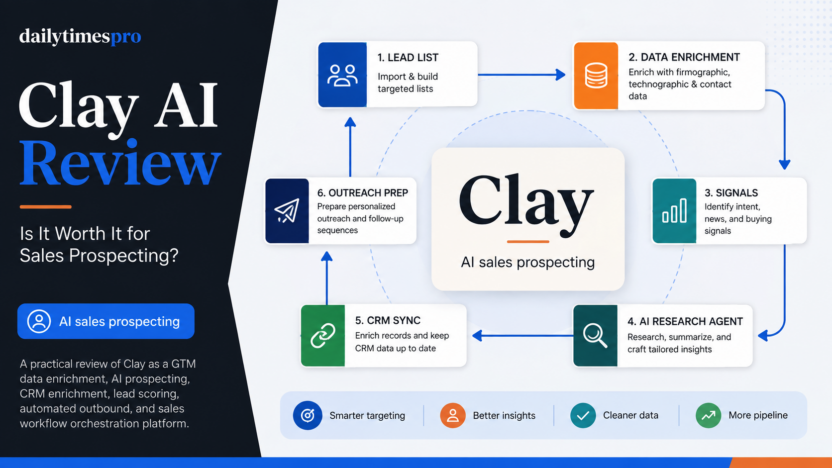
Clay is worth considering if your team needs a serious GTM workflow platform for prospecting, enrichment, signals, AI research, CRM updates, and outbound preparation. It is strongest for RevOps teams, growth teams, founders, agencies, and sales teams that want to build repeatable outbound systems instead of manually researching every account.
The main reason to consider Clay is its data and workflow layer. Clay describes itself as a platform for sourcing, enriching, scoring, and acting on GTM data. Its pricing page says teams can find and enrich data from 150+ providers, run multi-provider waterfalls, use Claygent for AI research, bring their own API key, track signals, and connect sales workflows.
Clay is not the best choice if you only need a simple email finder, a lightweight CRM, or a basic list-building tool. It also requires process discipline. If your team does not know its ICP, enrichment rules, outbound triggers, and CRM hygiene standards, Clay can become a powerful but underused workspace. For teams that do know those inputs, Clay can become the engine behind cleaner prospecting and more targeted GTM execution.
Best For
Clay is best for teams that need to build and maintain sales data workflows. A startup can use it to build target account lists, enrich companies, identify buyers, find contact data, score accounts, and prepare personalized outreach. An agency can use it to run repeatable prospecting workflows for clients. A RevOps team can use it to enrich CRM records, monitor buying signals, and route qualified accounts to the right campaign.
It is especially useful when the sales process depends on combining multiple data sources. Instead of checking separate tools one by one, a team can use waterfall enrichment so Clay tries different providers in sequence. This matters when the team wants better coverage without overpaying for one data source that may not have every record.
If your sales team also spends time in meetings, our best AI meeting assistants for sales teams guide covers the meeting side of the workflow. Clay is more about finding, enriching, and preparing account data before and around outreach.
Not Best For
Clay is not ideal for a team that only needs a small static lead list once in a while. If the workflow is simply "find 50 contacts and send a campaign," a narrower prospecting or email finder tool may be easier.
It may also be too advanced for teams without clear data rules. Clay works best when you can define what counts as a good company, which roles matter, which signals indicate timing, which CRM fields should update, and how outbound should be personalized. Without those rules, the workspace can become another database rather than a real GTM system.
Clay is also not a substitute for sales strategy. It can support targeting, enrichment, research, and workflow execution, but the team still needs a clear offer, relevant messaging, compliant outreach practices, and a process for managing replies.
Our Evaluation Criteria
This review uses practical criteria for small teams and GTM operators evaluating Clay:
| Criteria | What Matters |
|---|---|
| Data enrichment depth | Whether the platform can enrich companies and people from multiple provider sources |
| Workflow automation | Whether repeatable prospecting and CRM workflows can run with less manual work |
| AI research quality | Whether AI research can create useful account insights and custom data points |
| Signal tracking | Whether job changes, promotions, company news, web intent, or social signals can trigger better timing |
| CRM fit | Whether CRM sync and enrichment features help maintain cleaner records |
| Pricing clarity | Whether official pricing explains plans, actions, credits, and upgrade paths |
| Setup effort | Whether the team can define useful rules without excessive complexity |
| Small business value | Whether the platform saves enough research and list-building effort to justify the cost |
What Is Clay?
Clay is a GTM data enrichment and workflow platform. Its official pricing page describes a system for finding and enriching data from third-party sources, running multi-provider waterfalls, using Claygent as an AI agent for web research, bringing your own API key, creating workflows, using signals, and preparing sales actions.
In practical terms, Clay helps teams answer questions like:
| GTM Question | How Clay Can Help |
|---|---|
| Which companies match our target market? | Build and import audience lists, then enrich company records |
| Who should we contact? | Find people, roles, and contact data using provider workflows |
| Is this account worth prioritizing now? | Track signals such as job changes, promotions, company news, and intent |
| What should we say? | Use AI research to summarize context and support personalization |
| Where should the data go? | Sync enriched records with CRM or other GTM systems |
This is why Clay usually makes more sense for GTM teams than for casual users. The product is not just a database. It is meant to help teams design outbound workflows that start with better data.
Key Features
Multi-Provider Data Enrichment
Clay's official pricing page says the platform can find and enrich data from 150+ providers and run multi-provider waterfalls. This is one of the most important features because no single provider has perfect coverage.
In a typical sales workflow, a team may need company size, industry, location, technologies used, job openings, funding information, contact details, and decision-maker roles. If one provider does not return a useful result, a waterfall can try another provider. This can improve coverage and reduce manual research work.
Claygent AI Research
Claygent is described on Clay's pricing page as Clay's AI agent with access to web research. The page says it can generate custom data points using AI. For prospecting, this is useful when the information you need is not a simple database field.
A sales team could use AI research to summarize what a company does, identify whether it matches a target use case, find recent signals, draft a company-specific insight, or prepare a more relevant opening line. This should be used carefully. AI research is best when the output is reviewed and tied to verified account context rather than treated as a perfect source.
Signals and Intent
Clay's pricing page lists job changes, promotions, new hires, company news, social signals, and web intent signals across plan features. Signals matter because outbound timing is often as important as targeting.
A team could build a workflow around new executive hires, hiring activity, company expansion, funding news, website visits, or product launches. Instead of sending the same message to every lead, the team can prioritize accounts where there is a reason to reach out now.
CRM Enrichment and Sync
The Growth plan section on the official pricing page includes auto-sync and enrich CRM, auto-sync with data warehouse, HTTP API integration, and webhook signal automation. This makes Clay more useful for teams that already have CRM workflows and need cleaner account or contact data.
For example, a RevOps team could enrich stale CRM accounts, update fields from trusted data sources, add buying signals, and keep lists aligned with campaigns. This is more valuable than a standalone spreadsheet because the enriched data can flow back into the systems sales teams already use.
Outbound Preparation
Clay's pricing page references sending emails via Clay or integrations and using Clay's email sequencer or sequencing integrations. This positions Clay as part of the outbound workflow, not only the data cleanup step.
That does not mean every team should send directly from Clay. Some teams may prefer to use Clay for enrichment and personalization, then push records to their preferred sequencer. The right setup depends on existing tools, deliverability controls, and approval processes.
Actions and Data Credits
Clay's pricing model separates Actions and Data Credits. The pricing FAQ explains Actions as platform work Clay performs, while Data Credits cover data sourced from providers. This distinction matters because teams need to plan usage around both workflow volume and data consumption.
For small teams, this is one of the biggest learning points. A workflow that enriches thousands of leads, calls multiple providers, runs AI research, and syncs records will consume more capacity than a simple list import. Buyers should map expected monthly workflows before choosing a plan.
Clay Pricing
Pricing last checked on September 5, 2026.
Clay's official pricing page lists these plan details at the time checked:
| Plan | Official Listed Price | Included Capacity Shown | Best Fit |
|---|---|---|---|
| Free | Free | 500 actions/month, 100 data credits/month, unlimited seats and tables, up to 200 rows per table | Testing Clay and building a small first workflow |
| Launch | $167/month | Starts at 15,000 actions/month and 3,000 data credits/month | Small teams building and automating prospecting workflows |
| Growth | $446/month | Starts at 40,000 actions/month and 6,000 data credits/month | Teams with CRM-based workflows and growth campaigns |
| Enterprise | Custom | Custom actions and enterprise controls | Organizations building GTM systems at scale |
The same pricing page shows monthly and annual capacity options, mentions a 14-day trial for paid plans, and says annual plans can save 10%. It also says Data Credits can roll over, with Launch and Growth unused credits accumulating up to 2x the monthly credit amount. Enterprise credit rollover is described differently on the official page.
For most small teams, Launch is the first serious plan to evaluate because it adds phone number enrichment, Audiences search, job change and other signals, reusable functions, and email sending through Clay or integrations. Growth becomes more relevant when CRM enrichment, data warehouse sync, webhook automation, web intent signals, and stronger workflow integrations matter.
Real Use Cases
Lead List Building
A founder or sales team can use Clay to build a list of target accounts, enrich company details, find relevant contacts, and prioritize accounts that match the team's ideal customer profile. This is useful when prospecting requires more than downloading a generic list.
CRM Cleanup and Enrichment
A RevOps team could use Clay to enrich old CRM records, fill missing company or contact data, and keep fields current. The official pricing page specifically mentions auto-sync and CRM enrichment on Growth, which makes this a natural fit for teams with existing CRM workflows.
Signal-Based Outbound
A sales team can create outreach workflows around job changes, promotions, new hires, company news, and web intent. Instead of sending generic outbound to a cold list, the team can use a signal as the reason for the message.
Account Research
Claygent can help research accounts and generate custom data points. A practical use case is preparing a short account summary before outreach, identifying likely pain points based on public information, or building a structured personalization field for a sequencer.
Agency Prospecting Workflows
Agencies can use Clay to build repeatable prospecting systems for multiple clients. A workflow might include account sourcing, enrichment, scoring, personalization, and delivery to a campaign tool. The agency still needs to manage data quality and messaging standards, but Clay can reduce manual execution.
Sales and Meeting Follow-Up
Clay handles the prospecting and enrichment side. For call-heavy sales teams, tools focused on meeting notes may still be useful. Our AI sales call summaries guide covers the follow-up layer after conversations happen.
Pros and Cons
| Pros | Why It Matters |
|---|---|
| Strong data enrichment workflow | Helps teams combine multiple data sources instead of relying on one provider |
| Multi-provider waterfalls | Can improve coverage for contact and company data |
| Claygent supports AI research | Useful for account insights and custom data points |
| Signal tracking supports better timing | Outreach can be triggered by relevant account events |
| CRM enrichment and sync on Growth | Better fit for RevOps teams with existing CRM processes |
| Free plan is available | Teams can test the workspace before choosing a paid plan |
| Cons | Why It Matters |
|---|---|
| Higher starting price than simple prospecting tools | Launch starts at a level better suited to serious GTM workflows |
| Actions and Data Credits require planning | Teams need to understand usage before scaling workflows |
| Setup can be complex | The platform is most valuable when ICP, data rules, and routing logic are clear |
| Not a complete CRM strategy | Clay supports data workflows, but sales process and messaging still matter |
| Enterprise pricing is custom | Larger teams need sales-led pricing for organization-level needs |
Clay vs Alternatives
| Tool | Best For | Main Strength | Limitation |
|---|---|---|---|
| Clay | GTM data enrichment, AI research, signals, and workflow orchestration | Flexible outbound data workflows with multiple providers | Can be more complex than simple lead list tools |
| Apollo.io | Sales intelligence and prospecting database workflows | Large sales database and outbound features | Less flexible for custom multi-source enrichment workflows |
| ZoomInfo | Enterprise sales intelligence | Deep B2B data and enterprise buying motion | Often better suited to larger sales organizations |
| Clearbit | Company and contact enrichment | Enrichment for marketing and sales data | Narrower workflow orchestration than Clay |
| HubSpot | CRM, marketing, and sales operations | Central customer record and pipeline workflow | Clay-like external data workflows may require integrations |
If your team is comparing broader automation systems, our best AI agent platforms guide may help. If you are building GTM content workflows as well, the Copy.ai alternatives for GTM teams article covers another part of the same go-to-market stack.
What Most Teams Should Watch Before Choosing Clay
The biggest mistake is treating Clay as a magic lead generator. Clay is more accurately a GTM workflow builder. It can help source, enrich, research, score, and route prospects, but it works best when the team already knows what good data and good timing look like.
Before upgrading, map one workflow clearly:
| Workflow Step | Decision to Define |
|---|---|
| Targeting | Which companies and roles qualify? |
| Enrichment | Which fields are required before outreach? |
| Signals | Which events make outreach timely? |
| AI research | What custom insight is useful and reviewable? |
| CRM sync | Which fields should update, and who owns them? |
| Outreach handoff | Which sequencer or sales process receives the final records? |
If you cannot answer those questions yet, start with a small Free or trial workflow. If you can answer them, Clay can become a strong operational layer for repeatable sales prospecting.
Final Recommendation
Clay is a strong choice for teams that take outbound and GTM operations seriously. It is best for prospecting workflows where account data, enrichment, AI research, signals, CRM sync, and outbound preparation need to work together.
Choose Clay if you want a flexible GTM data engine and you are willing to design clear workflows. Consider a simpler tool if you only need a one-time lead list, a basic email finder, or a lightweight CRM.
For most small teams, Launch is the first plan to evaluate because it unlocks more practical prospecting features beyond the Free plan. Growth is better for teams with CRM-based workflows, data warehouse sync, webhook automation, and more advanced campaigns. Enterprise is for organizations that need custom scale, controls, and support.
FAQs
Is Clay free?
Yes. Clay's official pricing page lists a Free plan. At the time checked, it included 500 actions per month, 100 data credits per month, unlimited seats and tables, up to 200 rows per table, multi-provider waterfalls, Claygent enrichment, and bring-your-own API key support.
What is Clay used for?
Clay is used for GTM data workflows, prospecting, account enrichment, lead research, buying signals, CRM enrichment, and outbound preparation. It helps teams combine data sources and automate parts of the sales research process.
What is Claygent?
Claygent is Clay's AI agent for web research. Clay's pricing page says it can generate custom data points with AI. Sales teams can use it to research accounts, summarize context, and support personalization fields.
Is Clay good for small businesses?
Clay can be useful for small businesses with serious outbound workflows. It may be too much if the team only needs occasional list building, but it can fit founders, agencies, and sales teams that need repeatable enrichment and prospecting systems.
How does Clay pricing work?
Clay pricing uses plans, Actions, and Data Credits. Actions cover platform work such as workflow execution, while Data Credits cover data sourced from providers. Teams should estimate both workflow volume and data needs before choosing a plan.
Can Clay replace a CRM?
Clay should usually support a CRM rather than replace it. It can enrich records, prepare prospecting workflows, and sync data, but a CRM remains the main system for pipeline, customer history, sales activity, and reporting.
What are Clay's main limitations?
Clay's main limitations are setup complexity, usage planning, and fit. It is powerful when a team has clear targeting and data rules. It is less useful when the team needs a simple list tool or does not know how prospecting data should flow.
Who should choose Clay?
Choose Clay if your team needs multi-source data enrichment, AI account research, signal-based prospecting, CRM enrichment, and repeatable outbound workflows. It is best for GTM teams that want process control, not just another contact database.