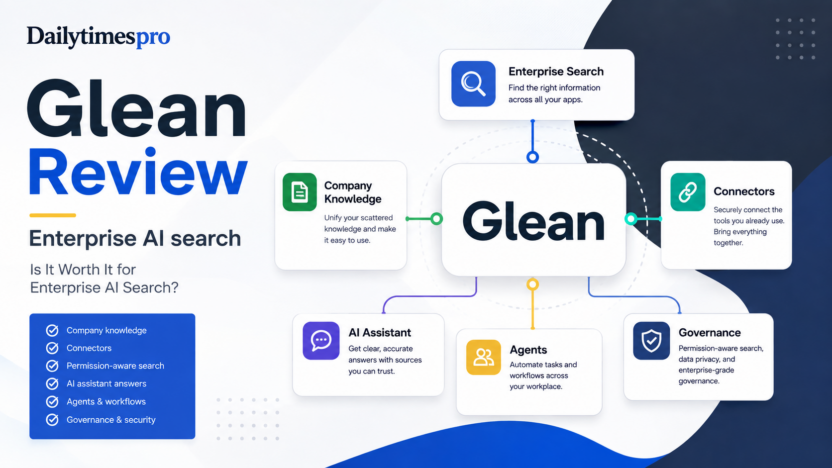
Glean is worth considering if your team has useful information spread across Google Drive, Slack, Microsoft 365, Jira, Confluence, Salesforce, Zendesk, GitHub, Notion, and other workplace systems. It is built for enterprise AI search, company knowledge discovery, AI assistant answers, and governed workplace agents.
The short answer: Glean is strongest for growing companies that have already outgrown basic document search. It is less suitable for a very small business that keeps most knowledge in one workspace and only needs a simple chatbot or help center search bar.
This Glean review looks at features, pricing, use cases, limitations, alternatives, and practical buying guidance for teams evaluating enterprise AI search in 2026.
Quick Verdict
Glean is a serious workplace AI platform, not a lightweight website chatbot. Its value comes from connecting many workplace systems, respecting source permissions, helping employees find company knowledge, and adding AI assistant and agent workflows on top of that knowledge layer.
For teams with scattered documentation, repeated internal questions, and slow handoffs, Glean can solve a real operational problem. For teams without clean permissions, reliable documentation, or enough internal content volume, the product may feel too enterprise-heavy.
Best For
Glean is best for companies where knowledge is spread across many apps and employees waste time finding answers. A SaaS team could use it to search product docs, Slack discussions, customer tickets, release notes, CRM records, engineering decisions, and onboarding content from one place. An operations team could use it to reduce repeated questions about policies, approvals, and internal processes.
It is also a strong fit for IT and knowledge management teams that care about access control. Glean's documentation describes connectors that fetch both data and permissions from enterprise data sources, which is important when workplace search must avoid exposing private information to the wrong employees.
Not Best For
Glean is not the first tool I would choose for a small website chatbot, a simple FAQ bot, or a team that only needs AI writing. It also may be unnecessary if your company already keeps almost everything in one clean system and search already works well enough.
The product needs implementation discipline. Connectors, permissions, assistant rollout, agents, policies, and adoption should be planned. Without that, enterprise search can become another place employees try once and ignore.
Our Evaluation Criteria
| Criteria | What We Looked For | Why It Matters |
|---|---|---|
| Search quality | Ability to find useful knowledge across workplace apps | Enterprise search fails if employees still hunt manually. |
| Connector coverage | Native and custom data source options | The tool needs to index the places where work actually happens. |
| Permissions | Source permissions, admin controls, and governance | Search must not reveal restricted information. |
| AI assistant value | Answers grounded in company context | Employees need useful answers, not generic AI text. |
| Agent workflow depth | Support for governed agents and task automation | Mature teams want more than search results. |
| Setup effort | Admin rollout, crawling, data readiness, user access | Implementation quality affects adoption. |
| Pricing clarity | Public pricing availability and buying path | Buyers need to know whether procurement is sales-led. |
What Is Glean?
Glean is an enterprise AI search and work assistant platform. Its official materials position the product around company knowledge, workplace search, AI answers, and agents that work across enterprise context.
The practical idea is simple: most companies already have the answer somewhere, but employees do not know where to look. It might be in a Slack thread, a Jira issue, a Google Doc, a Salesforce note, a Zendesk ticket, a Notion page, or a Confluence space. Glean aims to connect those systems, index the content, preserve permissions, and make the knowledge easier to retrieve.
That is different from a generic AI chatbot. A generic chatbot can answer broad questions. Glean is more valuable when the question depends on company-specific context: internal policies, customer history, project decisions, product docs, support procedures, or previous work.
Key Features
Enterprise Search Across Workplace Apps
Glean's connector documentation lists many popular workplace sources, including Asana, Confluence, Google Drive, Gmail, Google Calendar, Jira, GitHub, Gong, Notion, OneDrive, Outlook, PagerDuty, Salesforce, SharePoint, Slack, Teams, Website, Zendesk, Zoom, and more.
For a growing company, this matters because the best answer often lives outside the system where the employee starts searching. A customer success manager may need a product decision from Slack, a renewal note from Salesforce, and a support pattern from Zendesk. A single search layer can reduce that context switching.
Permission-Aware Knowledge Access
Enterprise search has a security problem: finding information is useful only if access remains correct. Glean connector documentation says connectors fetch data and permissions from enterprise data sources. That is important because search results should follow the access model of the original source systems.
In practice, this means setup should involve IT or an admin who understands identity, permissions, groups, and source ownership. The search experience is only as trustworthy as the permissions model behind it.
Glean Assistant
Glean Assistant gives employees an AI interface for asking questions and completing work using enterprise context. Glean documentation says the Assistant can use company context and knowledge sources to provide answers tailored to the user.
This is useful for questions such as: "What is our refund policy for annual plans?", "Where is the latest onboarding checklist?", "What changed in the last release?", or "Summarize what the account team knows about this customer." The answer should still be reviewed when it affects customers, money, legal commitments, or private information.
Glean Agents
Glean Agents are designed to automate tasks and workflows using company context. Glean's agent documentation describes agents as AI-powered tools that can gather information, summarize data, make decisions based on steps, and carry out workflows.
For a typical business workflow, agents could help draft an internal status update, summarize support themes, prepare an account brief, route HR questions, or guide IT help desk requests. The most useful agents are narrow and governed. Broad "do everything" agents are harder to trust.
Agent Governance and Access Controls
Glean documentation includes admin controls for managing agent creation, sharing, and publishing. It describes roles such as Agent Creator and Agent Moderator, plus default member permissions for whether users can create, share, or publish agents.
This is a meaningful feature for larger teams. If every employee can publish agents without review, the organization can end up with overlapping or risky automations. If only a few people can build and approve agents, quality and ownership are easier to manage.
AI Security Policies
Glean's documentation describes AI security policies that can apply to Glean Assistant, interactive agents, and automatically triggered agents. Policies can block high-severity violations or flag issues for review.
For teams using AI with company data, these controls matter. A workplace AI platform should not only generate answers. It should provide guardrails for what agents can access, what actions they can take, and when issues need review.
Auto-Routing to Specialized Agents
Glean documentation describes Assistant auto-routing to agents, where user questions can be routed to specialized agents such as HR, IT help desk, or departmental experts. This is useful because employees should not need to know which agent handles every category of question.
For example, HR policy questions can go to an HR agent, IT access issues can go to an IT agent, and department-specific process questions can go to an expert agent. This can make the assistant more practical as a single entry point.
Glean Pricing
Pricing last checked on September 8, 2026. Glean does not publish a simple public self-serve price table in the same way many small-business SaaS tools do. The official buying path is sales-led through Glean's website and demo/contact flow.
| Pricing Area | Officially Verifiable Status | Buyer Guidance |
|---|---|---|
| Public self-serve monthly price | Not listed as a simple public plan table on the official site during review | Expect sales-led pricing and confirm seat, connector, security, and deployment requirements with Glean. |
| Enterprise deployment | Sales-led | Prepare app inventory, user count, permission model, security needs, and rollout scope before a demo. |
| Connectors and data sources | Product and docs describe broad connector support | Confirm which connectors are included for your deployment and which require extra setup. |
| Agents and governance | Official docs describe agent roles, sharing, policies, and governance | Ask how agent features, admin controls, and security policies map to your plan. |
For the latest commercial terms, use the official Glean website and request current pricing from Glean directly. Do not estimate total cost without confirming users, connected sources, security requirements, implementation needs, and support level.
Real Use Cases
Internal Knowledge Search
In a typical small business workflow, an employee may need to find a policy, project note, product decision, customer detail, or onboarding guide. If that information is scattered across docs, chat, tickets, and project tools, Glean can reduce search time by creating one permission-aware discovery layer.
Customer Support Context
A SaaS support team could use Glean to find previous tickets, known issues, troubleshooting notes, release decisions, and policy details before replying to a customer. This does not replace support judgment, but it can help agents find the right internal context faster.
Sales and Customer Success Prep
Before a renewal call, a customer success manager could search across CRM notes, support tickets, product feedback, meeting summaries, and account history. Glean can help assemble context that would otherwise require checking several tools manually.
Employee Onboarding
New employees often ask repeated questions: where documents live, how approvals work, what tools to use, who owns a process, and where to find training material. Glean can make onboarding smoother when company knowledge is documented and indexed.
IT and HR Agent Routing
Glean's auto-routing concept is useful for internal service desks. A company could route HR questions to an HR policy agent and IT access questions to an IT help desk agent. This works best when each agent has clear scope and approved source material.
Pros and Cons
| Pros | Cons |
|---|---|
| Strong fit for companies with knowledge spread across many apps. | Too much platform for teams with simple knowledge needs. |
| Broad connector ecosystem and custom data source options. | Requires careful admin setup and permission review. |
| AI Assistant can answer from enterprise context. | Pricing is sales-led rather than simple public self-serve. |
| Agents add workflow automation beyond search. | Adoption depends on content quality and employee trust. |
| Governance and policy controls support larger organizations. | Implementation can involve IT, security, and knowledge owners. |
Alternatives
| Tool | Best For | Main Strength | Limitation |
|---|---|---|---|
| Glean | Enterprise AI search across workplace apps | Permission-aware search, assistant, connectors, and agents | Sales-led and implementation-heavy |
| Guru | Knowledge management and employee answers | Strong knowledge base workflow and verification habits | More knowledge-base centered than broad enterprise search |
| Notion AI | Teams already using Notion heavily | Good for workspace docs and internal writing | Less suitable as a cross-enterprise search layer |
| Microsoft 365 Copilot | Microsoft-centered organizations | Works inside Microsoft 365 apps and business data | Best when the company is deeply Microsoft-based |
| Google Gemini for Workspace | Google Workspace teams | Useful inside Gmail, Docs, Sheets, Meet, and Drive | Not a replacement for broad cross-app enterprise search |
For related buying context, read Best AI Agent Platforms for Small Business, Botpress Review, Best AI Help Desk Tools, and AI Customer Support Workflow.
How to Decide
Choose Glean if your company has enough internal knowledge volume to justify enterprise search. The strongest signal is repeated employee friction: people ask the same questions, cannot find decisions, switch across too many apps, or depend on a few senior teammates to remember where everything lives.
Wait if your documentation is thin, permissions are messy, or the first use case is unclear. Glean can make a good knowledge system easier to use, but it cannot magically fix undocumented processes.
Before a demo, prepare a list of connected systems, user groups, security requirements, core search use cases, agent ideas, and success measures. Useful measures include reduced time to find answers, fewer repeated internal questions, faster onboarding, cleaner support research, and better account preparation.
Final Recommendation
Glean is worth it for organizations that need enterprise AI search and governed workplace AI across many systems. It is especially compelling when internal knowledge is valuable but hard to find.
It is not the best first AI purchase for every small business. If your team only needs a website chatbot, a writing assistant, or a single-app search improvement, choose a narrower tool first. But if your company is growing, knowledge is spread across tools, and employees lose time finding trustworthy answers, Glean deserves a serious evaluation.
FAQs
Is Glean good for small businesses?
Glean can work for growing small businesses with many workplace apps and a real knowledge discovery problem. Very small teams with simple documentation may not need an enterprise search platform yet.
Does Glean publish public pricing?
Glean's public site uses a sales-led buying path rather than a simple public monthly plan table. Pricing last checked on September 8, 2026.
What does Glean connect to?
Glean documentation lists many connectors, including Google Drive, Gmail, Slack, Jira, GitHub, Salesforce, Zendesk, Notion, Confluence, Microsoft tools, and custom data sources.
Is Glean only search?
No. Glean includes search, assistant capabilities, agents, connectors, and governance features. Search is the foundation, but the platform also supports AI workflows.
How does Glean handle permissions?
Glean connector documentation describes fetching data and permissions from enterprise sources. Buyers should still validate permission behavior during implementation.
What are Glean Agents?
Glean Agents are AI-powered workflows that can gather information, summarize data, make decisions across steps, and automate tasks using company context.
Who should manage Glean?
IT, operations, knowledge management, security, and department owners should all be involved. Enterprise search affects data access, workflow trust, and adoption.
What is the main limitation of Glean?
The main limitation is implementation complexity. Glean is most useful when connectors, permissions, source quality, and rollout plans are handled carefully.
What should I compare Glean against?
Compare it with Guru, Notion AI, Microsoft 365 Copilot, Google Gemini for Workspace, and other enterprise search or knowledge management tools based on your existing stack.
What is the best first use case?
Start with one high-friction use case such as employee onboarding, support research, sales account prep, or internal policy lookup. Expand after the first workflow proves useful.