An AI knowledge base workflow helps a small business turn scattered information into reviewed, searchable answers. The goal is not to let AI invent company policy. The goal is to use AI to organize source material, draft helpful summaries, and make human review faster.
This workflow is useful for support teams, operations teams, agencies, SaaS companies, and founders who keep answering the same questions in chats, emails, meetings, and documents.
Quick Answer
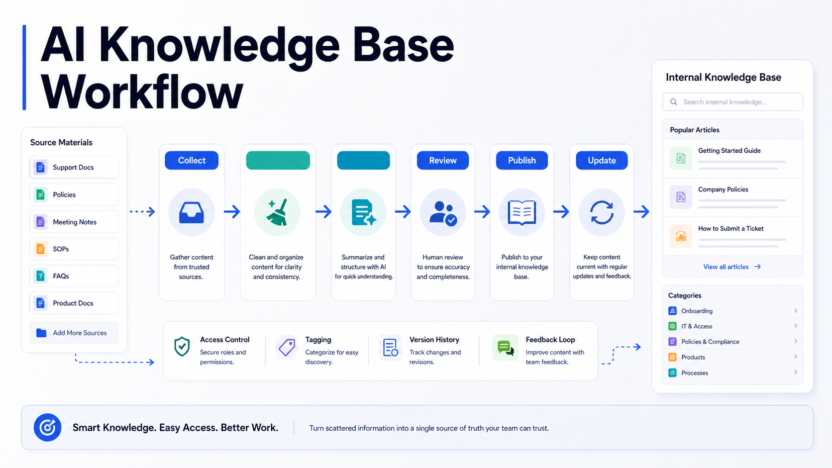
Build the workflow in six stages: collect sources, clean and label them, summarize with AI, review with a human owner, publish into a searchable knowledge base, and update it on a fixed schedule.
Best For
- Support teams handling repeated FAQs.
- Small businesses with scattered policies and SOPs.
- Agencies onboarding new team members.
- SaaS teams documenting product answers.
- Operations teams standardizing internal processes.
Not Best For
- Companies with no trusted source documents.
- Teams that want AI to invent policies.
- Sensitive legal, HR, or financial answers without review.
- Knowledge bases with no owner or update process.
The Workflow
1. Collect Source Material
Start with existing material: help docs, support tickets, call notes, onboarding guides, SOPs, pricing rules, product docs, policy PDFs, and Slack or email answers that are already approved.
Do not begin with a blank AI prompt. Begin with real company sources.
2. Clean And Label Sources
Remove duplicates, outdated notes, private customer details, and uncertain claims. Label each source by topic, owner, date, and trust level.
3. Use AI To Summarize
Use AI to create draft answers, short summaries, decision trees, and FAQ outlines. The AI should cite or refer back to source material wherever possible.
4. Review With Human Owners
Assign a person to approve each topic. Support answers may need a support lead. Pricing answers may need sales or finance. Policy answers may need operations or HR.
5. Publish Into A Searchable System
Publish only reviewed material into a tool your team actually uses. This may be Notion, Guru, Slite, Zendesk, Intercom, Help Scout, SharePoint, Google Drive, or another knowledge base.
6. Update On A Schedule
Every answer needs an owner and review date. Product changes, pricing updates, policy changes, and repeated customer confusion should trigger updates.
Real Use Cases
Customer Support FAQs
Support teams can turn repeated questions into approved macros and knowledge base articles. This reduces inconsistent answers and helps new agents learn faster.
Billing Questions
Billing topics need careful review. AI can draft summaries, but finance or operations should approve refunds, invoices, cancellation rules, and plan limits.
Onboarding Support
New employees can use a knowledge base to find setup steps, tool access, process notes, and internal policies without asking the same questions repeatedly.
Human Handoff
AI should not answer every question alone. The knowledge base should include escalation rules for legal issues, angry customers, account risks, refunds, security concerns, and unclear product behavior.
For related workflows, see our AI customer support workflow and AI customer feedback analysis workflow.
Quality Checklist
| Check | Why It Matters |
|---|---|
| Source linked | Prevents unsupported answers |
| Owner assigned | Gives someone responsibility |
| Review date set | Prevents stale content |
| Escalation rule included | Keeps sensitive issues safe |
| Customer-facing language reviewed | Protects brand trust |
| Internal-only notes separated | Reduces accidental sharing |
Common Mistakes
- Letting AI create policy from memory.
- Mixing draft notes with approved answers.
- Publishing answers without owners.
- Forgetting to review pricing or legal language.
- Letting old screenshots and outdated docs stay in the source folder.
Final Recommendation
Start with one high-volume category, such as support FAQs or onboarding. Build the review process before scaling the tool. A small, accurate knowledge base is more valuable than a large one full of unverified AI summaries.
FAQs
What is an AI knowledge base workflow?
It is a repeatable process for collecting company information, cleaning it, summarizing it with AI, reviewing it with humans, publishing it, and keeping it updated.
What tools can support this workflow?
Teams may use Notion, Google Drive, Microsoft SharePoint, Help Scout, Intercom, Zendesk, Slite, Guru, NotebookLM, ChatGPT Business, Claude Team, or similar systems depending on their stack.
Can AI write the whole knowledge base?
AI can draft and summarize, but humans should review accuracy, policy details, customer-facing language, and sensitive information.
What should go into a small business knowledge base?
FAQs, support macros, product docs, onboarding notes, SOPs, pricing rules, internal policies, troubleshooting steps, and customer handoff notes.
How do you avoid outdated answers?
Assign owners, review dates, source links, and update triggers whenever products, pricing, policies, or processes change.
Should customer support teams use AI knowledge bases?
Yes, when the workflow includes reviewed answers, escalation rules, and clear limits on what AI can say.
Can this help onboarding?
Yes. New employees can find approved answers faster when the knowledge base is structured and searchable.
What is the biggest risk?
The biggest risk is publishing confident but outdated or unsupported information.
How often should content be reviewed?
High-impact policies and customer-facing answers should be reviewed more often than low-risk internal notes.
What is the first step?
Start by collecting the top repeated questions and the source documents that already answer them.
Recommended Tool Stack
The workflow can be built with many tools. A simple small-business version might use Google Drive or SharePoint for source files, Notion or Guru for approved internal answers, Zendesk or Intercom for customer-facing support content, and ChatGPT Business, Claude Team, or NotebookLM for drafting and summarizing.
The tool stack matters less than the review process. A knowledge base with clear ownership in a simple tool is better than an advanced AI system with unreviewed answers.
Governance Rules
Every article or answer should have an owner, source link, review date, audience label, and escalation rule. Audience labels are important because internal notes, customer-facing answers, sales talk tracks, and policy language should not be mixed casually.
Use labels such as internal only, customer facing, draft, approved, needs legal review, needs product review, and outdated. These labels help AI-assisted workflows stay controlled.
Example Workflow For Support Teams
1. Export the top repeated support questions. 2. Match each question to the best official source. 3. Ask AI to draft a short answer and a longer troubleshooting note. 4. Have a support lead review the answer. 5. Publish it to the help center or internal knowledge base. 6. Track whether the answer reduces repeat tickets. 7. Update it when the product, pricing, or policy changes.
Example Workflow For Operations
Operations teams can use the same approach for SOPs, onboarding, expense policies, vendor processes, access requests, and recurring administrative questions. AI can help turn messy notes into a clean first draft, but the process owner should approve the final version.
Quality Standard
A good knowledge base answer is short enough to use, specific enough to be trusted, and sourced enough to be checked. If the answer cannot point back to a source, it should not be treated as approved.
Final Warning
The worst knowledge base is not an empty one. It is a confident, outdated one. Build update reviews into the workflow from day one.
What To Include In The Knowledge Base
A useful AI knowledge base starts with repeated questions, not with a blank tool. Look for support tickets, onboarding questions, sales objections, billing questions, product setup steps, policy explanations, and internal SOPs that people already ask about every week.
For customer support, include FAQs, troubleshooting steps, account setup instructions, refund or billing rules, onboarding guidance, and escalation instructions. For sales, include positioning notes, product limits, competitor comparison notes, qualification questions, and approved talk tracks. For operations, include vendor processes, expense rules, access requests, hiring steps, and recurring administrative tasks.
Each answer should include a source, owner, review date, and audience. Without those fields, the knowledge base slowly becomes a pile of confident but unverified answers.
Review Roles
An AI knowledge base should not be owned by AI. It should be owned by people with clear review roles.
| Role | Responsibility |
|---|---|
| Source owner | Confirms the original policy, product detail, or process |
| Knowledge editor | Turns the source into a clear answer |
| Support or operations lead | Approves the answer for real workflow use |
| Reviewer | Checks outdated answers on a regular schedule |
Small businesses do not need a complex governance department. They need one clear owner per content area. Billing answers should have a billing owner. Product answers should have a product owner. HR answers should have an HR owner.
AI Prompting Workflow
Use AI to draft from approved sources, not from memory. A safe prompt might ask the AI to summarize a source document into a customer-facing answer, list assumptions, identify missing information, and flag anything that requires human approval. This keeps the assistant focused on transforming known material instead of inventing policy.
Do not ask AI to create a policy from scratch unless a human subject-matter owner will review it carefully. For sensitive topics such as refunds, legal terms, employment rules, security, pricing, or medical and financial information, AI should be a drafting assistant only.
Maintenance Schedule
Set a review rhythm before publishing the first batch of answers. Product setup articles may need review after every major release. Billing and pricing answers should be checked whenever plans change. HR and policy documents should be reviewed on a fixed schedule. Support FAQs should be reviewed when ticket volume shows repeated confusion.
The goal is not to create a large knowledge base. The goal is to create a trusted one. A small set of accurate answers is more valuable than hundreds of stale articles.
Success Metrics
Track whether the workflow reduces repeated questions, improves first-response quality, speeds up onboarding, and helps new employees find approved answers. Avoid made-up precision. A small business can start with simple signals: fewer repeated support tickets, fewer internal Slack questions, faster onboarding, and better consistency in customer replies.
Common Failure Points
The most common failure is publishing AI-written answers without source ownership. The second is mixing internal and customer-facing content. Internal notes often include shortcuts, exceptions, or informal language that should not appear in a public help center. The third is letting old answers stay live after pricing, product features, policies, or support processes change.
Another failure point is using AI to answer questions from memory instead of approved sources. That creates confident-sounding content that may not match the business policy. The better workflow is source first, AI draft second, human review third, publication last.
Example Article Template
Every knowledge base article can follow a simple structure:
| Section | Purpose |
|---|---|
| Short answer | Gives the user a direct answer quickly |
| When to use this | Explains the scenario or audience |
| Steps | Shows the process in order |
| Exceptions | Lists cases where the answer changes |
| Escalation | Tells the reader when to contact a human |
| Source and owner | Keeps the answer auditable |
This template works for customer FAQs, internal SOPs, onboarding articles, sales enablement notes, and support troubleshooting guides. The wording can change by audience, but the approval structure should stay consistent.
Final Implementation Advice
Start with the top 20 repeated questions, not every possible article. Publish only reviewed answers. After two weeks, look at support tickets, internal messages, and onboarding questions to see which answers helped and which need revision. Then expand the knowledge base in small batches.
AI can make the drafting process faster, but trust comes from source links, ownership, and review. That is the difference between a useful AI-assisted knowledge base and another folder of stale documents.