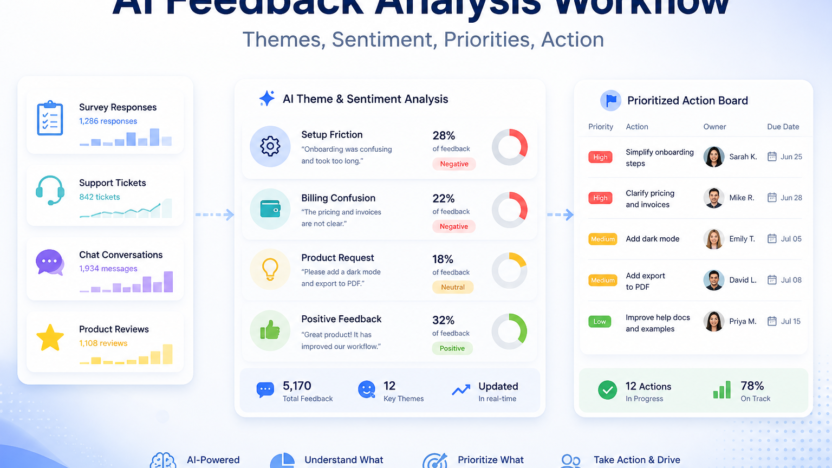
Customer feedback is easy to collect and surprisingly hard to use. Surveys, reviews, support tickets, sales notes, cancellation reasons, and chat transcripts all contain signals, but most teams only read a few examples. An AI customer feedback analysis workflow helps turn that scattered input into themes, sentiment, priorities, and owned action items.
The workflow should not replace customer judgment. It should make feedback easier to understand. SurveyMonkey AI survey analysis focuses on finding themes, sentiment, and insights in survey responses. Qualtrics XM describes turning feedback from multiple channels into predictive insights and recommendations. Zendesk AI supports service teams with AI agents, copilots, automation, and QA. Intercom AI insights focuses on conversation analysis and service performance.
The Feedback Analysis Workflow
| Stage | AI role | Human role |
|---|---|---|
| Collection | Group feedback by channel and topic | Confirm sources are relevant |
| Theme analysis | Identify repeated issues and requests | Merge or rename themes |
| Sentiment review | Flag negative, neutral, and positive patterns | Interpret severity and context |
| Prioritization | Suggest high-frequency or high-risk issues | Decide business priority |
| Action tracking | Turn insights into tasks | Assign owners and due dates |
Collect Feedback From The Right Places
Start with the channels that already contain customer language. These might include survey responses, support tickets, chat conversations, public reviews, onboarding calls, churn notes, and product feedback forms. Do not wait for a perfect system. Start with two or three reliable sources and expand later.
For each source, record the date range, customer segment, channel, and owner. AI analysis is more useful when you know where the feedback came from. A complaint from a long-term customer may mean something different from a one-line anonymous survey response.
If the team already has support and marketing workflows, connect the analysis back to them. A support trend may feed into AI customer support workflow. A repeated objection may become content for AI marketing workflow for small business.
Use AI To Find Themes, Not Final Truth
AI is useful for grouping messy feedback into themes: billing confusion, setup friction, missing integrations, slow response, unclear onboarding, product quality, or feature requests. It can also summarize examples and surface representative quotes.
But themes need human review. AI may combine different problems under one label or split the same problem into multiple labels. A customer success manager, support lead, or product owner should review the theme list and rename it in plain business language.
A good theme is actionable. “Negative sentiment†is not enough. “Customers cannot find the export button after onboarding†is useful because someone can fix it.
Add Sentiment Carefully
Sentiment analysis helps identify emotion, but it can be blunt. A polite customer may still be at risk. An angry customer may be reacting to one temporary issue. Treat sentiment as a signal, not a verdict.
Use AI sentiment to find clusters worth reviewing: strongly negative tickets, positive product mentions, recurring frustration, or confusing onboarding comments. Then read samples before making decisions.
The strongest workflow combines frequency, sentiment, customer value, and business risk. A low-frequency issue from high-value customers may be more urgent than a common but minor annoyance.
Turn Insights Into Work
Feedback analysis only matters when it changes something. For each important theme, create an action item with an owner, due date, source examples, expected outcome, and review date.
Common action types include updating help docs, changing onboarding emails, fixing a product flow, improving sales qualification, creating a comparison page, retraining support macros, or escalating a bug.
Keep the action list short. If AI produces 40 insights, choose the five that matter now. A focused feedback workflow beats a giant dashboard nobody uses.
Close The Loop
When a customer issue leads to a change, close the loop internally and, when appropriate, externally. Tell the support team what changed. Update the knowledge base. Add the new issue to onboarding or sales enablement. If customers asked for the change directly, let them know.
This is where AI can help again. It can summarize what changed, draft internal notes, and suggest a customer update. A human should approve anything customer-facing.
FAQ
What is an AI customer feedback analysis workflow?
It is a repeatable process for using AI to organize feedback, identify themes, review sentiment, prioritize issues, and create action items.
What feedback sources should I use?
Start with surveys, support tickets, chat conversations, reviews, churn notes, and sales call notes.
Can AI replace manual feedback review?
No. AI can cluster and summarize feedback, but humans should validate themes and priorities.
What is the best use of sentiment analysis?
Use sentiment to find patterns worth reviewing, not as the only basis for decisions.
How often should feedback be analyzed?
Monthly works for many teams. High-volume support teams may need weekly analysis.
Who should own the workflow?
Customer success, support, product, or marketing can own it, but every action item needs a named owner.
What should I do with repeated complaints?
Group them by theme, review examples, assign a fix, and track whether the issue declines after the change.
Can feedback analysis help content marketing?
Yes. Customer questions and objections can become articles, FAQs, comparison pages, and onboarding content.
What metrics should I track?
Track theme frequency, negative sentiment clusters, resolution time, churn reasons, support volume, and action completion.
What is the biggest limitation?
AI can misread context when feedback is short, sarcastic, incomplete, or pulled from only one channel.
Final Decision
Use this workflow if your team already has the core business process in place and wants AI to remove drafting, summarizing, sorting, and follow-up friction. Do not use it as a substitute for human review, legal approval, customer-sensitive judgment, or final publishing decisions. The best setup is simple: one source of truth, one review owner, a short list of approved prompts, and a weekly check of what the AI helped create.