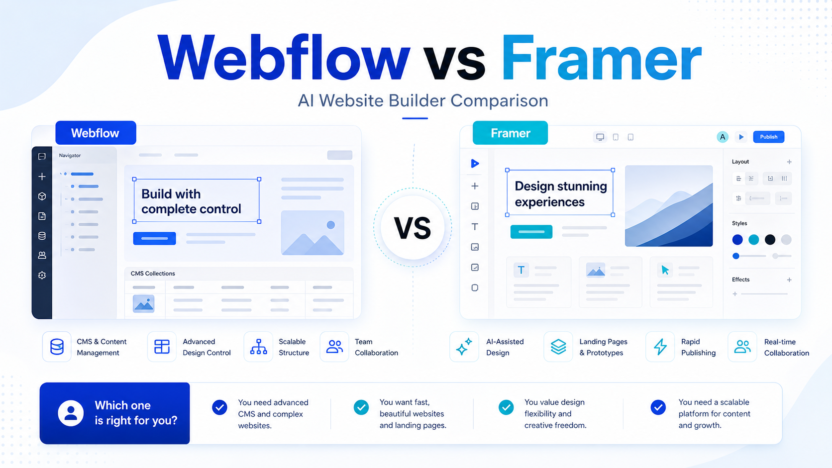
Webflow and Framer both help teams build polished websites, but they are not identical tools. Webflow is stronger for structured sites, CMS needs, governance, and larger marketing operations. Framer is often faster for design-led landing pages, startup sites, and lightweight publishing.
Quick Verdict
Choose Webflow if your team needs a scalable marketing site, CMS, publishing workflows, governance, or advanced platform features. Choose Framer if your priority is speed, design quality, fast landing pages, and a lighter creative workflow. Both can support AI-assisted website work, but the best choice depends on the website you are building.
Best For
- Webflow: content-rich sites, marketing teams, CMS workflows, governance, and larger organizations.
- Framer: startup landing pages, portfolio-style sites, design-led marketing pages, and quick publishing.
Not Best For
- Webflow may be too much for a simple one-page site.
- Framer may be too light for complex content operations.
- Neither tool replaces brand strategy, SEO planning, or content governance.
- Teams with strict developer-owned infrastructure may prefer custom builds.
Comparison Table
| Factor | Webflow | Framer |
|---|---|---|
| Best fit | Scalable marketing sites and CMS | Design-led websites and landing pages |
| Free plan | Starter site plan is free | Free plan exists |
| Entry paid site plan | Basic $15/mo billed yearly | Basic $10/mo |
| Higher self-serve site plan | Premium $25/mo billed yearly | Pro $30/mo |
| Enterprise path | Team starts at $2,500/mo annual contract; Enterprise custom | Enterprise custom |
| CMS | Stronger CMS focus | CMS collections available by plan |
| AI | Webflow AI listed in site plans | Agents and AI features use credits |
| Collaboration | Stronger platform/governance direction | Additional editors available |
| Best for marketers | Strong when site operations are complex | Strong when speed and design matter |
| Main limitation | More platform complexity | Less enterprise marketing-site depth |
Pricing last checked on June 24, 2026.
Webflow Overview
Webflow is a website platform for design, CMS, hosting, SEO, collaboration, publishing workflows, localization, and enterprise site operations. Its official pricing page lists Starter as free, Basic at $15/month billed yearly, Premium at $25/month billed yearly, Team at $2,500/month with annual contract, and Enterprise as sales-assisted.
Webflow is best when the site is a business asset with content workflows, multiple stakeholders, governance, and ongoing updates. It has more operational depth than a lightweight landing page builder.
Framer Overview
Framer is a design-led website builder with fast publishing, CMS collections, hosting, SEO, credits for agents and AI features, and an Enterprise option. Its pricing page lists Basic at $10/month, Pro at $30/month, and Enterprise as custom. It also states that every plan includes credits for agents and other AI features, with free-plan credit limits and paid plan credits.
Framer is best when a team wants to build a polished page quickly. It is especially useful for founders, designers, product marketers, and startups that need a high-quality web presence without a heavy site operations workflow.
Real Use Cases
Startup Launch Site
Framer is often the faster choice for a launch site, waitlist page, product page, or campaign page where visual polish and speed matter.
Content-Rich Marketing Site
Webflow is stronger when the site has a blog, CMS collections, multi-page structure, SEO operations, localization, or multiple people involved in publishing.
Agency Workflow
Agencies can use both. Framer can help with fast design-led builds. Webflow can be better for clients that need CMS, governance, and long-term site operations.
Enterprise Marketing
Webflow has a clearer enterprise platform story with governance, workflows, and enterprise-grade controls. Framer has Enterprise as well, but many teams will evaluate it more for design-led production first.
Pros And Cons
Webflow Pros
- Strong CMS and marketing-site platform.
- Free Starter plan and clear paid site plans.
- More suitable for content-rich sites.
- Platform features support teams and governance.
- Good fit for larger site operations.
Webflow Cons
- More complex than Framer for a simple landing page.
- Platform plans can become expensive.
- Teams need process for CMS, publishing, and design governance.
Framer Pros
- Fast, design-led site creation.
- Lower entry price for Basic.
- Useful AI credits and agent workflow.
- Good fit for startups and polished landing pages.
- Simple path for visual publishing.
Framer Cons
- Less mature fit for complex content operations.
- Credit usage needs planning.
- Enterprise needs custom evaluation.
- Designers still need content and SEO discipline.
Which One Should You Choose?
Choose Webflow if the website is a long-term marketing platform with CMS, SEO, publishing, governance, and multiple stakeholders. Choose Framer if the website is a fast-moving design asset: launch page, startup site, product page, portfolio, or campaign page. If your team has both needs, use Webflow for the core site and Framer for fast experiments only when governance allows it.
For related coverage, see our Lovable vs Bolt comparison and AI WordPress content workflow.
FAQs
Is Webflow better than Framer?
Webflow is better for larger marketing sites, CMS workflows, governance, and structured content. Framer is better for fast design-led pages and simpler publishing.
Is Framer cheaper than Webflow?
Framer Basic is listed at $10/month, while Webflow Basic is listed at $15/month billed yearly. Pricing last checked on June 24, 2026.
Which is better for landing pages?
Framer is often faster for design-led landing pages. Webflow is better when the landing page belongs to a larger CMS or marketing-site system.
Which is better for CMS?
Webflow generally has the stronger CMS and site-operations fit. Framer supports CMS collections, but Webflow is more commonly chosen for content-rich marketing sites.
Do Webflow and Framer include AI?
Webflow lists Webflow AI in site plans. Framer says agents and other AI features consume credits. Teams should check plan details before buying.
Which is better for agencies?
Agencies can use either. Framer is good for fast visual projects. Webflow is better for clients with CMS, governance, localization, and ongoing publishing needs.
Can either replace developers?
Not fully. Both can reduce development dependency for marketing sites, but technical review may still be needed for integrations, analytics, forms, accessibility, and custom code.
What should I test first?
Build one real page in each tool: a homepage, landing page, or CMS page. Compare speed, editing, publishing, SEO setup, collaboration, and maintenance.
Implementation Notes
Before switching website builders, document your current site needs: number of pages, CMS collections, forms, analytics, SEO workflow, localization, approval process, and who edits the site. A tool that feels faster on day one may not be easier after 100 content updates.
How To Choose By Website Type
For a one-page launch site, Framer may be the faster and simpler choice. For a content-rich marketing site with a blog, CMS collections, SEO workflows, forms, and multiple editors, Webflow is usually the stronger fit. The difference becomes clearer as the website grows.
A founder might start with Framer to validate positioning and collect signups. Later, if the company needs a larger content system, localization, governance, and more structured publishing, Webflow may become more practical. The right choice can change as the business grows.
Migration And Maintenance
Before choosing either platform, list the current and future site requirements. Include page count, CMS collections, custom forms, analytics, SEO controls, redirects, localization, approval workflow, custom code, and who will edit pages. A tool that feels faster during design can become harder if the maintenance workflow does not fit the team.
If migrating from another builder, avoid rebuilding everything at once. Start with the most important pages: homepage, product page, pricing page, and one content template. Test editing, publishing, redirects, forms, and analytics before moving the whole site.
AI Features In Context
AI features can help with page ideas, content drafts, layouts, and workflow acceleration. They should not decide the platform. The platform decision should be based on CMS needs, publishing workflow, team roles, design control, hosting, SEO, and long-term maintenance.
For example, Framer credits and agents may be attractive for fast iteration. Webflow AI and platform features may be more useful when the team needs a structured site operation. In both cases, AI output needs human review.
Common Mistakes
The first mistake is choosing based only on visual demos. A beautiful prototype is not the same as an maintainable website. The second mistake is ignoring the editor experience. If marketers cannot update content safely, the website becomes a bottleneck. The third mistake is skipping SEO and analytics setup until after launch.
Practical Test
Build the same page in both tools. Include a hero section, form, CMS-driven section, mobile layout, SEO title, meta description, analytics script, and one update from a non-designer. Compare not only design speed but also editing, publishing, and maintenance confidence.
Team Workflow Differences
Webflow tends to fit teams that need a more structured website operation. Marketers, designers, content editors, and stakeholders may all be involved in updates. That makes roles, permissions, CMS structure, and publishing workflow important. Webflow is not only a design canvas; it can become the operating layer for a marketing site.
Framer tends to fit smaller or faster-moving teams. A designer or founder can create polished pages quickly and publish without a heavy process. That makes it attractive for launches, portfolios, product pages, and campaign experiments. The tradeoff is that complex content operations may need more planning.
SEO And Content Considerations
Both platforms can support SEO basics, but the workflow matters. A content-heavy site needs templates, metadata rules, redirects, internal links, image handling, analytics, and repeatable publishing. Webflow's CMS orientation can help here. Framer can still work well for simpler content needs, but teams should test their exact content process before committing.
Cost Beyond The Plan Price
Plan prices are only part of the cost. Consider the cost of migration, redesign, content entry, training, maintenance, custom code, integrations, and future rebuilds. A cheaper monthly plan may be less attractive if it creates extra maintenance work. A more expensive platform can be worth it if it reduces friction for the team.
Agency Considerations
Agencies should choose based on client needs. A startup client that needs a fast launch page may be happier with Framer. A B2B client with a large blog, many landing pages, localization, and approval needs may be better served by Webflow. Agencies should also consider handoff. If the client cannot maintain the site, the project will create ongoing support pressure.
Final Decision Matrix
Choose Webflow for CMS depth, site operations, governance, and larger marketing sites. Choose Framer for speed, visual polish, lighter sites, and quick iteration. If both seem viable, build one real page and have the actual future editor update it. The editor experience often reveals the right answer faster than a feature list.