Otter.ai is a capable meeting transcription service, but it is not the right fit for every individual or team. Some buyers need more generous free recording, stronger CRM automation, deeper conversation intelligence, better multilingual support, or a pricing model that does not require paying for every collaborator. The best Otter.ai alternative depends on what you need to do after the transcript is created.
Quick verdict: Fireflies.ai is the strongest all-round Otter alternative for teams that want searchable transcripts, AI summaries, broad integrations, and conversation intelligence. Fathom is the best option for individuals who want a genuinely useful free meeting assistant. tl;dv is best for multilingual teams and teams that want to search and summarize multiple meetings. Avoma is the better choice for revenue teams that need coaching, CRM updates, and deal intelligence. Read AI is worth considering when meeting analytics and cross-meeting insights matter more than a simple transcript.
If your main requirement is accurate notes from occasional meetings, start with a free plan and test the real meetings your team runs. If the notes feed sales, support, hiring, or project workflows, compare administration, consent controls, integrations, data retention, and the work required to move decisions into your systems.
Otter.ai Alternatives at a Glance
| Tool | Best for | Main strength | Main limitation |
|---|---|---|---|
| Fireflies.ai | General business teams | Broad meeting capture, search, integrations, and conversation intelligence | Advanced team analytics require higher plans |
| Fathom | Individuals and small teams | Generous free recording and polished summaries | Team administration and collaboration require paid tiers |
| tl;dv | Multilingual and research-heavy teams | Multi-meeting search, clips, coaching, and language coverage | The most useful team intelligence sits above the free tier |
| Avoma | Sales and customer-success teams | Meeting assistant plus coaching, CRM, and revenue workflows | More expensive and complex than a basic notetaker |
| Read AI | Teams focused on meeting analytics | Engagement, summaries, search, and meeting reports | Analytics may be more than note-only users need |
Pricing was last checked on September 28, 2026, using official vendor pricing pages. Prices and limits can change by billing cycle, region, seat count, usage, and add-ons. Confirm the current plan before purchasing.
Why Look for an Otter.ai Alternative?
Otter combines live transcription, speaker identification, summaries, AI chat, file imports, and team workspaces. Its Basic plan includes 300 monthly transcription minutes, while paid plans expand recording allowances, imports, exports, workflows, and administration. That is enough for many users.
An alternative may make more sense in five common situations:
1. You record many meetings. A restrictive minute allowance or import limit can become a problem for consultants, recruiters, researchers, and customer-facing teams. 2. You need follow-through, not only notes. Sales and support teams often need CRM updates, task creation, follow-up emails, coaching, and topic tracking. 3. You work across languages. Language coverage, automatic detection, and translation can matter more than a polished English transcript. 4. You need team governance. Administrators may require retention controls, private storage, SSO, audit logs, user groups, or role-based access. 5. You want a different buying model. Some products charge only recorder seats or provide more capable free access for individual users.
Do not compare products only by the number of transcription minutes. A cheaper tool can create more manual work if summaries are weak, speakers are mislabeled, or integrations cannot map information into the right fields.
Our Evaluation Criteria
We compared these Otter.ai alternatives using the factors that affect everyday use:
- Capture options: support for Zoom, Google Meet, Microsoft Teams, uploaded files, desktop capture, and mobile use.
- Transcript utility: speaker separation, search, editing, language support, and export formats.
- AI notes: summary quality, action items, templates, follow-up drafting, and questions across meetings.
- Workflow fit: CRM, task, calendar, collaboration, and automation integrations.
- Team controls: workspaces, permissions, administration, retention, security, and enterprise options.
- Pricing clarity: whether a buyer can understand the cost of the plan needed for the intended workflow.
- Decision value: whether the product solves a distinct use case better than a general-purpose meeting recorder.
Transcription performance varies with microphones, accents, crosstalk, connection quality, vocabulary, language, and meeting platform. Use a trial with your own calls before standardizing on one service.
1. Fireflies.ai: Best Overall Otter Alternative for Teams
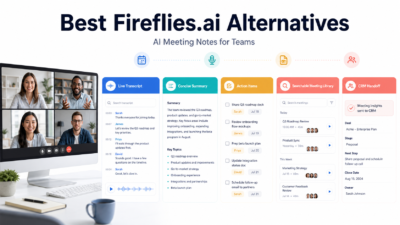
Fireflies.ai is the most balanced alternative for teams that want more than a transcript. It can join major meeting platforms, capture notes, provide searchable meeting records, create summaries and action items, and connect meeting information to other business tools. Its AskFred assistant helps users query a meeting, while topic trackers and conversation intelligence support managers who need to review patterns across calls.
The distinction from Otter is workflow breadth. A small team can use Fireflies as a searchable meeting library, then add integrations, downloads, video, analytics, and administrative controls as requirements grow. The product also supports browser, desktop, mobile, and uploaded-file workflows.
Practical use cases
- A customer-success team can track renewal risks, feature requests, and follow-up actions across calls.
- A recruiting team can keep searchable interview notes and share selected recordings with hiring managers.
- A consultancy can summarize client meetings, export deliverables, and create task handoffs.
- A sales manager can review talk time, questions, objections, and tracked topics across representatives.
- An operations team can route action items into project or communication tools through integrations.
Pricing
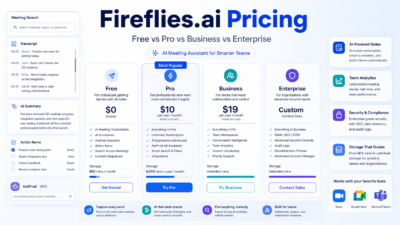
Fireflies offers a Free plan. Its official pricing page lists Pro at $10 per seat per month billed annually or $18 monthly, Business at $19 per seat per month billed annually or $29 monthly, and Enterprise at $39 per seat per month billed annually. Storage, video, analytics, AI credits, administration, and security features vary by plan.
Pros
- Broad meeting capture and integration coverage.
- Useful free entry point and transparent paid tiers.
- Conversation intelligence and team analytics available as needs grow.
- Search, summaries, action items, and AI questions support post-meeting work.
Cons
- Important analytics and governance features require Business or Enterprise.
- AI credit allowances and feature packaging need careful review.
- Teams must configure sharing and recording behavior to match their consent policies.
Choose Fireflies.ai when: several departments need one meeting library with flexible integrations and a clear path from basic notes to team intelligence. For a deeper cost breakdown, read our Fireflies.ai pricing guide.
2. Fathom: Best Free Otter Alternative for Individuals
Fathom is appealing to consultants, founders, account managers, and other professionals who want automatic notes without immediately buying a team platform. Its free edition supports unlimited recordings, storage, and transcription across Zoom, Google Meet, and Microsoft Teams. The product is designed to make highlights, summaries, and follow-up material easy to use after a call.
Fathom becomes more compelling when one person's main concern is staying present during meetings and leaving with an organized record. Paid plans add more advanced summaries, team collaboration, administration, coaching, and integrations.
Practical use cases
- A solo consultant can record discovery calls and turn key moments into a structured recap.
- A founder can review customer interviews and search for recurring pain points.
- An account manager can generate follow-up notes without typing through the meeting.
- A project lead can share selected clips instead of asking stakeholders to watch a full recording.
- A small team can standardize summary formats as it moves to a paid team edition.
Pricing
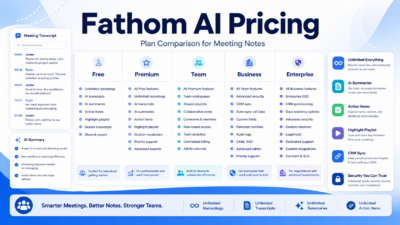
Fathom's official pricing page lists a Free plan, Premium at $15 per user per month, Team Edition at $19 per user per month, and Team Edition Pro at $29 per user per month on the annual pricing view. Buyers should verify monthly and annual totals, team minimums, and feature differences at checkout.
Pros
- Strong free option for individual meeting capture.
- Unlimited recording, transcription, and storage reduce minute anxiety.
- Fast path from a meeting to summaries, highlights, and follow-ups.
- Paid team tiers add collaboration and management features.
Cons
- The free experience is optimized for individuals rather than centralized administration.
- Advanced team controls and coaching require paid editions.
- Buyers should confirm platform, language, and integration details for their exact workflow.
Choose Fathom when: one person or a small team wants useful meeting notes with a low-friction free starting point. Our Fathom AI pricing guide explains the plans in more detail.
3. tl;dv: Best for Multilingual and Multi-Meeting Research
tl;dv combines meeting recording with clips, searchable transcripts, AI notes, integrations, and questions across a meeting library. Its free plan is particularly useful for evaluating the capture experience, while Pro and Business expand AI usage, integrations, playbooks, coaching, and cross-meeting analysis.
This is a good fit for product researchers, agencies, customer teams, and distributed organizations that need to compare themes across many conversations. Instead of treating each call as an isolated document, teams can use recurring reports and multi-meeting questions to find repeated objections, requests, decisions, or risks.
Practical use cases
- A product team can compare themes across a month of customer interviews.
- An agency can create clips that show clients the exact context behind a recommendation.
- A multilingual team can capture calls across supported languages and centralize notes.
- A sales leader can use playbooks and coaching views to review call behavior.
- A researcher can search a meeting library for every mention of a feature or competitor.
Pricing
tl;dv offers a Free plan. Its official materials list Pro at $18 per seat per month billed annually or $29 monthly, Business at $29 per seat per month billed annually or $39 monthly, and Enterprise with custom pricing. Limits apply to AI notes, multi-meeting questions, storage or retention, concurrent recordings, and advanced intelligence depending on plan.
Pros
- Useful free plan for recording and transcription.
- Strong multi-meeting search and research workflow.
- Broad language positioning and support for major meeting platforms.
- Clips, integrations, playbooks, and coaching serve multiple team types.
Cons
- Cross-meeting intelligence and coaching are plan-dependent.
- Free retention and AI allowances may not suit a long-term archive.
- Teams should verify fair-use, concurrency, and data-retention limits.
Choose tl;dv when: your team needs to learn from a collection of meetings, not simply generate one summary at a time.
4. Avoma: Best for Revenue Teams and CRM Workflows
Avoma is a broader revenue-conversation platform. Its meeting assistant provides recording, transcription, summaries, templates, and follow-up support, while optional modules add conversation intelligence, coaching, deal risk analysis, forecasting, and lead routing. The product is therefore a stronger Otter alternative for sales and customer-success teams than for someone who only wants personal notes.
Avoma's licensing model is also notable: paid recorder users need licenses, while viewers and collaborators can remain free. That can be attractive when a smaller group records meetings but many colleagues need to review the results.
Practical use cases
- A sales representative can send notes and follow-up tasks to the CRM after a discovery call.
- A manager can use scorecards and coaching insights to review team performance.
- A customer-success team can track risks, commitments, and product feedback.
- Revenue operations can standardize meeting templates and CRM field updates.
- Executives can review deal signals and forecasts without buying recorder seats for every viewer.
Pricing
Avoma's official pricing page lists Startup at $19 per recorder seat per month billed annually, Organization at $29 per recorder seat per month billed annually, and Enterprise at $39 per recorder seat per month billed annually. Monthly Startup and Organization prices are higher. Conversation Intelligence and Revenue Intelligence are each listed at $29 per seat per month annually, while Lead Router is $19 per seat per month annually. Viewers and collaborators are free.
Pros
- Combines meeting notes with structured revenue workflows.
- Free viewer and collaborator roles can reduce total seat cost.
- CRM updates, templates, coaching, and intelligence support sales operations.
- Modular add-ons let teams assign advanced capabilities selectively.
Cons
- Base plan plus add-ons can cost more than a simple notetaker.
- Configuration and change management are more involved.
- Most valuable for customer-facing revenue teams, not casual transcription.
Choose Avoma when: meetings must feed CRM records, coaching, pipeline reviews, and repeatable revenue processes.
5. Read AI: Best for Meeting Analytics and Cross-Meeting Insights
Read AI focuses on turning meetings into reports that combine summaries, transcripts, topics, action items, and participation signals. It is useful for teams that want to understand how meetings run as well as what was said. Search and cross-meeting intelligence can help users revisit decisions and patterns without opening each recording manually.
The analytics layer deserves careful interpretation. Engagement or sentiment indicators can help a manager notice moments worth reviewing, but they should not be treated as definitive measures of employee performance, intent, or emotion. Use them as prompts for human review.
Practical use cases
- A project manager can compare decisions and action items across recurring meetings.
- A team lead can identify meetings that need follow-up or clearer ownership.
- A researcher can ask questions across a meeting archive.
- A remote team can review participation patterns alongside the actual transcript.
- An operations leader can use reports to reduce repetitive or unfocused meetings.
Pricing
Read AI offers multiple plans and changes feature allowances over time. Buyers should use the official Read AI pricing page to confirm the current Free, Pro, Enterprise, or related plan options, billing cycle, report limits, integrations, retention, and workspace controls. Pricing may vary based on plan, usage, or add-ons, so do not rely on an old third-party table.
Pros
- Strong focus on meeting reports and analytical context.
- Cross-meeting search can help recover decisions and recurring themes.
- Supports productivity improvement beyond transcript storage.
- Useful for recurring team and project meetings.
Cons
- Analytics require careful human interpretation.
- Users seeking only a transcript may prefer a simpler tool.
- Current pricing and limits must be confirmed on the official page.
Choose Read AI when: your team wants meeting analytics and cross-meeting learning, not only automated notes. See our full Read AI review for a closer look.
Pricing Comparison
| Tool | Entry option | Paid starting point checked | Important buying detail |
|---|---|---|---|
| Otter.ai | Basic free | Pro from $8.33/user/month annually on the official annual view | Minutes, imports, AI chat, workspace size, and concurrency vary |
| Fireflies.ai | Free | Pro $10/seat/month annually | Storage, credits, video, analytics, and admin features vary |
| Fathom | Free | Premium $15/user/month annually | Team controls and collaboration require team plans |
| tl;dv | Free | Pro $18/seat/month annually | Retention, AI allowances, and multi-meeting intelligence vary |
| Avoma | 14-day trial | Startup $19/recorder/month annually | Viewers are free; intelligence modules cost extra |
| Read AI | Free option available | Check official page | Verify current report limits, retention, integrations, and workspace controls |
The lowest advertised price is not necessarily the lowest operational cost. Estimate the number of recorder seats, viewer seats, monthly meetings, imported files, storage period, integrations, and add-ons. Then calculate the cost of the plan that contains the features you will actually use.
Which Otter.ai Alternative Should You Choose?
Use this decision path:
- Choose Fireflies.ai for the best general combination of notes, integrations, search, and team intelligence.
- Choose Fathom when an individual needs excellent free meeting capture and summaries.
- Choose tl;dv for multilingual teams, customer research, clips, and questions across many meetings.
- Choose Avoma when sales coaching, CRM hygiene, and revenue intelligence justify a larger platform.
- Choose Read AI when meeting reports and cross-meeting analytics are the priority.
- Stay with Otter.ai if live transcription, collaborative notes, its interface, and existing workspace integrations already fit your team.
Before purchasing, run a structured trial. Record the same types of meetings your team handles: a one-to-one call, a crowded group meeting, a customer call with product terms, and a meeting with action items. Compare speaker labels, missed terms, summary accuracy, export quality, permissions, and the time required to correct and distribute the notes.
Also test the workflow after the meeting. Can the tool send the right fields to your CRM? Can a manager find a decision from three months ago? Can an external client receive only the clip they need? Can an administrator remove a user and preserve the correct records? Those questions reveal more than a polished sample transcript.
For a broader sales-focused shortlist, read our guide to the best AI meeting assistants for sales teams. Teams building follow-through processes can also use our guide to AI meeting follow-up emails.
Final Recommendation
Fireflies.ai is the best overall Otter.ai alternative for most business teams because it balances meeting capture, searchable knowledge, integrations, transparent pricing, and room to add conversation intelligence. Fathom is the easiest recommendation for an individual who wants a capable free assistant. tl;dv is better when the value lies in comparing many conversations or working across languages. Avoma is the specialist choice for revenue teams, while Read AI is strongest for teams that want an analytical view of meeting quality and patterns.
The right choice is the product that reduces work after the meeting without creating governance problems before it. Test with real audio, confirm consent and retention settings, verify the required paid tier, and measure how many corrections and handoffs each tool removes.
FAQs
What is the best free alternative to Otter.ai?
Fathom is a strong free option for individuals because it offers unlimited recording, transcription, and storage on its Free plan. Fireflies.ai and tl;dv also provide useful free tiers with different limits and team features.
Is Fireflies.ai better than Otter.ai?
Fireflies.ai may be better for teams that prioritize integrations, topic tracking, conversation intelligence, and flexible capture. Otter.ai may remain preferable for users who like its live transcription, collaborative notes, and existing workflow. The better product depends on the required plan and integrations.
Which Otter alternative is best for sales teams?
Avoma is the strongest specialist option when the team needs CRM updates, coaching, call scoring, deal intelligence, and revenue workflows. Fireflies.ai and tl;dv can be better-value options for teams with lighter sales-intelligence needs.
Which meeting transcription tool supports multiple languages?
Fireflies.ai, tl;dv, Avoma, Fathom, and Otter.ai all advertise multilingual capabilities, but supported languages and features differ. Verify the exact language, translation requirement, and automatic-detection behavior before purchase.
Can these tools record Zoom, Google Meet, and Microsoft Teams?
The leading alternatives in this guide support the major meeting platforms, but capture methods vary. Some use a meeting bot, desktop application, browser extension, native app, or calendar connection. Confirm the method allowed by your organization.
Are AI meeting notes accurate enough to send automatically?
They can produce useful drafts, but important customer commitments, prices, legal statements, names, and technical details should be checked against the recording or transcript. Accuracy varies with audio quality and meeting complexity.
What should a small business check before buying?
Check recorder-seat cost, free viewer access, meeting limits, import limits, storage, retention, exports, integrations, permissions, consent controls, and the quality of summaries from your own calls. Do not buy only on the headline monthly price.