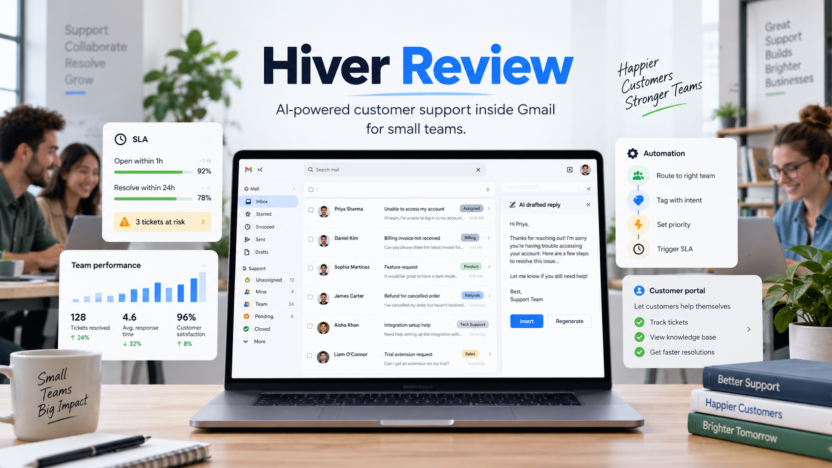
Hiver is worth considering if your team already works inside Gmail or Google Workspace and wants to turn shared inboxes like support@, billing@, info@, or help@ into a more structured customer support workflow. It is not only a Gmail add-on for assigning emails. Hiver now positions itself as an AI-powered customer service platform with shared inboxes, ticketing, help center features, automation, analytics, integrations, SLAs, AI agents, AI Copilot, AI QA, and customer intelligence depending on the plan.
The short answer: Hiver is a strong fit for support, finance, IT, operations, and customer-facing teams that want help desk structure without forcing agents out of Gmail. It is less suitable if your team does not use Gmail, needs a fully standalone enterprise help desk, or wants a broader omnichannel platform that is not tied to the inbox.
This Hiver review covers features, official pricing, real use cases, pros and cons, alternatives, and buyer guidance for small business teams evaluating AI customer support tools.
Quick Verdict
Hiver is best for teams that want a help desk inside Gmail. The product is strongest when agents already work in Gmail every day and switching to a separate help desk would add friction. Hiver keeps the inbox familiar while adding shared ownership, assignments, ticket status, AI-drafted replies, rules, automations, SLAs, customer portals, analytics, integrations, and AI support workflows.
The most important buyer question is whether Gmail should remain the team’s support workspace. If the answer is yes, Hiver is a serious option. If the answer is no, compare standalone help desk platforms such as Help Scout, Zendesk, Freshdesk, Intercom, Front, and Missive.
Hiver is not the cheapest shared inbox tool, especially on Pro and Elite. The value depends on whether keeping support inside Gmail improves adoption, speed, and team visibility enough to justify the cost.
Best For
Hiver is best for Google Workspace teams that handle customer support, finance requests, IT tickets, internal operations, vendor communication, or customer service from shared Gmail inboxes.
A support team could use it to manage support@ with assignments, AI-drafted replies, SLAs, customer satisfaction surveys, and analytics. A finance team could use it for billing@, invoice questions, reimbursement requests, and approval handoffs. An IT team could use it for internal access requests, device issues, and employee help emails.
It is also a good fit for teams that want AI assistance but still want humans in the loop for sensitive actions.
Not Best For
Hiver is not the best fit if your team does not use Gmail or Google Workspace. Hiver’s own pricing FAQ says Hiver in Gmail works on top of an existing Gmail or Google Workspace account, while Hiver Omni is the standalone option for teams that need more channels or do not use Gmail.
It may also be too expensive or too support-focused for teams that only need a basic shared inbox. Missive, Hiver alternatives, or a lighter team email tool may be enough.
Large enterprise support organizations that need complex routing, workforce management, deep reporting, knowledge management at scale, advanced bot orchestration, and multiple support channels should compare Hiver with mature help desk platforms before committing.
Our Evaluation Criteria
| Criteria | What We Looked For | Why It Matters |
|---|---|---|
| Gmail fit | Shared inboxes, assignments, status, and support workflows inside Gmail | Hiver’s main advantage is reducing tool switching for Gmail teams. |
| AI support depth | AI Agents, AI Copilot, AI Knowledge Builder, AI QA, and AI Insights | AI should improve triage, replies, knowledge, and quality control. |
| Workflow control | Rules, automations, routing, custom fields, SLAs, and customer portal | Support teams need repeatable processes, not only shared visibility. |
| Pricing clarity | Growth, Pro, Elite, annual and monthly pricing, and plan limits | Buyers need to match plan cost to support maturity. |
| Reporting | Pre-built analytics, advanced analytics, CSAT, and SLA reporting | Teams need to measure response time, volume, and quality. |
| Integrations | Slack, CRM, Jira, Asana, Shopify, APIs, and business systems | Agents need customer context from the tools around support. |
| Alternatives | Help Scout, Zendesk, Freshdesk, Front, Missive, and Intercom | Hiver is not the best fit for every support model. |
What Is Hiver?
Hiver is an AI-powered customer service platform with a major product line that works inside Gmail. Its official product page says Hiver in Gmail turns Gmail into a help desk with shared inboxes like support@ and info@, cross-team collaboration, workflows, and AI.
The product adds support structure to a familiar inbox. Agents can assign conversations, track ownership, collaborate with internal notes, use AI-drafted replies, apply rules, manage SLAs, report on performance, and connect tools such as CRMs, Jira, Linear, NetSuite, Slack, Shopify, Asana, and other systems depending on the plan.
Hiver also distinguishes Hiver in Gmail from Hiver Omni. Hiver in Gmail is for teams whose support happens primarily in Gmail. Hiver Omni is positioned for teams handling conversations across multiple channels or not using Gmail.
Key Features
Shared Inboxes Inside Gmail
Hiver helps teams manage shared inboxes such as support@, billing@, returns@, care@, and info@ inside Gmail. Instead of sharing credentials or forwarding messages, the team can assign conversations, track status, and see ownership.
For small support teams, this is the core reason to use Hiver. Gmail stays the interface, but the workflow becomes more accountable.
Ticketing and Assignment
Hiver adds ticket-like structure to email conversations. Teams can assign messages, mark status, track activity history, and manage escalation or handoff with shared context.
In a typical support workflow, a billing question can be assigned to finance, a bug report can be routed to technical support, and a VIP customer issue can be escalated without losing the original conversation thread.
AI Agents and AI Copilot
Hiver’s official pricing page says AI Agents can triage, resolve requests, and act across systems. It also says AI Copilot can draft replies, surface answers, and suggest next steps.
This is useful for repetitive customer support work. A support agent could get a drafted reply based on help articles and customer context, while a human reviews the message before sending. Hiver’s pricing page also says AI Agents can pause for approval on actions marked sensitive.
AI Knowledge Builder
Hiver lists AI Knowledge Builder on its Growth plan. It is described as detecting missing knowledge and recommending content updates across a Help Center, Notion, and other sources.
This matters because AI support quality depends heavily on the underlying knowledge base. If support documentation is stale, the AI assistant will not reliably improve outcomes. Knowledge maintenance is one of the harder parts of support operations.
Rules and Automations
Hiver supports rule-based automations. The pricing page lists automations per shared inbox, with higher limits on higher plans. Teams can automate repetitive routing, tagging, assignment, and workflow actions.
For example, a team could route refunds to billing, product bugs to support, enterprise customers to senior agents, and urgent words to priority queues.
SLAs, CSAT, and Analytics
Hiver’s Pro plan adds SLAs, CSAT surveys, advanced analytics, and custom reports. This is where Hiver becomes more than a shared inbox for many teams.
SLAs help teams define response and resolution targets. CSAT surveys help capture customer feedback. Analytics help managers understand volume, response time, resolution trends, agent workload, and service quality.
Customer Portal and Help Center
Hiver’s Pro plan includes a customer portal, and its pricing page lists Help Center features. Customers can submit and track requests, while teams can publish help articles and organize knowledge.
This is useful when email alone is no longer enough. A customer portal gives customers a place to check request status without sending another follow-up email.
Integrations and API Access
Hiver supports Slack and other basic integrations on Growth, while Pro adds premium integrations and API access. Official pages reference business tools including Slack, Zoho CRM, Pipedrive, Copper, QuickBooks, Asana, Jira, Zapier, Shopify, CRMs, and custom APIs.
Integrations matter because support questions often require context from orders, invoices, CRM records, bugs, subscriptions, or internal systems.
Security and Compliance
Hiver’s pricing FAQ says it is GDPR, SOC 2 Type II, ISO 27001, CCPA, and HIPAA compliant. Elite adds SSO, HIPAA, and custom roles according to the pricing page.
Teams handling customer, finance, healthcare, or internal IT requests should verify the plan-level controls they need before purchase.
Hiver Pricing
Pricing last checked on September 13, 2026. Hiver’s official Hiver in Gmail pricing page lists Growth, Pro, and Elite plans, with annual and monthly pricing.
| Plan | Annual Price | Monthly Price | Best For |
|---|---|---|---|
| Growth | $25 per user/month | $35 per user/month | Small teams that need AI support, shared inboxes, help center, automations, analytics, and basic integrations. |
| Pro | $55 per user/month | $65 per user/month | Teams needing SLAs, CSAT, customer portal, advanced analytics, premium integrations, and API access. |
| Elite | $85 per user/month | $95 per user/month | Teams needing AI QA, AI Insights, customer intelligence, skill-based routing, custom objects, SSO, HIPAA, and custom roles. |
Hiver’s pricing page also says all plans include AI Agents, and its FAQ says the free trial gives access to the Elite plan for 7 days without requiring a credit card. It also says all Hiver plans start at 2 seats, and teams can increase from 2 to 5 and then in increments of 5 seats.
For the latest details, review the official Hiver in Gmail pricing page and Hiver in Gmail product page.
Real Use Cases
Customer Support in Gmail
A small support team could use Hiver to convert support@ into a managed queue. Agents can assign conversations, use internal notes, track status, use AI-drafted replies, and review analytics.
This is useful when Gmail is familiar but basic labels and forwarding rules no longer provide enough accountability.
Billing and Finance Requests
A finance team could manage billing@, invoices, refunds, reimbursements, payment questions, and vendor issues. Rules can route predictable messages, while assignments clarify ownership.
This workflow is especially useful when finance requests are time-sensitive and need an audit trail.
IT Help Desk
An internal IT team could use Hiver for access requests, device issues, software questions, and employee support emails. SLAs and assignments help keep requests from getting buried.
Hiver may be enough for smaller IT support teams that do not need a dedicated ITSM platform.
Customer Portal and Help Center
Teams receiving repeated support questions can use Hiver’s customer portal and Help Center features to reduce repetitive replies. AI-powered search and knowledge recommendations can help customers and agents find answers faster.
The key is maintaining useful help content. AI support workflows depend on accurate source material.
AI Triage and Routing
Hiver’s AI Agents and AI Autopilot style workflows can support triage, routing, field updates, and reply drafting. A support team can use this to reduce repetitive classification work while keeping sensitive actions under approval.
This fits teams with high repeat volume: refunds, account access, billing questions, order status, and common troubleshooting requests.
Pros and Cons
| Pros | Cons |
|---|---|
| Strong fit for teams that already work in Gmail. | Less suitable for teams not using Gmail or Google Workspace. |
| AI features are included across plans, including AI Agents. | Pricing can become high for larger support teams. |
| Adds shared inbox, ticketing, assignment, and analytics without leaving Gmail. | Deep enterprise help desk requirements may need a more specialized platform. |
| Pro adds SLAs, CSAT, customer portal, premium integrations, and API access. | Growth has limits on shared inboxes, users, automations, and custom fields. |
| Elite adds AI QA, AI Insights, customer intelligence, and stronger controls. | Teams must manage Gmail permissions and adoption carefully. |
Hiver Alternatives
| Alternative | Best For | Main Strength | Limitation |
|---|---|---|---|
| Help Scout | Small support teams wanting a dedicated help desk | Simple support workflow, docs, inbox, and reporting | Not built specifically inside Gmail. |
| Front | Customer-facing teams needing shared inbox operations | Strong collaborative inbox and team communication | Can be more operationally complex or costly for smaller teams. |
| Zendesk | Larger support organizations | Mature ticketing, routing, reporting, and enterprise controls | Heavier than many small teams need. |
| Freshdesk | Teams wanting affordable help desk coverage | Broad help desk features and AI pricing options | Separate interface outside Gmail. |
| Missive | Teams wanting shared inbox and team email collaboration | Flexible shared inbox across email and other channels | Less help-desk-specific than Hiver. |
If your team wants support inside Gmail, Hiver is one of the strongest options. If your team wants a standalone support system, compare dedicated help desk platforms first.
Who Should Choose Hiver?
Choose Hiver if Gmail is already your team’s home base and customer support needs more structure. It is especially relevant for teams that want AI, assignments, help center, automations, analytics, and SLA workflows without forcing agents to learn a separate help desk.
Growth is the starting plan for small teams. Pro is better when SLAs, CSAT, customer portal, premium integrations, and API access matter. Elite is for teams needing AI QA, AI Insights, customer intelligence, custom objects, skill-based routing, and stronger security controls.
Avoid Hiver if your team does not use Gmail, if you need a fully standalone support platform, or if you only need personal email productivity.
Buying Checklist
Before buying Hiver, answer these questions:
- Does the support team already work mostly inside Gmail?
- How many shared inboxes are needed?
- Are 2 shared inboxes on Growth enough, or does the team need more?
- Do you need SLAs, CSAT surveys, customer portal, or advanced analytics?
- Do you need API access or premium integrations?
- Are SSO, HIPAA, or custom roles required?
- Which support workflows should AI agents handle first?
- Which actions must pause for human approval?
This checklist prevents overbuying and helps map each plan to actual support maturity.
Final Recommendation
Hiver is a strong choice for Gmail-first support teams that want help desk structure, AI assistance, shared inbox ownership, automations, analytics, and customer-facing workflows without leaving Gmail.
For small support teams, Growth is the first plan to evaluate. For more mature support teams, Pro is the practical tier because it adds SLAs, CSAT, customer portal, advanced analytics, premium integrations, and API access. Elite is best for teams that need AI QA, AI Insights, customer intelligence, skill-based routing, SSO, HIPAA, and custom roles.
If Gmail is central to your workflow, Hiver deserves a serious look. If your team wants a standalone help desk or does not use Gmail, compare Help Scout, Front, Zendesk, Freshdesk, Intercom, or Missive before choosing.
For related Dailytimespro guides, read our Missive review, Help Scout AI review, Zendesk AI review, and Freshdesk AI pricing guide.
FAQs
Is Hiver worth it?
Hiver is worth it for Gmail-first teams that need shared inboxes, ticketing, AI support workflows, assignments, automations, analytics, and SLAs without moving agents into a separate help desk.
How much does Hiver cost?
Hiver’s official Hiver in Gmail pricing page lists Growth at $25 per user/month billed annually, Pro at $55 per user/month billed annually, and Elite at $85 per user/month billed annually. Monthly pricing is higher.
Does Hiver have AI features?
Yes. Hiver’s pricing page lists AI Agents, AI Copilot, AI Knowledge Builder, AI QA, AI Insights, and customer intelligence depending on the plan.
Does Hiver work inside Gmail?
Yes. Hiver in Gmail works on top of Gmail or Google Workspace and lets teams manage shared inboxes, support workflows, AI assistance, and analytics inside Gmail.
Is Hiver better than Zendesk?
Hiver is better for Gmail-first teams that want support workflows inside Gmail. Zendesk is better for larger or more complex support organizations that need a standalone enterprise help desk.
Is Hiver good for small business?
Hiver can be good for small businesses that already use Gmail for support and need clearer ownership, assignments, automations, and reporting. The plan cost should be weighed against support volume and team size.
Does Hiver offer a free trial?
Hiver’s official pricing FAQ says users get a 7-day free trial of the Elite plan and do not need a credit card to sign up.
Who should not use Hiver?
Teams that do not use Gmail, teams needing a broad standalone omnichannel help desk, and users who only want a personal email productivity app may be better served by other tools.