Quick Verdict
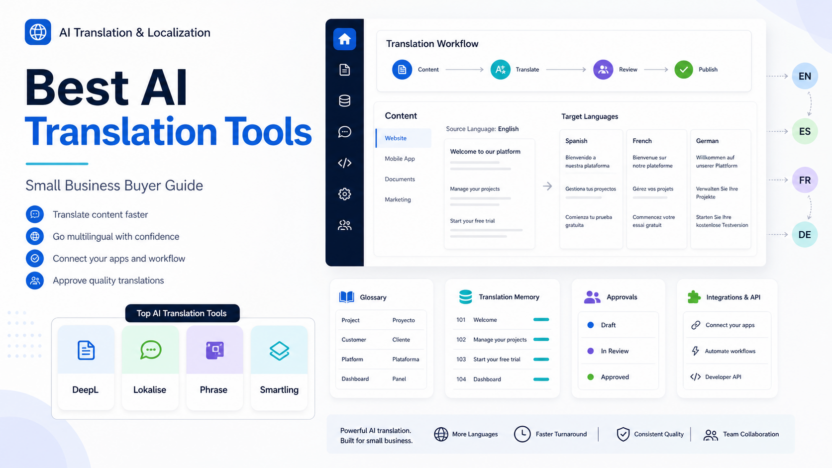
DeepL is the simplest choice for everyday business translation, Lokalise is stronger for teams localizing apps and product content, Phrase fits companies that need a broader localization platform, and Smartling is best for organizations that want translation management plus AI and human translation services in one workflow.
Official product sources reviewed include DeepL, Lokalise, Phrase, Smartling. Official pricing sources reviewed include DeepL pricing, Lokalise pricing, Phrase pricing, Smartling pricing. Pricing last checked on July 18, 2026. Plan details can differ by billing term, usage volume, workspace size, seats, credits, and add-ons, so use this pricing section as a decision snapshot and confirm the plan details that match your account before purchase.
Related Dailytimespro reading:
- AI Sales Follow-Up Workflow
- Best AI Video Generators for Training Videos
- Best AI Project Management Tools
- AI WordPress Content Workflow
Best For
- small businesses translating website pages, help docs, product copy, emails, or marketing material.
- teams that need glossary, review, approvals, translation memory, and localization workflow control.
- companies expanding into new regions without building a full in-house localization department.
Not Best For
- teams that only need a one-off casual translation and do not need review or brand consistency.
- businesses handling legal, medical, financial, or regulated text without qualified human review.
- buyers who expect AI translation to understand product context without glossaries, source quality, and approval steps.
Our Evaluation Criteria
We evaluated this topic by ease of use, setup effort, pricing clarity, AI usefulness, workflow fit, integrations, review controls, support for real use cases, and value for money. A good tool should make the work easier to inspect, not harder. The strongest option is usually the one that fits a process your team already understands and improves one repeated job without hiding ownership.
For small businesses, the practical question is simple: can this tool reduce repeated work while keeping responsible people in control? That matters more than a long feature list. AI tools are most useful when they help with briefs, drafts, summaries, routing, calendars, reports, captions, or optimization steps that already happen every week. They are less useful when the team has no clear source data, no workflow owner, or no review habit.
Key Features and Product Fit
DeepL
DeepL is included because its official product material points to AI-first text, file, voice, and API translation plans for individuals and teams. For this buying decision, the important question is whether DeepL improves a repeated workflow with less cleanup, clearer ownership, and a visible review habit. Buyers should compare the feature set against the work they already do every week, not against a demo scenario that looks polished but does not match their process.
Lokalise
Lokalise is included because its official product material points to AI localization workflow, processed-word pricing dimensions, unlimited translator and reviewer seats on paid plans, and product localization management. For this buying decision, the important question is whether Lokalise improves a repeated workflow with less cleanup, clearer ownership, and a visible review habit. Buyers should compare the feature set against the work they already do every week, not against a demo scenario that looks polished but does not match their process.
Phrase
Phrase is included because its official product material points to AI-powered localization platform covering translation management, string management, machine translation, and AI tools. For this buying decision, the important question is whether Phrase improves a repeated workflow with less cleanup, clearer ownership, and a visible review habit. Buyers should compare the feature set against the work they already do every week, not against a demo scenario that looks polished but does not match their process.
Smartling
Smartling is included because its official product material points to translation management, AI translation, machine translation, human translation options, workflow, integrations, and quality assessment. For this buying decision, the important question is whether Smartling improves a repeated workflow with less cleanup, clearer ownership, and a visible review habit. Buyers should compare the feature set against the work they already do every week, not against a demo scenario that looks polished but does not match their process.
Pricing
DeepL explains separate plan paths for Translator, Voice, and API use cases and points buyers to its official pricing flow for current plan details. Lokalise says its pricing combines processed words and advanced seats, with unlimited translator and reviewer seats and unlimited hosted words on paid plans. Phrase publishes pricing plans for its localization platform, including TMS, string management, machine translation, and AI tools. Smartling publishes plan and service pricing signals for machine translation, AI translation, AI human translation, human translation, workflow, integrations, reporting, and customer success. Pricing last checked on July 18, 2026. Pricing may vary by plan, usage, words processed, language pairs, seats, workflows, translation services, integrations, or add-ons, so check each official pricing page before purchase.
| Tool or plan | Official pricing note | Best-fit buying context |
|---|---|---|
| DeepL | Official DeepL plan documentation separates Translator, Voice, and API plan needs | Everyday business translation, files, voice, or API translation depending on plan |
| Lokalise | Official pricing combines processed words and advanced seats; translator and reviewer seats are unlimited on paid plans | Product, app, website, and help-center localization workflows |
| Phrase | Official pricing page publishes localization platform plan options | Teams needing TMS, string management, machine translation, and AI localization workflows |
| Smartling | Official plans page publishes machine translation, AI translation, AI human translation, and human translation service pricing signals | Companies needing translation management plus service options and workflow governance |
Pricing should be compared against the workflow, not only the monthly subscription line. Review seats, channels, credits, exports, task limits, execution limits, storage, collaboration controls, security requirements, and support needs. A lower plan can become frustrating when it lacks one required approval, integration, or usage allowance. A higher plan can be wasteful when the team only needs one narrow workflow.
Real Use Cases
Translating Website And Landing Page Copy For A New Market
In a typical small business workflow, translating website and landing page copy for a new market works best when the source information is clear, the owner is named, and the final output has a review step. AI can speed up drafting, summarizing, routing, or organizing the work, but the team should still review details that affect customers, money, legal commitments, staff, or public messaging. The practical benefit is not simply producing more text. The benefit is reaching a cleaner approved result with less repeated manual effort.
Localizing Product Interface Strings And Release Notes
In a typical small business workflow, localizing product interface strings and release notes works best when the source information is clear, the owner is named, and the final output has a review step. AI can speed up drafting, summarizing, routing, or organizing the work, but the team should still review details that affect customers, money, legal commitments, staff, or public messaging. The practical benefit is not simply producing more text. The benefit is reaching a cleaner approved result with less repeated manual effort.
Turning Help Center Articles Into Multilingual Support Content
In a typical small business workflow, turning help center articles into multilingual support content works best when the source information is clear, the owner is named, and the final output has a review step. AI can speed up drafting, summarizing, routing, or organizing the work, but the team should still review details that affect customers, money, legal commitments, staff, or public messaging. The practical benefit is not simply producing more text. The benefit is reaching a cleaner approved result with less repeated manual effort.
Using Glossary And Translation Memory To Keep Brand Terms Consistent
In a typical small business workflow, using glossary and translation memory to keep brand terms consistent works best when the source information is clear, the owner is named, and the final output has a review step. AI can speed up drafting, summarizing, routing, or organizing the work, but the team should still review details that affect customers, money, legal commitments, staff, or public messaging. The practical benefit is not simply producing more text. The benefit is reaching a cleaner approved result with less repeated manual effort.
Routing Sensitive Translations To Human Review Before Publishing
In a typical small business workflow, routing sensitive translations to human review before publishing works best when the source information is clear, the owner is named, and the final output has a review step. AI can speed up drafting, summarizing, routing, or organizing the work, but the team should still review details that affect customers, money, legal commitments, staff, or public messaging. The practical benefit is not simply producing more text. The benefit is reaching a cleaner approved result with less repeated manual effort.
Comparison Table
| Decision point | Strong fit | Watch out for |
|---|---|---|
| Workflow ownership | One person owns the process and review step | Everyone assumes the AI output is someone else's responsibility |
| Source quality | Inputs come from trusted records, docs, analytics, tickets, or dashboards | The tool is asked to fill gaps from vague prompts |
| Integration depth | The tool connects to the apps where work already happens | The team creates another isolated workspace |
| Review controls | Drafts, approvals, permissions, logs, or handoffs are visible | Output reaches readers or customers without review |
| Pricing fit | Usage, seats, channels, and credits match real volume | Limits are ignored until the workflow scales |
| Adoption | The team starts with one high-frequency use case | The rollout begins with too many experiments at once |
Pros
- Helps reduce repeated drafting, routing, summarizing, planning, editing, reporting, or optimization work.
- Can improve consistency when prompts, templates, source data, and review rules are maintained.
- Works best when connected to a real workflow instead of treated as a novelty layer.
- Gives small teams a way to produce more structured handoffs without hiring for every administrative task.
- Can support cleaner reporting, faster follow-up, better content operations, and more reliable review.
Cons and Limitations
- AI output can be incomplete, overconfident, or too generic when source material is weak.
- Teams still need approval rules for customer-facing, financial, legal, HR, sales, or public content.
- Plan limits, credits, usage allowances, seats, exports, channels, and add-ons can change the real cost.
- Some tools require meaningful setup before they become useful.
- Overlapping subscriptions can create confusion if each team buys a different tool for the same job.
Alternatives
| Alternative | Best for | When to consider it |
|---|---|---|
| Google Translate or Google Cloud Translation | general translation and API-driven workflows | Consider it when general translation and api-driven workflows matters more than the main article choice. |
| Microsoft Translator | Microsoft ecosystem translation and business workflows | Consider it when microsoft ecosystem translation and business workflows matters more than the main article choice. |
| Crowdin | developer-friendly localization and software translation management | Consider it when developer-friendly localization and software translation management matters more than the main article choice. |
Implementation Checklist
| Step | What to decide |
|---|---|
| Define the workflow | Name the repeated task, source input, owner, review step, and final output |
| Choose the first use case | Pick one high-frequency process before expanding |
| Prepare source data | Use real records, documents, analytics, tasks, tickets, calendars, or messages |
| Set review rules | Decide what AI can draft and what a person must approve |
| Check integrations | Confirm the tool fits the apps where work already happens |
| Measure value | Track cleanup time, adoption, approved output, and handoff quality |
How to Run a Responsible Pilot
Start with one team and one repeated workflow. Document how the process works today: where the request starts, what information is required, who reviews the output, what system is updated, and what a successful result looks like. This baseline matters because AI can make a weak process look more polished without making it more reliable.
Use real work during the pilot. Include routine cases, incomplete inputs, edge cases, and one situation that should be escalated. Measure how long it takes to reach an approved result, not how quickly the AI produces a draft. The most useful signal is cleanup time: if the draft is fast but review takes longer than before, the workflow is not ready.
Limit access during the pilot. Connect only the systems required for the workflow. Confirm who can view prompts, outputs, logs, files, and connected records. If the tool touches customer data, employee data, legal documents, candidate information, financial records, or private messages, keep permissions narrow and document the review rule clearly.
At the end of the pilot, choose one of three outcomes. Adopt if the workflow is easier and review remains clear. Revise if the tool helps but ownership, prompts, source data, or permissions need work. Stop if cleanup cancels the time saved or the team avoids the process.
Buying Decision Guide
Before choosing a plan, write down the exact job the tool will do in the first 30 days. The best first use case usually has clear inputs, a known owner, a visible review step, and a result the team already produces manually. If the first workflow cannot be described in one paragraph, the team may need process cleanup before it needs more software.
Next, compare the tool against the environment where work already happens. A small business using Gmail, Sheets, Slack, a CRM, a publishing calendar, a project workspace, or recurring reports should value connectors, permissions, and handoff quality more than a long list of experimental AI features. The question is whether the tool can sit inside the current workflow without forcing every teammate to change habits at once.
Finally, decide what will prove value. Useful measures include drafts approved per week, time saved after review, fewer missed follow-ups, cleaner reporting handoffs, faster content refreshes, better publishing consistency, or fewer manual status checks. Avoid measuring only generated output volume. More AI output is not automatically better if people spend more time editing, correcting, or explaining it.
Final Recommendation
DeepL is the simplest choice for everyday business translation, Lokalise is stronger for teams localizing apps and product content, Phrase fits companies that need a broader localization platform, and Smartling is best for organizations that want translation management plus AI and human translation services in one workflow.
For most small businesses, the right decision is not the tool with the longest feature list. It is the tool that improves one repeated workflow, fits existing systems, gives the team a clear review path, and scales without creating unnecessary subscription overlap.
FAQs
Is Best AI Translation Tools for Small Business a good fit for small business?
Yes, when the business has a repeated workflow and a clear owner. It is most useful when AI assists drafting, summarizing, routing, editing, reporting, or follow-up while a responsible person reviews the final output.
What should buyers compare first?
Compare workflow fit, source data quality, integrations, review controls, plan limits, and cleanup time. AI features matter, but they should be judged by whether they improve the real process.
How should pricing be evaluated?
Compare seats, usage, credits, task volume, channel count, execution limits, billing term, storage, support, and security needs. A plan that looks affordable can become limiting when the workflow grows.
Can AI replace human review?
No. AI can prepare drafts, summaries, workflows, and recommendations. Human review is still needed for customer-facing, legal, financial, HR, sales, or sensitive output.
What is the safest rollout plan?
Start with one use case, one owner, one review rule, and one success measure. Expand after the first workflow produces reliable approved results.
What mistake should teams avoid?
Avoid buying software because the demo looks impressive. Test it against the actual work your team repeats, including messy inputs and exceptions.
How many internal links should an article like this include?
Three to five relevant internal links are usually enough. Links should help the reader choose a related tool, comparison, or workflow, not interrupt the article.
What is the final recommendation?
DeepL is the simplest choice for everyday business translation, Lokalise is stronger for teams localizing apps and product content, Phrase fits companies that need a broader localization platform, and Smartling is best for organizations that want translation management plus AI and human translation services in one workflow.
Bottom Line
The best AI software decision is practical. Pick the tool that improves a real workflow, keeps review visible, and helps the team reach an accurate approved result faster. Start narrow, document what works, and expand only after the first use case proves useful.