Quick Answer
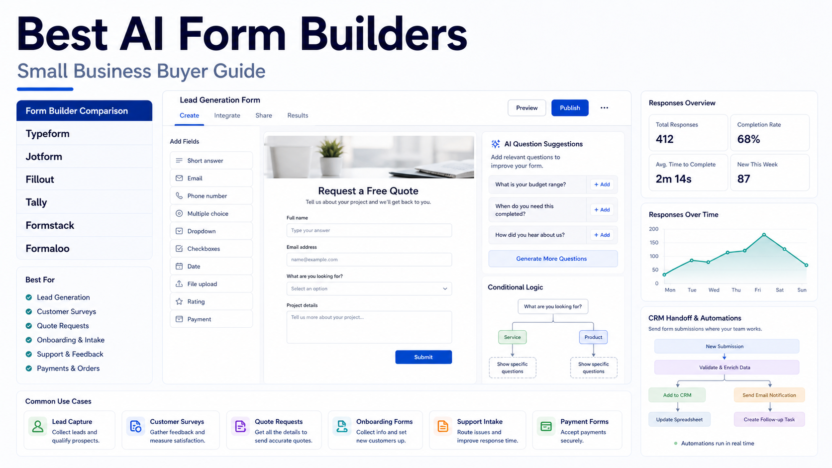
The best AI form builders for small business are the tools that help you create useful forms faster without making the form feel generic or careless. Typeform is strong for polished conversational forms, Jotform is strong for broad template coverage and payments, Fillout is strong for modern no-code forms, Tally is strong for simple clean forms, Formstack is strong for business workflows and compliance-heavy processes, and Formaloo is useful when forms need to become lightweight customer-facing apps.
For most small businesses, the right choice depends on the job. Lead capture, customer surveys, support intake, onboarding questionnaires, quote requests, and payment forms all need different form logic. AI can help draft questions, suggest answer options, classify responses, summarize feedback, and route submissions, but a human should still review wording, required fields, privacy notices, and follow-up rules.
If the form data needs to become an operating workflow, connect it to the right next step. For example, our AI procurement workflowshows how a structured intake form can become an approval system, and our Rows AI reviewcovers spreadsheet-style reporting after responses are collected.
How We Evaluated the Tools
| Criteria | Why it matters |
|---|---|
| AI-assisted form creation | Small teams need help drafting good questions quickly. |
| Conditional logic | Forms should adapt based on answers. |
| Templates and use cases | Lead forms, surveys, requests, onboarding, and support intake need different layouts. |
| Integrations | Responses should move into CRM, email, spreadsheets, automation, or project tools. |
| Reporting | Teams need summaries, dashboards, and exports. |
| Brand and user experience | A form is often the first interaction with a lead or customer. |
| Pricing clarity | Small businesses need to know whether limits fit form volume and team size. |
It is based on official product information and official pricing pages reviewed on July 1, 2026.
Quick Comparison Table
| Tool | Best for | Main strength | Limitation to consider | Official source |
|---|---|---|---|---|
| Typeform | Conversational forms and surveys | Polished respondent experience | Can be more expensive for high-volume needs | Typeform |
| Jotform | Broad small-business form needs | Large template library and payment workflows | Interface can feel broad because it covers many use cases | Jotform |
| Fillout | Modern no-code forms | Clean forms and strong workflow fit | Smaller ecosystem than older form platforms | Fillout |
| Tally | Simple forms and startups | Clean, lightweight form creation | Less suited to complex enterprise workflows | Tally |
| Formstack | Business and regulated workflows | Forms, documents, and workflow automation | May be more platform than a tiny team needs | Formstack |
| Formaloo | Forms plus lightweight apps | Customer portals and database-style forms | Best fit depends on app-style workflow needs | Formaloo |
1. Typeform
Typeform is best known for conversational forms that feel more like a guided interaction than a traditional questionnaire. That makes it useful for lead qualification, customer surveys, quizzes, onboarding forms, and feedback collection where completion experience matters.
In a typical small business workflow, Typeform can help a marketing team ask fewer but better questions. AI can assist with question drafting and structure, but the team should still review whether each question is necessary. A beautiful form is not useful if it asks irrelevant questions or creates poor follow-up data.
Choose Typeform if brand experience and respondent engagement matter. Avoid it if your main requirement is the cheapest high-volume backend form system.
2. Jotform
Jotform is a broad form platform with many templates and business use cases. It is useful for appointment requests, order forms, registration forms, payments, approvals, and internal requests. Small teams often like Jotform because it covers many form types without needing a developer.
Jotform is a strong choice when the business needs practical forms quickly: quote requests, service bookings, applications, customer intake, or payment collection. AI can help draft form questions and organize structure, but sensitive workflows still need human review.
Choose Jotform if you want broad template coverage and many business form options. Avoid it if you want the simplest minimalist form experience.
3. Fillout
Fillout is a modern form builder that fits no-code workflows well. It is useful when teams want clean forms connected to databases, automations, and internal processes. For teams already using Airtable, Notion, or other structured tools, Fillout can be a good intake layer.
A small operations team could use Fillout for vendor intake, employee requests, customer onboarding, or internal approvals. The form should collect structured fields that can feed the next workflow step.
Choose Fillout if you want modern forms connected to operational tools. Avoid it if your team mainly needs a huge legacy template marketplace.
4. Tally
Tally is strong for simple, clean forms. It is useful for startups, creators, and small teams that want to publish forms quickly without heavy setup. The interface is especially appealing when the form does not need complex workflow logic.
Good use cases include waitlists, simple surveys, contact forms, content requests, event signups, and lightweight intake. AI-assisted drafting can help create a first version, but the owner should remove unnecessary questions and make the form concise.
Choose Tally if simplicity and speed matter. Avoid it if you need complex approvals, compliance workflows, or heavy enterprise controls.
5. Formstack
Formstack is better suited to business workflows where forms connect to documents, approvals, routing, and more formal processes. It can fit teams that need structured data collection with workflow depth.
A healthcare-adjacent, finance, education, or operations-heavy business may need more control than a lightweight form builder provides. Formstack can be more appropriate when form submissions need document generation, approval routing, or stronger workflow management.
Choose Formstack if forms are part of a business process. Avoid it if you only need simple lead capture.
6. Formaloo
Formaloo combines forms with database and app-style experiences. It can be useful when a form is not just a submission box but part of a customer portal, survey system, or lightweight app.
Small businesses could use Formaloo for customer feedback hubs, internal request systems, surveys, directories, or simple data-driven portals. The value depends on whether the business needs more than a standalone form.
Choose Formaloo if your form needs to become a small app or data experience. Avoid it if a plain contact form is enough.
Best Tool by Use Case
| Use case | Best fit |
|---|---|
| Polished lead forms | Typeform |
| Broad business forms | Jotform |
| Modern no-code intake | Fillout |
| Simple startup forms | Tally |
| Approval-heavy workflows | Formstack |
| Form-powered mini apps | Formaloo |
Practical Use Cases
Lead qualification
A small agency can use AI to draft a lead form that asks budget range, service need, timeline, company size, and project priority. The form should route qualified leads to CRM and low-fit inquiries to a nurture workflow.
Customer surveys
A SaaS team could use a form builder to collect feature feedback, categorize responses, and summarize common themes. AI can help classify answers, but the product team should still review original responses before making roadmap decisions.
Support intake
Support teams can collect issue type, account email, screenshots, urgency, and affected product area. Good form structure reduces back-and-forth and helps support route requests faster.
Quote requests
Service businesses can collect project scope, timeline, budget, location, and contact details. The form should produce clean data for the person preparing the quote.
Pricing Notes
Pricing last checked on July 1, 2026. Each vendor publishes official pricing or plan information on its own website. Before choosing, review response limits, user seats, custom branding, payment support, file uploads, AI features, integrations, and automation limits from the official pricing pages.
Common Mistakes
The first mistake is asking too many questions. Every extra field can reduce completion. Ask only what is needed for the next action.
The second mistake is collecting data without a workflow. A form that sends responses to an ignored inbox is not an operating system.
The third mistake is using AI-generated questions without editing. AI can draft, but the business needs to make the form specific, clear, and privacy-safe.
The fourth mistake is forgetting mobile users. Many customers complete forms on phones, so long text blocks and complex grids can hurt completion.
Final Recommendation
Choose Typeform for polished interactive forms, Jotform for broad practical business forms, Fillout for modern no-code intake, Tally for simple clean forms, Formstack for workflow-heavy processes, and Formaloo for form-powered apps. The best AI form builder is the one that improves both sides of the process: the customer experience and the internal follow-up workflow.
FAQs
What is an AI form builder?
An AI form builder helps create, structure, summarize, or route forms using AI. It may help draft questions, suggest answer choices, classify responses, or summarize submissions.
Which AI form builder is best for small business?
Typeform, Jotform, Fillout, Tally, Formstack, and Formaloo are all useful depending on the workflow. The best fit depends on whether you need lead capture, surveys, payment forms, approvals, or app-style forms.
Can AI create a complete form automatically?
AI can draft a first version, but a human should review the questions, required fields, privacy language, and follow-up logic before publishing.
What should I connect forms to?
Connect forms to the next workflow: CRM, spreadsheet, email tool, automation platform, help desk, project tool, or approval queue.
Are AI form builders safe for customer data?
They can be, but teams should review vendor privacy, data handling, access controls, and retention settings before collecting sensitive information.
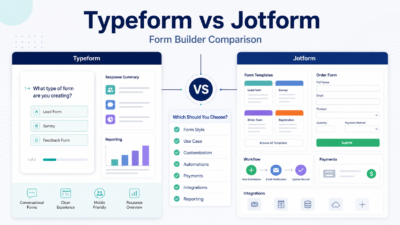
Should I use Typeform or Jotform?
Use Typeform when respondent experience and conversational design matter most. Use Jotform when you need many templates, payments, and broad business form coverage.
What is the biggest form-building mistake?
The biggest mistake is building a form without a follow-up process. The form should collect only useful data and send it to the person or system that will act on it.