Quick Answer
An AI refund request workflow helps a small business collect refund requests, classify the reason, check policy fit, route edge cases for human approval, draft customer replies, update the help desk or CRM, and hand approved refunds to finance. AI should not approve refunds automatically. It should prepare the information so a support lead, manager, or finance owner can make the decision quickly.
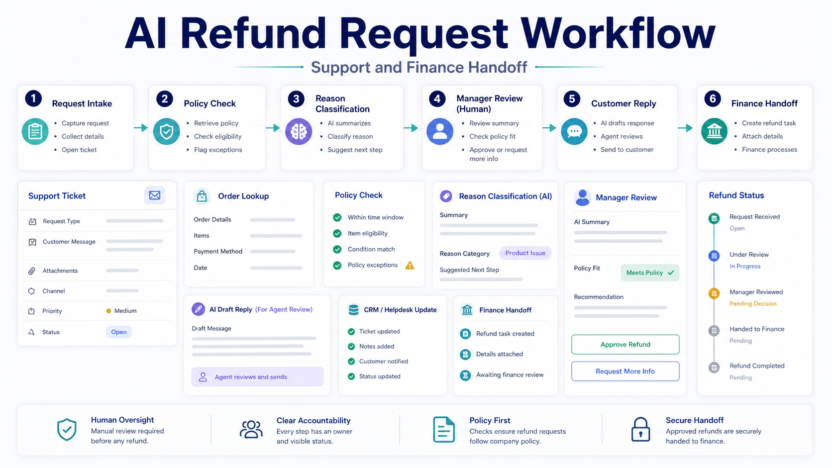
The workflow has six stages: intake, order lookup, reason classification, policy check, manager review, and finance handoff. This structure is useful for ecommerce teams, SaaS support teams, agencies, course creators, and service businesses that handle recurring refund questions.
If you are building more intake workflows, our Best AI Form Builders for Small Business guide covers tools for capturing structured requests.
Best For
- Ecommerce teams handling returns or refund requests
- SaaS support teams reviewing cancellation and billing issues
- Course creators managing refund windows
- Agencies handling service cancellation requests
- Finance teams that need cleaner support handoff
Not Best For
- Businesses that want AI to approve refunds without review
- High-risk disputes requiring legal or payment processor review
- Companies without a clear refund policy
- Teams that cannot connect support and finance records
Workflow Overview
| Stage | Purpose | AI can help with | Human decision required |
|---|---|---|---|
| Request intake | Collect customer and order context | Summarize request and detect missing fields | Confirm request is valid |
| Order lookup | Match request to order or account | Prepare lookup notes | Confirm account/order record |
| Reason classification | Identify refund reason | Tag category and sentiment | Review edge cases |
| Policy check | Compare against refund policy | Flag policy fit or missing information | Approve exceptions |
| Manager review | Decide approve, deny, or escalate | Draft decision summary | Make refund decision |
| Finance handoff | Process approved refund | Prepare handoff note | Execute payment/refund |
Step 1: Create a Structured Refund Form
Start with a structured intake form. Ask for customer name, account email, order number, product or service, purchase date, refund reason, supporting details, and preferred resolution. Avoid asking for sensitive payment details in the form.
AI can summarize long customer explanations, but the fields should still be structured. A free-text message alone makes routing harder. If you use a form builder, connect it to your help desk, CRM, spreadsheet, or project system.
Step 2: Classify the Refund Reason
Common categories include duplicate purchase, product did not fit, billing error, subscription cancellation, late delivery, technical issue, service dissatisfaction, and policy exception.
AI can suggest the category, but support should review the result. Misclassifying a refund can create poor customer experience or incorrect finance records.
Step 3: Check Policy Fit
Your refund policy should be easy for the workflow to reference. Include refund window, eligible products, excluded items, partial refund rules, cancellation requirements, and escalation criteria.
AI can compare the request summary against policy language and flag likely fit. It should not make the final decision. A manager should review exceptions, unclear cases, repeat refund behavior, chargeback risk, or sensitive customer situations.
Step 4: Route for Manager Review
Create simple routing rules. Low-risk requests inside policy can go to a support lead. Higher-value refunds, repeat requests, chargeback threats, or policy exceptions should go to a manager or finance owner.
The manager view should include the request summary, policy fit, order details, customer history notes, suggested reply, and finance handoff fields.
Step 5: Draft the Customer Reply
AI is useful for drafting polite customer replies. It can prepare an approval message, denial explanation, request for missing information, or escalation note. The support agent should edit the message before sending.
Good refund messages are clear, brief, and specific. They explain the decision, next step, timing, and where the customer can ask follow-up questions.
Step 6: Handoff to Finance
Finance needs clean context: customer, order, amount, approval owner, reason code, date, payment processor, and notes. If the workflow ends with a support message but finance lacks context, the process will still break.
Use a task, spreadsheet row, help desk status, accounting note, or payment processor workflow to confirm completion. Keep the approval record attached.
Tool Stack Options
A lightweight stack can use a form builder, help desk, spreadsheet, automation tool, and payment processor. For example, the request can arrive through a form, create a help desk ticket, write a row to a spreadsheet, route a manager task, and send a finance handoff note after approval.
Tools such as Zendesk, Intercom, Stripe, and Zapier can be part of the workflow depending on the business stack.
Common Mistakes
The first mistake is letting AI approve refunds. Approval should stay with a human because refunds affect money, customer trust, and policy exceptions.
The second mistake is not recording reason codes. Without categories, the business cannot see why refunds happen.
The third mistake is sending unclear denial replies. If a refund is denied, the customer should understand the policy reason and next option.
The fourth mistake is failing to close the loop with finance. A support approval is not complete until the refund is processed and recorded.
Final Checklist
- Collect structured request details.
- Avoid sensitive payment data in forms.
- Classify refund reason.
- Check policy fit.
- Route exceptions to a manager.
- Draft but review customer replies.
- Send approved refunds to finance.
- Record reason codes.
- Track repeated refund patterns.
- Review policy gaps monthly.
Final Recommendation
Build the workflow before adding more AI. A clear refund policy, structured intake, manager review, and finance handoff matter more than any single AI feature. Use AI to summarize, classify, and draft. Keep humans responsible for approval.
FAQs
Can AI approve refunds automatically?
It should not approve important refunds automatically. AI can summarize and classify requests, but a human should approve payment decisions and policy exceptions.
What should a refund request form include?
Include customer email, order number, product or service, purchase date, refund reason, supporting details, and preferred resolution. Avoid collecting full payment details.
How does AI help support teams?
AI can summarize long messages, classify reasons, detect missing information, draft replies, and prepare manager review notes.
Who should approve refunds?
Low-risk requests can be approved by a support lead. High-value, unclear, repeat, or exception requests should go to a manager or finance owner.
What should finance receive?
Finance should receive customer, order, amount, approval owner, reason code, payment processor, and final status.
How do you reduce refund requests?
Track reason codes and review patterns. Refund data can reveal product fit issues, unclear pricing, late delivery, onboarding gaps, or billing confusion.