Quick Verdict
Taskade AI is worth considering if your team wants project management, shared documents, AI agents, automations, and simple app building in one workspace. It is strongest for small teams that want to move from scattered task lists into a more connected operating system without buying separate tools for notes, projects, chat, automation, and lightweight internal dashboards.
The main reason to consider Taskade is not that it is only an AI writing assistant or only a task manager. The useful idea is that projects, agents, automations, and published apps can use the same workspace data. In a typical small business workflow, that means a sales pipeline, content calendar, client checklist, meeting agenda, and reporting dashboard can live closer together instead of being split across several tools.
Taskade is not the best fit for teams that already have a mature Jira, Asana, ClickUp, or Notion setup with deeply customized reporting and governance. It is also not ideal if you need industry-specific compliance controls, complex portfolio management, or a traditional enterprise PMO process. But for small teams that want a flexible AI workspace with real-time collaboration, built-in agents, automation, and cross-device access, Taskade is a credible productivity platform.
Best For
Taskade AI is best for small teams, agencies, creators, founders, marketers, and operations teams that need a practical workspace rather than a narrow AI chatbot. It fits teams that want to plan work, manage tasks, document processes, build repeatable checklists, and automate lightweight actions from one place.
It is especially useful for teams that create many similar workflows. A small agency could use Taskade for campaign planning, client onboarding, deliverable tracking, content calendars, and weekly reporting. A SaaS team could use it for launch checklists, customer feedback triage, product research notes, and handoff tasks between marketing, support, and product. A solo operator could use it as a combined task board, knowledge base, and AI assistant layer.
Taskade also makes sense for teams exploring AI agents but not ready to build a custom automation stack. The official pricing page describes AI agents, automations, app generation, Workspace DNA, and 100+ integrations on paid plans, which makes Taskade more ambitious than a basic to-do app.
Not Best For
Taskade is not the right choice if you mainly need a rigid project management system with advanced dependency mapping, earned value reporting, formal resource planning, or complex approval chains. Dedicated enterprise platforms may be better for those cases.
It may also be too broad if your team only wants one narrow function. If you only need meeting notes, a focused meeting assistant can be cleaner. If you only need email triage, a dedicated email AI tool may fit better. If you only need software sprint planning, a developer-first project management system may offer deeper engineering workflows.
Taskade's value depends on whether your team will actually use the connected workspace. If projects, tasks, agents, automations, and apps remain isolated, the platform can feel like several tools in one interface instead of one coordinated system.
Our Evaluation Criteria
This Taskade AI review uses practical buying criteria for small teams and growing businesses:
| Criteria | What We Looked For |
|---|---|
| Ease of use | Whether a non-technical team can organize projects, tasks, agents, and automations without a long setup cycle |
| Setup effort | How quickly a team can move from a blank workspace to usable boards, checklists, and app-like workflows |
| AI capability | Whether AI agents and app generation support real workflows rather than only text generation |
| Collaboration | Whether team members can work together across projects, tasks, chats, files, and shared views |
| Automation fit | Whether automations can handle repeatable business workflows without needing a separate automation platform |
| Pricing clarity | Whether official plan pages explain plan names, user limits, credits, and upgrade reasons clearly |
| Integration value | Whether the platform can connect to the apps small teams already use |
| Long-term fit | Whether the workspace can grow beyond a simple task board without becoming confusing |
What Is Taskade AI?
Taskade is an AI-native workspace for creating AI apps, agents, workflows, projects, and automations. Its official website positions the platform around three connected ideas: creating apps, connecting workflows and integrations, and cloning ready-made apps or templates.
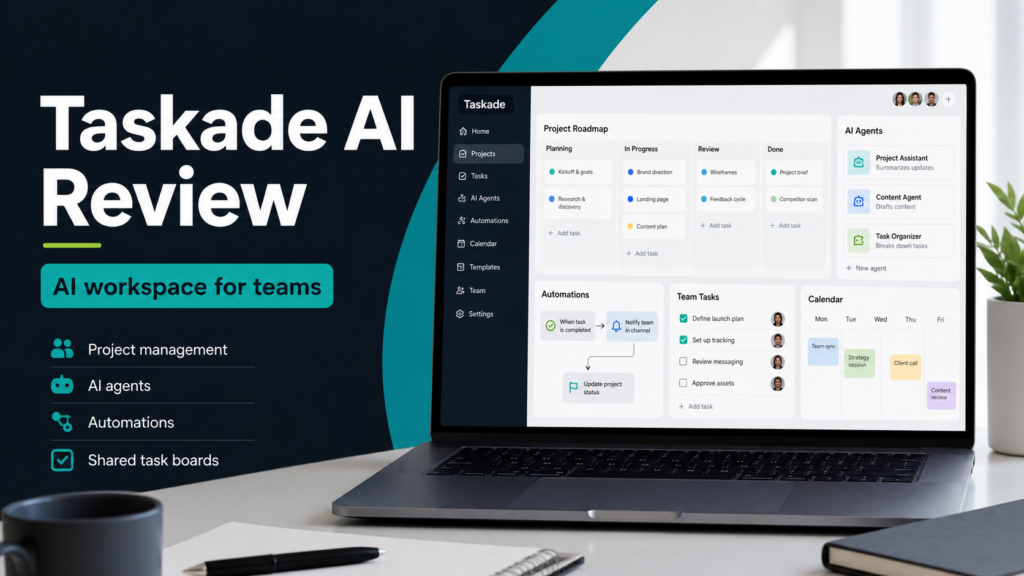
The current product is broader than a standard kanban board. Taskade includes project views, tasks, collaboration, AI agents, automations, templates, and Genesis app building. The official FAQ explains Taskade Genesis as a way to turn a plain-English prompt into a live app connected to workspace projects, AI agents, and automations.
That matters because many productivity tools add AI as a writing box inside an existing product. Taskade's pitch is different: the workspace data, AI agents, and workflow execution are meant to work together. For example, a team could keep a client onboarding checklist in Taskade Projects, ask an AI agent to summarize the latest client notes, and trigger automations that update tasks or notify the team when milestones change.
For readers comparing productivity platforms, our best AI project management tools guide is a useful broader reference. This review focuses specifically on Taskade and whether it is worth using as a daily team workspace.
Key Features
AI Agents
Taskade's AI agents are designed to work inside the same workspace as your projects and tasks. The pricing page says Pro includes unlimited AI agents, while Free is more limited. Agents can support writing, research, task breakdowns, summarization, and workflow actions depending on how the workspace is configured.
In a typical small business workflow, an AI agent could summarize project notes before a weekly meeting, draft a content brief from campaign goals, turn a client request into a task list, or help prepare a launch checklist. The important benefit is context. When the agent is connected to the workspace, it can work closer to the actual project information instead of acting as a separate chat window.
Project Boards and Multiple Views
Taskade supports projects, tasks, and multiple ways to view work. The official pricing and feature pages reference project views across web, desktop, and mobile apps. For small teams, this means one workspace can hold a content calendar, product roadmap, client list, meeting plan, and personal task board.
The practical value is flexibility. A marketing team may prefer a calendar view for campaigns. An operations lead may want a checklist. A founder may want a dashboard-style overview. A project coordinator may want boards by status. Taskade is strongest when a team wants lightweight structure without forcing every workflow into one rigid format.
Automations
Taskade's paid plans emphasize AI-powered automations, scheduled workflows, integrations, branching, looping, and filters. The official pricing page says Pro includes unlimited AI automations and Business adds multi-agent workflows.
A small team could use this for lead capture, email alerts, project updates, CRM-style follow-ups, weekly reporting, internal reminders, and handoff notifications. For example, a small agency could create a workflow where a new client intake item creates follow-up tasks, notifies the account manager, and adds a deadline to the campaign board.
This is not a replacement for every advanced automation platform. Teams with heavy data transformations, complex API logic, or strict audit requirements may still need a dedicated automation tool. But Taskade can reduce the gap between project planning and execution for many everyday workflows.
Genesis Apps
Taskade Genesis is one of the more distinctive parts of the platform. The official FAQ describes a Genesis app as a live interface built on workspace projects, agents, and automations. The pricing page lists examples such as dashboards, client portals, CRM systems, internal tools, websites, landing pages, event pages, forms, and booking systems.
This is useful when a team needs lightweight internal apps but does not want to build custom software. A SaaS team could create a customer feedback tracker. A service business could build a client onboarding portal. A founder could create a simple KPI dashboard. An operations manager could turn a recurring approval process into a small app.
The limitation is that no-code app building is only valuable when the generated app matches the team's real process. Teams should start with a narrow workflow before trying to move every business process into app form.
Collaboration Across Devices
Taskade lists web browsers, iOS, Android, Mac, Windows, and Linux support on its pricing page. That broad platform support matters for distributed teams where not everyone works from the same device.
For a small remote team, Taskade can act as a shared planning layer. Team members can update tasks, add notes, review project status, and coordinate work without needing a separate document tool for every small process. This is most valuable when the workspace stays clean and teams agree on naming, ownership, and review habits.
Integrations and API
The official pricing page says Taskade connects with 100+ integrations on Pro and above, including examples such as Slack, Gmail, Google Workspace, Microsoft 365, HubSpot, Salesforce, Stripe, and GitHub. It also mentions API, webhooks, and HTTP requests on Business.
That makes Taskade more useful for teams that want workflow automation connected to the rest of their business tools. A sales team could connect leads and notifications. A marketing team could connect campaign tasks with content channels. A product team could connect issue updates and documentation workflows.
The practical caution is that integrations should be planned carefully. Connecting many apps without a clear workflow can create noise. Start with one or two automations that remove repeated manual work.
Taskade AI Pricing
Pricing last checked on August 31, 2026.
Taskade's official pricing page lists these public plans at the time checked:
| Plan | Official Listed Price | Users Listed | AI Credit / Capacity Notes | Best Fit |
|---|---|---|---|---|
| Free | Free | 1 user included on pricing page | 6,000 one-time credits are listed on the pricing page | Trying Taskade and building a first small workflow |
| Pro | $10/mo | 10 users included | 50,000 credits/month listed | Small teams that want unlimited apps, agents, workspaces, and automations |
| Business | $25/mo | Unlimited users included | 150,000 credits/month listed | Growing teams that need custom domains, analytics, admin controls, and larger collaboration |
| Max | $100/mo | Unlimited users and teams | Maximum AI generation capacity described | Power users and teams with heavier agent and automation needs |
| Enterprise | $250/mo | Organization-wide support | Enterprise-scale controls described | Larger organizations needing SCIM, SLA, governance, and advanced controls |
The official page also notes that plan changes are not available in the App Store version of Taskade. That is a practical detail for teams buying through mobile app stores.
From a value perspective, Pro is the plan most small teams will probably compare first because it includes 10 users, 50,000 monthly credits, unlimited AI apps, unlimited AI agents, unlimited workspaces, and unlimited AI automations according to the official pricing page. Business becomes more relevant when a team needs custom domains, advanced analytics, white-label branding, API and webhook capabilities, admin controls, and priority support.
Real Use Cases
Team Planning and Project Tracking
A small business can use Taskade to keep projects, tasks, owners, notes, and status updates in one place. Instead of spreading work across chat messages, spreadsheets, and personal task lists, the team can maintain shared boards for campaign launches, client work, product tasks, or internal operations.
Content and Marketing Workflows
A marketing team could use Taskade for editorial calendars, campaign briefs, social content planning, SEO task lists, and approval workflows. An AI agent could help turn a campaign goal into draft tasks, summarize research notes, or prepare first-pass content outlines.
If your team is mainly evaluating AI writing workflows, the KoalaWriter review gives a better view of a dedicated SEO writing tool. Taskade is broader and is more about managing the workflow around content.
Client Onboarding
Agencies and service businesses can use Taskade for onboarding checklists, client portals, intake forms, meeting notes, deadlines, and internal handoffs. A typical onboarding workflow could include a kickoff checklist, file collection, brand notes, task assignments, and recurring update reminders.
Sales and CRM-Style Processes
Taskade is not a full CRM replacement for every sales team, but it can support lightweight pipelines. A team could track leads, next actions, call notes, follow-up reminders, and handoff tasks. With integrations and automations, Taskade may help route simple lead capture or status updates into a shared workspace.
Internal Dashboards and Lightweight Apps
Taskade Genesis makes the platform interesting for teams that want simple internal apps without writing code. Examples include a project dashboard, resource tracker, content intake form, event plan, or approval workflow. The best use case is a specific process with clear fields and actions.
Meeting Follow-Ups
Taskade can support meeting agendas, decision logs, action items, and follow-up tasks. It is not only a meeting transcription tool, so teams that need automatic call capture may still compare dedicated tools such as Read AI or Granola AI. Taskade fits better when the goal is to move meeting outcomes into project execution.
Pros and Cons
| Pros | Why It Matters |
|---|---|
| Combines tasks, projects, agents, automations, and apps | Reduces the need to connect several basic tools for small team workflows |
| Free plan is available | Teams can explore the interface and build an initial workflow before upgrading |
| Pro includes 10 users on the official pricing page | Useful for small teams that want predictable workspace pricing |
| AI agents work inside the workspace concept | Better fit for project context than a standalone chatbot |
| Automations and integrations are built into paid plans | Helps teams turn project updates into repeatable workflows |
| Cross-device availability | Useful for teams working across desktop, browser, and mobile |
| Cons | Why It Matters |
|---|---|
| Broad product scope can feel complex | Teams need a clear workspace structure to avoid clutter |
| Not a dedicated enterprise project management suite | Advanced governance, resource planning, and portfolio reporting may be limited compared with specialist tools |
| AI credits affect heavy usage | Teams building many apps or running many AI workflows need to watch credit capacity |
| App generation still requires good process design | A generated app will only be useful if the underlying workflow is clear |
| Pricing and features are plan-dependent | Teams should match required features such as custom domains, API access, and admin controls to the right plan |
Taskade vs Alternatives
| Tool | Best For | Main Strength | Limitation |
|---|---|---|---|
| Taskade | Small teams that want projects, AI agents, automations, and lightweight apps together | Connected workspace with AI agents and Genesis apps | Can be too broad if the team only needs one simple task board |
| Asana | Teams that need structured project and task management | Mature project planning and team coordination | AI and automation experience is not the same as Taskade's app-agent-workflow model |
| Notion | Teams that want flexible docs, databases, and knowledge management | Strong documentation and database flexibility | Project execution may require more manual structure |
| ClickUp | Teams that want a very configurable work management system | Broad project management depth and views | Setup can become heavy for small teams |
| Trello | Simple visual task boards | Easy kanban-style planning | Less suitable for complex AI agent and automation workflows |
For a deeper look at a traditional project management competitor with AI features, see our Asana AI review. If your team is choosing between workspace AI platforms more broadly, the ChatGPT Business vs Microsoft 365 Copilot comparison may also help.
What Most Teams Should Watch Before Choosing Taskade
The biggest buying question is not whether Taskade has enough features. It has many. The better question is whether your team wants a connected workspace where AI agents, automations, projects, and lightweight apps all share context.
Choose Taskade if your team often says, "We need a simple system for this process" and then ends up building another spreadsheet, checklist, or half-finished dashboard. Taskade is useful when the team wants to turn those repeatable processes into living workspaces.
Be more cautious if your team already has clean project systems and only needs one missing capability. In that case, a focused tool may be faster. For example, teams that mainly need AI email productivity might compare Fyxer AI or Shortwave AI instead of adopting a broader workspace.
Final Recommendation
Taskade AI is a strong option for small teams that want to combine project management, task planning, AI agents, automations, and lightweight app building in one place. It is most compelling for teams that handle repeatable workflows such as content production, client onboarding, sales follow-up, internal reporting, and launch planning.
The Pro plan looks like the main starting point for many teams because the official pricing page lists 10 users, unlimited AI apps, unlimited AI agents, unlimited workspaces, unlimited AI automations, and 50,000 credits per month. Business is more appropriate when custom domains, white-labeling, API access, analytics, and admin controls matter.
Do not choose Taskade only because it has AI. Choose it if your team wants one workspace where tasks, knowledge, automation, and simple apps can work together. If your team needs highly specialized project governance or a narrow single-purpose AI tool, compare alternatives first.
FAQs
Is Taskade AI free?
Yes. Taskade's official pricing page lists a Free plan. At the time checked, the pricing page listed 1 user included and 6,000 one-time credits for Free. The Free plan is best for trying the platform and building an initial workflow.
What is Taskade best used for?
Taskade is best used for shared project planning, task boards, team workflows, AI-assisted planning, lightweight automations, and simple internal apps. It fits small teams that want one workspace for projects, notes, agents, checklists, and repeatable processes.
Does Taskade include AI agents?
Yes. Taskade's official pricing page lists AI agents as part of the product. Pro includes unlimited AI agents according to the official page checked for this review. Agents can help with planning, summarization, research, task breakdown, and workflow support.
Can Taskade replace Asana or ClickUp?
Taskade can replace a project management tool for teams that prefer a flexible AI workspace with tasks, projects, agents, automations, and app building. Larger teams with complex reporting, resource planning, or mature project governance may still prefer dedicated work management platforms.
Is Taskade good for agencies?
Taskade can work well for agencies because it supports client onboarding, campaign planning, content workflows, checklists, portals, and recurring operational processes. Agencies should start with one workflow, such as onboarding or reporting, before moving all client work into Taskade.
Does Taskade support integrations?
Yes. Taskade's official pricing page says paid plans connect with 100+ integrations and lists examples such as Slack, Gmail, Google Workspace, Microsoft 365, HubSpot, Salesforce, Stripe, and GitHub. Business also references API, webhooks, and HTTP requests.
What are the main limitations of Taskade?
The main limitations are product breadth, credit-based AI capacity, and fit for advanced enterprise project management. Teams need a clear workspace structure. Heavy AI users should understand plan capacity. Enterprise teams may need deeper governance than Taskade provides.
Who should choose Taskade AI?
Choose Taskade AI if your team wants to manage projects, create repeatable workflows, use AI agents, automate simple actions, and build lightweight apps from one workspace. It is strongest for small teams that value speed and flexibility over rigid enterprise process design.