
Quick verdict
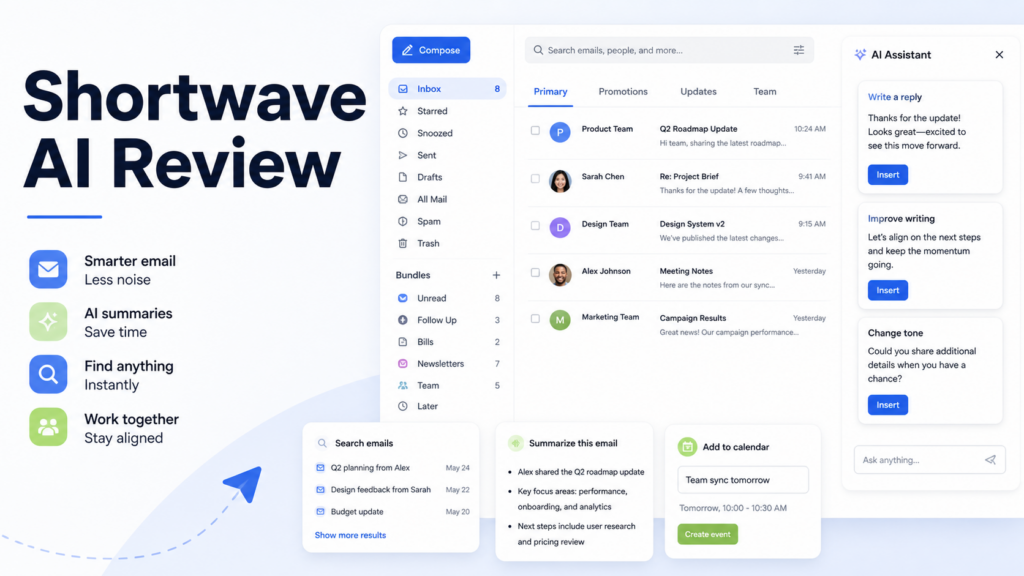
Shortwave is worth considering if your team uses Gmail and wants an AI-first email client rather than a simple add-on. It helps organize, write, search, summarize, and schedule from inside an email workflow. Based on Shortwave's official pages, the product is available on web, desktop, iOS, and Android, and its AI assistant can help with inbox organization, email writing, instant answers, email analysis, and calendar management.
The main tradeoff is that Shortwave changes the way you use email. That can be a benefit for people who want a faster, more organized interface, but it can be friction for teams that prefer to stay inside the standard Gmail experience. If you want an inbox-native layer that keeps Gmail as the source but improves the daily work surface, Shortwave is a serious option. If you only need occasional help writing replies, a general assistant may be enough.
Best for
Shortwave is best for Gmail-heavy professionals who spend a lot of time searching threads, summarizing long conversations, writing replies, and managing follow-ups. It fits founders, account managers, consultants, support leads, recruiters, sales teams, and small business operators who want email to feel more like a command center.
It is also useful for teams that need shared inboxes, faster triage, AI summaries, and better search across past communication. Shortwave's official pricing page includes business plans with AI search history, AI-powered filters, integrations, web browsing, read statuses, link tracking, snippets, and more.
Not best for
Shortwave is not the best fit if your company is committed to Outlook or Microsoft 365 email. It is also not ideal if your team does not want to learn a different email interface. Shortwave can improve email productivity, but it still asks users to work inside the Shortwave client.
It may also be more than you need if you only want help rewriting a few emails each week. In that case, ChatGPT, Claude, Gemini in Gmail, or another lightweight writing assistant may be enough.
What is Shortwave?
Shortwave is an AI email app built around Gmail. The official homepage describes it as an agentic AI product that helps users organize, write, search, schedule, and more with a prompt. It is available on iOS, Android, Mac, Windows, and the web.
Shortwave is different from a normal email writing extension because it provides a full email interface. It can bundle related messages, support team inbox workflows, provide AI summaries, help search through email history, and assist with writing. The official docs describe the AI Assistant as a conversational assistant built into email.
For a small business, the practical question is simple: do you want to keep using the standard Gmail interface, or do you want a more specialized email workspace? Shortwave is strongest when you want the second option.
Our evaluation criteria
| Criteria | What matters |
|---|---|
| Ease of use | Whether the interface improves Gmail work without creating confusion |
| Setup | Whether a team can start quickly from an existing Gmail workflow |
| AI quality | Whether assistant features help with real email decisions |
| Search | Whether users can find answers across past threads and context |
| Writing support | Whether reply drafting and rewriting reduce repetitive work |
| Team workflow | Whether shared inboxes, snippets, and collaboration features matter |
| Pricing clarity | Whether official plans and AI limits are understandable |
| Alternatives | Whether a simpler or broader tool would be a better fit |
| Value for money | Whether the time saved justifies a per-seat subscription |
Key features
AI assistant inside email
Shortwave's AI Assistant can help organize the inbox, write and improve emails, search for answers, understand and analyze emails, and manage the calendar. This makes it more useful than a basic grammar tool. The assistant is designed to work with the user's email context.
In a typical small business workflow, that can help with long customer threads, vendor conversations, hiring updates, and sales follow-ups. Instead of searching manually and copying context into another tool, the user can work where the messages already live.
Email search and answers
Shortwave's pricing page references AI search history limits by plan. The Business plan includes five years of AI search history and up to 50 threads per AI search. Premier includes unlimited AI search history and up to 100 threads per AI search. Max includes up to 150 threads per AI search.
That matters for people who use email as their business memory. A consultant may need to find what a client approved last quarter. A founder may need to find investor feedback from a long thread. A support lead may need to understand a customer's history before replying.
Writing and summaries
Shortwave's official docs state that the AI Assistant can write better emails, improve drafts, and analyze messages. This is useful for replies that require clear tone and context. It can also reduce the time spent reading long threads by summarizing the key points.
A sales team could use this to summarize a long buying thread before replying. A manager could use it to rewrite a sensitive email more clearly. A recruiter could use it to prepare candidate follow-ups without starting from a blank message.
Bundles and inbox organization
Shortwave is known for helping users organize Gmail with bundles and a cleaner inbox structure. For high-volume users, organization is not cosmetic. It decides whether important email gets handled at the right time.
Common examples include separating newsletters, team updates, customer messages, receipts, and follow-ups. The goal is to reduce inbox noise so the user can focus on messages that require action.
Team and business features
Shortwave's paid plans include business-oriented features such as read statuses, link tracking, snippets, AI-powered filters, integrations, and more depending on plan. These are useful when email is tied to sales, support, recruiting, or client delivery.
For example, snippets can speed up common replies, read statuses can help with sales follow-up timing, and AI filters can help route inbox attention. These features are not necessary for every user, but they can matter for teams that handle email as part of revenue or customer experience.
Real use cases
Client email management
In a typical agency workflow, account managers receive updates, approvals, attachments, questions, and meeting follow-ups across many threads. Shortwave can help organize those threads, summarize context, and draft replies. The account manager still approves the final message, but the preparation time is lower.
Sales follow-up
A sales rep could use Shortwave to summarize a prospect thread, find the last objection, draft a follow-up, and schedule a next step. This is useful when reps handle many conversations and need to stay responsive without losing context.
Founder inbox control
Founders often use email for hiring, customer feedback, investor updates, vendors, and internal coordination. Shortwave can help turn the inbox into a prioritized workspace rather than a chronological list. The benefit is faster attention allocation.
Support and shared inbox workflows
Teams using shared inboxes can benefit from organization, snippets, and AI assistance. Shortwave may help users respond faster to common questions while still reviewing each response for accuracy and tone.
Researching old conversations
Email is often the record of decisions. Shortwave's AI search can help users find past commitments, documents, timelines, and context from older threads. This is useful for consultants, project managers, and client-facing teams.
Shortwave pricing
Pricing last checked on August 30, 2026.
Shortwave's official pricing page lists a 14-day free trial. For business users, the visible monthly prices are Business at $30 per seat per month, Premier at $45 per seat per month, and Max at $120 per seat per month. The pricing page also shows annual billing discounts in the plan interface.
| Plan | Official monthly price shown | Best fit |
|---|---|---|
| Business | $30 per seat/month | Everyday AI productivity, standard intelligence, and business email features |
| Premier | $45 per seat/month | More AI usage, advanced intelligence, unlimited AI search history, and larger search context |
| Max | $120 per seat/month | Highest usage limits and expert intelligence for power users |
The buying decision depends on usage. Business may be enough for people who want AI email productivity and standard history limits. Premier is more relevant when AI search is central to the workflow. Max is for heavy users who need significantly more AI usage and larger context limits.
Sources: Shortwave official pricing, Shortwave homepage, Shortwave AI Assistant documentation, and Shortwave billing documentation.
Pros and cons
| Pros | Cons |
|---|---|
| Strong fit for Gmail-heavy users | Not ideal for Outlook-first teams |
| AI assistant works inside the email workflow | Requires learning a different email client |
| Useful for search, summaries, writing, and calendar context | Per-seat pricing can add up for teams |
| Business plans include team productivity features | Some advanced AI features require higher plans |
| Available across web, desktop, and mobile | Users who only need occasional writing help may not need it |
Shortwave alternatives
| Tool | Best for | Main strength | Limitation |
|---|---|---|---|
| Shortwave | Gmail users who want an AI email client | AI email assistant, search, bundles, summaries, and team features | Requires using Shortwave's email interface |
| Fyxer AI | Gmail or Outlook users wanting inbox help and meeting notes | Works around inbox, drafts replies, and supports meeting workflows | Less of a full email client replacement |
| SaneBox | Inbox cleanup and prioritization | Strong filtering and email noise reduction | Not primarily an AI drafting assistant |
| Superhuman | Premium email speed and keyboard-driven productivity | Fast interface and polished workflow | Higher-cost positioning and less focused on AI search depth |
| ChatGPT or Claude | Occasional email writing and rewriting | Flexible writing support | Manual copy-paste and no native inbox organization |
Choose Shortwave if you want to rethink Gmail around AI search, summaries, and an organized interface. Choose Fyxer if you want AI email help around Gmail or Outlook without committing to a full Shortwave-style email client. Choose SaneBox if filtering is the main problem. Choose a general assistant if you only need occasional writing help.
Final recommendation
Shortwave is a strong option for Gmail users who treat email as a daily workspace. It is most useful when email is not just communication, but also the place where tasks, decisions, files, follow-ups, and customer context live.
For small businesses, Shortwave is worth a trial if inbox overload is slowing down sales, client service, recruiting, or operations. The product is less compelling if your team is already happy with Gmail, uses Outlook, or only needs occasional reply drafting.
Shortwave's value comes from reducing search time, improving reply speed, and making email easier to manage. It should still be used with human review for important business messages.
For related comparisons, see DailyTimesPro's reviews of Fyxer AI, best AI meeting assistants for sales teams, best AI work management tools for small teams, and AI sales call summaries.
FAQs
Is Shortwave an AI email assistant?
Yes. Shortwave's official docs describe the AI Assistant as a conversational assistant built into email. It can help organize messages, write and improve emails, search for answers, analyze email content, and manage calendar context.
Does Shortwave work with Gmail?
Yes. Shortwave is built around Gmail and Google Workspace workflows. It provides a different email interface on top of Gmail rather than a generic writing box.
Does Shortwave work with Outlook?
Shortwave is primarily positioned around Gmail. Outlook-first teams should compare alternatives such as Fyxer AI or Microsoft 365 Copilot before choosing an email assistant.
How much does Shortwave cost?
Pricing last checked on August 30, 2026. Shortwave's official pricing page shows Business at $30 per seat per month, Premier at $45 per seat per month, and Max at $120 per seat per month, with a 14-day free trial.
Is Shortwave better than Fyxer AI?
Shortwave is better if you want an AI-focused Gmail client with search, bundles, and team email features. Fyxer may be better if you want AI email help for Gmail or Outlook plus meeting notes without switching into a fuller email client replacement.
Is Shortwave good for small businesses?
Yes, if the business runs heavily on Gmail and email volume creates real work. It is most useful for sales, client service, recruiting, consulting, and founder inbox management.
Can Shortwave summarize emails?
Yes. Shortwave's AI Assistant documentation says it can understand and analyze emails. In practical use, summaries are helpful for long threads, client conversations, and decision history.
Who should avoid Shortwave?
Teams that use Outlook, do not want a new email interface, or only need occasional reply rewriting may not need Shortwave. A broader AI assistant or a lighter inbox tool may be enough.
Is Shortwave worth it?
Shortwave is worth it if email is a daily bottleneck and you want AI search, organization, summaries, and writing help in one Gmail-focused workspace. It is less necessary for light email users.
What is the best Shortwave alternative?
Fyxer AI is a strong alternative for Gmail and Outlook users who want email help and meeting notes. SaneBox is better for filtering. ChatGPT or Claude are useful for occasional writing support.




One response to “Shortwave AI Review: Is It Worth It for Email Productivity?”
[…] For related Dailytimespro guides, read our Superhuman AI review, Fyxer AI review, Help Scout AI review, and Shortwave AI review. […]