Quick Verdict
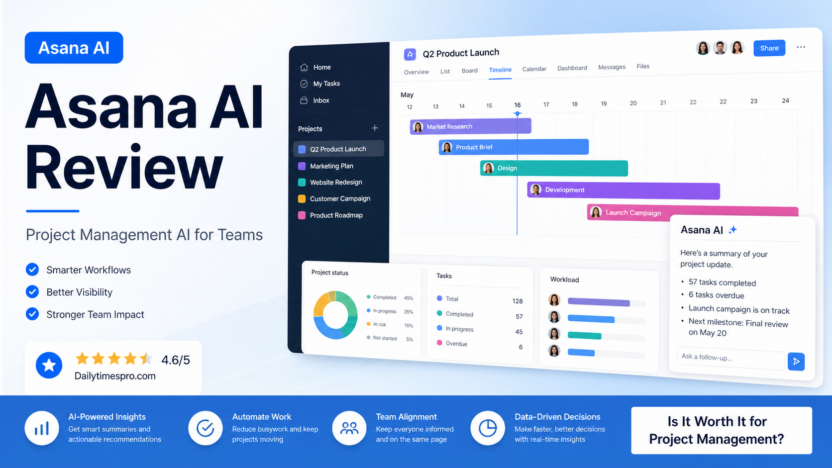
Asana AI is worth considering if your team already uses Asana or wants project management software with AI-assisted summaries, project updates, goal visibility, and workflow support. It is strongest for teams that need better status reporting, clearer task ownership, and faster project communication. It is not the best fit if your team mainly needs a standalone chatbot, deep document generation, advanced spreadsheet analysis, or a highly customized automation platform.
The practical value of Asana AI is simple: it can reduce the time spent asking for updates, rewriting project summaries, and scanning task lists. For small businesses, agencies, marketing teams, operations teams, and SaaS teams, that can matter more than flashy AI features. Project management problems are usually not caused by a lack of ideas. They are caused by unclear ownership, scattered status updates, missed dependencies, and too much manual coordination.
Best For
Asana AI is best for teams that already manage work in Asana, teams that need clearer project updates, managers who spend too much time chasing status, and departments that want AI assistance inside daily work rather than another separate tool. It can help marketing teams plan campaigns, operations teams manage recurring work, product teams track launches, and service teams coordinate client deliverables.
Not Best For
Asana AI is not best for teams that do not want a project management platform, teams that require fully custom AI agents, or businesses that need heavy spreadsheet modeling. It also is not a substitute for managers making priority decisions. AI can summarize and suggest, but project owners still need to decide scope, deadlines, tradeoffs, and accountability.
Our Evaluation Criteria
| Criteria | What to check |
|---|---|
| Ease of use | Can non-technical team members understand the AI features inside normal project work? |
| Setup | Does the value appear after tasks, owners, due dates, and projects are organized? |
| AI quality | Are summaries and updates useful after review? |
| Workflow fit | Does it help status reporting, planning, handoffs, and project visibility? |
| Integrations | Does it fit the tools your team already uses with Asana? |
| Pricing clarity | Are official plans, AI availability, and enterprise options clear enough for buying decisions? |
| Governance | Can managers control what gets used, shared, and reviewed? |
| Value for money | Does it save enough coordination time to justify the plan cost? |
Key Features
Asana official product pages describe AI and work management capabilities around project planning, smart summaries, status updates, goals, workflows, reporting, and team coordination. The exact features available can depend on plan, workspace configuration, region, and product updates. For small business buyers, the important question is not whether Asana has AI. The important question is whether AI appears inside the project work your team already maintains.
Smart project summaries
A project summary can help managers quickly understand progress, blockers, and next steps. This is useful when a project has many tasks, comments, and dependencies. Instead of reading every update manually, a manager can use AI-assisted summaries as a starting point and then review the underlying project details before sending a final update.
Status update support
Project status updates are often delayed because managers need to collect information from several owners. Asana AI can help draft updates based on project information. The manager still needs to verify accuracy, but the blank-page work is reduced.
Goals and reporting context
Teams that use Asana for goals, portfolios, and reporting may benefit from AI summaries that connect tasks to broader outcomes. This is especially helpful when leadership wants a quick view of which projects are on track and which need attention.
Workflow assistance
Asana already supports workflows, rules, templates, approvals, and dependencies. AI assistance can make these workflows easier to understand and maintain, but it works best when the team already has clean project structure.
Real Use Cases
Marketing campaign planning
In a typical small business workflow, a marketing manager could use Asana to plan a campaign with tasks for landing pages, email copy, ads, design, approvals, launch checks, and reporting. Asana AI can help summarize progress before the weekly meeting and draft a project update for stakeholders. The manager reviews the summary, adds context, and sends a cleaner update faster.
Client project delivery
An agency could use Asana for client deliverables such as website builds, content calendars, SEO audits, ad campaigns, and reporting. AI summaries can help account managers prepare for client calls by showing open tasks, blockers, and recent progress. This does not replace client judgment, but it reduces the time spent digging through task comments.
Product launch coordination
A SaaS team could use Asana to coordinate product launch work across product, engineering, marketing, support, and sales. AI-assisted updates can help identify what has moved, what is late, and what needs leadership attention. The team still needs owners for decisions such as scope changes and launch timing.
Operations workflows
Operations teams can use Asana for onboarding, procurement, vendor tasks, compliance checklists, finance handoffs, and recurring reviews. Asana AI is useful when work is structured enough for summaries and updates to be meaningful. If tasks are vague or ownership is missing, AI will not fix the underlying operating problem.
Meeting follow-up
After team meetings, managers often need to turn discussion into tasks and updates. Asana can help keep action items visible when teams use it consistently. AI-assisted summaries are most useful when the team work already lives in the platform.
Pricing
Pricing last checked on July 30, 2026. Asana publishes official pricing for its plans on its pricing page. The current public plan structure includes free and paid team/business options, while enterprise needs can require a sales conversation. AI feature availability can vary by plan and Asana current product packaging.
Use the official pricing page for the latest plan details: https://asana.com/pricing
Pricing may vary based on plan, billing term, seats, enterprise requirements, admin controls, and feature availability. For a buying decision, compare the plan against the workflows your team will actually run: number of users, number of projects, reporting needs, automation needs, portfolio needs, and AI availability.
Pros and Cons
| Pros | Cons |
|---|---|
| AI features live inside project work rather than a separate tool | Value depends on clean tasks, owners, and project structure |
| Useful for summaries, status updates, and project visibility | Not a replacement for project management discipline |
| Strong fit for marketing, operations, product, and client-service teams | Some AI and advanced controls may depend on plan availability |
| Good broader work management platform beyond AI features | Pricing can rise as more team members need paid seats |
| Helps reduce manual status reporting work | Teams already committed to another PM tool may not switch easily |
Alternatives
| Tool | Best for | Main strength | Limitation |
|---|---|---|---|
| ClickUp AI | Teams that want project management, docs, tasks, and AI in one workspace | Broad feature set and flexible work views | Can feel busy for teams that want a simpler setup |
| monday.com AI | Operations and business teams that like visual boards and configurable workflows | Strong board-based workflow management | AI value depends on plan and workflow setup |
| Notion AI | Knowledge-heavy teams that manage docs, notes, and lightweight projects | Strong writing, search, and workspace knowledge features | Less traditional project management depth than Asana for some teams |
| Trello with Atlassian Intelligence | Simple task boards and lightweight project tracking | Easy board-based workflow | Less robust for complex portfolios and cross-team reporting |
For related Dailytimespro guides, read our best AI project management tools, ClickUp Brain review, and best AI work management tools for small teams.
How to Decide
Choose Asana AI if your team wants project visibility, structured work management, status updates, and AI assistance in the same place. It is especially strong when managers already spend time writing updates, checking blockers, and translating task progress into stakeholder reports.
Choose ClickUp if your team wants a more all-in-one workspace with docs, dashboards, project views, and AI features in a highly configurable environment. Choose monday.com if your operations workflows are board-heavy and visual. Choose Notion AI if the main pain is knowledge management and documentation rather than project execution.
Final Recommendation
Asana AI is a good choice for small teams that need less manual status reporting and more reliable project visibility. It will not fix vague priorities, missing task owners, or unclear deadlines. But when the team already uses structured projects, it can help managers summarize progress, prepare updates, and spot blockers faster.
Start with one real workflow, such as a marketing campaign, client project, product launch, or operations checklist. Add clear owners and due dates. Then evaluate whether Asana AI saves review time without reducing accuracy. If it does, the paid plan may be justified. If the team still needs to rewrite every update from scratch, the bigger issue is probably project structure rather than AI.
FAQs
What is Asana AI?
Asana AI refers to AI-assisted capabilities inside Asana work management platform, such as summaries, updates, workflow support, and project visibility features. Availability can vary by plan and product packaging.
Is Asana AI good for small businesses?
Yes, when the business already needs structured project management. It is most useful for teams that manage campaigns, launches, client work, operations tasks, or recurring workflows.
Does Asana AI replace a project manager?
No. It can help summarize, draft updates, and surface project information, but managers still need to make decisions about priorities, deadlines, scope, and team accountability.
How much does Asana AI cost?
Pricing last checked on July 30, 2026. Asana publishes current plans on its official pricing page at https://asana.com/pricing. AI availability and plan packaging may vary, so evaluate the plan against your actual team workflow.
What is the best Asana AI alternative?
ClickUp AI, monday.com AI, Notion AI, and Trello with Atlassian Intelligence are useful alternatives depending on whether you need project depth, visual operations workflows, knowledge management, or lightweight boards.
When should a team avoid Asana AI?
Avoid it if the team does not maintain tasks, owners, projects, or due dates. AI summaries are only useful when the underlying work data is clear enough to summarize.
What is the safest rollout plan?
Start with one project, review every AI-assisted update before sharing it, compare the saved time against manual status reporting, and expand only when the summaries stay accurate and useful.