Quick Verdict
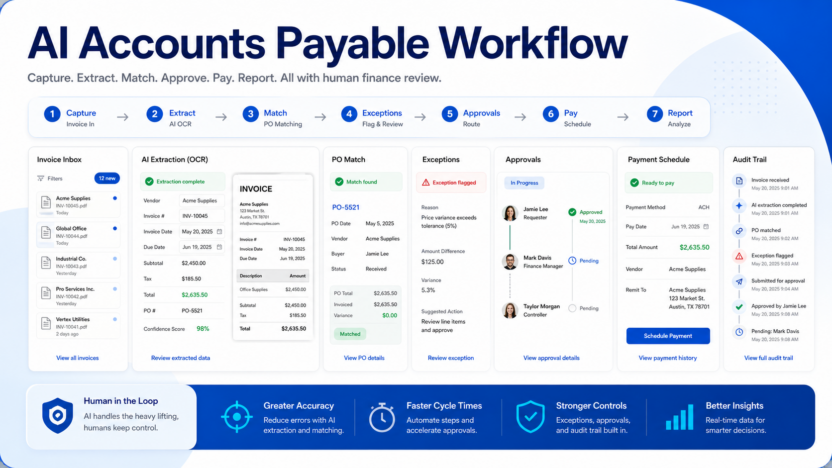
AI can improve accounts payable when it captures invoices, extracts fields, matches purchase orders, flags exceptions, routes approvals, and prepares payment reports. Human finance review is still required for vendor changes, exceptions, duplicate invoices, approvals, and payment release.
This guide is written for small business owners, operators, marketers, finance teams, sales teams, support leaders, creators, and founders who need a practical software decision. It focuses on workflow fit, pricing clarity, implementation effort, review controls, and the job the software needs to perform. Official product and pricing sources reviewed include Ramp, Bill.com, Tipalti, Dext, QuickBooks. Pricing last checked on July 30, 2026.
Related Dailytimespro reading:
- Best AI Help Desk Tools
- Best AI Work Management Tools
- AI Product Demo Videos
- Best AI Spreadsheet Tools
Best For
- small finance teams handling recurring invoices.
- bookkeepers who need cleaner invoice intake and approval routing.
- operations teams trying to reduce manual AP follow-up.
Not Best For
- companies without clear approval limits.
- teams with unresolved vendor master data problems.
- businesses expecting AI to authorize payments without review.
Our Evaluation Criteria
We evaluated AI accounts payable workflow by ease of use, setup effort, pricing clarity, AI usefulness, integration fit, review controls, support workflow, value for money, and how well the tool supports a repeatable business process. A useful AI product is not simply the product with the longest feature list. It is the product that turns a real workflow into a cleaner process with less manual preparation and fewer handoff gaps.
For small businesses, the best evaluation starts with one repeated task. Define the input, expected output, reviewer, and destination system. Then compare each tool against that same workflow. This prevents a polished demo from hiding setup cost, unclear ownership, weak data, or a pricing model that does not match actual usage.
Quick Comparison
| Tool | Main strength | Limitation | Official pricing source |
|---|---|---|---|
| Ramp | spend management and bill payment workflows | fit depends on finance stack | https://ramp.com/pricing |
| Bill.com | AP, AR, approvals, and payment workflows | plan fit depends on payment volume | https://www.bill.com/pricing |
| Tipalti | global payables and supplier operations | often broader than tiny business needs | https://tipalti.com/pricing/ |
| Dext | receipt and invoice capture for bookkeeping | not a full AP operating system | https://dext.com/pricing |
| QuickBooks | accounting workflow and bill tracking | AI/AP depth depends on plan and connected apps | https://quickbooks.intuit.com/pricing/ |
Key Features To Compare
- Source inputs: records, tickets, documents, calls, invoices, meetings, scripts, product data, or internal knowledge.
- AI output quality: summaries, recommendations, drafts, classifications, generated media, or workflow actions.
- Editing and review: how easily a person can check, approve, adjust, or reject the output.
- Integrations: whether the tool connects with the systems where the team already works.
- Admin controls: permissions, workspace management, data access, and audit visibility.
- Pricing model: seats, credits, minutes, tasks, contacts, documents, conversations, or add-ons.
- Adoption fit: whether the team can use it weekly without heavy process change.
Product Notes
Ramp
Ramp is included because its official product material supports a realistic workflow in this category. Its main strength is spend management and bill payment workflows. Its practical limitation is that fit depends on finance stack. A small team should compare it with the same source material, output standard, and review owner before making a final decision.
Pricing source: Ramp pricing.
Bill.com
Bill.com is included because its official product material supports a realistic workflow in this category. Its main strength is ap, ar, approvals, and payment workflows. Its practical limitation is that plan fit depends on payment volume. A small team should compare it with the same source material, output standard, and review owner before making a final decision.
Pricing source: Bill.com pricing.
Tipalti
Tipalti is included because its official product material supports a realistic workflow in this category. Its main strength is global payables and supplier operations. Its practical limitation is that often broader than tiny business needs. A small team should compare it with the same source material, output standard, and review owner before making a final decision.
Pricing source: Tipalti pricing.
Dext
Dext is included because its official product material supports a realistic workflow in this category. Its main strength is receipt and invoice capture for bookkeeping. Its practical limitation is that not a full ap operating system. A small team should compare it with the same source material, output standard, and review owner before making a final decision.
Pricing source: Dext pricing.
QuickBooks
QuickBooks is included because its official product material supports a realistic workflow in this category. Its main strength is accounting workflow and bill tracking. Its practical limitation is that ai/ap depth depends on plan and connected apps. A small team should compare it with the same source material, output standard, and review owner before making a final decision.
Pricing source: QuickBooks pricing.
Real Use Cases
Capturing Vendor Invoices From Email
In a typical small business workflow, capturing vendor invoices from email works best when inputs are clear, responsibility is assigned, and the output has a review step. AI can reduce manual preparation, identify patterns, summarize information, and route the next action. The team should still review customer-facing, employee-facing, financial, legal, or public outputs before relying on them. This is the practical value of AI software: it speeds up responsible work without removing accountability.
Extracting Invoice Number, Date, Vendor, And Amount
In a typical small business workflow, extracting invoice number, date, vendor, and amount works best when inputs are clear, responsibility is assigned, and the output has a review step. AI can reduce manual preparation, identify patterns, summarize information, and route the next action. The team should still review customer-facing, employee-facing, financial, legal, or public outputs before relying on them. This is the practical value of AI software: it speeds up responsible work without removing accountability.
Matching Purchase Orders And Receipts
In a typical small business workflow, matching purchase orders and receipts works best when inputs are clear, responsibility is assigned, and the output has a review step. AI can reduce manual preparation, identify patterns, summarize information, and route the next action. The team should still review customer-facing, employee-facing, financial, legal, or public outputs before relying on them. This is the practical value of AI software: it speeds up responsible work without removing accountability.
Routing Exceptions For Finance Review
In a typical small business workflow, routing exceptions for finance review works best when inputs are clear, responsibility is assigned, and the output has a review step. AI can reduce manual preparation, identify patterns, summarize information, and route the next action. The team should still review customer-facing, employee-facing, financial, legal, or public outputs before relying on them. This is the practical value of AI software: it speeds up responsible work without removing accountability.
Preparing Payment Schedules And Ap Reports
In a typical small business workflow, preparing payment schedules and AP reports works best when inputs are clear, responsibility is assigned, and the output has a review step. AI can reduce manual preparation, identify patterns, summarize information, and route the next action. The team should still review customer-facing, employee-facing, financial, legal, or public outputs before relying on them. This is the practical value of AI software: it speeds up responsible work without removing accountability.
Pricing
Ramp, Bill.com, Tipalti, Dext, and QuickBooks publish official pricing or pricing-contact pages. Pricing last checked on July 30, 2026. Costs may vary by users, payments, vendors, transaction volume, global payout needs, accounting integrations, and support level. Review current official pricing before purchasing.
Pricing should be judged against the workflow you will actually run. Count seats, credits, minutes, messages, tasks, operations, projects, contacts, exports, or documents where those factors apply. A cheaper entry plan can become expensive if the required feature sits in a higher tier. A more expensive plan can be justified only when the reviewed output saves real time, reduces risk, improves follow-up quality, or creates a business result the team can measure.
| Pricing factor | What to check | Why it matters |
|---|---|---|
| Seats | Number of users who need access | Seat-based pricing can grow quickly |
| Usage | Credits, tasks, minutes, messages, documents, or operations | AI-heavy workflows can hit limits |
| Add-ons | AI agents, data packages, admin features, or automation credits | Key features may not be included in the base plan |
| Integrations | CRM, helpdesk, docs, meetings, accounting, publishing, or analytics tools | Premium integrations can change the real cost |
| Support level | Standard support, onboarding, or enterprise support | Implementation help can matter for small teams |
Pros
- Helps reduce repeated preparation work and manual handoffs.
- Makes process ownership clearer when inputs and reviewers are defined.
- Can improve consistency across sales, support, finance, legal, HR, marketing, operations, or content workflows.
- Gives teams a faster first draft, summary, recommendation, or routing decision.
- Works best when paired with official sources, internal policies, and responsible review.
Cons
- AI output still needs review before it affects customers, employees, public pages, contracts, billing, payments, or strategic decisions.
- Pricing can be hard to compare when products use different seat, usage, credit, or add-on models.
- Setup effort can be larger than expected if source data is scattered or outdated.
- A tool may be excellent for one narrow workflow and weak as a general operating platform.
- Teams can overvalue demo quality and undervalue governance, maintenance, and adoption.
Alternatives
| Alternative | Best for | Main limitation |
|---|---|---|
| Ramp | spend management and bill payment workflows | fit depends on finance stack |
| Bill.com | AP, AR, approvals, and payment workflows | plan fit depends on payment volume |
| Tipalti | global payables and supplier operations | often broader than tiny business needs |
| Dext | receipt and invoice capture for bookkeeping | not a full AP operating system |
| QuickBooks | accounting workflow and bill tracking | AI/AP depth depends on plan and connected apps |
Alternatives matter because most AI software decisions are workflow decisions. A product that looks weaker in a generic feature comparison may be stronger for a specific use case, existing stack, or team habit. Compare tools with the same example, the same source material, and the same approval standard.
Implementation Checklist
1. Define the workflow in one sentence. 2. List the source inputs the tool needs. 3. Decide who reviews or approves the output. 4. Review the official pricing page and estimate realistic usage. 5. Run two or three representative examples if a trial is available. 6. Record what needs correction after AI prepares the output. 7. Compare two to four alternatives using the same scenario. 8. Choose the tool only if it saves time after review, not just before review.
Final Recommendation
AI can improve accounts payable when it captures invoices, extracts fields, matches purchase orders, flags exceptions, routes approvals, and prepares payment reports. Human finance review is still required for vendor changes, exceptions, duplicate invoices, approvals, and payment release.
The practical buying rule is to start narrow. Pick the workflow that happens often, verify current pricing from official sources, make review ownership explicit, and expand only after the tool saves real time in reviewed work. AI tools are most valuable when they improve a process your team already understands.
FAQs
What is the quick answer?
AI can improve accounts payable when it captures invoices, extracts fields, matches purchase orders, flags exceptions, routes approvals, and prepares payment reports. Human finance review is still required for vendor changes, exceptions, duplicate invoices, approvals, and payment release.
Who should use this type of tool?
Use it when the task happens often enough to justify setup and when a team member can own final review.
What should small businesses compare first?
Start with workflow fit, then pricing model, then integrations, then output quality after review.
Should AI output be published or sent without review?
No. Review customer-facing, employee-facing, financial, legal, public, or strategic outputs before using them.
How should pricing be evaluated?
Use official pricing pages and estimate real usage, including seats, credits, operations, minutes, projects, messages, channels, documents, or add-ons where relevant.
What is a realistic first rollout?
Choose one repeated workflow, run a small set of representative examples, record corrections, then decide whether the saved time is meaningful.
What are the biggest mistakes?
The biggest mistakes are buying from demo quality alone, ignoring review ownership, skipping official pricing details, and using weak source data.
When should a team avoid it?
Avoid it when source data is unclear, privacy rules are unresolved, the workflow has no owner, or the output would create customer trust risk.
How many alternatives should be compared?
Two to four serious alternatives are usually enough for a useful buying decision.
What matters more than features?
Review controls, integration fit, pricing clarity, repeatability, and team ownership usually matter more than a long feature list.