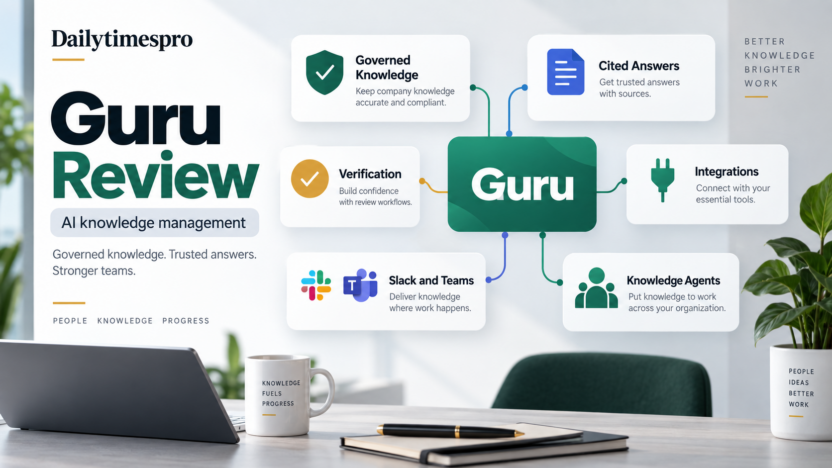
Guru is worth considering if your team needs one reliable place for company knowledge, AI answers, verification workflows, and knowledge delivery inside tools like Slack, Microsoft Teams, and the browser. It is strongest for support, sales, operations, enablement, and HR teams that need trusted answers from approved internal content.
The short answer: Guru is a practical AI knowledge management platform for teams that care about accuracy, ownership, and review habits. It is not the best choice if you only need a simple public FAQ, a generic AI writing assistant, or a lightweight document folder.
This Guru review explains what the platform does, where it fits, pricing considerations, real use cases, pros and cons, alternatives, and how to decide if it belongs in your software stack.
Quick Verdict
Guru is a strong fit when employees ask the same internal questions repeatedly and the company needs a governed knowledge base with AI-powered answers. Its value is not only storing articles. The stronger use case is keeping knowledge verified, searchable, reusable, and available where people already work.
Guru is less compelling when a team has very little internal documentation or no clear knowledge owner. AI knowledge management works best when the source material is maintained. If company knowledge is stale, duplicated, or scattered without ownership, the first project should be cleanup and governance.
Best For
Guru is best for support teams, revenue teams, operations teams, HR teams, enablement managers, and SaaS companies that need fast answers from internal knowledge. A support team could use Guru to answer policy questions, product troubleshooting questions, escalation rules, and refund guidance. A sales team could use it for competitive notes, qualification rules, messaging, and product positioning. HR could use it for benefits, onboarding, and policy lookup.
Guru is also useful for companies that want AI search and answers but still need content verification. That matters because internal AI answers should not float away from approved source material.
Not Best For
Guru is not ideal for a business that only needs a few static FAQ pages. It may also be too structured for a solo operator who simply wants AI note-taking or document drafting.
It is also not a replacement for process ownership. Someone still needs to decide which information is approved, who verifies it, how often it is reviewed, and what employees should do when the answer is missing.
Our Evaluation Criteria
| Criteria | What We Looked For | Why It Matters |
|---|---|---|
| Knowledge structure | Cards, collections, ownership, verification | Useful knowledge needs structure and accountability. |
| AI answer quality | Source-grounded answers and citation behavior | Employees need answers they can trust and trace. |
| Workflow fit | Slack, Teams, browser, and app delivery | Knowledge should appear where people already work. |
| Governance | Permissions, verification, analytics, security controls | Internal knowledge often contains sensitive business context. |
| Setup effort | Migration, content cleanup, admin ownership | The tool works best with planned rollout. |
| Pricing clarity | Official commercial path and billing notes | Buyers need realistic cost expectations. |
| Value for money | Fit between repeated questions and platform depth | The product should reduce real support and enablement friction. |
What Is Guru?
Guru is an AI-powered knowledge management platform. Its official website positions the product around enterprise search, an employee intranet, knowledge agents, and a company wiki. The product is designed to help teams capture, verify, search, and deliver company knowledge.
Guru's core idea is that company knowledge should be easy to find and easy to trust. Many teams already have documents, Slack threads, help center articles, CRM notes, training decks, and operating procedures. The problem is that employees often do not know which version is current. Guru gives teams a managed knowledge layer with verification and AI assistance.
That distinction matters. A folder of documents can store information. A governed knowledge platform tries to make the information usable, owned, and current.
Key Features
AI-Powered Knowledge Search
Guru helps employees search across approved company knowledge and connected sources. For a business user, this is useful when answers are split across tools. Instead of asking a manager where the latest pricing note, support policy, or onboarding guide lives, an employee can search from a central knowledge experience.
Search quality depends on source quality. Guru can make maintained knowledge easier to retrieve, but it should not be treated as a shortcut around documentation discipline.
Cited Answers
Guru's AI answer experience is built around trusted company knowledge. The practical goal is to let employees ask questions and receive answers that point back to source material. This is important because teams should be able to inspect where an answer came from before using it with a customer or teammate.
In support, cited answers can reduce uncertainty. In sales, they can help reps avoid old positioning. In HR, they can keep policy answers tied to approved internal material.
Verification Workflows
Verification is one of Guru's strongest fit signals. Knowledge management fails when old content looks just as authoritative as current content. Guru supports workflows for keeping knowledge reviewed by owners.
For example, a billing policy card can have an owner, a review cadence, and a clear source of truth. If the policy changes, the owner updates and verifies the content. That is more useful than a shared folder where outdated PDFs remain visible for years.
Knowledge Delivery in Slack, Teams, and Browser Workflows
Guru is useful when knowledge appears inside existing work. Teams often ask questions in Slack or Microsoft Teams, and employees search while working in the browser. Guru's integrations and extensions help knowledge reach those contexts.
This matters because a knowledge platform that requires constant tab switching may fail adoption. Employees use the path of least resistance. Putting answers closer to the question improves the chance that the knowledge base becomes part of daily work.
Collections and Permissions
Guru supports organizing knowledge into collections and managing access. For small businesses, this matters once the team has multiple departments. Sales content, support policies, HR documents, leadership notes, and customer information may not all need the same visibility.
Permissions should be planned before rollout. A company should decide who can create, edit, verify, publish, and view different knowledge areas.
Analytics and Knowledge Gaps
Knowledge analytics help teams see what employees search for, what content is used, and where gaps exist. This turns internal questions into a maintenance signal.
If employees repeatedly search for the same answer and fail to find it, that is not only a search problem. It may mean the knowledge base is missing a needed article, the title is unclear, or ownership is weak.
Guru GPT and Knowledge Agents
Guru has expanded beyond a classic wiki into AI knowledge experiences, including Guru GPT and knowledge agents. The value is strongest when the agent answers from controlled company knowledge and supports a specific workflow.
For example, a support knowledge agent could help agents answer product questions. A sales enablement agent could surface competitive talking points. An HR agent could answer onboarding policy questions. Each agent should have defined scope and source material.
Guru Pricing
Pricing last checked on September 9, 2026. Guru's current pricing page uses a custom-fit pricing path rather than a simple public plan grid with self-serve prices. Guru's help center also states that Guru has a 10-seat minimum billing requirement.
| Pricing Item | Officially Verifiable Status | Buyer Guidance |
|---|---|---|
| Public self-serve price grid | Not presented as a simple fixed plan table during review | Expect to request current pricing from Guru based on team needs. |
| Billing minimum | Guru help states a 10-seat minimum billing requirement | Small teams should confirm whether the minimum fits their budget. |
| Product scope | Pricing is tied to knowledge management, enterprise search, intranet, wiki, and AI capabilities | Prepare use cases before requesting pricing. |
| Implementation fit | Cost depends on rollout scope, seats, integrations, and governance needs | Compare cost against repeated support, enablement, and onboarding questions. |
For buying due diligence, use the official Guru pricing page and Guru's official help center billing guidance. Do not estimate the real monthly cost until Guru confirms seats, included features, billing terms, support needs, and implementation scope for your account.
Real Use Cases
Customer Support Answers
In a typical small business workflow, support agents need quick answers about product behavior, refund rules, escalation steps, and troubleshooting. Guru can store approved support knowledge and help agents retrieve it while answering tickets or chat conversations.
This is useful when support quality depends on consistency. Instead of each agent relying on memory or old chat threads, the team can maintain verified support cards.
Sales Enablement
A SaaS sales team could use Guru for pricing notes, competitor guidance, objection handling, product positioning, and qualification rules. Sales content changes often, so verification matters. Reps need to know which answer is current before using it in a live deal.
Employee Onboarding
New hires need answers about tools, policies, processes, team rituals, and responsibilities. Guru can act as a guided internal knowledge source so managers do not answer the same questions repeatedly.
Onboarding works best when the company creates role-specific collections rather than one large pile of articles.
HR and Policy Lookup
HR teams can use Guru to maintain benefits information, leave policies, compliance reminders, and employee handbook content. For sensitive areas, permissions and verification are important.
The AI layer should help employees find policy information faster, while final policy interpretation remains owned by HR.
Operations and SOPs
Operations teams can document repeatable processes such as invoice approval, vendor onboarding, reporting steps, CRM hygiene, customer handoff, and quality checks. Guru makes those SOPs easier to find and review.
This is especially useful when a process happens often enough that undocumented tribal knowledge creates mistakes.
Pros and Cons
| Pros | Cons |
|---|---|
| Strong verification workflow for keeping knowledge current. | Requires knowledge ownership and maintenance habits. |
| Useful for support, sales, HR, operations, and onboarding. | Custom-fit pricing path can slow quick budget comparisons. |
| AI answers can be tied to company knowledge and sources. | Very small teams may not need a full knowledge platform. |
| Integrations help deliver knowledge where teams work. | Migration and cleanup can take effort if documentation is messy. |
| Analytics can reveal knowledge gaps and repeated questions. | Value depends on employee adoption. |
Alternatives
| Tool | Best For | Main Strength | Limitation |
|---|---|---|---|
| Guru | Governed knowledge management with AI answers | Verification, knowledge ownership, and daily workflow delivery | Needs maintained content and rollout planning |
| Glean | Enterprise AI search across many workplace apps | Broad permission-aware search and AI assistant layer | More enterprise-search focused and sales-led |
| Notion AI | Teams already building docs and projects in Notion | Flexible workspace with AI writing and summarization | Less specialized for verified support knowledge |
| Slite | Lightweight team knowledge base | Simple documentation experience for teams | Less broad than enterprise AI search platforms |
| Confluence with Atlassian Intelligence | Atlassian-centered technical and project teams | Strong fit for Jira and software documentation workflows | Best inside the Atlassian ecosystem |
For related decisions, read Glean Review, Best AI Knowledge Base Tools, Best AI Agent Platforms for Small Business, and AI Customer Support Workflow.
How to Decide If Guru Is Right for You
Choose Guru if your team has recurring internal questions and needs verified answers. The clearest buying signal is repeated interruption: employees keep asking managers, team leads, or senior support agents for information that should already be documented.
Wait if your team has no owner for company knowledge. Guru can support verification, search, and AI answers, but someone still needs to maintain the source material.
Before requesting pricing, list your first three workflows. Good candidates include support answer lookup, sales enablement, employee onboarding, HR policy answers, and operations SOPs. Then estimate how many employees need access and which integrations matter.
Final Recommendation
Guru is worth it for teams that need trusted company knowledge, not just another place to store documents. Its strongest value is the combination of knowledge ownership, verification, AI answers, integrations, and usage insight.
It is not the cheapest or simplest answer for every company. If your team only needs a small FAQ or a single shared document space, start narrower. But if repeated questions slow down support, sales, onboarding, or operations, Guru can be a practical knowledge layer.
For most growing teams, the right pilot is one department and one measurable problem. Start with support answers, sales enablement, or onboarding. Keep the content small, assign owners, verify the most-used cards, and measure whether employees find accurate answers faster.
FAQs
Is Guru good for small businesses?
Guru can be good for small businesses that have enough internal knowledge to manage and a real need for verified answers. Very small teams with only a few documents may not need it yet.
Does Guru publish simple public pricing?
Guru currently uses a custom-fit pricing path on its official pricing page. Guru help also notes a 10-seat minimum billing requirement. Pricing last checked on September 9, 2026.
What is Guru best used for?
Guru is best used for internal knowledge management, support answers, sales enablement, onboarding, HR policies, operations procedures, and trusted AI answers from company knowledge.
Is Guru an AI search tool?
Guru includes AI search and answers, but it is more knowledge-management focused than a broad enterprise search platform. It emphasizes verified knowledge and workflow delivery.
How is Guru different from Glean?
Guru is stronger as a governed knowledge management and verification platform. Glean is stronger as a broad enterprise AI search layer across many workplace systems.
Can Guru help customer support teams?
Yes. Support teams can use Guru to store verified product answers, policy guidance, escalation steps, troubleshooting notes, and internal procedures.
Does Guru replace Slack or Microsoft Teams?
No. Guru can work alongside Slack and Microsoft Teams by making knowledge available where employees ask questions and collaborate.
What should I prepare before adopting Guru?
Prepare knowledge owners, collections, priority use cases, permission rules, integration requirements, and a review cadence for important content.
What is the biggest risk with Guru?
The biggest risk is poor maintenance. If nobody owns content quality, any knowledge platform can become stale.
What is the best first Guru pilot?
Start with one high-frequency workflow such as support answers, onboarding, or sales enablement. Measure whether employees find accurate approved answers faster.