Quick Verdict
Gamma AI is worth considering if your team needs to create polished presentation-style content faster than starting from a blank slide deck. It is best for startup pitches, internal updates, sales enablement, onboarding decks, product explainers, and repurposing written notes into visual pages. It is not the best fit if you need deep PowerPoint control, strict brand systems, or complex chart-heavy financial decks.
For small businesses, Gamma’s real value is speed. A founder can turn a rough outline into a usable deck draft. A marketer can create a campaign recap. A team lead can make an onboarding explainer. The output still needs human review, but the blank-page problem becomes much smaller.
If you are comparing presentation tools more broadly, our Best AI Presentation Tools for Small Business guide is a useful next read.
Best For
- Founders creating pitch decks or investor updates
- Marketing teams turning ideas into visual briefs
- Sales teams creating explainers and enablement decks
- Operations teams creating onboarding and process explainers
- Solo creators who need polished web-style presentations quickly
Not Best For
- Finance-heavy decks with complex spreadsheet-linked charts
- Teams that require pixel-level PowerPoint formatting
- Companies with strict enterprise design governance
- Users who expect AI to create final publish-ready strategy without review
Our Evaluation Criteria
| Criteria | Why it matters |
|---|---|
| Draft speed | Small teams need a good first version quickly. |
| Editing workflow | AI output must be easy to revise. |
| Visual quality | Decks should look presentable without heavy design work. |
| Collaboration | Teams need comments, sharing, and review. |
| Export and sharing | Presentations may need links, PDFs, or slide formats. |
| Pricing clarity | Buyers need to check official plan limits and AI credits. |
| Alternatives | Gamma should be compared with Canva, Tome, Beautiful.ai, and PowerPoint Copilot. |
This review is based on official Gamma product and pricing information reviewed on July 1, 2026.
What Is Gamma AI?
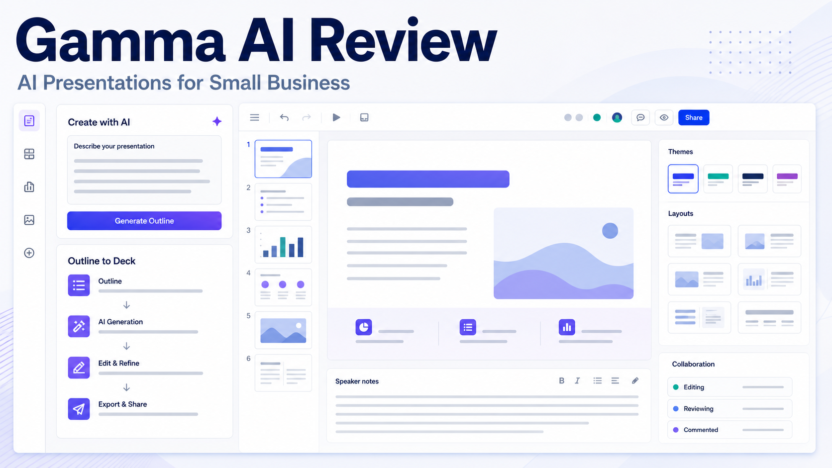
Gamma is an AI-assisted presentation and document creation platform. It helps users create visual pages, decks, and web-style presentations from prompts or outlines. Instead of manually designing every slide, the user can start with a topic, structure, or imported content and then edit the generated draft.
This makes Gamma useful for small teams that need to communicate ideas clearly but do not have a dedicated designer for every deck.
Key Features
AI deck generation
Gamma can help turn a prompt or outline into a structured deck. This is useful for first drafts, especially when the user knows the message but not the slide structure.
Web-style presentation format
Gamma presentations often feel more like visual web pages than traditional slide files. That can be useful for sharing explainers, internal updates, and product narratives through a link.
Editing and themes
AI-generated content is only useful if it is easy to revise. Gamma’s editing workflow matters because users need to adjust structure, wording, visuals, and layout after generation.
Collaboration and sharing
Small teams need to collect feedback before sending a deck externally. Collaboration, sharing, and presentation links are important for review workflows.
Practical Use Cases
Startup pitch draft
A founder could use Gamma to turn a rough outline into a pitch narrative. The founder should still rewrite claims, check numbers, and refine positioning before using it with investors.
Sales explainer
A sales team could create a short visual deck explaining a service, onboarding process, or product package. Gamma can help structure the story quickly.
Internal update
A manager could create a monthly update with goals, progress, blockers, and next steps. Gamma is useful when a written memo would be too flat but a full design process is too slow.
Content repurposing
A marketer could turn a blog outline, webinar notes, or report summary into a visual presentation. This can help convert one piece of research into multiple formats.
Onboarding content
Operations or HR teams can create onboarding explainers for tools, values, processes, and team rituals. For deeper documentation workflows, see our Best AI SOP Software guide.
Pricing
Pricing last checked on July 1, 2026. Gamma publishes current plan information on its official pricing page. Buyers should review current plan limits, AI credits, export options, collaboration features, and workspace controls from the official page before purchasing.
Pros and Cons
| Pros | Cons |
|---|---|
| Fast first drafts from prompts or outlines | Output still needs human review |
| Good for visual storytelling and explainers | Not ideal for complex finance-heavy decks |
| Useful for web-style sharing | May not match strict PowerPoint workflows |
| Helps non-designers create polished drafts | Brand control may need manual refinement |
| Strong fit for startup, marketing, and internal updates | Not a replacement for strategy or messaging judgment |
Gamma AI Alternatives
| Tool | Best for | Main strength | Limitation |
|---|---|---|---|
| Canva | Design-heavy presentations and social assets | Broad design ecosystem | Can be more manual for narrative generation |
| Tome | AI storytelling decks | Presentation narrative workflow | Fit depends on current product direction and team needs |
| Beautiful.ai | Structured business slide design | Professional slide layouts | Less flexible for web-style pages |
| PowerPoint Copilot | Microsoft 365 teams | Familiar enterprise slide workflow | Depends on Microsoft environment and licensing |
When Gamma Is the Right Choice
Choose Gamma if your team needs to communicate ideas quickly and visually. It is especially useful when the goal is to create a good first draft, not a final board-level deck.
When to Avoid Gamma
Avoid Gamma if your workflow depends on complex Excel-linked charts, strict corporate slide templates, or detailed PowerPoint formatting. Also avoid using it as a shortcut for unsupported claims. AI can help structure a deck, but it cannot create truthful business evidence.
Common Mistakes
The first mistake is publishing the AI draft without editing. Gamma can create structure, but the user still needs to check facts, remove vague claims, and make the message specific.
The second mistake is using too much text. A presentation should help the viewer understand the story quickly.
The third mistake is choosing Gamma when a simple memo would be better. Not every update needs a deck.
Final Recommendation
Gamma AI is a strong choice for small businesses that need fast visual presentations, explainers, and internal updates. It is best for turning ideas into a structured visual draft. It is not the best tool for highly controlled enterprise presentation workflows or complex financial decks.
FAQs
Is Gamma AI good for small businesses?
Yes, especially for founders, marketers, sales teams, and operations leads who need polished presentation drafts quickly.
Can Gamma replace PowerPoint?
It can replace some presentation workflows, but PowerPoint remains stronger for teams that need traditional slide control, enterprise templates, and Microsoft integration.
Does Gamma create final-ready decks?
It can create useful drafts, but users should review wording, facts, visuals, and claims before sharing externally.
What is Gamma best used for?
Gamma is best for pitch drafts, explainers, internal updates, onboarding content, sales decks, and content repurposing.
What are the best Gamma alternatives?
Canva, Tome, Beautiful.ai, and PowerPoint Copilot are common alternatives depending on whether the team needs design assets, storytelling, structured slides, or Microsoft integration.
Does Gamma publish pricing?
Gamma publishes current plan information on its official pricing page. Pricing last checked on July 1, 2026.