Quick Answer
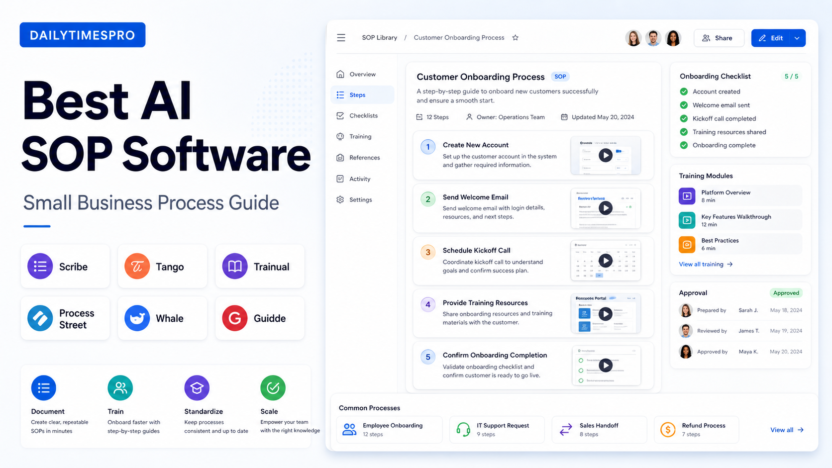
The best AI SOP software for a small business is the tool that makes repeatable work easy to document, update, assign, and train against. For most small teams, the best choice depends on how your procedures are created. If you want to capture screen-based workflows quickly, Scribe and Tango are strong options. If you need employee training, role-based onboarding, and policy documentation, Trainual and Whale are better fits. If you need recurring process checklists with approvals, Process Street is usually stronger. If video-based SOPs matter, Guidde is worth evaluating.
This guide focuses on practical small-business use cases: onboarding a new employee, documenting customer support steps, standardizing sales handoffs, training virtual assistants, creating agency delivery checklists, and keeping internal knowledge from living only in one person’s head. If your team is also building a broader knowledge workflow, our AI knowledge base workflowand NotebookLM employee onboarding guideare useful next reads.
What Makes Good AI SOP Software?
Good SOP software should do more than store documents. It should help a team turn work into repeatable operating instructions. AI can help by drafting procedure text, converting screen recordings into steps, summarizing process notes, suggesting checklist items, and making training content easier to search.
The key is accuracy. SOPs are operational instructions, so a vague AI summary is not enough. A good system should let a human review every step, fix tool names, update screenshots, assign owners, and keep old procedures from becoming misleading.
Our Evaluation Criteria
| Criteria | Why it matters |
|---|---|
| Capture speed | Small teams need to document work without spending hours writing from scratch. |
| AI assistance | AI should help draft, summarize, structure, or convert workflows into usable SOPs. |
| Checklist and workflow support | Some SOPs need recurring execution, not just documentation. |
| Training features | Onboarding, quizzes, assignments, and role-based learning matter for growing teams. |
| Collaboration | SOPs need owners, comments, version updates, and review workflows. |
| Pricing clarity | Small teams need to understand whether pricing fits their headcount and process volume. |
| Search and knowledge access | Staff should find the right procedure when they need it. |
| Fit for small business | The best tool should not require a full operations department to maintain. |
It is based on official product information and official pricing pages reviewed on June 30, 2026.
Quick Comparison Table
| Tool | Best for | Main strength | Limitation to consider | Official pricing source |
|---|---|---|---|---|
| Scribe | Fast screen-based SOP capture | Turns workflows into step-by-step guides quickly | Best when work happens in browser or app screens | Scribe pricing |
| Tango | Visual process documentation | Captures process steps and screenshots for how-to guides | Less suited to policy-heavy training programs | Tango pricing |
| Trainual | Employee onboarding and training | Combines SOPs, policies, roles, and training content | More training-system oriented than simple screen capture | Trainual pricing |
| Process Street | Recurring checklists and approvals | Turns SOPs into repeatable workflows | Documentation-only teams may find it more process-heavy | Process Street pricing |
| Whale | Team knowledge and process training | SOPs, onboarding, and knowledge base structure | Best value depends on team size and training needs | Whale pricing |
| Guidde | Video-based SOPs and product walkthroughs | Creates video documentation and visual guides | Not the best fit for every text-heavy policy workflow | Guidde pricing |
1. Scribe
Scribeis built for turning a workflow into a step-by-step guide. That makes it useful when a process is mostly screen-based: updating a CRM record, processing an invoice, publishing a blog post, handling a support ticket, or setting up a user account.
Best For
- Teams that need fast documentation from browser or software workflows
- Operations managers documenting repetitive admin tasks
- Agencies training new team members on client delivery steps
- Customer support teams documenting internal tools
Not Best For
- Companies that mainly need policy manuals, employee handbooks, or training modules
- Teams that need advanced recurring approvals inside every SOP
- Businesses that want every SOP to be video-first
Practical Use Cases
In a typical small business workflow, Scribe can help an operations lead document how to create a customer account, update a HubSpot deal, process a refund, or submit a monthly report. Instead of manually writing each click, the user records the workflow and then edits the generated guide.
For a small agency, Scribe could document client onboarding steps: create the project folder, add the client to the CRM, send the intake form, create a task board, and notify the delivery team. The value is speed. The limitation is that someone still needs to review the output and keep it current when tools change.
Pricing
Pricing last checked on June 30, 2026. Scribe publishes plan information on its official pricing page. Buyers should review the current plan details, seat requirements, and feature limits before purchase because documentation tools often separate free, individual, team, and enterprise capabilities.
2. Tango
Tangois another strong option for turning process work into visual how-to guides. It is useful for teams that want simple documentation without building a large training system first.
Best For
- Visual SOPs with screenshots
- Fast documentation of internal software processes
- Training new team members on repeatable admin work
- Customer-facing help guides when a visual walkthrough is easier than text
Not Best For
- Full employee training programs with complex role-based learning needs
- Heavy approval workflows
- Teams that need a broad operations platform rather than a documentation tool
Practical Use Cases
A customer support lead could use Tango to document how to handle a billing question, update a subscription, or escalate a ticket. A marketing assistant could document how to upload social posts, prepare a newsletter, or update a landing page.
For small teams, Tango’s biggest advantage is reducing the blank-page problem. The first draft of the SOP appears from the workflow capture, then the owner can refine instructions, remove extra steps, and add context.
Pricing
Pricing last checked on June 30, 2026. Tango publishes plan details on its official pricing page. Review the live pricing page for current seat limits, workspace features, and team plan details.
3. Trainual
Trainualis better understood as a training and operations knowledge platform, not just a screen-capture SOP tool. It is useful when a business wants to organize roles, responsibilities, policies, processes, and onboarding content in one place.
Best For
- Employee onboarding
- Role-based training
- Company policies and operating procedures
- Teams that need accountability around who has completed training
Not Best For
- One-off visual guides
- Teams that only need quick click-by-click documentation
- Companies not ready to maintain a structured training library
Practical Use Cases
In a small business, Trainual can help document how a new hire should learn the company’s tools, customer communication standards, delivery process, security rules, and role-specific procedures. HR and operations teams can use it to reduce repeated training conversations.
A SaaS team could use Trainual to onboard customer support staff with modules for product basics, ticket triage, refund policy, escalation rules, and handoff to engineering. The article should not imply measured results, but the practical value is clear: consistent onboarding reduces dependence on informal verbal training.
Pricing
Pricing last checked on June 30, 2026. Trainual publishes plan information on its official pricing page. Confirm current plan features, user limits, and add-ons from that page during buying review.
4. Process Street
Process Streetis strongest when SOPs need to become repeatable workflows. A static document says what should happen. A Process Street checklist can guide a person through each recurring run of the process.
Best For
- Recurring operational checklists
- Approvals and handoffs
- Client onboarding workflows
- Finance, HR, sales, and operations processes that repeat
Not Best For
- Simple one-page documentation
- Teams that only need screenshot-based how-to guides
- Businesses that do not want to manage process runs
Practical Use Cases
An agency could use Process Street for client onboarding: collect assets, verify contract status, create shared folders, assign internal owners, schedule kickoff, and confirm the first deliverable. A finance team could use it for month-end reporting. A support team could use it for escalations that require manager approval.
The key benefit is execution. If your SOPs are often ignored because they live in a document nobody opens, a checklist workflow can make the process active.
Pricing
Pricing last checked on June 30, 2026. Process Street publishes plan information on its official pricing page. Review current plan details, workflow limits, and automation features before deciding.
5. Whale
Whalefocuses on team knowledge, SOPs, onboarding, and training. It fits companies that want a clearer home for internal processes without turning every SOP into a heavy checklist workflow.
Best For
- Internal knowledge bases
- Training and onboarding content
- Process ownership and updates
- Teams that want searchable SOPs with training structure
Not Best For
- Teams that only need quick browser workflow capture
- Businesses that want advanced checklist automations as the main feature
- Companies with no owner for keeping knowledge updated
Practical Use Cases
A growing service business could use Whale to document delivery standards, customer communication rules, tool setup procedures, and recurring admin processes. A support team could create SOPs for onboarding support, billing questions, ticket deflection, and human handoff.
Whale is best when knowledge management and training are the main goals. The tool is less about capturing one workflow quickly and more about keeping team knowledge usable over time.
Pricing
Pricing last checked on June 30, 2026. Whale publishes plan information on its official pricing page. Review the current plan structure, user counts, and feature differences before purchasing.
6. Guidde
Guiddeis useful when video-based documentation is important. Some procedures are easier to understand when a user can see the action, not only read the steps.
Best For
- Product walkthroughs
- Customer support videos
- Internal tool demos
- Teams that prefer visual training clips
Not Best For
- Text-heavy policy documentation
- Complex recurring approval workflows
- Teams that want a traditional HR training platform first
Practical Use Cases
A product team could use Guidde to create a short walkthrough for a new feature. A support team could document how to solve a common customer issue. An operations lead could create short internal videos for tools that are difficult to explain with text alone.
Video SOPs can be helpful, but they need maintenance. If the interface changes, the video may become outdated faster than a text checklist. That is the main tradeoff for video-first documentation.
Pricing
Pricing last checked on June 30, 2026. Guidde publishes plan information on its official pricing page. Confirm current plan limits, recording features, and sharing options from that page.
Best Tool by Use Case
| Use case | Best fit | Reason |
|---|---|---|
| Fast click-by-click SOPs | Scribe or Tango | They are built around workflow capture and visual documentation. |
| Employee onboarding | Trainual or Whale | They support training libraries, roles, and team knowledge. |
| Recurring operational checklists | Process Street | It turns procedures into active workflow runs. |
| Video SOPs | Guidde | It is designed for visual walkthroughs and video documentation. |
| Agency delivery processes | Process Street, Scribe, or Whale | The best fit depends on whether the process needs execution, capture, or knowledge storage. |
| Support team documentation | Scribe, Tango, Whale, or Guidde | Support SOPs often need screenshots, searchable knowledge, and short walkthroughs. |
Common Mistakes When Choosing SOP Software
The first mistake is choosing a tool based only on AI features. AI can draft and structure content, but SOP quality depends on human review, ownership, and maintenance. A bad process documented with AI is still a bad process.
The second mistake is buying a training platform when the real need is fast documentation. If your team mainly needs to record steps in browser tools, Scribe or Tango may be simpler than a full training system.
The third mistake is buying a documentation tool when the real need is process execution. If the SOP must run every week with approvals and handoffs, Process Street may fit better than a static knowledge base.
The fourth mistake is failing to assign ownership. Every SOP should have an owner, last-reviewed date, and update path. Otherwise, the library becomes stale and employees stop trusting it.
Final Recommendation
Choose Scribe if your main goal is fast screen-based process documentation. Choose Tango if you want a similar visual guide workflow with a lightweight feel. Choose Trainual if onboarding, employee training, and role-based documentation matter most. Choose Process Street if your SOPs need to run as recurring checklists with approvals. Choose Whale if you want a structured knowledge base for processes and training. Choose Guidde if video walkthroughs are central to your documentation style.
For most small businesses, the practical sequence is simple: start by documenting the processes that create the most repeated questions, then assign owners, then decide whether those SOPs need training, checklist execution, or video support. The tool should match that workflow, not the other way around.
FAQs
What is AI SOP software?
AI SOP software helps teams create, organize, and maintain standard operating procedures using AI-assisted drafting, workflow capture, summaries, checklists, or training features. The goal is to make repeatable work easier to document and follow.
What is the best AI SOP software for small business?
Scribe and Tango are strong for fast visual SOP capture. Trainual and Whale are better for onboarding and training. Process Street is stronger for recurring workflow checklists. Guidde is a good option when video walkthroughs are important.
Can AI write SOPs automatically?
AI can help draft SOPs, but a human should review every step. SOPs often include company-specific rules, tool names, exceptions, and risk points that AI may miss or phrase too generally.
How many SOPs should a small business create first?
Start with the five to ten processes that create the most repeated questions, errors, delays, or training time. Good early candidates include customer onboarding, refund handling, invoice processing, content publishing, sales handoff, and new employee setup.
Is SOP software different from a knowledge base?
Yes. A knowledge base stores information. SOP software focuses on repeatable procedures. Some tools do both, but the difference matters: SOPs should explain who does what, in what order, with what standard.
Should SOPs be text, screenshots, or video?
Use the format that matches the task. Screen-based workflows often need screenshots. Tool walkthroughs may work better as video. Policies and decision rules usually need text. Many teams use a mix.
How often should SOPs be reviewed?
Review critical SOPs whenever the underlying tool, policy, or team responsibility changes. For routine processes, a quarterly or semiannual review is usually more realistic than waiting until employees report that documentation is wrong.
What makes an SOP useful?
A useful SOP is specific, current, easy to find, assigned to an owner, and clear enough for a trained employee to follow without asking the same repeated questions. It should include exceptions and escalation steps where needed.