Quick Answer
The best AI contract review tools for small business are the tools that reduce routine contract review work without pretending to replace legal judgment. For many lean teams, the right choice depends on the type of contracts you review, how often you negotiate, and whether you need simple AI review, full contract lifecycle management, or a searchable contract repository.
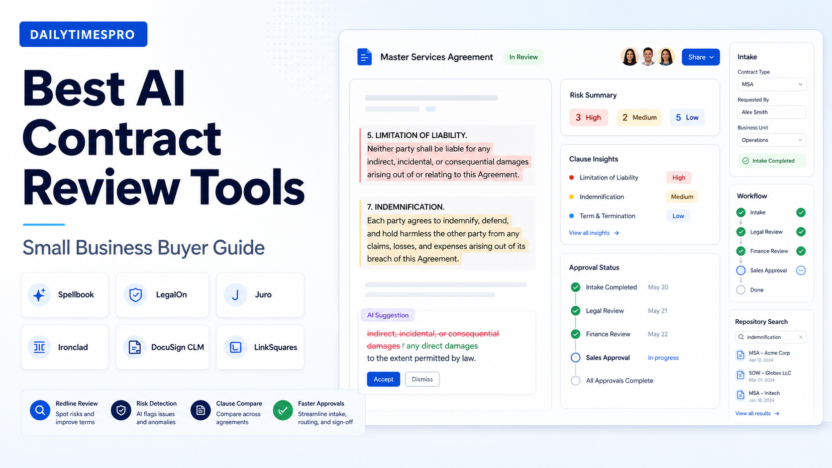
For a small business that mainly reviews vendor agreements, sales contracts, NDAs, order forms, and renewal terms, Spellbookand LegalOnare strong AI-first review options. If your company needs contract intake, approval workflows, negotiation tracking, and a central contract system, Juroand Ironcladare closer to full CLM platforms. If contracts are already tied to e-signature and sales operations, DocuSign CLM and LinkSquares may fit better.
This guide focuses on practical contract review use cases for small businesses: spotting risky clauses, comparing terms against a playbook, preparing redlines, moving contracts through approvals, tracking renewals, and handing complex issues to a lawyer at the right time. If you are also comparing broader business software, our Best AI Proposal Software for Small Businessguide and AI sales forecasting workflowarticle cover adjacent sales operations workflows.
How We Evaluated AI Contract Review Tools
Small businesses usually do not need the most complex legal operations platform on day one. They need a system that makes common contract work easier, keeps risk visible, and does not create a false sense of legal certainty. We evaluated each option using criteria that matter in a typical small business workflow.
| Evaluation area | Why it matters for small businesses |
|---|---|
| Contract review depth | The tool should help flag risky language, missing clauses, unusual obligations, renewal terms, indemnity, confidentiality, data protection, and payment issues. |
| Playbooks and standards | Teams need a way to compare contracts against company-preferred language instead of starting every review from scratch. |
| Redline support | Useful tools should help prepare negotiation language, not only summarize the document. |
| Workflow fit | A small business may need intake, approval routing, repository search, or renewal tracking in addition to review. |
| Ease of setup | Lean teams rarely have a dedicated legal operations administrator. |
| Pricing clarity | Transparent pricing is helpful, but many legal AI and CLM vendors use quote-based pricing. |
| Collaboration | Sales, finance, operations, and legal reviewers need a clean handoff process. |
| Security posture | Contracts can contain confidential commercial, employment, and customer terms. |
| Best-fit use case | The best tool for AI redlines is not always the best tool for enterprise CLM. |
It is based on official product information, official pricing pages where available, and source-backed feature analysis as of the pricing date below.
Quick Comparison Table
| Tool | Best for | Main strength | Limitation to consider | Pricing model |
|---|---|---|---|---|
| Spellbook | Lawyers and teams that want AI drafting and review inside contract work | AI-assisted drafting, review, and contract playbook support | Better fit when a legal reviewer is still part of the workflow | Official pricing page is demo or quote oriented |
| LegalOn | Contract risk review and legal playbooks | Contract review focused on risk spotting and attorney-built review guidance | Small teams should confirm contract volume and workflow fit before buying | Contact-led pricing from vendor sources |
| Juro | End-to-end contract lifecycle management | Intake, collaboration, workflow, approvals, signing, and repository in one system | May be more platform than a very small team needs | Custom package based on requirements |
| Ironclad | Larger or fast-growing teams with complex contracting workflows | Enterprise-grade digital contracting and workflow design | Heavier implementation and buying process | Custom quote |
| DocuSign CLM | Teams already using DocuSign or e-signature-heavy workflows | Contract generation, workflow, approvals, and signing ecosystem | AI review depth depends on selected DocuSign products and setup | Plan and quote dependent |
| LinkSquares | Contract repository, search, and post-signature insights | Centralized contract intelligence and obligation visibility | Less ideal if the main need is simple first-pass redline help | Quote based |
1. Spellbook
Spellbook is a legal AI tool designed for contract drafting, review, and negotiation support. It is especially relevant for lawyers, in-house counsel, and business teams that want AI assistance while still keeping a human legal reviewer responsible for final judgment.
In a typical small business workflow, Spellbook can help when a sales agreement arrives from a customer, a vendor sends an updated master services agreement, or the company needs to revise an NDA quickly. Instead of reading from a blank screen, the reviewer can use AI assistance to identify clauses that need attention, draft alternative wording, and compare the contract against preferred positions.
Best For
- Small businesses with regular contract review but limited legal bandwidth
- Founders and operations teams that work with outside counsel
- Legal reviewers who want drafting and redline support
- Teams that need reusable contract review instructions
- Companies that want AI help without sending contract text into unmanaged consumer AI tools
Not Best For
- Teams that need a full CLM system with deep workflow configuration from day one
- Businesses with almost no contract review volume
- Companies that want a self-serve low-cost tool with fully public pricing
Key Features
Spellbook is useful because it focuses on the contract itself: drafting language, reviewing text, and applying repeatable instructions. Its official pricing page highlights playbooks, secure/private handling, and suitability for law firms and in-house teams. That matters because small businesses often struggle to create consistent standards. One person may accept a renewal clause while another flags it, and the result is messy negotiation history.
The strongest use case is not replacing a lawyer. The stronger use case is preparing better first-pass review work before legal handoff. For example, a SaaS team could use Spellbook to compare customer contract terms against internal positions on payment timelines, data processing, limitation of liability, and termination rights. The legal reviewer still decides what to accept, but the AI can reduce the time spent finding the obvious issues.
Pricing
Pricing last checked on June 29, 2026. Spellbook maintains an official pricing page, but buying details are oriented around plan fit, demo flow, and team requirements rather than a simple public checkout table. Pricing may vary based on plan, usage, or add-ons. Use the official pricing page when budgeting because legal AI plans can depend on team size, product scope, and deployment needs.
2. LegalOn
LegalOn is built around AI contract review and legal risk analysis. Its positioning is especially relevant for teams that want structured review guidance, not just a generic document summary. LegalOn is a good fit when contracts repeat enough that playbooks and standard review positions matter.
In a typical small business workflow, LegalOn can support vendor contract review, customer agreement checks, procurement terms, and internal legal intake. A finance or operations person could send a contract through the review process, see flagged issues, and then escalate only the points that need legal judgment.
Best For
- Teams that review similar contracts repeatedly
- Businesses that need risk spotting and review consistency
- Companies that want a legal review layer before outside counsel
- Operations teams that need better intake and escalation
Not Best For
- Very small teams that only sign a few low-risk contracts each year
- Buyers that require fully public self-serve pricing before taking a demo
- Teams that need broad sales proposal or CRM automation rather than contract review
Key Features
LegalOn is strongest when contract risk review is the main job. The tool is designed to help teams identify terms that may need attention and align review with legal standards. That can be useful when a business has many contracts but not enough internal legal capacity to review every agreement manually from the beginning.
A practical example: an ecommerce company reviewing vendor agreements could use LegalOn to flag payment terms, renewal obligations, insurance language, confidentiality requirements, and termination clauses. The tool does not remove the need for legal review, but it can help the business focus legal attention on the clauses that matter most.
Pricing
Pricing last checked on June 29, 2026. LegalOn’s public product site is contact-led rather than a transparent self-serve checkout flow. Pricing may vary based on plan, usage, or add-ons. Small businesses should treat LegalOn as a demo-led purchase and confirm contract volume, review types, workflow needs, and implementation requirements before choosing it.
3. Juro
Juro is broader than a pure AI contract review assistant. It is a contract lifecycle management platform that helps teams create, approve, negotiate, sign, store, and manage contracts. That makes it useful when contract review is only one part of the problem.
For a small business, Juro becomes more interesting when contracts slow down sales or operations. If deals wait in email threads, approvals are unclear, contract versions are scattered, and renewals are easy to miss, a CLM platform can solve more than first-pass review.
Best For
- Growing companies that need a full contract workflow
- Sales, legal, finance, and operations teams working across the same agreements
- Businesses that want intake, approvals, negotiation, signing, and repository features
- Teams replacing manual contract folders and email-based approvals
Not Best For
- Teams that only need one-off AI review of a few contracts
- Buyers that want a lightweight document review assistant
- Companies not ready to configure contract processes
Key Features
Juro’s official pricing page describes custom packages based on business needs, workflows, support, integrations, SSO, and API requirements. That signals a platform approach rather than a simple AI add-on. The value is strongest when the business needs one contract workspace, not just clause analysis.
In a typical SaaS workflow, Juro could help route a sales contract from account executive to finance approval, legal review, signature, and storage. The AI layer can support contract work, but the bigger benefit is process control: fewer lost versions, clearer approval owners, and a better contract record.
Pricing
Pricing last checked on June 29, 2026. Juro’s official pricing pagesays packages are custom and shaped around features, workflows, support, integrations, SSO, and API needs. Juro also explains on its official pricing education page that contract management software cost depends on requirements and contract workflows. Pricing may vary based on plan, usage, or add-ons.
4. Ironclad
Ironclad is a digital contracting platform for companies with more complex contract operations. It is often a better fit for larger teams, regulated workflows, and organizations that need serious contract process design.
Small businesses should consider Ironclad when contract volume, risk, and workflow complexity justify a heavier platform. If you have sales contracts, procurement contracts, online agreements, approvals, legal review queues, and reporting needs, Ironclad may be worth evaluating. If you just need to review occasional vendor contracts, it may be more than you need.
Best For
- Scaling teams with complex contract workflows
- Companies that need workflow design across legal, sales, procurement, and finance
- Businesses with legacy agreements to analyze
- Teams that need a mature contracting platform rather than a simple AI review tool
Not Best For
- Very small companies with limited contract volume
- Buyers seeking a quick self-serve AI review tool
- Teams without the time to implement a full contracting process
Key Features
Ironclad’s official pricing page emphasizes custom quotes and a suite of solutions for analyzing legacy agreements, streamlining contract creation, and tracking online agreements. That broader coverage is useful for organizations that need contract operations, not just a document assistant.
A practical small-business example would be a company moving from founder-led contract review to a formal approval workflow. Ironclad can help design repeatable processes so contracts do not depend on a single person’s inbox. The tradeoff is complexity: implementation and buying effort are likely higher than with a narrower AI review assistant.
Pricing
Pricing last checked on June 29, 2026. Ironclad’s official pricing pageuses a custom quote model. It asks buyers to work with Ironclad to design a digital contracting journey and receive a quote based on needs. Pricing may vary based on plan, usage, or add-ons.
5. DocuSign CLM
DocuSign CLM is relevant for businesses already using DocuSign heavily or planning to connect contract workflows with e-signature. The main appeal is not only AI review. It is the connection between contract generation, approvals, signing, and the wider DocuSign ecosystem.
In a typical small business workflow, DocuSign CLM can help when sales contracts require consistent templates, approval steps, signature routing, and storage after execution. If your contract problem begins after the redline stage, DocuSign may be more useful than a narrow review tool.
Best For
- Teams already invested in DocuSign
- Sales-led organizations with repeatable contract and signature workflows
- Businesses that need contract generation plus signing
- Companies that want a known vendor ecosystem
Not Best For
- Teams seeking a standalone AI contract review assistant
- Businesses that do not need CLM or e-signature integration
- Buyers who want the simplest possible setup
Pricing
Pricing last checked on June 29, 2026. DocuSign CLM pricing and packaging can depend on selected products, contract workflow needs, users, and implementation requirements. Buyers should compare CLM scope, e-signature requirements, and AI capabilities before deciding whether it fits the budget.
6. LinkSquares
LinkSquares is useful when contract visibility is the bigger problem. Many small businesses do not only need help reviewing new contracts. They also need to know what is already inside signed agreements: renewal dates, termination windows, obligations, payment terms, customer commitments, and vendor risks.
In a typical small business workflow, LinkSquares can support post-signature contract intelligence. For example, a finance team could search for renewal dates, an operations team could find vendor obligations, and leadership could understand which contracts need attention before quarter end.
Best For
- Teams with many existing contracts
- Companies that need contract repository search and obligation visibility
- Finance, operations, and legal teams managing renewals
- Businesses moving from shared folders to structured contract intelligence
Not Best For
- Teams that only need pre-signature redline help
- Very small companies with few stored contracts
- Buyers who want a low-cost single-purpose AI reviewer
Pricing
Pricing last checked on June 29, 2026. LinkSquares is typically evaluated through a sales-led buying process. Pricing may vary based on plan, usage, or add-ons. For small businesses, the important question is whether the value comes from repository intelligence, renewal tracking, and obligation visibility rather than only AI review.
Best Tool by Use Case
| Use case | Best fit | Why |
|---|---|---|
| First-pass contract review | Spellbook or LegalOn | Both focus heavily on review, drafting, and legal risk support. |
| Reusable legal playbooks | Spellbook or LegalOn | Playbook-style review helps teams apply consistent standards. |
| End-to-end contract workflow | Juro | Stronger fit when intake, approval, negotiation, signing, and repository matter. |
| Enterprise contracting operations | Ironclad | Better for larger workflows, legacy agreement analysis, and complex contracting processes. |
| E-signature-linked CLM | DocuSign CLM | Useful when signing workflows are central to the process. |
| Contract repository intelligence | LinkSquares | Stronger when the pain is finding and managing signed agreement data. |
Practical Use Cases for Small Businesses
Vendor contract review
A small business could use AI contract review to examine vendor agreements for renewal clauses, payment terms, service obligations, liability language, confidentiality, and data protection terms. The goal is not to make final legal decisions automatically. The goal is to surface the clauses that deserve attention before a founder, finance lead, or lawyer approves the agreement.
Sales contract negotiation
Sales teams often face customer redlines that slow down deals. An AI review tool can help identify which changes affect payment timing, cancellation rights, indemnity, support obligations, or security commitments. A legal reviewer can then focus on negotiation strategy instead of manually scanning every sentence.
NDA review
NDAs are common, but they still create risk. AI can help compare confidentiality terms, term length, permitted disclosures, return or destruction obligations, and mutuality. This is a good use case for teams that process many low-to-medium-risk documents.
Renewal and obligation tracking
Once contracts are signed, the risk shifts from review to visibility. Tools with repository and intelligence features can help teams find renewal dates, notice periods, auto-renewal clauses, and commercial obligations. This matters for small businesses because missed renewal windows can create avoidable cost.
Legal handoff
AI review works best when it improves handoff quality. Instead of sending a lawyer a raw document with no context, the business can provide the contract, flagged clauses, business priority, risk notes, and suggested negotiation points. That makes outside counsel time more productive.
Common Mistakes When Choosing AI Contract Review Software
The first mistake is buying a full CLM platform when the real need is basic review support. A company with a few contracts per month may not need workflow design, repository analytics, and enterprise configuration.
The second mistake is choosing a lightweight AI reviewer when the real problem is process. If contracts are stuck in sales inboxes, approvals are unclear, and signed agreements are hard to find, a review assistant will not fix the operational problem.
The third mistake is treating AI output as legal advice. AI contract tools can help organize review work, but they should not become the final decision maker for high-risk legal terms. A human reviewer still needs to decide what the company accepts.
The fourth mistake is ignoring security. Contracts may include customer data, employee information, financial terms, acquisition language, and confidential obligations. Buyers should review security documentation, data handling, retention, and vendor terms before sending sensitive documents into any AI system.
Final Recommendation
Choose Spellbook if your main need is AI-assisted contract drafting and review with reusable instructions. Choose LegalOn if structured risk review and legal playbook support are the priority. Choose Juro if your company needs a broader contract workflow from intake to signing and repository. Choose Ironclad if contract operations are already complex enough to justify a more advanced platform. Choose DocuSign CLM if your workflow is closely tied to DocuSign and e-signature operations. Choose LinkSquares if your biggest issue is understanding and managing signed contracts.
For most small businesses, the practical starting point is simple: decide whether your contract problem is review, workflow, or repository visibility. If it is review, start with AI-first review tools. If it is workflow, evaluate CLM. If it is visibility, look at contract intelligence platforms.
FAQs
What is an AI contract review tool?
An AI contract review tool helps analyze contract language, identify clauses that may need attention, compare terms against preferred positions, summarize obligations, and support redline preparation. It should assist the review process, not replace legal judgment.
Can AI contract review tools replace a lawyer?
No. They can reduce routine review work and improve consistency, but legal decisions still require human judgment. This is especially important for high-value contracts, regulated industries, unusual liability terms, employment agreements, and complex negotiations.
Which AI contract review tool is best for small businesses?
For simple review support, Spellbook and LegalOn are strong candidates. For broader contract workflow, Juro is often a better fit. For complex enterprise-style contracting, Ironclad is more appropriate. The right answer depends on contract volume, risk, and workflow complexity.
Are AI contract review tools safe for confidential contracts?
They can be, but buyers should verify security, data handling, retention, access controls, and vendor terms before uploading confidential agreements. Contract data can be sensitive, so security review should be part of the buying process.
What should small businesses look for first?
Start with the workflow problem. If contracts are risky but manageable, prioritize review quality and playbooks. If contracts are delayed by approvals, prioritize CLM workflow. If signed agreements are hard to find, prioritize repository intelligence.
Do these tools publish transparent pricing?
Some vendors provide pricing pages, but many legal AI and CLM products use quote-based pricing because cost depends on users, contract volume, workflows, integrations, support, and implementation scope. Pricing last checked on June 29, 2026.
What contracts are best suited for AI review?
Common business contracts such as NDAs, vendor agreements, customer agreements, order forms, service agreements, procurement terms, and renewal-heavy contracts are good candidates for AI-assisted review. Complex or high-risk contracts still need careful legal review.
How should a small business roll this out?
Start with one contract type, define your preferred positions, assign a human owner for final decisions, and create an escalation path for risky clauses. After the workflow works reliably, expand to more contract types and teams.