Quick Verdict
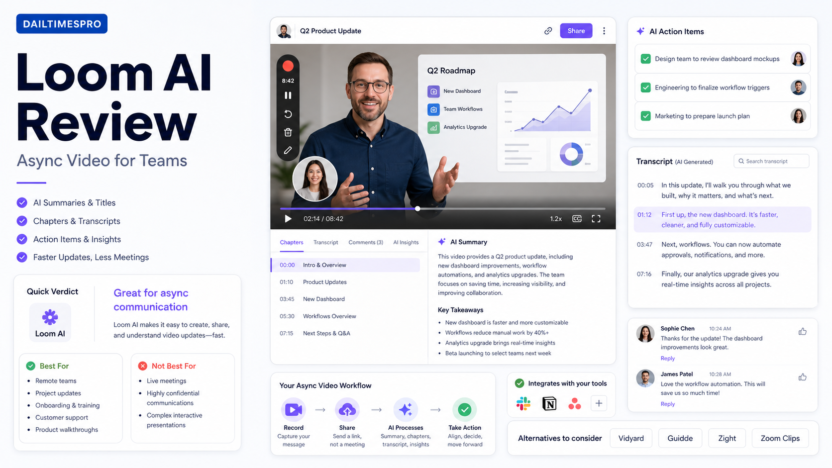
Loom AI is worth considering if your team already uses short videos for updates, walkthroughs, support replies, or onboarding. The strongest value is not simply recording a screen. It is the AI layer around the video: summaries, chapters, transcripts, titles, and follow-up context that make async video easier to consume.
For small businesses, Loom AI is best when meetings are too frequent, written explanations are too slow, and team members need context without scheduling another call. It is less useful if your team rarely records videos, needs advanced video editing, or wants a full learning management system. If your team is also documenting repeatable procedures, see our Best AI SOP Software for Small Business guide.
This review is based on official product and pricing information reviewed on June 30, 2026.
Best For
- Remote and hybrid teams that rely on async updates
- Founders who explain decisions through short videos
- Product teams recording walkthroughs and release notes
- Customer support teams sending visual explanations
- Agencies sharing client updates without extra meetings
- HR and operations teams creating onboarding clips
Not Best For
- Teams that do not use video communication
- Companies needing advanced editing, production, or brand-control workflows
- Training teams that need quizzes, certifications, and structured courses
- Businesses that prefer written SOPs or checklist-based processes
Our Evaluation Criteria
| Criteria | Why it matters |
|---|---|
| Recording workflow | The tool should make screen, camera, and microphone recording fast enough for daily use. |
| AI summary quality | Viewers need concise summaries before committing to a full video. |
| Transcript and search | Teams should be able to find the part of the video that matters. |
| Chapters and structure | Longer videos become easier to consume when AI creates sections. |
| Team collaboration | Comments, sharing, permissions, and workspace controls matter for business use. |
| Use-case fit | Loom should reduce meetings, not create a new communication burden. |
| Pricing clarity | Small teams need to understand plan limits and AI availability. |
| Alternatives | Buyers should compare Loom with video, SOP, and support-documentation tools. |
What Is Loom AI?
Loom is an async video messaging platform. Users record their screen, camera, or both, then share the video through a link. Loom AI adds assistance around that recording workflow, helping turn raw video into something easier to watch, skim, and act on.
The practical value is simple: most work videos are not polished training videos. They are quick explanations. A founder records a strategy update. A support lead explains a bug workaround. A product manager walks through a new feature. An account manager sends a client update. AI summaries and chapters make those videos less painful for the viewer.
Key Loom AI Features
AI summaries
AI summaries help viewers understand the point of a video before watching every minute. In a typical small business workflow, this matters because team members often receive multiple async updates in a day. A summary can help them decide whether to watch now, skim, or save the video for later.
Titles and descriptions
Videos often get shared with unclear titles such as "Quick update" or "Demo." AI-generated titles and descriptions can make the workspace easier to search and reduce confusion later.
Transcripts
Transcripts make video knowledge more accessible. A support team can scan a walkthrough. A new hire can review an onboarding clip. A manager can find the part of a product update that affects their team.
Chapters
Chapters are useful when videos run longer than expected. They turn one long recording into sections, such as context, walkthrough, issue, next steps, and questions.
Comments and collaboration
Loom is not only a recorder. It is also a collaboration tool. Teams can comment, react, and share videos inside a workspace. For async communication, that is important because the discussion around the video is often as valuable as the video itself.
Real Use Cases
Replacing status meetings
A team lead could record a weekly update that covers priorities, blockers, and decisions. Instead of asking everyone to attend a call, the team can watch when convenient and reply with comments.
Product walkthroughs
A product manager could record a short walkthrough of a new feature and use AI summaries to make the main change clear. This is useful for sales, support, and customer success teams that need context quickly.
Customer support replies
Support teams can use Loom to explain steps visually when written instructions would be confusing. A short screen recording can show where to click, what to expect, and when to escalate.
Onboarding
HR or operations teams can build a lightweight onboarding library with short clips for tools, policies, communication norms, and internal workflows. For more structured process documentation, compare this with AI knowledge base workflow.
Agency client updates
An agency could send a client a campaign update, website review, analytics walkthrough, or design explanation without scheduling another meeting. The key is keeping videos concise and action-oriented.
Pricing
Pricing last checked on June 30, 2026. Loom publishes current plan information on its official pricing page. Plan availability, recording limits, workspace controls, and AI features should be reviewed from the official page during buying review because plan details can vary by team size and product packaging.
For small businesses, the pricing question should be tied to communication volume. A founder who records a few customer walkthroughs each month has a different need from a remote team that records daily engineering updates, product walkthroughs, internal training clips, and support replies. Before buying, list the number of active recorders, the expected number of videos per month, whether AI features are needed for every user, and whether admin controls matter.
The important point is not only the monthly subscription. Loom creates a new communication habit. If the team records too many long videos, the cost is not just software spend; it is viewer time. A good rollout should include simple rules: keep updates short, title videos clearly, summarize the action needed, and avoid recording a video when a two-sentence message would do.
Pros and Cons
| Pros | Cons |
|---|---|
| Easy fit for async team updates | Not useful if the team does not communicate through video |
| AI summaries reduce viewer friction | Longer videos can still become a communication burden |
| Transcripts and chapters improve searchability | Not a replacement for full SOP or training platforms |
| Good for product demos, support, and onboarding clips | Advanced editing needs may require another tool |
| Simple sharing workflow | Sensitive videos require clear permission and retention rules |
Loom AI Alternatives
| Tool | Best for | Main strength | Limitation |
|---|---|---|---|
| Vidyard | Sales video messaging | Strong sales and marketing video workflow | May be broader than internal async updates |
| Guidde | Video SOPs and walkthroughs | Good for visual documentation and how-to videos | Less focused on general async team messaging |
| Zight | Screenshots, screen recording, and visual communication | Useful for quick visual explanations | Different workflow emphasis than Loom |
| Zoom Clips | Teams already using Zoom | Fits Zoom-centered communication | Less compelling if Loom is already adopted |
Setup Tips for Small Teams
Start with one or two repeatable use cases rather than asking everyone to record everything. Good first use cases include weekly founder updates, product walkthroughs, support explanations, client status updates, and onboarding clips. Each use case should have a simple format. For example, a weekly update might include what changed, why it matters, what the team should do next, and where to ask questions.
Set expectations for video length. Many async video workflows fail because recordings become informal meetings that nobody wants to watch. For most internal updates, two to five minutes is easier to consume than a 15-minute recording. If a video needs to be longer, chapters and summaries become more important.
Create naming rules. A searchable video library only works if titles are clear. A title like "June onboarding process update" is more useful than "Quick Loom." AI-generated titles can help, but team members should still review them before sharing important videos.
Decide what should not be recorded. Some discussions are better live or written. Sensitive HR issues, legal decisions, compensation discussions, and high-conflict feedback may need a more controlled format. Loom works best for context sharing, walkthroughs, and explanations.
Security and Permission Notes
Small businesses should treat video messages as business records. A Loom recording may include customer data, internal dashboards, financial information, product plans, or private employee context. Before broad adoption, define who can view shared videos, whether external sharing is allowed, and how long sensitive recordings should remain available.
For client-facing videos, check the screen before recording. Browser tabs, notifications, private documents, and customer names can appear accidentally. A simple pre-recording checklist can prevent most issues: close unrelated tabs, mute notifications, use a clean demo account when possible, and avoid exposing private data.
What Most Teams Get Wrong
The common mistake is treating Loom as a replacement for writing. Video is useful, but it is not always faster for the receiver. A five-minute video takes five minutes to watch, while a concise written update may take thirty seconds. Loom AI summaries reduce that friction, but the sender still needs judgment.
Another mistake is storing important procedures only as videos. Video is excellent for showing a workflow, but text is better for exact rules, exceptions, ownership, and review dates. For important processes, pair a Loom video with a written checklist or SOP.
The third mistake is failing to close the loop. If a video asks someone to take action, the action should be clear in the title, summary, comments, or project tool. Otherwise, async communication becomes passive content rather than operational communication.
When Loom AI Is the Right Choice
Choose Loom AI if your team already records videos or wants to reduce meetings with short, structured async updates. It is strongest when the viewer needs context, not just a raw recording. AI summaries, transcripts, and chapters make Loom more useful for teams that create many short videos.
When to Avoid Loom AI
Avoid Loom AI if your actual problem is process documentation, training management, or recurring workflow execution. In that case, an SOP tool, knowledge base, or checklist platform may be a better fit. Also avoid it if your team tends to record long unfocused videos; AI can summarize them, but it cannot fix poor communication habits completely.
Final Recommendation
Loom AI is a strong choice for small businesses that want async video to replace unnecessary meetings and improve visual explanations. It works best for product updates, support replies, client updates, and onboarding clips. It is not the best tool for every knowledge workflow, but for quick video communication with AI-assisted structure, it is practical and easy to understand.
FAQs
Is Loom AI useful for small businesses?
Yes, if the team already uses or wants to use async video. It can help reduce meetings, improve walkthroughs, and make video updates easier to scan with summaries and transcripts.
Can Loom AI replace meetings?
It can replace some status updates, walkthroughs, and explanations, but it should not replace meetings that require live debate, sensitive feedback, or fast group decision-making.
Does Loom AI replace SOP software?
No. Loom can support visual documentation, but SOP software is better for repeatable procedures, ownership, reviews, and training libraries.
What are the best Loom alternatives?
Vidyard, Guidde, Zight, and Zoom Clips are common alternatives depending on whether the team needs sales video, video SOPs, visual communication, or Zoom-centered clips.
Is Loom AI good for customer support?
It can be useful when a visual explanation is clearer than text, such as showing where to click or how to reproduce an issue. Teams should still document repeated support answers in a searchable help system.
Should every team use Loom?
No. Loom is best for teams that communicate visually and asynchronously. Teams that prefer written documentation or rarely need screen recordings may get less value.
Is Loom pricing public?
Loom publishes plan information on its official pricing page. Pricing last checked on June 30, 2026.