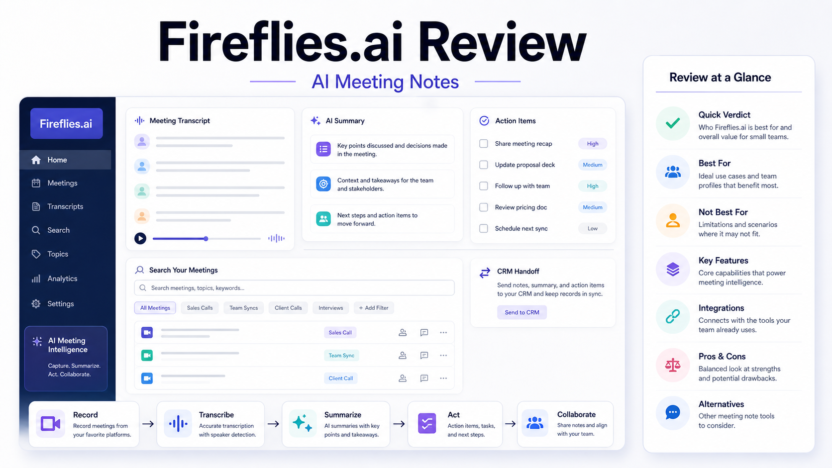
Fireflies.ai is an AI meeting assistant for teams that want transcripts, summaries, searchable meeting history, and action items without manually writing every note. It can be useful, but it is not a magic replacement for meeting discipline.
This Fireflies.ai review is written for small businesses, agencies, SaaS teams, sales teams, customer success managers, and founders deciding whether to pay for an AI meeting notes tool.
Quick Verdict
Fireflies.ai is worth considering if your team has frequent meetings and repeatedly loses decisions, follow-ups, objections, or customer context. It is most useful when meeting notes need to become searchable knowledge, CRM updates, support handoffs, or next-step reminders.
It is not the right tool if your team rarely meets, does not have consent practices for recording, or handles sensitive conversations that require stricter controls than a standard meeting bot workflow.
Best For
- Sales teams recording discovery calls and demos.
- Customer success teams summarizing check-ins.
- Founders who need searchable meeting history.
- Agencies turning client calls into action items.
- Teams that want meeting notes connected to follow-up workflows.
Not Best For
- Teams with very few meetings.
- Meetings where recording consent is unclear.
- Sensitive legal, medical, or HR conversations without governance review.
- Teams that will not verify action items before sending follow-ups.
Our Evaluation Criteria
We looked at Fireflies.ai based on ease of setup, meeting transcription workflow, summary usefulness, action item capture, integrations, searchable meeting knowledge, pricing clarity, team controls, and value for small businesses.
It is based on official Fireflies product and pricing sources plus practical workflow analysis.
Key Features
Fireflies.ai focuses on capturing meeting conversations, turning them into transcripts, generating AI summaries, extracting action items, and making meetings searchable. That combination is valuable when meetings create knowledge that would otherwise disappear into scattered notes.
For sales, Fireflies can help capture objections, next steps, account context, and customer language. For customer success, it can summarize check-ins and surface recurring issues. For operations, it can help turn meeting discussions into tasks and documentation.
Real Use Cases
Sales Follow-Up
A sales rep can use Fireflies to summarize a prospect call, identify objections, list requested information, and draft a follow-up. The summary should be reviewed before sending anything to the prospect.
Customer Success Handoff
A customer success manager can use Fireflies to capture account risks, renewal topics, product questions, and open action items. This helps the team avoid relying on memory after a busy call day.
Internal Project Meetings
Teams can use Fireflies to capture decisions, owners, deadlines, and unresolved questions. This is useful when paired with a project management system rather than leaving action items inside the transcript.
Knowledge Base Inputs
Repeated customer questions can become raw material for a help center or internal knowledge base. For a broader process, see our AI knowledge base workflowonce published.
Pricing
Fireflies publishes free and paid plan information on its official pricing page. Pricing last checked on June 22, 2026. Review the official plan page for current limits, transcription credits, storage, integrations, and team features before choosing a plan.
Alternatives
| Alternative | Best For | Main Difference |
|---|---|---|
| Otter.ai | General meeting notes | Strong brand recognition and meeting note workflows |
| Fathom | Simple call summaries | Popular for fast meeting summaries |
| tl;dv | Sales and team calls | Useful for recorded meetings and snippets |
| Avoma | Sales-focused teams | Meeting intelligence with revenue workflow angle |
| Native Zoom/Teams AI | Existing suite users | Less tool sprawl if your platform already includes AI notes |
For more meeting tool comparisons, see Otter.ai vs Fireflies.aiand Otter.ai vs Fathom.
Pros
- Helps reduce manual note taking.
- Makes meetings searchable after the call.
- Useful for sales, support, and customer success handoffs.
- Can turn conversations into action item lists.
- Practical for teams with recurring meeting volume.
Cons
- Transcripts and summaries still need human review.
- Recording consent and privacy rules matter.
- Meeting bots can feel intrusive in some conversations.
- Value drops if the team does not act on the summaries.
- Plan limits and integrations should be reviewed before rollout.
Final Recommendation
Fireflies.ai is a practical meeting assistant for teams that treat meetings as business data. It is strongest when summaries become follow-ups, CRM notes, support handoffs, or internal knowledge. It is weaker when used casually without review, consent practices, or a clear workflow.
If your team spends hours each week in calls and often loses decisions afterward, Fireflies.ai is worth evaluating. If meetings are rare or sensitive, start cautiously and define recording rules first.
FAQs
Is Fireflies.ai good for small businesses?
Yes, it can be useful for small businesses that need meeting transcription, summaries, action items, and searchable meeting history.
Does Fireflies.ai replace a human note taker?
No. It can reduce manual note taking, but important decisions, customer commitments, and action items still need human review.
What is Fireflies.ai best for?
It is best for recurring sales calls, customer success meetings, internal team meetings, interviews, and workflows where notes need to be searched later.
Who should avoid Fireflies.ai?
Teams with strict consent rules, highly sensitive meetings, or no process for reviewing AI summaries should be cautious.
Does Fireflies.ai have a free plan?
Fireflies publishes free and paid plan information on its official pricing page.
Can Fireflies.ai help sales teams?
Yes. Sales teams can use it to summarize calls, capture objections, prepare follow-ups, and hand notes to a CRM workflow.
Can Fireflies.ai summarize Zoom or Google Meet calls?
Fireflies positions itself around meeting transcription and integrations; review official integration pages for the current supported apps.
What alternatives should I compare?
Otter.ai, Fathom, tl;dv, Avoma, and Microsoft Teams/Zoom native AI features are common alternatives to review.
Does Fireflies.ai claim perfect transcripts?
No transcription tool should be treated as perfect. Accents, audio quality, overlapping speakers, and jargon can affect accuracy.
What should I test before paying?
Test one sales call, one internal meeting, and one customer success call, then review transcript quality, summary usefulness, action item accuracy, and privacy fit.
Deeper Evaluation
The value of Fireflies.ai depends on what happens after the meeting. If transcripts and summaries sit unused, the tool becomes another archive. If summaries become follow-ups, CRM notes, support handoffs, and action items, the value becomes much clearer.
Evaluate Fireflies with three real meeting types: a sales call, an internal project meeting, and a customer success call. Review transcript accuracy, speaker separation, summary usefulness, action item quality, search, integrations, and whether the team actually trusts the output.
Setup And Governance Checklist
Before rolling out Fireflies.ai, write down when recording is allowed, who can access transcripts, which meetings should never be recorded, and who reviews summaries before they are sent externally.
For sales teams, decide whether AI summaries can be copied into the CRM automatically or whether a rep must approve them first. For customer success teams, decide which account health notes belong in customer records. For internal teams, decide how long meeting records should stay accessible.
Workflow Fit By Team
| Team | Useful Workflow | Watch-Out |
|---|---|---|
| Sales | Discovery summaries, objections, next steps | Do not send follow-ups without checking facts |
| Customer success | Account notes and renewal risks | Sensitive customer issues need careful handling |
| Operations | Decisions and action items | Meeting notes must connect to task systems |
| Agencies | Client call summaries | Client confidentiality rules must be clear |
| Founders | Searchable meeting memory | Avoid recording conversations where consent is unclear |
Limitations To Understand
No meeting assistant can guarantee perfect notes. Audio quality, accents, jargon, interruptions, and overlapping speakers can affect transcript quality. AI-generated action items can also miss nuance, especially when a meeting includes informal commitments or conditional decisions.
Fireflies.ai is strongest when the team treats it as a capture and review system. It is weakest when the team lets it publish or send outputs without human judgment.
Detailed Feature Review
The most important Fireflies.ai feature is not transcription by itself. It is the combination of transcript, summary, search, and follow-up workflow. A transcript alone is often too long to be useful. A short summary alone can miss important context. The best outcome is a meeting record where the summary gives a fast overview, the transcript gives detail, and search lets the team find a decision later.
For sales teams, the useful pieces are objections, buying criteria, next steps, competitor mentions, timeline, budget comments, and promised follow-up. For customer success teams, the useful pieces are risks, feature requests, unresolved issues, renewal concerns, and customer sentiment. For internal teams, the useful pieces are decisions, owners, deadlines, blockers, and open questions.
Pricing And Plan Fit
Fireflies publishes plan information on its official pricing page. A small team should not choose a plan only by the lowest monthly cost. Compare transcription limits, storage, AI summary access, integrations, team controls, and whether the plan supports your meeting volume. A sales team with many calls may need different limits than a founder who only records a few weekly meetings.
Pricing last checked on June 22, 2026. Use the official pricing source linked in this article for current plan names, billing options, and limits.
Alternatives Compared
Otter.ai is a strong alternative for general meeting notes and transcription. Fathom is popular for simple meeting summaries. tl;dv is useful for teams that want clips and recorded meeting workflows. Avoma is more sales-meeting oriented. Native Zoom, Google Meet, or Microsoft Teams AI features may be enough if your team wants fewer tools.
Fireflies.ai is worth comparing when searchable meeting memory matters. If you only need a quick summary after a call, a lighter tool may be enough. If meeting notes need to feed CRM, support, and knowledge workflows, Fireflies becomes more interesting.
Final Buying Advice
Pilot Fireflies with a small group before rolling it out company-wide. Choose users who have frequent meetings and will actually review the output. Track whether follow-ups improve, whether missed action items decrease, and whether people search old meetings. If the tool only creates more unread transcripts, it is not solving the problem.
What A Real Fireflies.ai Pilot Should Measure
A useful Fireflies.ai pilot should measure whether the meeting record improves work after the call. Do not judge the tool only by whether it produces a readable summary. A polished summary can still be weak if it misses the actual decision, assigns the wrong owner, or hides an important customer concern.
For a sales team, review whether the summary captures the buyer's problem, objections, decision process, competitors mentioned, follow-up promises, and next meeting date. For a customer success team, review whether the notes capture risks, renewal issues, feature requests, unresolved tickets, and internal handoff details. For a founder or manager, review whether the tool makes past decisions easier to search.
The pilot should include at least three meeting types:
| Meeting Type | What To Review |
|---|---|
| Sales discovery call | Pain points, budget comments, timeline, objections, next steps |
| Customer success call | Account risks, open issues, product requests, support handoff |
| Internal project meeting | Decisions, owners, deadlines, blockers, unresolved questions |
After each meeting, compare the AI summary with the transcript and with what the meeting owner remembers. If the output saves time but still needs light review, that is normal. If the output repeatedly misses critical commitments, the team should adjust recording quality, meeting structure, or tool choice before rolling it out broadly.
Best For And Not Best For
Fireflies.ai is best for teams with recurring meetings and a real follow-up process. Sales reps, account managers, founders, recruiters, agencies, consultants, and customer success teams are the most obvious users. These teams often need a searchable record of what was said and what should happen next.
It is not best for teams that rarely meet, teams that already have a strong native meeting summary workflow, or organizations that cannot record meetings because of consent, privacy, or client restrictions. It is also not the right answer if the company has no discipline around reviewing notes. AI meeting notes help most when they support an existing process.
Human Review Workflow
The safest workflow is simple. Let Fireflies capture and summarize the meeting. Have the meeting owner review the summary before it is sent to a client, copied into a CRM, or used as a project record. Then move only the useful parts into the system of record.
This matters because meeting assistants can misunderstand conditional language. A customer saying "we might consider upgrading next quarter" is not the same as a firm renewal commitment. A manager saying "let's explore this" is not the same as an assigned task. Human review keeps AI summaries from becoming accidental promises.